Mobicip vs Webwatcher
Mobicip 和 Webwatcher 都承诺为孩子提供数字安全,但它们的方法却大相径庭。Mobicip 侧重于针对全家在许多设备上实现广泛、一致的控制。Webwatcher 则专注于深度、隐秘的监控,通常面向年龄较大的青少年和高风险行为。最终,选择取决于主动控制还是取证式监控。
Best for: 需要在 5-20 台混合设备(iOS、Windows、Android)上实现一致规则的家庭。, 优先考虑屏幕时间限制和活动调度,而不是深度监控的家长。
Best for: 需要深度、隐秘地监控一台高风险青少年 Android 手机的家长。, 优先考虑捕获短信、通话记录和社交媒体活动(Snapchat)详细记录的用户。
Comprehensive Features, Criticized Reliability.
We found Mobicip offers comprehensive, multi-platform features like robust screen time limits and social media monitoring at a competitive annual price. Overall, we are concerned by multiple reports indicating that controls are easily circumvented by tech-savvy children, which fundamentally undermines the security promise of the product.
优点
- App blocking and time schedules work effectively for basic enforcement.
- Supports a wide range of platforms (iOS, Android, Windows, Chromebooks).
- Competitive annual pricing tiers based on family device count.
- Email customer support is rated highly and is helpful during initial setup.
缺点
- Controls are easily bypassed by children changing device time or disabling the VPN.
- Settings frequently get corrupted or unblocked following software updates.
- Administrative functions, like account cancellation, are not available in the web portal and require contacting support.
- Technical glitches can cause connectivity problems and significant battery drain.
Extreme risk due to billing and support issues.
We found Webwatcher markets itself strongly on guaranteed functionality and comprehensive support for parental monitoring needs. However, our review of public user feedback showed severe, concrete accusations of fraudulent billing, refusal to issue refunds, and complete non-response from customer support. Overall, the serious financial and reliability risks reported by consumers necessitate a very low rating.
优点
- Advertised compatibility across major devices (Android, iPhone, PC, Mac).
- Unlimited data storage is included in the current subscription plan.
- Setup is claimed to be quick and easy (under five minutes).
- Functionality is officially guaranteed with a full refund if issues cannot be resolved.
缺点
- Users report being refused refunds despite the official money-back guarantee.
- Specific claims of fraudulent double billing and funds theft were reported.
- Customer support was reported as non-responsive or misleading ('runaround').
- Product allegedly failed to work properly for some customers.
关于Mobicip
Mobicip is a comprehensive Smart Parental Control App built specifically for the needs of busy families. It aims to simplify digital parenting by offering reliable protection across many different platforms. 💡
Unlike tools restricted to a single company, Mobicip bridges the gap by applying consistent settings across nearly any device. It protects your family on iOS, Android, macOS, Windows, Chromebook, and even Kindle. The app is simple to set up and keeps detailed track of everything your child does online.
关于Webwatcher
WebWatcher is a specialized parental monitoring app. It is primarily aimed at supervising teenagers who may be involved in risky online behavior. The software gives parents necessary visibility into their child's digital footprint.
It works across major platforms including Android, iPhone, PC, and Mac devices. You can monitor everything seamlessly from anywhere using your secure, web-based online account. The application is designed to be discrete and tamper-proof once it's correctly installed. 💡
亮点
功能比较
功能概览
我们强调主要差异并为每个功能选择获胜者。
跨平台一致性
Mobicip 支持多种不同平台,并保持一致性;Webwatcher 主要专注于单设备。
Mobicip 在强大的多平台控制方面表现出色。您可以管理 20 台设备,确保一致的规则适用于所有设备。 Mobicip 涵盖了 iOS、Android、Windows、macOS、Chromebook 和 Kindle 设备。这为忙碌的父母简化了管理。 Webwatcher 经过优化,用于深度监控每份购买的单个设备。虽然它支持 PC 和 Mac,但其核心购买方案大多侧重于 Android。 如果您的家庭使用多种不同类型的手机和电脑,Mobicip 是必需的。
监控深度
Webwatcher 提供取证式监控数据;Mobicip 则侧重于更广泛的屏幕时间控制。
Webwatcher 优先捕获原始数据,如短信和通话记录。它会记录访问过的网站和特定的搜索词。 Webwatcher 专为高风险监督而设计,其中隐秘数据收集至关重要。它可以可靠地捕获私人对话。 Mobicip 提供详细的活动报告和有害内容的警报。它的优势在于设定限制,而不是阅读每一条私人短信。 如果您需要完全的可见性(阅读短信),只有 Webwatcher 能提供这种详细程度。
社交媒体洞察
Webwatcher 记录 Snapchat 截图数据;Mobicip 则监控一般对话中的有害内容。
Mobicip 会监控三大社交平台上的对话。如果检测到有毒或有害内容,它会发送主动提醒。 Mobicip 使用其应用拦截器来管理花费在分散注意力的社交媒体应用上的时间。它有助于减少总体接触。 Webwatcher 会进行深度分析,捕获 Android 设备上 Snapchat 活动的截图。这为高风险的社交媒体使用提供了切实的文档记录。 在 Android 设备上,Webwatcher 为高风险的社交媒体使用提供了更好的证据数据。
定价与价值
Mobicip 在多设备价值方面远超 Webwatcher,而 Webwatcher 对每台设备收费高昂。
Mobicip 的月费在 2.99 美元到 7.99 美元之间(按年计费)。这种可扩展的结构支持多达 20 台设备。 对于需要全面覆盖的大家庭来说,Mobicip 计划提供了极高的价值。与替代方案相比,其每台设备的成本非常低。 Webwatcher 每月收费 19.98 美元,按季度计费,仅监控一台设备。对于三个或更多的孩子来说,这很快就变得不合理了。 在价值和跨家庭的可扩展性方面,Mobicip 明显优于 Webwatcher。
安全与信任
Mobicip 有技术错误;Webwatcher 则有严重、公开的财务欺诈指控。
Mobicip 用户报告了错误,如设置损坏和技术绕过问题(VPN 已禁用)。这些问题大多是关于功能限制。 Mobicip 的客户服务获得了不错的评价,尤其是在初始设置帮助方面。他们的支持通常响应及时。 Webwatcher 的用户声称存在欺诈性的重复计费和资金盗窃。用户表示,支持对数十个退款请求置之不理。 Webwatcher 的基本服务可信度因严重的客户保护风险而完全受到影响。
高级控制
Mobicip 提供设备锁定和地理围栏;Webwatcher 仅限于被动数据收集。
Mobicip 提供了关键的主动式家长控制功能。它允许家长在需要时远程立即锁定设备。 Mobicip 具有地理围栏功能,可在您的孩子到达或离开常去地点时提醒您。这是一个关键的安全功能。 Webwatcher 缺乏这些即时控制和地理安全功能。它的重点仍然严格放在捕获活动日志上。 Mobicip 允许即时干预和实时移动监控;Webwatcher 则不能。
自我调节
Mobicip 包含教授责任感的工具;Webwatcher 纯粹是单方面的监视。
Mobicip 通过其孩子控制面板鼓励健康的设备使用。孩子们可以看到自己剩余的屏幕时间限制。 Mobicip 使用目标和奖励系统支持积极习惯的养成,以激励孩子。它促进了数字管理的协作。 Webwatcher 完全在后台运行,旨在隐秘且防篡改。它不为孩子提供任何功能。 如果你想从控制过渡到信任,Mobicip 提供了帮助有效教授自我调节的工具。
安装和设置
Mobicip 将规则广泛应用于各类平台;Webwatcher 需要针对 iPhone 监控进行特殊设置。
Mobicip 在所有支持的平台上的安装都很简单。它轻松地在 Windows、macOS 和移动设备之间架设保护。 Mobicip 确保在简单的初始入职后规则保持一致。支持经常因帮助设置而受到称赞。 Webwatcher 的 Android 安装很快,通常只需五分钟或更短时间。它强调安装后的深度数据收集。 Webwatcher 要求将 iPhone 一次性连接到本地 PC 或 Mac 进行初始设置,这对苹果用户来说增加了复杂性。
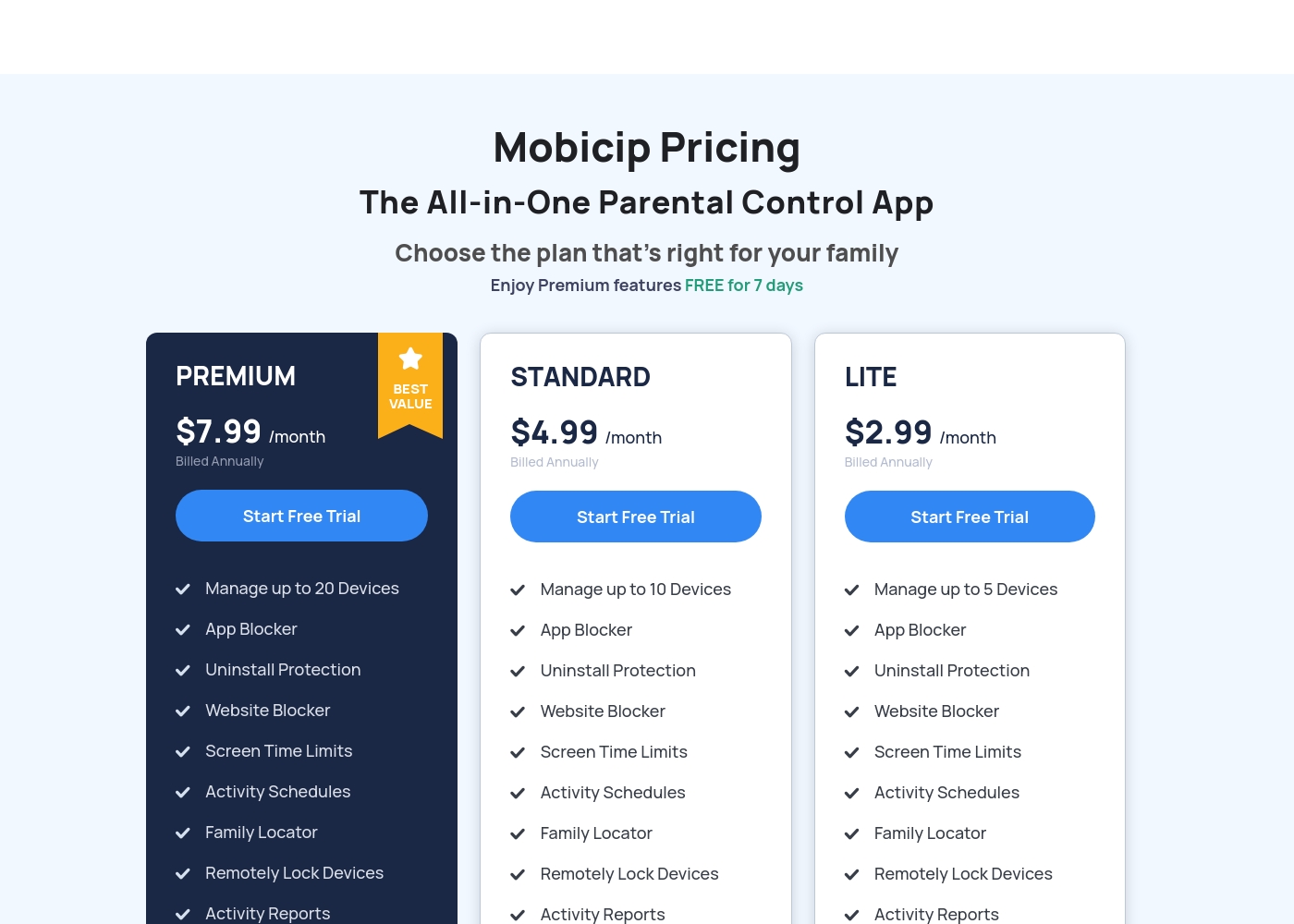
Mobicip costs between $2.99 and $7.99 per month (when billed annually) with three plans: LITE at $2.99/month, STANDARD at $4.99/month, and PREMIUM at $7.99/month.
You can easily choose the right plan for your family's needs below. All options include a 7-day free trial of Premium features.
LITE
Price: $2.99/month (Billed Annually) Best For: Families with 5 or fewer devices Other Features: Uninstall Protection, Website Blocker, Screen Time Limits, Activity Schedules, Activity Reports, Family Locator
- Manage up to 5 Devices
- App Blocker
- Uninstall Protection
- Website Blocker
- Screen Time Limits
- Manage up to 10 Devices
- App Blocker
- Uninstall Protection
- Website Blocker
- Screen Time Limits
- Manage up to 20 Devices
- App Blocker
- Uninstall Protection
- Website Blocker
- Screen Time Limits
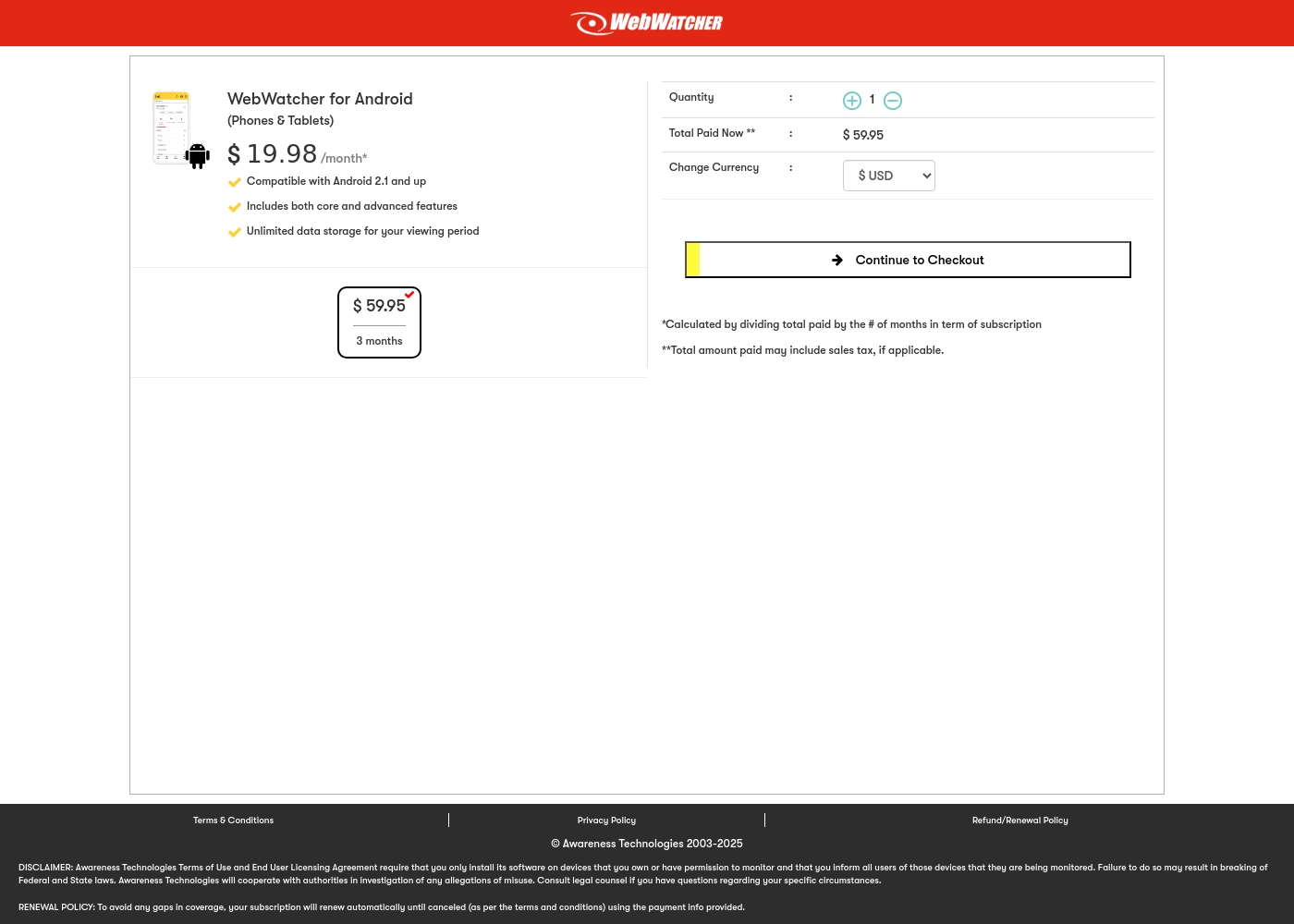
Webwatcher costs $19.98 per month with one explicitly priced plan: the 3-Month Android Subscription at $59.95 total.
Finding the right monitoring solution for your family is simple. Here is a detailed look at the pricing and features available in the current purchase flow.
3-Month Android Subscription
Price: $59.95 (paid every 3 months, calculated at $19.98/month) Best For: Parents monitoring Android phones and tablets Refund Policy: Full refund guaranteed if issues cannot be resolved Other Features:
- Compatible with Android 2.1 and newer versions
- Includes both core and advanced features
- Unlimited data storage for your full viewing period
- Compatible with Android 2.1 and up
- Includes both core and advanced features
- Unlimited data storage for your viewing period
Pricing Head-to-Head
用户评论
Mobicip holds a "Great" 4.1-star rating on Trustpilot, though this score is based on a very limited number of reviews. Users generally appreciate the core functions like app blocking and setting screen time schedules, which successfully helps keep young children focused, and email customer service has been highly praised as "Excellent" during setup.
However, significant reliability concerns challenge Mobicip's effectiveness as a true parental control tool. Several parents report that the app is easily bypassed—teenagers can circumvent controls by changing phone time, disabling the VPN, or simply deleting the app to regain full access.
App blocking and screen time schedules work well, especially for keeping my children focused during class time. We successfully use it across both iPhones and Windows PCs. It is an effective tool for setting digital boundaries.
Webwatcher’s external feedback is extremely limited, stemming only from two reviews which resulted in a very low 2.9 TrustScore. While the platform advertises a strong 'risk-free' guarantee and promises excellent, responsive customer care, the limited user reports strongly contradict these claims.
Both reviewers cited severe issues primarily centered on billing and refunds. Users claim they were refused refunds entirely, even when requested within the advertised refund window, despite the monitoring product reportedly failing to work properly.
They refused to honor the risk-free money-back guarantee, even though I submitted the request properly. Furthermore, the product I purchased never actually worked for me as advertised. I absolutely feel like they are ripping me off.
我们的判断
在 Mobicip 和 Webwatcher 之间做出选择,其根本在于控制与监控的权衡。对于绝大多数家庭来说,Mobicip 是明显更安全的选择。Webwatcher 严重的计费和支持投诉使其成为一个重大的财务风险。 Mobicip 的优势在于其强大的跨平台一致性和广泛的控制能力。您可以使用一套家庭规则管理多达 20 台设备,包括 iOS、Android 和 Chromebook。它在灵活的屏幕时间调度和主动式 AI 网页过滤方面表现出色。Mobicip 还通过其协作式的“孩子控制面板”功能,鼓励培养数字独立性。 Webwatcher 的优势在于其对 Android 设备进行深度、隐形监控的能力。它可以捕获敏感数据,如短信、通话记录,甚至是 Snapchat 截图。Webwatcher 适用于需要在一台特定、高风险设备上获取取证证据的家长。它专为秘密数据捕获而设计,而非公开对话。 决定性因素是信任和客户可靠性。虽然 Mobicip 存在一些技术漏洞,可能被精通技术的孩子利用,但其核心服务功能可靠。Webwatcher 的评分为 1 星,原因是存在严重的客户报告指控其财务欺诈和拒绝退款。 如果您是一个大家庭,选择预防措施和培养健康的屏幕习惯,那么请选择 Mobicip。如果您需要立即对一台 Android 手机进行深度、秘密监控,Webwatcher 确实能提供数据——但请注意涉及的严重财务和支持风险。对于全面的家庭控制来说,Mobicip 是更好、更安全的选择。
准备好选择了?
这两个工具都有各自的优点。根据您的具体需求进行选择。