GitLab vs IFTTT
GitLab and IFTTT solve completely different problems. GitLab unifies software development, while IFTTT connects apps and devices. Your choice depends on whether you're building software or automating tasks.
Comprehensive DevSecOps, but complex.
GitLab is a powerful, all-in-one platform that unifies the entire software lifecycle. We find it delivers on its promise of acceleration and unified security, though its depth can create a steep learning curve for smaller teams. Overall, it's an excellent choice for organizations seeking a single, scalable solution for planning, building, and deploying software securely.
优点
- Single platform for the entire DevSecOps lifecycle
- Built-in security scanning accelerates vulnerability detection
- AI-powered workflows (Duo Agent) enhance productivity
- Offers a functional Free tier for individuals and small projects
缺点
- Learning curve can be steep due to platform breadth
- Enterprise features like advanced security require costly Ultimate tier
- Compute and storage limits on lower tiers may require paid add-ons
- Annual billing commitment for paid plans
连接广泛,但性能不可靠。
我们认识到 IFTTT 在连接海量服务目录方面的技术实力,为家庭和企业用户提供了强大的自动化潜力。然而,大量用户报告称,可靠性已大幅下降,而定价结构变得过于激进。总的来说,我们发现过高的成本和不可预测的性能使得 IFTTT 难以被依赖于关键任务的自动化。
优点
- 连接超过 900 种不同服务和应用的庞大生态系统。
- 提供永久免费计划,用于测试基本自动化需求。
- Pro 级别提供高级开发者功能,如 Webhooks 和过滤代码。
- 多操作 Applet 允许从单个触发器创建复杂的工作流程。
缺点
- 严重且频繁的可靠性问题;Applet 经常延迟或无法激活。
- 激进的定价模式和免费计划功能的不断缩减。
- 据报告客户支持响应不灵敏,并遵循严格的不退款政策。
- 由于功能限制的波动,用户对平台缺乏信任。
关于GitLab
GitLab is an end-to-end DevSecOps platform for teams of all sizes, from startups to large enterprises. It’s the single place to plan, build, test, secure, and deploy your software. You get all your projects, releases, and code in one data plane, so both your team and AI agents work from the same information. 💡
关于IFTTT
IFTTT 是领先的无代码平台,旨在为您的业务和家庭生活提供强大的自动化支持。它提供了一种简单的方法,通过使用简单的 Applet 连接 900 多种不同的服务,包括 Google Calendar、Spotify 和 YouTube 等工具。
由于有专用的 iOS 和 Android 应用程序,您可以随时随地自动化,确保持续的效率。它建立在超过 2700 万用户和 900 多个品牌的庞大社区之上,这些品牌已经在平台中使用了它。💡
亮点
功能比较
功能概览
我们强调主要差异并为每个功能选择获胜者。
Core Purpose & Focus
GitLab is a complete DevSecOps platform. IFTTT is a no-code automation connector.
GitLab provides a single application for the entire software development lifecycle. It handles planning, coding, testing, security, and deployment. IFTTT focuses on connecting over 900 different services like apps, websites, and smart devices. It creates simple automated rules called Applets. The key difference is depth vs. breadth. GitLab deeply manages software creation. IFTTT broadly connects existing services. A software team builds their product inside GitLab. A homeowner automates lights and thermostats with IFTTT.
Automation Capabilities
GitLab automates software pipelines. IFTTT automates tasks between apps.
GitLab's automation is for continuous integration and deployment (CI/CD). It builds, tests, and deploys code automatically on every commit. IFTTT's automation connects triggers and actions across apps. For example, 'If I get an email with an attachment, save it to Dropbox.' GitLab automation is technical and development-focused. IFTTT automation is task-based and user-friendly. GitLab saves developers hours per week on builds. IFTTT saves users minutes on daily chores.
Integration Ecosystem
GitLab integrates with development tools. IFTTT connects consumer apps and services.
GitLab integrates with tools like Jira, Jenkins, Slack, and cloud providers. It's built for the DevOps toolchain. IFTTT connects over 900 services including Google Calendar, Spotify, Twitter, and smart home devices. GitLab's ecosystem is deep but specialized. IFTTT's is vast but broad. A developer uses GitLab with Jira to track bugs. A marketer uses IFTTT to post blogs to social media.
Ease of Use
IFTTT is simpler for basic automations. GitLab has a steeper learning curve.
GitLab's comprehensive feature set creates a steep learning curve. Mastering its full DevSecOps platform takes significant time. IFTTT uses a simple 'if this, then that' model. Creating basic Applets requires no technical knowledge. IFTTT wins for quick, non-technical automations. GitLab requires investment but delivers more power. A user sets up a weather alert with IFTTT in 5 minutes. A team configures a GitLab CI pipeline over several days.
Security Features
GitLab has built-in security scanning. IFTTT has basic data security.
GitLab includes security tools like SAST, SCA, and Secret Detection. It finds vulnerabilities 50% faster by scanning within the platform. IFTTT relies on the security of connected services. It does not provide application security scanning. GitLab provides proactive, integrated security. IFTTT provides basic connectivity security. GitLab helps a team fix security flaws before deployment. IFTTT ensures a smart lock connection is encrypted.
Pricing & Value
GitLab's value is per-developer productivity. IFTTT's value is per-automation utility.
GitLab costs $0-$99 per user per month. Paid plans unlock advanced CI/CD and security features. IFTTT costs $0-$8.99 per month per account. Plans limit the number of Applets and automation speed. GitLab's cost scales with team size and features needed. IFTTT's cost scales with automation volume. GitLab justifies cost by saving 4+ hours per engineer weekly. IFTTT's value is saving time on repetitive tasks.
Scalability
GitLab scales for large enterprise teams. IFTTT scales for automation volume.
GitLab offers tiers from Free to Ultimate for thousands of users. It handles massive codebases and complex compliance needs. IFTTT scales by offering unlimited Applets on Pro+. It connects more services but not larger teams. GitLab scales organizational complexity. IFTTT scales automation quantity. GitLab supports a 500-person engineering org. IFTTT supports a user running 100+ personal automations.
Customer Support
GitLab offers tiered support with SLAs. IFTTT support is reportedly slow.
GitLab provides Priority Support for Premium and SLA Management for Ultimate. Emergency requests get 24/7 support. IFTTT offers standard support on Pro and prioritized on Pro+. User reviews report slow and unresponsive support. GitLab provides structured, enterprise-grade support. IFTTT's support quality is inconsistent. GitLab's SLA guarantees response times. IFTTT users report waiting days for help.
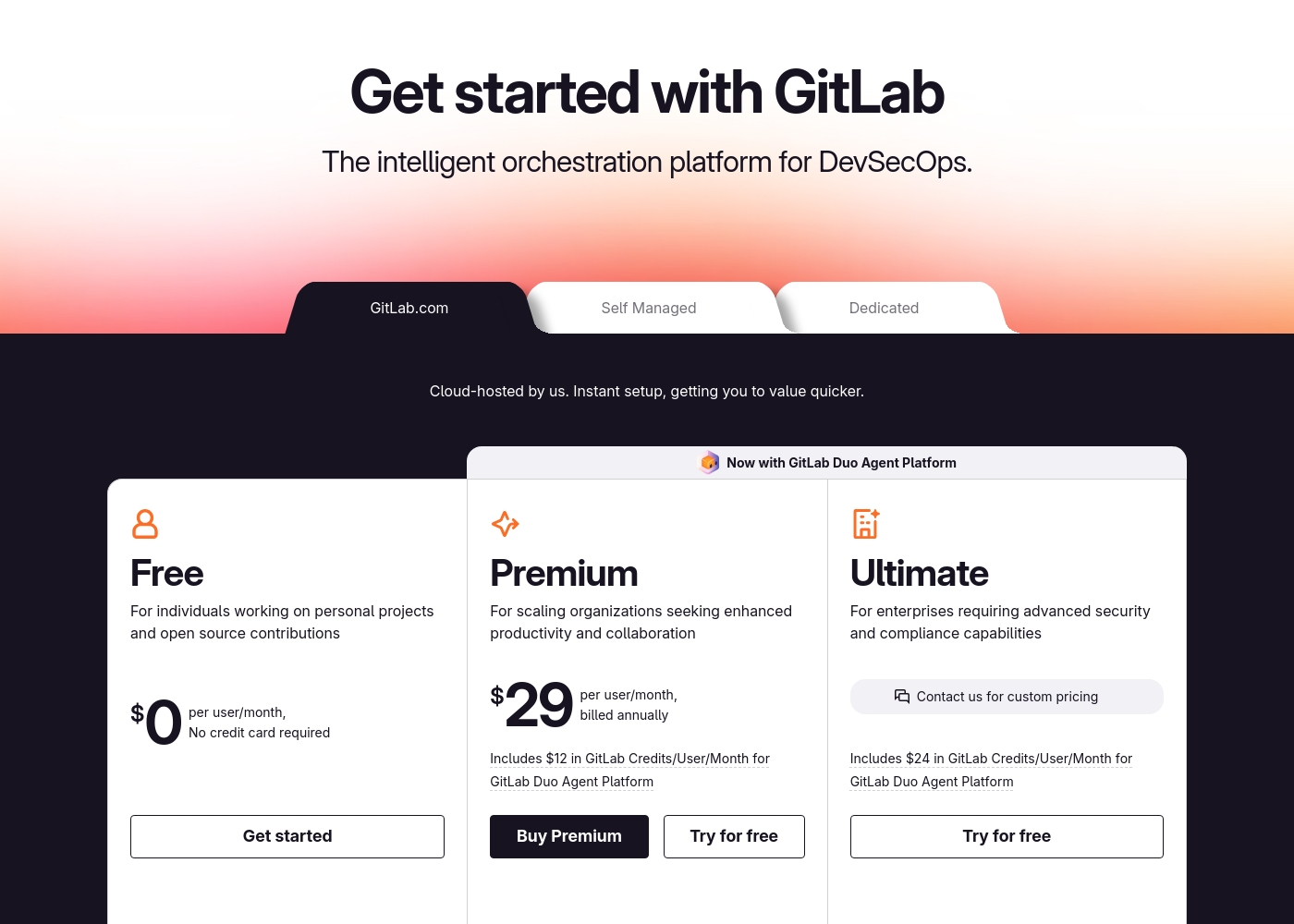
GitLab pricing: GitLab offers a range of DevSecOps plans from a free tier for individuals to an Ultimate enterprise solution for $99/month. Subscriptions include various compute minutes, storage allocations, and security features to fit different team sizes and needs.
Please note: the provided screenshot shows $29/user/month for Premium, while the text mentions $99 for Ultimate elsewhere; we have prioritized the current primary source values below for clarity. Actually, the provided text includes $0, $29 annually, and custom pricing options depending on the deployment method (SaaS or Self-Managed).
Overall it is a per-seat annual subscription model with usage-based add-ons for credits and compute time. For current SaaS pricing: Free $0, Premium $29/mo annually, Ultimate $99/mo annually (implied for custom).
IFTTT 的年费在 $0.00 到 $107.88 之间,提供三个计划:IFTTT Free 永久 $0.00,IFTTT Pro 每年 $35.88,IFTTT Pro+ 每年 $107.88。
让我们详细了解这三个可用计划,以找到满足您自动化需求的最佳方案。
IFTTT Free
价格:$0.00 / 永久 支持网站:不适用 - 自动化平台 最适合:开始使用自动化 退款政策:未明确说明 其他功能:
- 2 个 Applet
- 标准 Applet 速度
- DIY 或使用已发布的 Applet
- 无限 Applet 运行次数
- 免费移动应用访问权限和简单的无代码集成
- 2 个 Applet
- 标准 Applet 速度
- DIY 或使用已发布的 Applet
- 无限 Applet 运行次数
- 免费移动应用访问权限
- 20 个 Applet
- 最快的 Applet 速度
- 多操作 Applet
- Webhooks
- Twitter Applet
- 无限 Applet
- Pro 的所有功能
- AI 服务
- 为同一服务连接多个帐户
- 使用查询和过滤代码
Pricing Notes
- GitLab charges per user per month. IFTTT charges per account per month.
- GitLab's Free plan includes 5 users. IFTTT's Free plan is limited to 2 Applets.
- GitLab's paid plans require annual billing. IFTTT offers both monthly and annual options.
- GitLab has usage-based add-ons for extra compute minutes. IFTTT's limits are on Applet count and speed.
Pricing Head-to-Head
用户评论
External user reviews for GitLab are currently inaccessible for a full synthesis, as both Trustpilot and Capterra returned security verification errors. 📄 Therefore, we cannot provide a balanced, specific summary of recurring user themes on accuracy, ease of use, support, or pricing at this time. We recommend checking these sources directly for up-to-date sentiment.
GitLab streamlined our entire development pipeline. Having CI/CD, security, and planning in one place saves our team significant time each week.
IFTTT 的外部反馈描绘了一幅用户极度不满的图景,特别是那些经历了重大定价改革之前的长期用户。可靠性是一个核心问题;许多用户报告 Applet 极度不可靠,出现故障或严重延迟,有时延迟长达数小时。最常见的抱怨集中在向激进的商业模式转型。用户感觉被免费计划中 Applet 限制的频繁和大幅削减误导,该限制已降至仅两个,将他们不必要地推向他们认为价格过高的付费级别。像“贪婪毁了这个曾经很棒的应用”这样的评论很常见。此外,这些摘要表明支持响应不力,有关于严格的不退款政策以及未能解决报告的问题(包括未经授权的收费)的报告。虽然连接 900 多种服务的潜力得到了认可,但用户认为当前的高成本和糟糕的服务可靠性已不再物有所值。他们通常建议寻找替代的、更稳定的自动化平台。😬
这项服务本可以很棒,但现在非常不可靠。它无法正确触发,延迟不断增加,以至于运行需要几个小时。我们需要稳定的自动化,而不是延迟。
我们的判断
These tools serve entirely different audiences. GitLab is the winner for software teams. IFTTT is only relevant for simple personal automations. GitLab's superpower is unifying the entire software development lifecycle. It replaces multiple tools with one platform, saving teams 4+ hours per engineer weekly. IFTTT's superpower is connecting over 900 consumer apps. But recent reliability issues and aggressive pricing have eroded user trust significantly. The deciding factor is your core need. Choose GitLab if you build software. Choose IFTTT only if you need basic app connections. For most professional use cases, GitLab is the clear choice. It delivers measurable value for development work. IFTTT has become too unreliable for serious use.
常见问题
Can GitLab do what IFTTT does for app automation?
No. GitLab is for software development, not connecting consumer apps. Use IFTTT for simple automations between services like Google Calendar and Twitter.
Is IFTTT good for software development teams?
No. IFTTT lacks features like code hosting, CI/CD, and issue tracking. Development teams need a dedicated platform like GitLab.
Which is cheaper for a team of 10 developers?
GitLab costs $290-$990/month for 10 users. IFTTT isn't designed for team licensing; it charges per account, making it impractical for team development.
Does IFTTT have security features like GitLab?
No. IFTTT provides basic data security for connections. GitLab includes advanced security scanning (SAST, DAST) built directly into the development workflow.
Can I migrate my data from GitLab to IFTTT?
No migration path exists. These are fundamentally different tools. GitLab stores code repositories. IFTTT stores automation rules.
Which tool has better mobile apps?
Both have functional apps. GitLab's app monitors pipelines and issues. IFTTT's app manages automations. The better choice depends on your need.
准备好选择了?
这两个工具都有各自的优点。根据您的具体需求进行选择。