Camtasia vs Vyond
Camtasia and Vyond both create compelling video but in totally different ways. Camtasia is your reliable desktop powerhouse for screen recording and deep editing control. Vyond is an instant, AI-driven platform for scaling animated explainer content fast. Your project type will quickly dictate the winner between these two tools.
Powerful screen recording, premium price tag.
We find Camtasia to be an extremely capable, industry-standard tool for creating high-quality instructional video content. Its multitrack editing flexibility and AI enhancements effectively streamline complex workflows. Overall, Camtasia excels in core functionality, but its restrictive, mandatory subscription model significantly diminishes the overall value proposition for many loyal users.
优点
- Industry-standard platform for flexible screen recording and tutorial creation.
- Significantly simpler and more intuitive interface compared to advanced editors.
- Multitrack recording allows independent editing of screen, audio, and camera.
- Offers powerful AI features like text-based video editing and audio cleanup.
缺点
- Mandatory annual subscription model has replaced perpetual licenses.
- Users are frustrated by restrictive licensing (single-device sign-in limitations).
- Perceived as overly expensive compared to free or low-cost competitors.
- Inconsistent customer service experiences, including slow/non-responsive support.
强大的 AI。扩展内容。支持不佳。
Vyond 是行业领先的 AI 视频创作平台,非常适合快速扩展安全的、品牌一致的内容,深受财富 500 强公司的信赖。然而,我们发现关于客户支持响应速度和订阅条款出现问题的情况反复出现,这损害了个人用户的价值。总的来说,Vyond 是一款功能强大的工具,最适合需要安全、大批量制作的高预算企业团队。
优点
- 动画和说明性内容的行业标准质量。
- 使用 Vyond Go 通过简单提示快速创建视频。
- 出色的语音同步和文本脚本生成的音频效果。
- 用户界面 (UI) 完美,动画素材被认为是顶级的且美观。
缺点
- 客户支持有限或几乎没有;帮助主要依赖自动化。
- 据报道存在不道德行为,例如自动续订和强制升级计划。
- 经常为付费用户移除或限制功能(例如社区论坛、主题)。
- 有限或体验不佳的免费试用(例如,最多创建三个视频)。
关于Camtasia
Camtasia is truly everything you need in one powerful tool. It combines screen recording with full video editing capabilities. This software uses AI-powered tools to simplify the creation process. It is designed to help you turn your existing knowledge into highly engaging videos. 💡
关于Vyond
Vyond 是一体化 AI 视频创作平台,可帮助团队根据多个风格的简单提示生成有效的视频。它包括 Vyond Go,可即时将您的想法、文档或 URL 转换为视频,以及一个即时编辑器或工作室,用于快速调整。数千家企业和数百万用户信赖 Vyond,65% 的财富 500 强企业依赖 Vyond。🎬
亮点
功能比较
功能概览
我们强调主要差异并为每个功能选择获胜者。
Core Production Focus
Camtasia is built for screen recordings; Vyond is an animation powerhouse.
Camtasia is the industry standard for polished tutorials and software demos. It provides unparalleled editing control over captured video and audio tracks. Vyond is an AI video factory designed primarily for producing animated explainer videos quickly at scale. It converts text and documents instantly into highly visual content for corporate use. Choose Camtasia for deep editing control; choose Vyond for automated animation speed. The best tool depends entirely on your content style.
Screen Recording Control
Camtasia offers specific multitrack separation; Vyond offers basic capture.
Camtasia's core strength is its powerful multitrack recording capability. It automatically separates screen, audio, and camera feeds into independent tracks. Vyond includes basic tools for screen recording and mobile capture. Its primary workflow does not focus on heavy post-production editing of live footage. Camtasia delivers maximum creative control after the recording session finishes. If you rely on detailed software demos, Camtasia is indispensable for precise refinement.
AI Video Generation
Vyond turns documents into videos; Camtasia uses AI for editing only.
Vyond leverages Vyond Go, instantly turning your documents, URLs, or prompts into video drafts. This drastically simplifies and speeds up initial content creation. Camtasia uses AI to refine recordings and generate initial scripts from prompts. It is not designed to create full visual animation scenes from text inputs. Vyond is engineered for scaling animated content through extreme automation and speed. The trade-off is production time versus precise editing power.
Audio Refinement
Camtasia’s AI removes filler words; Vyond focuses on speech sync.
Camtasia excels in audio refinement using specialized AI tools. It automatically removes background fan noise and common filler words like 'uuhms' and 'aahs.' Vyond focuses on achieving seamless speech synchronization and generating high-quality audio for its characters. Specific dedicated noise or filler word cleanup tools are not highlighted for Vyond. For cleaning up voiceovers from live screen recordings, Camtasia delivers a significantly more powerful solution. This robust feature set saves hours of required manual correction.
Visual Styles
Vyond offers diverse animation styles; Camtasia supports standard video effects.
Vyond provides great stylistic flexibility, specializing in animated explainer content. Styles include Photorealistic, Mixed Media, and Gen AI visuals, plus character assets. Camtasia focuses on editing real-world footage and screens. It provides professional transitions and effects for standard video but lacks extensive animation styles. If you need compelling, cartoon-style business videos, Vyond is clearly the superior choice. Camtasia is best for realism, not stylized animation.
Pricing Visibility
Camtasia publishes annual rates; Vyond hides all subscription costs.
Camtasia uses transparent, publicly listed annual subscription rates for all individual plans. Costs range clearly from $179.88 to $599.00 yearly. Vyond requires users to contact sales for standard plan costs, hiding crucial pricing details. This lack of visibility typically frustrates individuals or small teams on tight budgets. Camtasia’s published pricing is essential for budget planning and trust building. Vyond's pricing secrecy suggests a high B2B focus.
Enterprise Security
Vyond ensures security for large teams; Camtasia focuses on individual desktop use.
Vyond offers a specialized Enterprise solution focused on robust security and compliance standards. This plan provides complete privacy guarantees for large corporate organizations. Camtasia's feature set focuses on individual editing efficiency and collaboration features for small teams (Pro plan). It does not highlight rigorous, large-scale security compliance. If you are part of a massive organization needing high data integrity, the Vyond Enterprise solution is the designed fit. Camtasia is built for the solo instructional designer or small content department.
User Review Sentiment
Camtasia review scores are higher; Vyond's rating suffers from poor support.
Camtasia holds a significantly higher overall user rating (4.2 average across reviewed sites). Users highly praise its core editing capability and reliability. Vyond’s rating is much lower (3.2 average) due to highly polarized feedback. Loyal Vyond customers frequently complain about receiving automated or non-existent customer service. High user frustration over pricing changes and support severely impacts Vyond's perception of value.
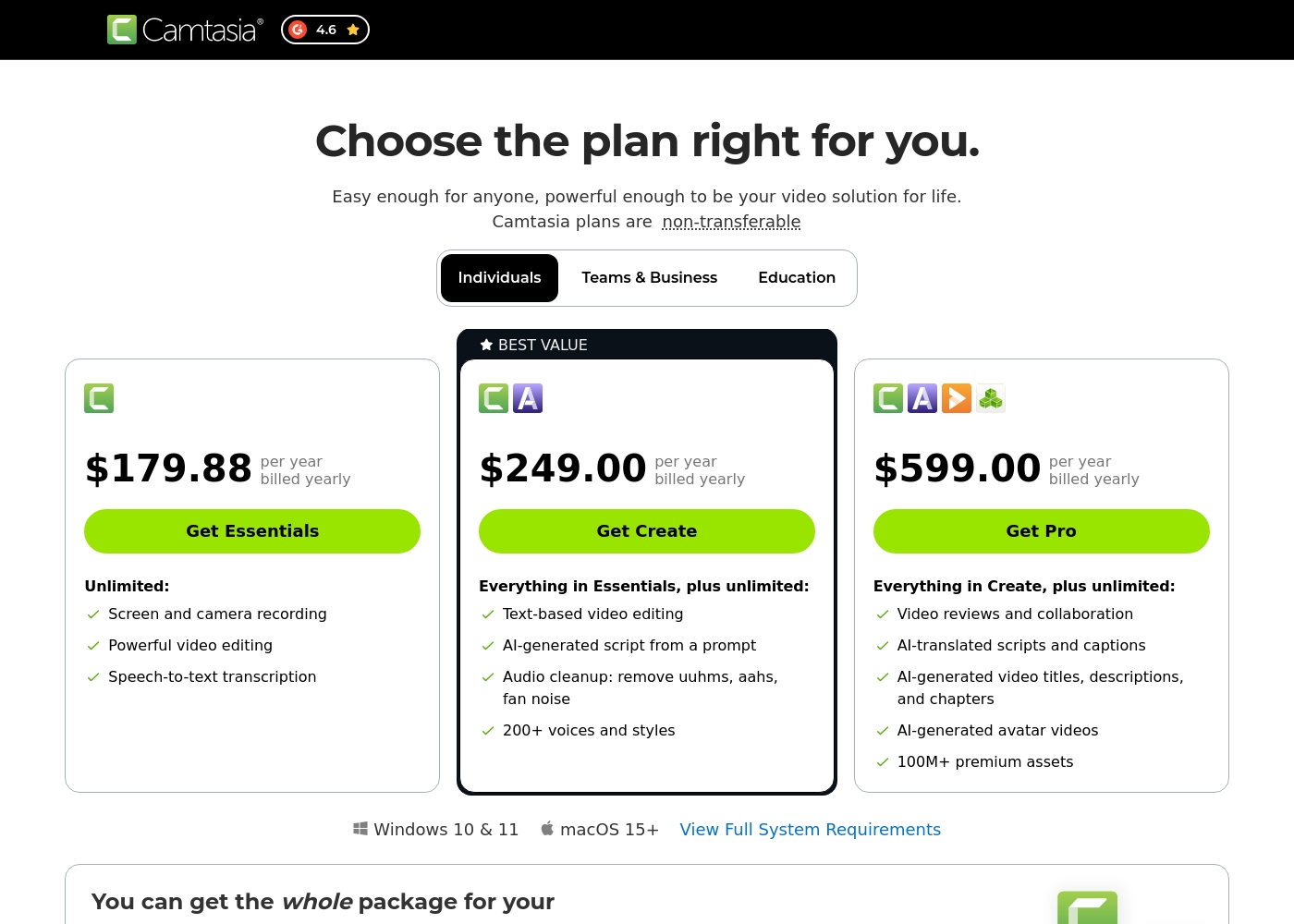
Camtasia costs between $179.88 and $599.00 per year with 3 plans: Essentials at $179.88, Create at $249.00, and Pro at $599.00. These plans cater to individuals, offering robust video and screen recording tools through an annual subscription model.
Essentials
Price: $179.88 per year billed yearly Websites Supported: Not explicitly stated Best For: Not explicitly stated Refund Policy: Not explicitly stated Other Features:
- Screen and camera recording
- Powerful video editing
- Speech-to-text transcription
The Essentials plan is perfect if you only need foundational tools for recording and editing videos. It provides unlimited screen and camera recording capabilities, which is great for beginners or those with basic needs.
- Screen and camera recording
- Powerful video editing
- Speech-to-text transcription
- Everything in Essentials
- Text-based video editing
- AI-generated script from a prompt
- Audio cleanup: remove uuhms, aahs, fan noise
- 200+ voices and styles
- Everything in Create
- Video reviews and collaboration
- AI-translated scripts and captions
- AI-generated video titles, descriptions, and chapters
- AI-generated avatar videos
Vyond 的价格范围是未明确说明到未明确说明,按未明确说明计费,共有 2 种明显方案:免费试用(价格未明确说明)和企业版(价格未明确说明)。
You can explore Vyond's flexible options tailored to individual users and large organizations through these principal offerings.
免费试用
价格:未明确说明 支持的网站:未明确说明 最适合:希望测试平台多种视频创作工具的用户。 退款政策:未明确说明 其他功能:
- 即时、轻松的视频创作
- 可使用 AI 角色和生成式 AI 功能
- 可使用全面的模板库
- 能够将 URL 或文档转换为视频 (Vyond Go)
- 为所有人提供即时、轻松的视频制作
- 可使用 AI 角色、生成式 AI 和逼真风格
- 屏幕录制和移动捕捉工具
- 使用 Vyond Go(文本、文档或 URL 转换)即时创建
- 高效地以规模化创建品牌一致的内容
- 完全的隐私和安全保障
- 支持企业组织严格的安全要求
Pricing Notes
- Camtasia uses transparent, mandatory annual subscriptions, costing between $179.88 (Essentials) and $599.00 (Pro) yearly.
- Vyond offers a free trial to test features, but specific costs for standard paid subscription tiers are not publicly visible.
- Vyond requires users to contact the sales team directly for accurate usage-based figures and custom Enterprise pricing.
- The Camtasia Pro plan includes collaboration tools, AI localization, and 100 million premium assets for $599.00 annually.
Pricing Head-to-Head
用户评论
Camtasia enjoys a long-standing reputation as an industry-standard tool, particularly for screen recording and tutorial creation. Users overwhelmingly praise the core software, noting it is dramatically simpler and more intuitive to use than complex alternatives like Adobe products, while still offering a deep feature set.
However, recent changes to the pricing model and licensing structure have caused significant user frustration. The shift to mandatory annual subscriptions, coupled with new restrictive single-device sign-in limits for individual users, is a major recurring complaint.
The software is great, the developers deserve five stars for the product quality. But management introduced a highly frustrating subscription model. The mandatory sign-in cycle when switching devices significantly harms my workflow.
Vyond 获得了高度两极分化的评价,反映了功能满意度和公司实践之间的极端分歧。许多用户称赞其核心动画工具,指出其行业标准质量、理想的语音同步效果以及快速制作说明性视频的便利性。他们欣赏成熟的现成角色素材库,使该平台非常适合提高营销参与度。然而,负面情绪,尤其是在 Trustpilot 上(评分为 2.0),很大程度上集中在定价和支持上。用户经常抱怨收到了自动化或不存在的客户服务,称之为“最糟糕的支持”。忠实创作者对功能移除、视频时长限制以及被视为不道德的行为(例如被推销更昂贵的“代理”计划或遭遇意外自动续订费用)感到非常沮丧 🚨。虽然该平台似乎对高预算的企业团队非常强大,但高成本和对创作者的漠视严重影响了整体价值和声誉。
有大量现成的角色和场景可供选择,可以快速上手。动画效果一流,将文字脚本配上生成的音频也毫不费力。总的来说,我对这个工具非常满意。
我们的判断
Choosing between Camtasia and Vyond is simple: decide between editing control or creation speed. Camtasia is your professional desktop editor for precision and recorded footage. You should pick Vyond if your primary need is scaling animation and corporate communication quickly. Camtasia’s superpower is granting users total post-production mastery over screen recordings. Its unique multitrack feature allows you to edit audio, camera, and screen entirely separately. You can use Camtasia’s AI audio cleanup to effortlessly remove filler words and distracting fan noise. This unmatched flexibility helps you deliver professional tutorials quickly. Vyond shines when you need speed and stylized, automated output for large audiences. Vyond Go instantly transforms existing text documents or URLs into captivating animated explainer videos. If your job involves L&D or HR communication, Vyond is far faster than human animators. It supports diverse visual styles and secure scaling for massive corporate teams. The key factor here is content type: Camtasia handles live realism; Vyond handles automation and stylized animation. If you require deep control over recorded footage and professional editing, Camtasia is the clear winner. If instant, secure, on-brand content generation is essential, Vyond is the appropriate platform. Final verdict: Pick Camtasia for high-stakes screen recordings and ultimate audio clarity. Go with Vyond if you prioritize rapid, scalable, animated content for training and internal marketing.
常见问题
Which is better for creating detailed software demonstrations: Camtasia or Vyond?
Camtasia is significantly better for software demonstrations and tutorials. Its multitrack recording separates audio from video, enabling precise edits after recording. Vyond focuses on animation from text prompts and does not offer this deep editing control.
Can Vyond easily create videos from my existing documents or URLs?
Yes, this is Vyond’s specific strength using the Vyond Go tool. Vyond instantly converts existing text documents, simple prompts, or URLs into effective video drafts. Camtasia only uses AI to generate initial scripts, not full moving visuals from outside inputs.
Is Camtasia generally more expensive than Vyond for individuals?
Camtasia lists its individual pricing publicly starting at $179.88 per year. Vyond’s specific subscription prices are not public, requiring you to contact sales. This often indicates a higher B2B price point, but a Vyond free trial is available.
Which tool has better customer support according to recent reviews?
Camtasia reports healthier customer support experiences, despite some inconsistency. Vyond faces heavy criticism from users regarding its customer service. Many Vyond reviewers report only automated responses or non-existent support.
Does Vyond offer dedicated support and security for enterprise teams?
Yes, Vyond maintains a specialized Enterprise solution for large organizations. This tier provides complete privacy, rigorous security guarantees, and support. Camtasia focuses on individual and small team collaboration tools instead of high-level security demands.
Which software is better for creating HR and L&D training content?
Vyond is explicitly designed for HR and L&D teams needing engaging, scalable content. Its animated styles boost learner attention better than static screen recordings. Camtasia is ideal if you need to record complex systems or detailed instructions precisely.
准备好选择了?
这两个工具都有各自的优点。根据您的具体需求进行选择。