Backlog by Nulab Inc vs Glances
Backlog by Nulab Inc and Glances tackle team productivity from completely different angles. Backlog is an all-in-one hub for planning, code, and collaboration. Glances unifies your existing apps into a single, live view. This comparison helps you pick the right one.
Best for: Software development teams needing Git/SVN hosting alongside project management., Growing businesses that want to avoid per-user pricing fees.
Best for: Teams wanting a quick, unified view of data across many business apps like Asana, Zendesk, and QuickBooks., Businesses using Monday.com and QuickBooks needing deep, real-time sync between those platforms.
Solid all-in-one for dev teams.
Overall, we find Backlog to be a capable and cost-effective platform that effectively merges project management, issue tracking, and code collaboration into a single tool. It's a strong choice for small to mid-sized teams looking to simplify their workflow without per-user costs.
优点
- All-in-one platform combining project management, issue tracking, and Git/SVN repositories.
- Transparent, flat-fee pricing with no per-user charges, making it affordable for growing teams.
- Built-in AI assistant to help with summaries, file retrieval, and task drafting.
- Integrates with popular tools like Slack, Microsoft Teams, and Google Drive.
缺点
- External review sources were inaccessible, limiting our ability to gauge user sentiment on support or reliability.
- The platform's breadth might be overwhelming for very simple project tracking needs.
- Advanced features are only available on higher-priced plans.
- Specific details on performance with very large teams or complex codebases are unclear from provided materials.
强大的无代码集成
我们将 Glances 视为一种无代码集成,可将应用统一为一个实时的单一视图。我们很看重其引导式设置、跨工具的实时数据以及为团队成员提供的安全访问权限。总体而言,我们认为它是需要治理和跨工具工作流程的团队的可靠选择,尽管某些细节如年度定价尚未显示。
优点
- 无代码设置,并提供引导式连接选项
- 跨应用的统一实时视图
- 主要应用(Monday.com 和 QuickBooks)的实时数据同步
- 安全的数据访问,无需共享凭据
缺点
- 当前视图未显示年度定价
- 部分产品详情(例如支持的网站)未明确说明
- 退款政策未明确说明
- 按用户定价对大型团队来说可能会增加成本
关于Backlog by Nulab Inc
Backlog is an all-in-one work management platform built for teams that build, plan, or create. 🚀 It combines project management, issue tracking, and team collaboration into a single, powerful tool. This makes it ideal for development teams managing code and bugs, design teams planning sprints, marketing teams running campaigns, and small businesses seeking a straightforward solution without user limits.
关于Glances
Glances 是一款无代码集成工具,可将您的业务应用统一到一个单一的实时视图中。它能帮助团队保持在一个位置,实时查看来自多个应用的数据,并在不离开当前工作流程的情况下执行操作。从 Asana 到 Zendesk,Glances 连接了各种业务应用。💡
亮点
功能比较
功能概览
我们强调主要差异并为每个功能选择获胜者。
Core Functionality
Backlog by Nulab Inc is a complete project hub. Glances is a powerful connector for tools you already use.
Backlog by Nulab Inc provides a unified platform for tasks, issues, and code. It's designed to replace multiple tools. You manage sprints, track bugs, and host Git repos all in one place. Glances creates a live, 360-degree view of data from your existing apps. It doesn't host projects but surfaces data from tools like Asana or QuickBooks. You perform actions across them from a single widget. The key difference is ownership vs. connection. Backlog by Nulab Inc owns your workflow data. Glances pulls it from your other apps for quick context. If you're building a new workflow, choose Backlog by Nulab Inc. If you need to streamline your current stack, Glances is the answer.
Workflow & Automation
Backlog by Nulab Inc automates within its ecosystem. Glances automates across your entire app stack.
Backlog by Nulab Inc uses its AI Assistant to draft to-do lists and summarize discussions. It automates tasks tied to its own projects and issues. Glances lets you perform cross-app actions without code. You can create a QuickBooks invoice from a Zendesk ticket or start a meeting from a calendar event. The trade-off is depth vs. breadth. Backlog by Nulab Inc's automation is deep within project management. Glances' automation is broad across connected services. A development team would use Backlog by Nulab Inc to link code commits to tasks. A sales team might use Glances to update customer records across platforms.
Collaboration Tools
Backlog by Nulab Inc has deep, built-in collaboration. Glances enables safe sharing of cross-app insights.
Backlog by Nulab Inc includes comments, file sharing, and @mentions directly on tasks. Teams discuss work and resolve issues within the platform. Glances allows you to grant teammates access to app data without sharing account credentials. This is secure and governance-friendly. The difference is focus. Backlog by Nulab Inc is for active project collaboration. Glances is for secure data visibility and quick actions. For daily stand-ups and bug triage, Backlog by Nulab Inc is ideal. For giving a manager a secure view of support tickets and invoices, Glances works well.
Integrations & Ecosystem
Glances connects to more apps out of the box. Backlog by Nulab Inc integrates with key tools and offers a custom API.
Glances boasts connections from Asana to Zendesk. It focuses on pulling data and enabling actions across a wide business stack. You can request new apps. Backlog by Nulab Inc integrates with Slack, MS Teams, Google Drive, and has importers for Jira/Redmine. A robust API allows custom builds. The choice depends on your stack. Glances is for unifying many business apps. Backlog by Nulab Inc is for connecting your project hub to communication and storage tools. If you use Monday.com and QuickBooks, Glances has a dedicated plan. If you're migrating from Jira, Backlog by Nulab Inc has specific import tools.
Pricing & Value
Backlog by Nulab Inc's flat fees are great for growing teams. Glances' per-user pricing can add up but offers specific bundles.
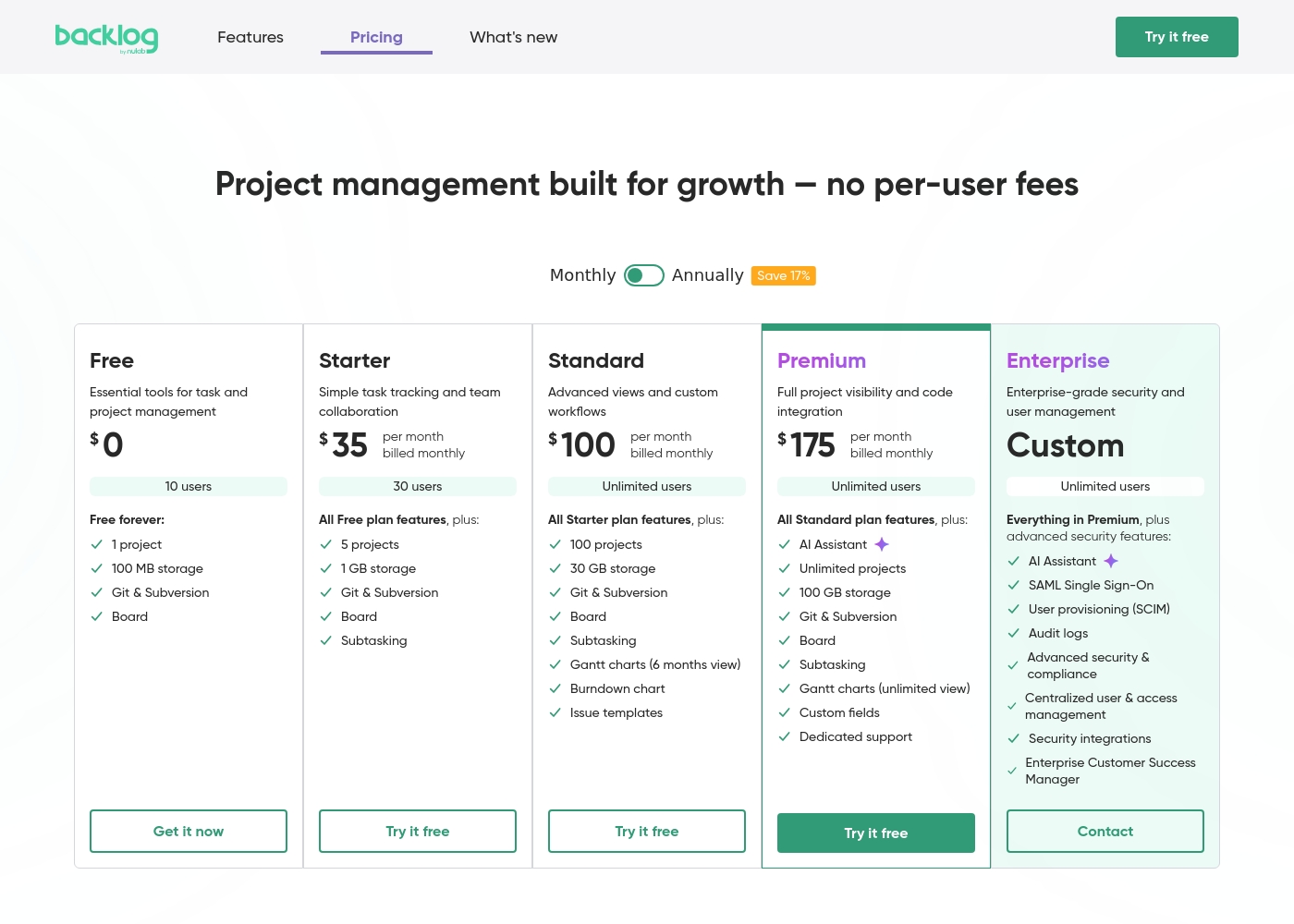
Backlog by Nulab Inc charges flat monthly fees from $0 to $175. You add unlimited users on higher plans without extra cost. Glances charges $29 per user/month for its Pro plan. The monday.com & QuickBooks plan is $99/month for up to 3 users. The value difference is scale. Backlog by Nulab Inc becomes more cost-effective as your team grows. Glances' cost scales directly with team size. A 20-person team would find Backlog by Nulab Inc significantly cheaper. A small 3-person team using Monday might prefer the Glances bundle.
Setup & Learning Curve
Glances offers faster, no-code setup. Backlog by Nulab Inc has more features to learn but provides guided training.
Glances emphasizes a quick, no-code setup with Guided Connect. You connect apps in minutes to start seeing data. Backlog by Nulab Inc requires more configuration to set up projects, boards, and repositories. The review noted a potential learning curve. The trade-off is simplicity vs. power. Glances gets you a unified view fast. Backlog by Nulab Inc takes longer but builds a comprehensive system. If you need a solution running today, Glances is faster. If you're building a long-term system, invest time in Backlog by Nulab Inc.
Backlog by Nulab Inc pricing: Backlog by Nulab Inc offers a range of flat-fee plans starting from a free tier up to $175 per month, with no per-user fees. You can save 17% by choosing annual billing for any paid plan level reached by your team's needs. Plans range: $0–$210/month Billing options: Free plan, Free trial, Monthly subscription, Yearly subscription, Per seat pricing, Usage-based pricing
Glances 的费用为每月 29 至 99 美元,包含 2 个方案:专业版 29 美元/用户/月,Glances for monday.com & QuickBooks 99 美元/月。显示的定价反映按月计费;此处未显示年度定价。两个方案均提供免费试用,开始时无需信用卡。
下方的定价详情细分了每个方案为您带来的内容。
Professional
价格:每用户每月 29 美元 支持的网站:未明确说明 适合人群:需要对访问权限和跨应用可见性有强大控制的团队 退款政策:未明确说明 其他功能:
- 连接和搜索无限应用
- 管理团队角色和权限
- 安全的数据传输
- 为每个应用自定义视图
- 在其他应用中执行操作
- 连接和搜索无限应用
- 管理团队角色和权限
- 安全的数据传输
- 为每个应用自定义视图
- 在其他应用中执行操作
- 包含专业版的所有功能,外加最多 3 个用户
- 发票到 Monday 的实时同步
- 创建和发送 QuickBooks 估价单和发票
- 将 QuickBooks 估价单转换为发票
- 创建和更新客户及子客户
Pricing Notes
- Backlog by Nulab Inc's flat-fee model means no per-user costs, offering huge savings for larger teams.
- Glances charges per user for its Professional plan, so costs scale linearly with team size.
- The Glances for monday.com & QuickBooks plan is a fixed $99/month for up to 3 users, adding more costs extra.
- Backlog by Nulab Inc offers a free tier and a 30-day free trial on paid plans.
- Glances offers a free trial for both plans with no credit card required.
Pricing Head-to-Head
用户评论
We found that external review platforms like Trustpilot were not accessible due to verification errors, preventing us from gathering specific user sentiment from those sources. Capterra was not provided.
Therefore, our review is based solely on the official product information and pricing details from Nulab. ✅ We can confirm Backlog offers a unified platform for project management, issue tracking, and collaboration with built-in Git/SVN support and no per-user fees.
Backlog is great for keeping all our code and tasks in one place. The Git integration is seamless, and my team stopped switching between five different apps. It just works for our sprint planning.
Capterra 上的评论表明,Glances 因其无代码方法、广泛的集成和清晰的统一实时数据视图而受到重视。我们没有收到 Trustpilot 的数据,但 Capterra 提到用户赞赏无需离开当前工作即可跨应用运行日常任务,这有助于节省时间和减少错误。该产品强调360 度视图、实时数据以及为团队成员提供的安全访问,并且免费试用过程很顺利。定价方面有两个方案——专业版 29 美元/用户/月,以及包含 monday.com 和 QuickBooks 的 99 美元/月的捆绑方案——试用无需信用卡。入职优势包括提供引导式连接选项来定制工作流程,无代码设置降低了入门门槛。它不是一个繁重的配置工具;它旨在提供治理和广泛的应用连接性,确保数据可靠地保留在原处。总而言之,对于寻求工具间一致性,同时希望保持设置精简和透明的团队来说,Glances 提供了实实在在的价值。👍
Glances 在不造成混乱的情况下统一了我们的应用。无代码设置帮助我们节省了数小时,实时视图使我们的团队在各个系统之间保持一致。
我们的判断
It's a classic case of building a new system vs. connecting your existing ones. Backlog by Nulab Inc wins if you need a comprehensive project hub from scratch. Glances wins if you want to unify and act on your current apps. Backlog by Nulab Inc's superpower is its all-in-one design. It combines project management, issue tracking, and Git repositories into a single platform. This eliminates tool-switching and provides deep context for development and planning. Glances excels at being the ultimate connector. It pulls live data from dozens of apps into one view. You can take actions across platforms without leaving your current workflow, saving time and reducing errors. The deciding factor is your starting point. Choose Backlog by Nulab Inc if you're building a new workflow or need code management. Choose Glances if your main pain is juggling data across 5+ existing tools. For most teams building software or products, Backlog by Nulab Inc offers more complete value. For teams drowning in a sea of disconnected SaaS apps, Glances provides immediate clarity and efficiency.
常见问题
Which is better for small teams: Backlog by Nulab Inc or Glances?
Backlog by Nulab Inc's free and Starter plans are cost-effective for small teams, especially with its flat-fee pricing. Glances is also suitable, particularly if your small team relies heavily on apps like Monday.com and QuickBooks.
Can I use Backlog by Nulab Inc to connect apps like I can with Glances?
Backlog by Nulab Inc integrates with key tools like Slack and Google Drive, but it doesn't offer the same breadth of cross-app unification as Glances. Use its robust API for custom integrations if needed.
Is Glances worth the cost over Backlog by Nulab Inc for a large team?
For a large team, Backlog by Nulab Inc's flat-fee pricing is significantly more cost-effective. Glances' per-user pricing would become very expensive at scale unless you only need its specific integration bundle.
Do both tools offer free trials?
Yes. Backlog by Nulab Inc offers a 30-day free trial of any paid plan. Glances also offers a free trial for both of its plans, with no credit card required to start.
Which tool is better for code management and version control?
Backlog by Nulab Inc is the clear choice. It has built-in Git and SVN repositories, allowing you to manage code directly within your project management platform. Glances does not offer code hosting features.
Can Glances replace my project management tool like Backlog by Nulab Inc?
No. Glances is an integration layer that connects your existing apps. It doesn't replace a dedicated project management tool like Backlog by Nulab Inc, which provides task boards, sprints, and issue tracking.
准备好选择了?
这两个工具都有各自的优点。根据您的具体需求进行选择。