Parallels vs Techinline
Parallels and Techinline solve completely different problems. Parallels runs Windows on your Mac, while Techinline connects you to any computer remotely. If you need to run Windows apps on a Mac, Parallels is your only choice. If you need to support or manage remote computers, Techinline wins hands down.
Best for: Mac users who need to run Windows-only applications (e.g., specific design or government software), Developers and creators who need to test across multiple operating systems (Windows, Linux, macOS)
Best for: IT professionals and support teams providing remote assistance to clients, Managed service providers (MSPs) managing fleets of unattended servers and desktops
Ảo hóa Tuyệt vời, Rủi ro Đăng ký Cao
Ưu điểm
- Hiệu suất tuyệt vời và tích hợp liền mạch giữa Windows và macOS.
- Giải quyết vấn đề cốt lõi là cần hai máy tính riêng biệt cho các nhu cầu HĐH khác nhau.
- Phân bổ tài nguyên cao có sẵn trong các phiên bản Pro/Business (lên đến 128 GB vRAM).
- Được công nhận là công cụ ảo hóa hàng đầu cho môi trường macOS.
Nhược điểm
- Các báo cáo phổ biến về việc tự động gia hạn và các vấn đề thanh toán mang tính săn mồi, không minh bạch.
- Dịch vụ khách hàng bị thiếu sót nghiêm trọng, thường không phản hồi các mối quan tâm kinh doanh khẩn cấp.
- Nhiều yêu cầu hoàn tiền được báo cáo là bị từ chối, ngay cả khi được gửi trong khung thời gian 30 ngày.
- Các giấy phép vĩnh viễn (mua một lần) được báo cáo là có thể ngừng hoạt động, buộc phải nâng cấp tốn kém.
Solid remote support with scalable pricing.
We found Techinline SetMe to be a capable and secure remote access solution, especially for IT professionals and small teams needing reliable unattended and on-demand support. Its tiered pricing offers flexibility, but the lack of a clear refund policy is a notable gap for potential buyers.
Ưu điểm
- Simple, instant client connections via a set.me link.
- Scalable plans from individual use to enterprise-level team management.
- Stable connections with auto-reconnect and multi-monitor support.
- Centralized dashboard for managing all devices and permissions.
Nhược điểm
- Limited public user reviews made independent sentiment analysis impossible.
- No explicit refund policy is detailed on the website.
- Advanced team features require upgrading to higher-tier, per-seat plans.
- The 'Core' plan for individual use lacks on-demand support features.
VềParallels
Parallels Desktop cho Mac cho phép bạn chạy Windows ngay trên máy dùng chip Intel hoặc Apple silicon của bạn. Nó được tin dùng bởi hơn 7 triệu người dùng Mac trên toàn thế giới, chứng minh độ tin cậy và giải quyết vô số vấn đề cho người dùng macOS. Về cơ bản, phần mềm này loại bỏ nhu cầu mua hoặc sử dụng hai máy tính vật lý riêng biệt. Điều này có nghĩa là bạn có thể truy cập tất cả các ứng dụng cần thiết của mình, cho dù chúng dành riêng cho Mac hay Windows, từ một không gian làm việc duy nhất, mạnh mẽ. Nó được công nhận rộng rãi là lựa chọn tốt nhất để chạy nhiều hệ điều hành trên máy Mac của bạn. ✅
VềTechinline
SetMe is a remote support and management tool 🛠️ designed for IT professionals, support teams, and managed service providers. It lets you instantly connect to any computer, whether you’re providing live help or managing unattended servers and desktops from a central dashboard.
So sánh tính năng
Tổng quan về tính năng
Chúng tôi làm nổi bật những khác biệt chính và chọn người chiến thắng cho từng tính năng.
Core Purpose
Parallels runs Windows on your Mac. Techinline provides remote computer access and support.
Parallels is a virtualization tool that lets you run Windows, Linux, or another macOS instance directly on your Mac. It eliminates the need for two separate computers. Techinline (SetMe) is a remote support and management platform. It lets IT professionals connect to any computer to provide live help or manage unattended machines. The fundamental difference is that Parallels runs software locally on your machine, while Techinline connects you to another machine over the internet. They solve entirely different problems. If you need to run a Windows-only application on your Mac, Parallels is the answer. If you need to fix a client's computer from your office, Techinline is the tool.
Target Audience
Parallels is for Mac users needing Windows. Techinline is for IT teams needing remote access.
Parallels targets Mac users who need to run Windows-specific applications, from e-Learning platforms to government design software. It's built for individual or business use on a single Mac. Techinline targets IT professionals, managed service providers, and support teams. It's designed for managing fleets of computers, providing remote help, and handling unattended server maintenance. You won't choose between these two based on features alone. Your decision depends entirely on whether you need to run software locally or access remote computers. A graphic designer needing Windows-only CAD software will pick Parallels. An IT consultant managing 50 office desktops will pick Techinline.
Performance & Stability
Parallels offers high-performance virtualization. Techinline provides stable remote connections on low-speed internet.
Parallels delivers fast, seamless integration between Windows and macOS. The Pro Edition supports up to 128 GB vRAM and 32 vCPUs, enabling graphics-intensive apps and multiple VMs. Techinline focuses on connection stability. It maintains a stable remote session even on low-speed internet and automatically reconnects if the network drops. This is crucial for support scenarios. The key trade-off is local vs. remote performance. Parallels optimizes for running software on your Mac. Techinline optimizes for maintaining a connection to another computer. If you're running demanding Windows apps on your Mac, Parallels's resource allocation matters. If you're troubleshooting a client's slow network, Techinline's auto-reconnect is more valuable.
Ease of Use
Parallels is praised for user-friendliness. Techinline offers simple one-click connections via a URL.
Parallels is known for its user-friendly interface that makes running Windows on a Mac straightforward. Users report a stable, easy-to-use experience. Techinline simplifies remote support with a simple set.me link. Clients just visit the URL in their browser—no complex downloads or setup required. This is a major win for non-technical end-users. Both tools aim to reduce friction, but in different ways. Parallels simplifies dual-OS management. Techinline simplifies establishing remote connections. For a user needing to run Windows, Parallels is easy. For a support technician helping a panicked client, Techinline's one-click link is incredibly effective.
Collaboration & Team Tools
Parallels Business Edition offers license management. Techinline offers detailed team management and permissions.
Parallels Business Edition provides centralized administration, license management, and CI/CD workflow automation. It supports volume licensing for organizations. Techinline offers more granular team tools. The Professional plan adds user management and advanced reports. The Business plan adds group/policy management and granular access control. For teams, Techinline's tools are more focused on managing who can access which remote machines. Parallels's tools are more focused on managing software licenses on Macs. If you're an MSP managing client devices, Techinline's team features are essential. If you're an IT team deploying Parallels to 100 Macs, the Business Edition's license management is key.
Pricing & Value
Parallels is cheaper for individuals. Techinline scales per seat for teams.
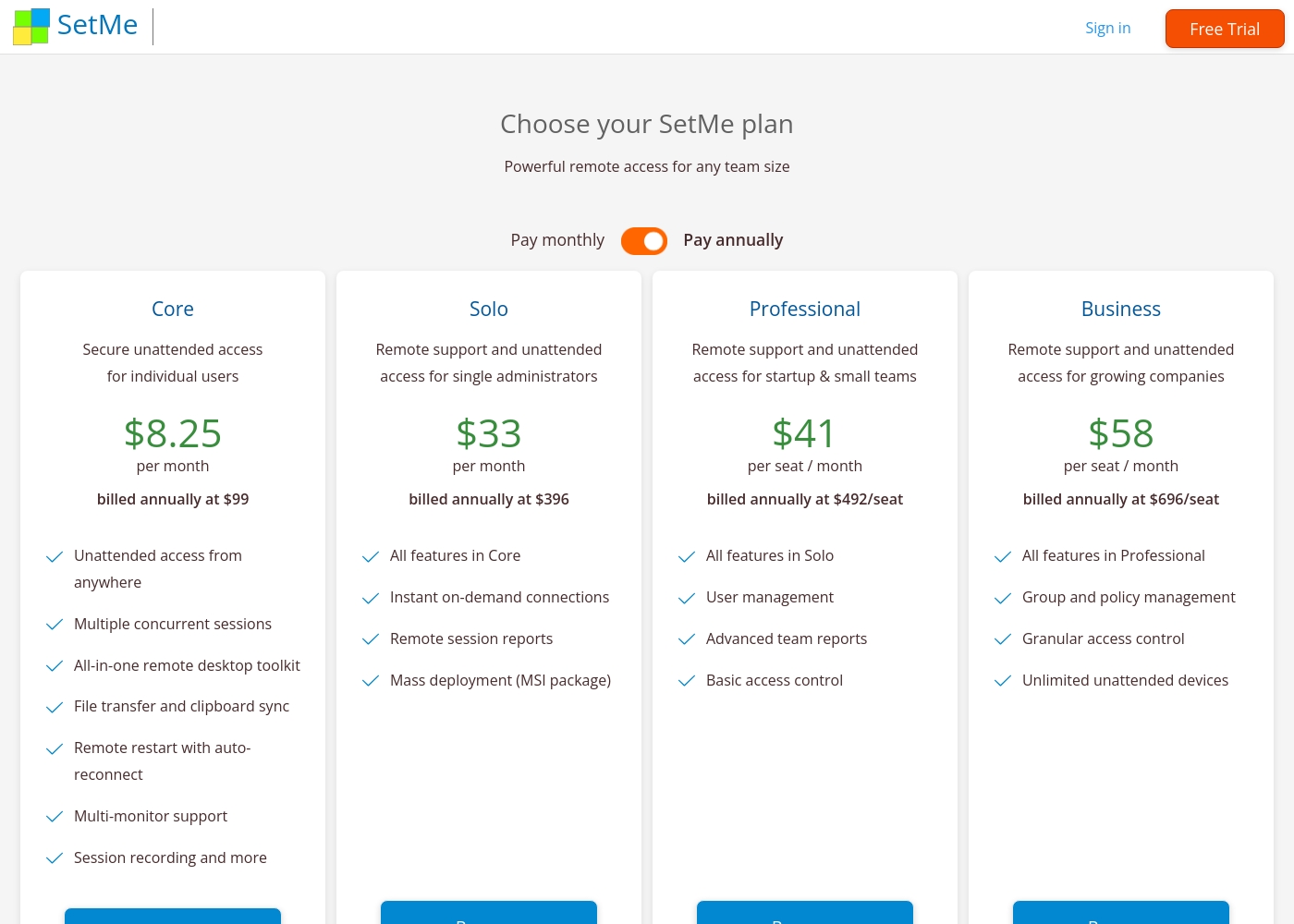
Parallels offers annual subscriptions from $49.99 to $97.49 per year. A one-time purchase is also available for the Standard Edition. It's a fixed annual cost. Techinline's pricing is per admin or per seat, starting at $8.25/month (annual) for the Core plan and going up to $58/seat/month for the Business plan. It scales with your team size. The value proposition is different. Parallels is a one-time or annual fee for local software. Techinline is a recurring per-user cost for a service. For a solo Mac user, Parallels is more affordable. For a growing IT team, Techinline's per-seat model might become expensive but offers powerful remote management.
Security & Compliance
Parallels has SOC 2 certification. Techinline uses end-to-end encryption.
Parallels Desktop is SOC 2 certified, indicating adherence to strict organizational security standards. This is important for enterprise compliance. Techinline uses end-to-end encryption for all remote sessions. This ensures data is protected in transit, which is critical for secure remote control. Both tools prioritize security, but for different threats. Parallels focuses on the security of the virtualization environment. Techinline focuses on securing the remote connection itself. For a business needing compliance, Parallels's SOC 2 is a strong point. For an IT team worried about data breaches during remote support, Techinline's encryption is essential.
User Reviews & Sentiment
Parallels has polarized reviews, with complaints about billing. Techinline lacks detailed external reviews.
Parallels has a 2.4/5 rating on Trustpilot. Reviews are deeply polarized. Some users praise performance, but many report predatory auto-renewal and unresponsive support. Techinline has a 4.2/5 rating, but external reviews were not accessible for this analysis. The data relies on product information and features. The most striking difference is the volume of negative feedback for Parallels. Users frequently mention denied refunds and billing issues. Techinline's review data is limited. If you're concerned about billing practices, Parallels's reviews are a red flag. If you want more user feedback, Techinline's limited data makes it harder to judge.
Integration Ecosystem
Parallels integrates with Jamf and Intune. Techinline's integrations are not detailed.
Parallels Business Edition integrates with enterprise management tools like Jamf and Intune for automated deployment and updates. This is crucial for IT teams managing many Macs. Techinline's integration capabilities are not detailed in the provided data. Users may need to check documentation or contact support. For organizations with existing IT infrastructure, Parallels's specific integrations with MDM tools are a clear advantage. Techinline's lack of detailed integration info is a gap. If your company uses Jamf to manage Macs, Parallels fits right in. If you need to integrate remote support with a PSA tool, Techinline's data doesn't confirm it.
Mobile Experience
Neither tool focuses on mobile apps. Parallels is desktop-only. Techinline may have mobile clients for remote access.
Parallels is a desktop application for Mac. It does not have a dedicated mobile app for managing or accessing VMs from a phone. Techinline is a remote access tool, which typically includes mobile clients for managing machines on the go. However, the data does not specify mobile app details. The comparison is limited here. Parallels is inherently a local desktop tool. Techinline's remote nature likely includes mobile access, but it's not confirmed. If you need to access your Mac's Windows apps from your phone, neither tool is the answer. If you need to manage remote servers from your tablet, Techinline is more likely to support it.
Parallels có giá từ 49,99 USD đến 97,49 USD mỗi năm với ba gói đăng ký hàng năm: Phiên bản Tiêu chuẩn với giá 49,99 USD, Phiên bản Pro với giá 59,99 USD và Phiên bản Business với giá 97,49 USD.
Dưới đây là cái nhìn chi tiết hơn về các tùy chọn có sẵn để bạn có thể chọn gói phù hợp với mình.
Parallels Desktop Standard Edition
Giá: 49,99 USD mỗi năm (Đăng ký) hoặc Mua một lần (giá Không nêu rõ) Trang web được hỗ trợ: Không nêu rõ Phù hợp nhất cho: Sử dụng tại nhà và cá nhân (hoặc sử dụng tại nhà ở mức độ nhẹ) Chính sách hoàn tiền: Bảo đảm hoàn tiền trong 30 ngày Các tính năng khác:
- 8 GB vRAM và 4 vCPU
- Chạy Windows và các ứng dụng Windows
- Sử dụng Linux và macOS trong máy ảo
- Hỗ trợ qua điện thoại và email không giới hạn (chỉ dành cho người đăng ký)
- 8 GB vRAM và 4 vCPU
- Chạy Windows và các ứng dụng Windows
- Sử dụng Linux và macOS trong máy ảo
- Truy cập các tính năng của Windows Excel trên Mac
- Hỗ trợ qua điện thoại và email không giới hạn (Chỉ đăng ký)
- Tất cả tính năng từ Standard Edition, cộng thêm:
- 128 GB vRAM và 32 VCPU cho mỗi VM
- Giao diện dòng lệnh
- Chạy các ứng dụng Windows chuyên sâu về đồ họa và nhiều VM
- Phát triển, tự động hóa, thử nghiệm và gỡ lỗi đồng thời trong nhiều hệ điều hành
- Tất cả tính năng từ Pro Edition, cộng thêm:
- Quản trị tập trung và quản lý giấy phép
- Tự động hóa quy trình công việc CI/CD
- Cung cấp thông qua các công cụ Quản lý Mac
- Sử dụng quản lý giấy phép số lượng lớn cho các tổ chức và nhóm
Techinline pricing: Techinline offers four SetMe plans starting at $8.25 per month (billed annually) for individual unattended access. Pricing scales based on features like on-demand support, seat count, and team management tools, with both monthly and yearly billing available for most tiers.
Core
Price: $8.25 per month (billed annually at $99) Best For: Individual users needing secure unattended access Other Features: Multiple concurrent sessions, File transfer and clipboard sync, Remote restart with auto-reconnect, Multi-monitor support, Session recording
This plan is perfect for individuals who only need to manage their own remote machines. It's a reliable choice if you don't need to provide instant on-demand support to new clients.
Pricing Head-to-Head
Đánh giá của người dùng
Phản hồi của người dùng về Parallels Desktop bị phân cực sâu sắc. Trong khi một số người dùng báo cáo rằng sản phẩm hoạt động tốt—khen ngợi hiệu suất ổn định và hoạt động liền mạch để chạy các ứng dụng Windows thiết yếu như MS Excel trên Mac—thì phần lớn các đánh giá bên ngoài bày tỏ sự cực kỳ không hài lòng với các hoạt động kinh doanh của công ty.
Những khiếu nại phổ biến nhất xoay quanh việc thanh toán mang tính săn mồi, đặc biệt là các khoản tự động gia hạn không rõ ràng và không mong muốn. Người dùng thường báo cáo bị tính phí hàng năm mà không có thông báo rõ ràng và cho biết các yêu cầu hoàn tiền liên tục bị từ chối, ngay cả khi được gửi trong thời hạn 30 ngày.
Sau 25 năm là người dùng PC, tôi chuyển sang MAC nhưng vẫn phụ thuộc rất nhiều vào Excel. Vì các phiên bản Mac không thân thiện với người dùng, Parallels đã giúp tôi thêm Windows Excel vào máy Mac của mình. Giờ đây tôi thực sự có được những điều tốt nhất của cả hai thế giới.
External reviews for Techinline SetMe were not accessible during this review. The provided Trustpilot URL returned a 403 error, preventing access to user feedback. Consequently, the review relies solely on the product's website information and our independent analysis of its features and pricing structure.
Phán quyết của chúng tôi
This isn't a close race—it's a category confusion. Parallels and Techinline solve completely different problems. You won't choose between them based on features. Your decision depends on whether you need to run Windows on your Mac or remotely support other computers. Parallels's superpower is virtualization. It runs Windows seamlessly on your Mac, so you can use both OS environments on one machine. This is perfect if you need a specific Windows app for work but love your Mac. It's a top-rated tool for this exact use case. Techinline's superpower is remote access. It lets you connect to any computer instantly via a simple URL. This is ideal for IT support teams and MSPs who need to fix issues quickly, even on low-speed internet. Its stable connections and centralized dashboard are built for that job. The deciding factor is your workflow. If you're a Mac user needing Windows software, Parallels is the only choice. If you're an IT pro managing remote devices, Techinline is the clear winner. There's no overlap in their core functions. Final verdict: Pick Parallels if you need Windows on your Mac. Pick Techinline if you need to remotely access and manage computers. For most people, one will be essential and the other irrelevant.
Câu hỏi thường gặp
Which is better for small teams: Parallels or Techinline?
It depends on your needs. Parallels Business Edition ($97.49/year) is for teams needing to run Windows on Macs. Techinline's Professional plan ($41/seat/month) is for small teams needing remote access and support.
Does Parallels have remote access like Techinline?
No. Parallels is a virtualization tool for running Windows on your Mac. It does not provide remote access to other computers. Techinline is built specifically for remote support and management.
Is Techinline worth the extra cost over Parallels?
They aren't competitors. Parallels costs $49.99–$97.49/year for local virtualization. Techinline costs $8.25–$58/seat/month for remote access. The cost is for a completely different service.
Can I migrate from Parallels to Techinline easily?
Migration isn't applicable. Parallels runs software on your Mac. Techinline connects you to remote computers. They serve different purposes and aren't interchangeable.
What are the biggest drawbacks of Parallels?
Parallels has serious billing issues. Users report predatory auto-renewals, denied refunds, and unresponsive support. The product works, but the business practices are a major risk.
Does Techinline offer a free trial?
Yes. Techinline offers a 15-day free trial with no credit card required. You get full access to zero-lag remote control features during the trial period.
Sẵn sàng chọn?
Cả hai công cụ đều có điểm mạnh riêng. Chọn dựa trên nhu cầu cụ thể của bạn.