GitLab vs IFTTT
GitLab and IFTTT solve completely different problems. GitLab unifies software development, while IFTTT connects apps and devices. Your choice depends on whether you're building software or automating tasks.
Comprehensive DevSecOps, but complex.
GitLab is a powerful, all-in-one platform that unifies the entire software lifecycle. We find it delivers on its promise of acceleration and unified security, though its depth can create a steep learning curve for smaller teams. Overall, it's an excellent choice for organizations seeking a single, scalable solution for planning, building, and deploying software securely.
Ưu điểm
- Single platform for the entire DevSecOps lifecycle
- Built-in security scanning accelerates vulnerability detection
- AI-powered workflows (Duo Agent) enhance productivity
- Offers a functional Free tier for individuals and small projects
Nhược điểm
- Learning curve can be steep due to platform breadth
- Enterprise features like advanced security require costly Ultimate tier
- Compute and storage limits on lower tiers may require paid add-ons
- Annual billing commitment for paid plans
Kết nối rộng rãi, hiệu suất không ổn định.
Chúng tôi công nhận sức mạnh kỹ thuật của IFTTT trong việc kết nối danh mục dịch vụ khổng lồ, mang lại tiềm năng tự động hóa mạnh mẽ cho cả người dùng gia đình và doanh nghiệp. Tuy nhiên, các báo cáo đáng kể của người dùng cho thấy độ tin cậy đã giảm đáng kể trong khi cấu trúc giá trở nên quá tích cực. Nhìn chung, chúng tôi nhận thấy rằng chi phí cao và hiệu suất khó lường khiến việc dựa vào nó cho các tự động hóa quan trọng trở nên khó khăn.
Ưu điểm
- Hệ sinh thái rộng lớn kết nối hơn 900 dịch vụ và ứng dụng khác nhau.
- Gói miễn phí vĩnh viễn có sẵn để kiểm tra các nhu cầu tự động hóa cơ bản.
- Các cấp độ Pro cung cấp các tính năng dành cho nhà phát triển nâng cao như webhook và mã bộ lọc.
- Applets đa hành động cho phép các quy trình làm việc phức tạp từ một lần kích hoạt.
Nhược điểm
- Các vấn đề về độ tin cậy nghiêm trọng và thường xuyên; applet thường bị trễ hoặc không kích hoạt.
- Mô hình định giá tích cực và việc thu hẹp liên tục chức năng của gói miễn phí.
- Hỗ trợ khách hàng được báo cáo là không phản hồi và tuân thủ các chính sách không hoàn tiền nghiêm ngặt.
- Người dùng bày tỏ sự thiếu tin tưởng sâu sắc do các giới hạn tính năng dao động.
VềGitLab
GitLab is an end-to-end DevSecOps platform for teams of all sizes, from startups to large enterprises. It’s the single place to plan, build, test, secure, and deploy your software. You get all your projects, releases, and code in one data plane, so both your team and AI agents work from the same information. 💡
VềIFTTT
IFTTT là nền tảng không cần mã code hàng đầu được thiết kế để tự động hóa mạnh mẽ trên cả cuộc sống kinh doanh và gia đình của bạn. Nó cung cấp một cách dễ dàng để kết nối hơn 900 dịch vụ khác nhau, bao gồm các công cụ như Google Calendar, Spotify và YouTube, bằng các Applet đơn giản. Bạn có thể tự động hóa từ bất kỳ đâu, bất cứ lúc nào, nhờ các ứng dụng iOS và Android chuyên dụng, đảm bảo năng suất liên tục. Nó được xây dựng trên một cộng đồng khổng lồ gồm hơn 27 triệu người dùng và hơn 900 thương hiệu đã sử dụng nền tảng này. 💡
Điểm nổi bật
So sánh tính năng
Tổng quan về tính năng
Chúng tôi làm nổi bật những khác biệt chính và chọn người chiến thắng cho từng tính năng.
Core Purpose & Focus
GitLab is a complete DevSecOps platform. IFTTT is a no-code automation connector.
GitLab provides a single application for the entire software development lifecycle. It handles planning, coding, testing, security, and deployment. IFTTT focuses on connecting over 900 different services like apps, websites, and smart devices. It creates simple automated rules called Applets. The key difference is depth vs. breadth. GitLab deeply manages software creation. IFTTT broadly connects existing services. A software team builds their product inside GitLab. A homeowner automates lights and thermostats with IFTTT.
Automation Capabilities
GitLab automates software pipelines. IFTTT automates tasks between apps.
GitLab's automation is for continuous integration and deployment (CI/CD). It builds, tests, and deploys code automatically on every commit. IFTTT's automation connects triggers and actions across apps. For example, 'If I get an email with an attachment, save it to Dropbox.' GitLab automation is technical and development-focused. IFTTT automation is task-based and user-friendly. GitLab saves developers hours per week on builds. IFTTT saves users minutes on daily chores.
Integration Ecosystem
GitLab integrates with development tools. IFTTT connects consumer apps and services.
GitLab integrates with tools like Jira, Jenkins, Slack, and cloud providers. It's built for the DevOps toolchain. IFTTT connects over 900 services including Google Calendar, Spotify, Twitter, and smart home devices. GitLab's ecosystem is deep but specialized. IFTTT's is vast but broad. A developer uses GitLab with Jira to track bugs. A marketer uses IFTTT to post blogs to social media.
Ease of Use
IFTTT is simpler for basic automations. GitLab has a steeper learning curve.
GitLab's comprehensive feature set creates a steep learning curve. Mastering its full DevSecOps platform takes significant time. IFTTT uses a simple 'if this, then that' model. Creating basic Applets requires no technical knowledge. IFTTT wins for quick, non-technical automations. GitLab requires investment but delivers more power. A user sets up a weather alert with IFTTT in 5 minutes. A team configures a GitLab CI pipeline over several days.
Security Features
GitLab has built-in security scanning. IFTTT has basic data security.
GitLab includes security tools like SAST, SCA, and Secret Detection. It finds vulnerabilities 50% faster by scanning within the platform. IFTTT relies on the security of connected services. It does not provide application security scanning. GitLab provides proactive, integrated security. IFTTT provides basic connectivity security. GitLab helps a team fix security flaws before deployment. IFTTT ensures a smart lock connection is encrypted.
Pricing & Value
GitLab's value is per-developer productivity. IFTTT's value is per-automation utility.
GitLab costs $0-$99 per user per month. Paid plans unlock advanced CI/CD and security features. IFTTT costs $0-$8.99 per month per account. Plans limit the number of Applets and automation speed. GitLab's cost scales with team size and features needed. IFTTT's cost scales with automation volume. GitLab justifies cost by saving 4+ hours per engineer weekly. IFTTT's value is saving time on repetitive tasks.
Scalability
GitLab scales for large enterprise teams. IFTTT scales for automation volume.
GitLab offers tiers from Free to Ultimate for thousands of users. It handles massive codebases and complex compliance needs. IFTTT scales by offering unlimited Applets on Pro+. It connects more services but not larger teams. GitLab scales organizational complexity. IFTTT scales automation quantity. GitLab supports a 500-person engineering org. IFTTT supports a user running 100+ personal automations.
Customer Support
GitLab offers tiered support with SLAs. IFTTT support is reportedly slow.
GitLab provides Priority Support for Premium and SLA Management for Ultimate. Emergency requests get 24/7 support. IFTTT offers standard support on Pro and prioritized on Pro+. User reviews report slow and unresponsive support. GitLab provides structured, enterprise-grade support. IFTTT's support quality is inconsistent. GitLab's SLA guarantees response times. IFTTT users report waiting days for help.
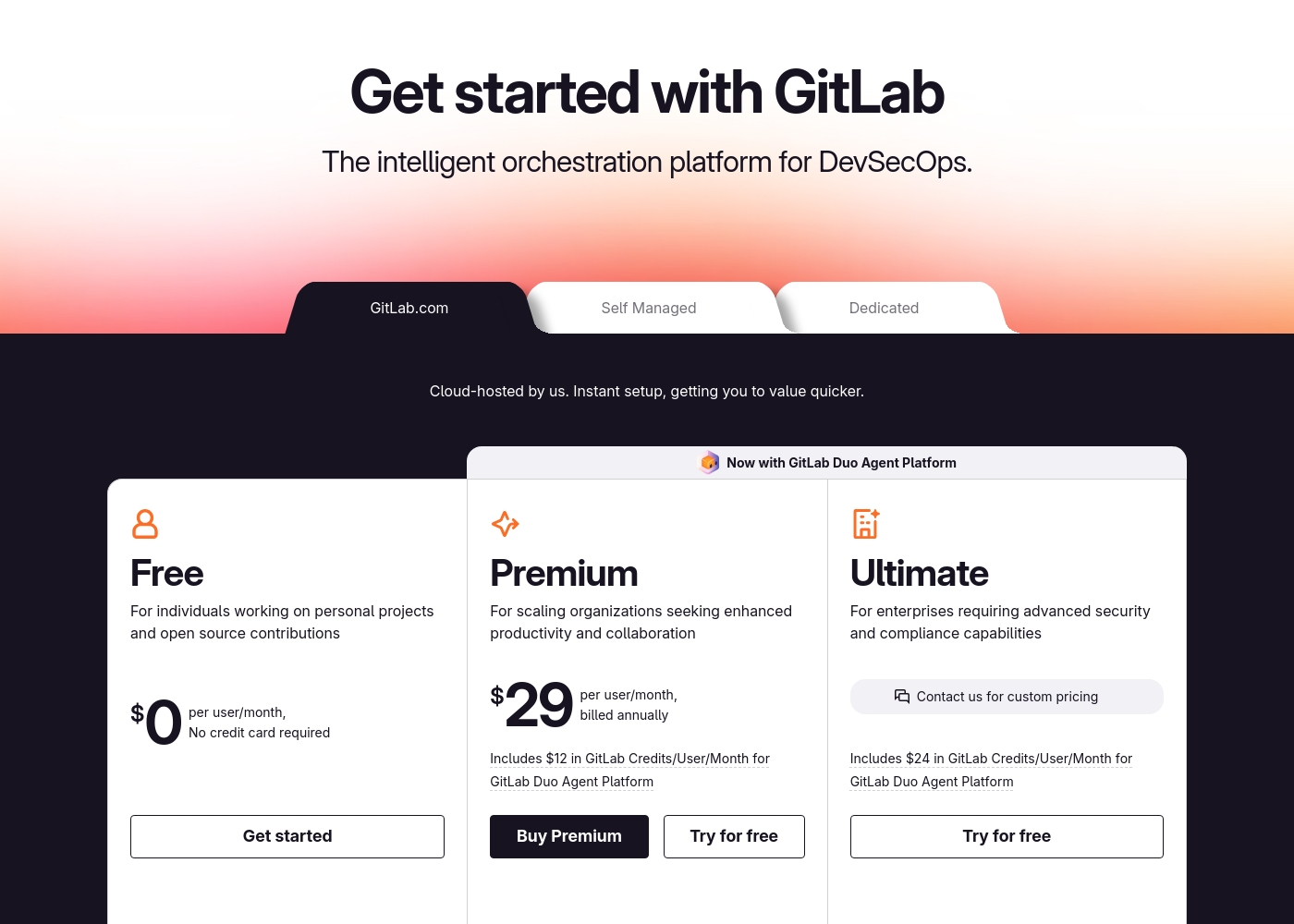
GitLab pricing: GitLab offers a range of DevSecOps plans from a free tier for individuals to an Ultimate enterprise solution for $99/month. Subscriptions include various compute minutes, storage allocations, and security features to fit different team sizes and needs.
Please note: the provided screenshot shows $29/user/month for Premium, while the text mentions $99 for Ultimate elsewhere; we have prioritized the current primary source values below for clarity. Actually, the provided text includes $0, $29 annually, and custom pricing options depending on the deployment method (SaaS or Self-Managed).
Overall it is a per-seat annual subscription model with usage-based add-ons for credits and compute time. For current SaaS pricing: Free $0, Premium $29/mo annually, Ultimate $99/mo annually (implied for custom).
IFTTT có giá từ 0,00 đô la đến 107,88 đô la mỗi năm với ba gói: IFTTT Free với giá 0,00 đô la, IFTTT Pro với giá 35,88 đô la/năm và IFTTT Pro+ với giá 107,88 đô la/năm.
Hãy cùng tìm hiểu chi tiết ba tùy chọn gói có sẵn để tìm ra mức độ tự động hóa phù hợp cho nhu cầu của bạn.
IFTTT Free
Giá: 0,00 đô la / vĩnh viễn Trang web được hỗ trợ: Không áp dụng - Nền tảng tự động hóa Phù hợp nhất cho: Bắt đầu với tự động hóa Chính sách hoàn tiền: Không được nêu rõ Các tính năng khác:
- 2 Applet
- Tốc độ Applet tiêu chuẩn
- Tự làm hoặc sử dụng các Applet đã xuất bản
- Số lần chạy Applet không giới hạn
- Truy cập ứng dụng di động miễn phí và tích hợp không cần mã đơn giản
- 2 Applet
- Tốc độ Applet tiêu chuẩn
- Tự làm hoặc sử dụng các Applet đã xuất bản
- Số lần chạy Applet không giới hạn
- Truy cập ứng dụng di động miễn phí
- 20 Applet
- Tốc độ Applet nhanh nhất
- Applets đa hành động
- Webhooks
- Applet Twitter
- Applet không giới hạn
- Tất cả tính năng từ Pro
- Dịch vụ AI
- Kết nối nhiều tài khoản cho mỗi dịch vụ
- Sử dụng truy vấn và mã bộ lọc
Pricing Notes
- GitLab charges per user per month. IFTTT charges per account per month.
- GitLab's Free plan includes 5 users. IFTTT's Free plan is limited to 2 Applets.
- GitLab's paid plans require annual billing. IFTTT offers both monthly and annual options.
- GitLab has usage-based add-ons for extra compute minutes. IFTTT's limits are on Applet count and speed.
Pricing Head-to-Head
Đánh giá của người dùng
External user reviews for GitLab are currently inaccessible for a full synthesis, as both Trustpilot and Capterra returned security verification errors. 📄 Therefore, we cannot provide a balanced, specific summary of recurring user themes on accuracy, ease of use, support, or pricing at this time. We recommend checking these sources directly for up-to-date sentiment.
GitLab streamlined our entire development pipeline. Having CI/CD, security, and planning in one place saves our team significant time each week.
Phản hồi bên ngoài về IFTTT vẽ nên một bức tranh về sự không hài lòng lớn của người dùng, đặc biệt là những khách hàng lâu năm đã trải nghiệm nền tảng này trước khi có những cải cách đáng kể về giá cả. Độ tin cậy là một vấn đề cốt lõi; nhiều người dùng báo cáo rằng Applets rất không đáng tin cậy, phải chịu lỗi hoặc sự chậm trễ nghiêm trọng, đôi khi lên đến vài giờ.
Khiếu nại thường gặp nhất xoay quanh sự chuyển đổi sang mô hình thương mại tích cực. Người dùng cảm thấy bị lừa dối bởi sự thu hẹp thường xuyên và đáng kể về giới hạn Applet của gói miễn phí, vốn đã giảm xuống chỉ còn hai, đẩy họ không cần thiết sang các cấp độ trả phí mà họ thấy quá đắt đỏ.
Dịch vụ này có thể tuyệt vời, nhưng thật không may, nó không còn đáng tin cậy nữa. Nó không kích hoạt các lần kích hoạt một cách chính xác và độ trễ ngày càng tăng đến mức phải mất vài giờ để chạy. Chúng tôi cần tự động hóa ổn định, không phải sự chậm trễ.
Phán quyết của chúng tôi
These tools serve entirely different audiences. GitLab is the winner for software teams. IFTTT is only relevant for simple personal automations. GitLab's superpower is unifying the entire software development lifecycle. It replaces multiple tools with one platform, saving teams 4+ hours per engineer weekly. IFTTT's superpower is connecting over 900 consumer apps. But recent reliability issues and aggressive pricing have eroded user trust significantly. The deciding factor is your core need. Choose GitLab if you build software. Choose IFTTT only if you need basic app connections. For most professional use cases, GitLab is the clear choice. It delivers measurable value for development work. IFTTT has become too unreliable for serious use.
Câu hỏi thường gặp
Can GitLab do what IFTTT does for app automation?
No. GitLab is for software development, not connecting consumer apps. Use IFTTT for simple automations between services like Google Calendar and Twitter.
Is IFTTT good for software development teams?
No. IFTTT lacks features like code hosting, CI/CD, and issue tracking. Development teams need a dedicated platform like GitLab.
Which is cheaper for a team of 10 developers?
GitLab costs $290-$990/month for 10 users. IFTTT isn't designed for team licensing; it charges per account, making it impractical for team development.
Does IFTTT have security features like GitLab?
No. IFTTT provides basic data security for connections. GitLab includes advanced security scanning (SAST, DAST) built directly into the development workflow.
Can I migrate my data from GitLab to IFTTT?
No migration path exists. These are fundamentally different tools. GitLab stores code repositories. IFTTT stores automation rules.
Which tool has better mobile apps?
Both have functional apps. GitLab's app monitors pipelines and issues. IFTTT's app manages automations. The better choice depends on your need.
Sẵn sàng chọn?
Cả hai công cụ đều có điểm mạnh riêng. Chọn dựa trên nhu cầu cụ thể của bạn.