Flowith vs GitLab
Flowith and GitLab are both ambitious platforms, but they live in different worlds. Flowith is a visual AI tool for creative minds and knowledge workers. GitLab is an all-in-one DevOps powerhouse for software teams.
Visual Thinking Meets AI Execution
Flowith presents a compelling platform that aims to bridge creative thinking and AI-powered execution. It offers a unique Canvas interface and a powerful agent system for managing knowledge and tasks. Overall, we find it to be a promising and innovative tool for creators and knowledge workers, though its real-world value will depend on user experience and support.
Ưu điểm
- Offers a unique Canvas for visual idea mapping and connection.
- Combines a Knowledge Garden for unified notes and research.
- Features a next-gen AI agent (FlowithOS) for task execution.
- Scalable pricing with a free Starter plan available.
Nhược điểm
- Core concept (Canvas-based AI) may have a learning curve.
- No verified external user reviews are currently available.
- Pricing scales to high-cost tiers for premium access.
- Actual performance and reliability are unverified by third parties.
Comprehensive DevSecOps, but complex.
GitLab is a powerful, all-in-one platform that unifies the entire software lifecycle. We find it delivers on its promise of acceleration and unified security, though its depth can create a steep learning curve for smaller teams. Overall, it's an excellent choice for organizations seeking a single, scalable solution for planning, building, and deploying software securely.
Ưu điểm
- Single platform for the entire DevSecOps lifecycle
- Built-in security scanning accelerates vulnerability detection
- AI-powered workflows (Duo Agent) enhance productivity
- Offers a functional Free tier for individuals and small projects
Nhược điểm
- Learning curve can be steep due to platform breadth
- Enterprise features like advanced security require costly Ultimate tier
- Compute and storage limits on lower tiers may require paid add-ons
- Annual billing commitment for paid plans
VềFlowith
Flowith is a next-generation AI platform built for creators, knowledge workers, and anyone who thinks visually. 💡 It moves beyond simple chat interfaces. At its core, it offers a Canvas to map out ideas and a powerful AI agent called FlowithOS to help you execute plans.
VềGitLab
GitLab is an end-to-end DevSecOps platform for teams of all sizes, from startups to large enterprises. It’s the single place to plan, build, test, secure, and deploy your software. You get all your projects, releases, and code in one data plane, so both your team and AI agents work from the same information. 💡
Điểm nổi bật
So sánh tính năng
Tổng quan về tính năng
Chúng tôi làm nổi bật những khác biệt chính và chọn người chiến thắng cho từng tính năng.
Core Purpose
Flowith is built for visual thinking and AI-assisted creativity. GitLab is built for the entire software development lifecycle.
Flowith provides a Canvas to map ideas freely and a Knowledge Garden to unify notes. Its FlowithOS agent helps turn visual plans into action. GitLab provides a single platform for planning, coding, testing, securing, and deploying software. It unifies projects, releases, and code in one data plane. The key difference is fundamental. Flowith enhances creative and knowledge workflows. GitLab streamlines technical software delivery.
User Interface
Flowith offers a freeform visual Canvas. GitLab offers a structured, feature-rich development environment.
Flowith's interface is a visual playground for connecting ideas. It breaks from linear chat, allowing non-linear exploration on a Canvas. GitLab's interface is organized around repositories, merge requests, and pipelines. It's powerful but can have a steep learning curve due to its breadth. Flowith prioritizes creative freedom. GitLab prioritizes structured process and visibility for software teams.
AI & Automation
Flowith's AI is for idea generation and execution. GitLab's AI automates code review and security tasks.
Flowith uses FlowithOS and Agent Neo. These AI agents are designed for task execution based on your visual plans and context. GitLab uses the Duo Agent Platform. Its AI agents can turn issues into merge requests and review code, while your team sets the guardrails. Flowith's AI is for creators. GitLab's AI is for accelerating developer workflows.
Security Features
Flowith does not mention security scanning. GitLab has security built into its core platform.
Flowith's provided data does not detail security scanning features like vulnerability detection. GitLab consolidates scanners (SAST, SCA, Secret Detection) into one system. Security findings appear directly in merge requests. This is a major difference. GitLab is designed for secure software delivery. Flowith focuses on creative output.
Team Collaboration
Flowith mentions visual collaboration but lacks team management details. GitLab offers robust, permission-based collaboration.
Flowith's Knowledge Garden and Canvas could be used collaboratively, but specific team features aren't detailed. It mentions unlimited concurrent nodes for team use on higher plans. GitLab provides detailed role-based access control, merge request approvals, and audit logs. It's built for teams from 5 to 5000+ people. GitLab offers a more mature and secure collaboration model for professional software teams.
Pricing Structure
Flowith uses a subscription with credit-based usage. GitLab uses per-seat annual pricing with usage add-ons.
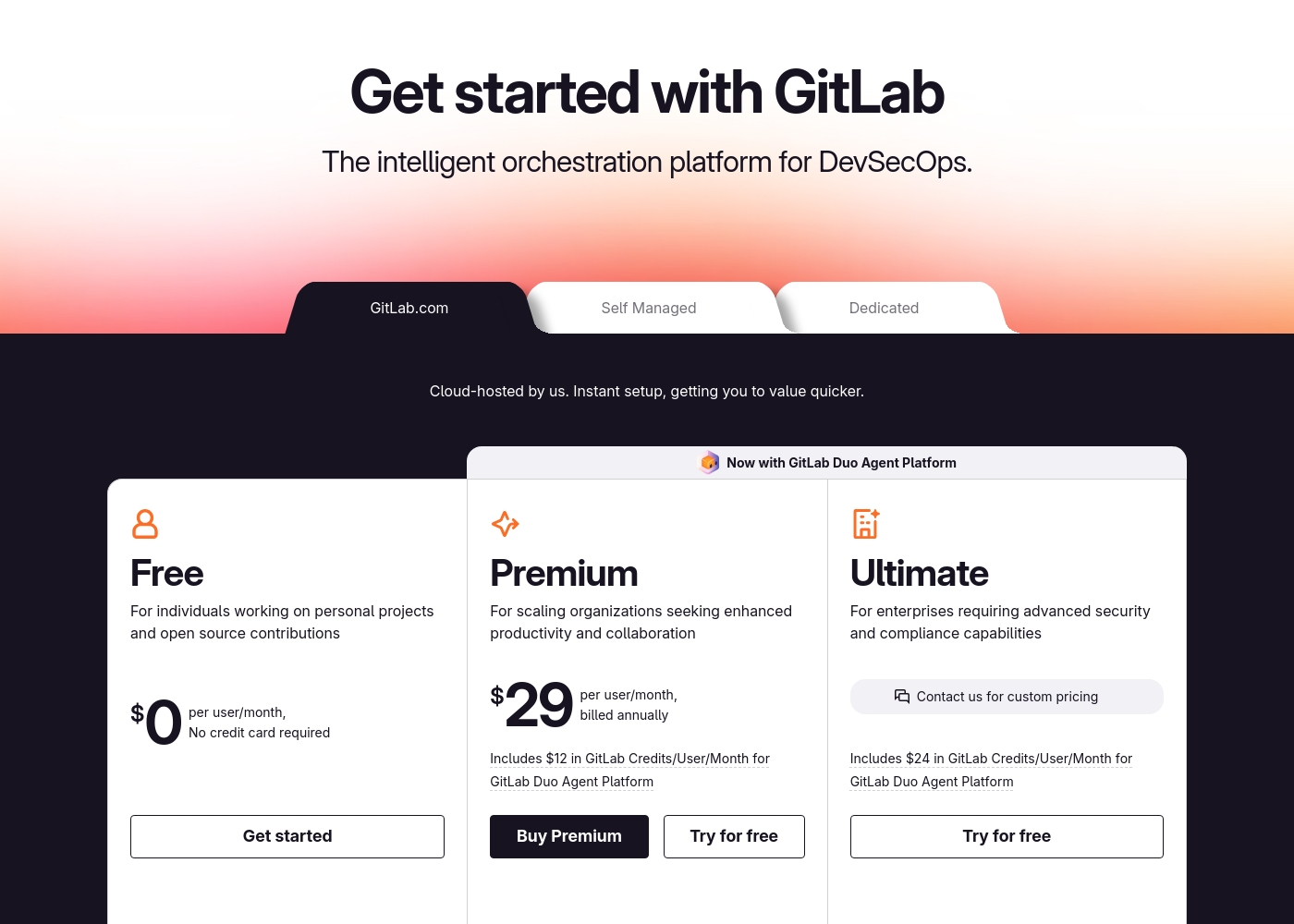
Flowith plans range from $0 (Starter) to $399.92/month (Infinite). You pay for credits to use AI models. There are no per-user fees. GitLab plans are Free, Premium ($29/user/month), and Ultimate ($99/user/month). All paid plans are billed annually. Extra compute costs money. Flowith's cost scales with usage. GitLab's cost scales with team size and feature tier.
Learning Curve
Flowith may be intuitive for visual thinkers. GitLab is known for a steeper learning curve.
Flowith's Canvas-based approach may be intuitive for visual thinkers, but its core concept could be new. Its pros list mentions this learning curve. GitLab's pros and cons explicitly note a steep learning curve due to its platform breadth. Mastering CI/CD and security features takes time. Flowith might be faster to start for creative tasks. GitLab requires investment to unlock its full power for DevOps.
Scalability
Flowith scales via plan tiers and credit limits. GitLab scales with enterprise tiers and self-managed options.
Flowith scales by offering higher tiers (Pro, Ultimate, Infinite) with more credits, devices, and concurrent nodes. GitLab scales from a free tier to an enterprise Ultimate tier. It offers flexible deployment options like Self-Managed and Dedicated for full control. GitLab offers more proven pathways for scaling complex software delivery operations and security compliance.
Flowith pricing: Flowith offers a range of subscription plans starting from a free Starter tier up to a comprehensive Infinite plan at $399.92 per month. Pricing scales based on credit allotments, concurrent tasks, and access to premium AI models with options for monthly or yearly billing discounts. ⚡️ Unlock the potential of AI with our flexible plans tailored for every creative need. Whether you're a curious hobbyist or a professional building momentum, we've got a perfect flow for you. Explore our comparison to find your ideal match today! 🚀✨
- Starter Plan at $0 /mo
- Pro Plan at $17.91 /mo
- Ultimate Plan at $42.42 /mo
- Infinite Plan at $399.92 /mo
- Free plan available with basic credits.
- Discounts available for yearly subscriptions.
- Different plans offer varying AI model access.
- Flexible billing to suit your flow.
- Enhanced features with premium tiers. ✨
- All major payment methods accepted.
- Credits reset monthly for paid plans.
- Unlimited mode available on select plans. ⚡️
- Support levels increase with plan tier.
- Cancellation available at any time. 🚫⚓️
- Carbon removal supported with every use. ☘️
- Dynamic rate limiting for fair use. ⚖️
- Standard and priority processing options.
- Multi-device support for seamless work.
- Commercial licensing included in paid tiers.
- Early access to Flowith OS features. 🛠️✨
- Direct access to developers for top tiers. 👨💻
- Advanced batch generation capabilities.
- High-speed processing for intensive tasks. ⚡️
- Unlimited concurrent nodes for team use. 🤝✨
- Join a global community of innovators today! 🌍🚀✨
- Ready to elevate your creativity? 🪜✨
- Select your plan and start flowing. 🌊✨
- Your journey with AI starts here. 🚀✨
- Experience the power of Flowith now! ⚡️✨
- We're here to support your growth. 🌱✨
- Unleash your imagination effortlessly. 🌠✨
- Transform your workflow with Flowith. 🔄✨
- Secure and reliable AI execution. 🛡️✨
- Flexible solutions for every budget. 💰✨
- Elevate your creativ

GitLab pricing: GitLab offers a range of DevSecOps plans from a free tier for individuals to an Ultimate enterprise solution for $99/month. Subscriptions include various compute minutes, storage allocations, and security features to fit different team sizes and needs.
Please note: the provided screenshot shows $29/user/month for Premium, while the text mentions $99 for Ultimate elsewhere; we have prioritized the current primary source values below for clarity. Actually, the provided text includes $0, $29 annually, and custom pricing options depending on the deployment method (SaaS or Self-Managed).
Overall it is a per-seat annual subscription model with usage-based add-ons for credits and compute time. For current SaaS pricing: Free $0, Premium $29/mo annually, Ultimate $99/mo annually (implied for custom).
Pricing Notes
- Flowith's Starter plan is free but limited. Paid plans require credit purchases.
- GitLab's free plan has a 5-user limit for private groups.
- GitLab's paid plans (Premium, Ultimate) require an annual billing commitment.
- Both platforms offer free tiers to start, but their target users and feature sets are very different.
Pricing Head-to-Head
Đánh giá của người dùng
Based on the provided external review snippets, we cannot synthesize a balanced summary of user sentiment from Trustpilot or Capterra. The only available snippet is a connection error page, which contains no actual user feedback, ratings, or recurring themes. Therefore, a meaningful review summary that references specific user experiences regarding accuracy, ease of use, support, pricing, or other factors cannot be constructed from the given data. 😅 We must rely solely on the website's own description for this review.
The Canvas is a game-changer for organizing my research. It's so much better than a chat window for complex projects. I can finally see how all my ideas connect visually.
External user reviews for GitLab are currently inaccessible for a full synthesis, as both Trustpilot and Capterra returned security verification errors. 📄 Therefore, we cannot provide a balanced, specific summary of recurring user themes on accuracy, ease of use, support, or pricing at this time. We recommend checking these sources directly for up-to-date sentiment.
GitLab streamlined our entire development pipeline. Having CI/CD, security, and planning in one place saves our team significant time each week.
Phán quyết của chúng tôi
Flowith and GitLab are tools for different fights. Choosing between them is about your core mission, not feature checklists. Flowith's superpower is visual thinking. It gives creators and knowledge workers a canvas to map, connect, and execute ideas with AI. It's built for the chaos of the creative process. GitLab's superpower is unified software delivery. It brings planning, coding, security, and deployment into one platform. Teams report saving 4 hours per engineer weekly and shipping 6x faster. The deciding factor is simple: What are you building? Are you crafting content and knowledge? Or are you deploying software? Choose Flowith if you're a visual thinker, writer, or creative team mapping complex ideas. Choose GitLab if you're a software team wanting to consolidate tools and ship securely. They're both excellent at their own jobs.
Câu hỏi thường gặp
Which is better for small teams: Flowith or GitLab?
It depends entirely on your work. For a creative or research team, Flowith might be better. For a small software development team, GitLab's free tier is a strong starting point.
Can I use GitLab for creative brainstorming like Flowith?
No, GitLab is not designed for that. It's a DevOps platform for software development. Flowith's Canvas and Knowledge Garden are built specifically for visual brainstorming and idea mapping.
Is GitLab worth the extra cost over Flowith?
They serve different needs, so cost isn't the right comparison. GitLab's value is in unifying software delivery and security. Flowith's value is in enhancing creative and knowledge work with AI.
Can I migrate my existing projects from Flowith to GitLab?
No, this isn't feasible. They store and manage fundamentally different types of data. Flowith holds ideas and notes. GitLab holds code repositories and deployment pipelines.
Which tool has a better free plan?
Both have free plans, but for different people. Flowith's Starter plan offers basic AI credits. GitLab's free plan offers code management and CI/CD for up to 5 users.
Does Flowith have security features like GitLab?
Based on the provided data, no. GitLab has built-in security scanners (SAST, SCA) as a core feature. Flowith does not mention security scanning capabilities.
Sẵn sàng chọn?
Cả hai công cụ đều có điểm mạnh riêng. Chọn dựa trên nhu cầu cụ thể của bạn.