Camtasia vs Vyond
Camtasia and Vyond both create compelling video but in totally different ways. Camtasia is your reliable desktop powerhouse for screen recording and deep editing control. Vyond is an instant, AI-driven platform for scaling animated explainer content fast. Your project type will quickly dictate the winner between these two tools.
Powerful screen recording, premium price tag.
We find Camtasia to be an extremely capable, industry-standard tool for creating high-quality instructional video content. Its multitrack editing flexibility and AI enhancements effectively streamline complex workflows. Overall, Camtasia excels in core functionality, but its restrictive, mandatory subscription model significantly diminishes the overall value proposition for many loyal users.
Ưu điểm
- Industry-standard platform for flexible screen recording and tutorial creation.
- Significantly simpler and more intuitive interface compared to advanced editors.
- Multitrack recording allows independent editing of screen, audio, and camera.
- Offers powerful AI features like text-based video editing and audio cleanup.
Nhược điểm
- Mandatory annual subscription model has replaced perpetual licenses.
- Users are frustrated by restrictive licensing (single-device sign-in limitations).
- Perceived as overly expensive compared to free or low-cost competitors.
- Inconsistent customer service experiences, including slow/non-responsive support.
AI Mạnh mẽ. Nội dung mở rộng quy mô. Hỗ trợ Kém.
Vyond cung cấp một nền tảng tạo video AI hàng đầu trong ngành, hoàn hảo để mở rộng quy mô nội dung an toàn, phù hợp thương hiệu một cách nhanh chóng, được hàng ngàn công ty và các công ty trong Fortune 500 tin dùng. Tuy nhiên, chúng tôi nhận thấy các vấn đề lặp đi lặp lại về khả năng phản hồi của bộ phận hỗ trợ khách hàng và những thay đổi có vấn đề đối với các điều khoản đăng ký, làm giảm giá trị đối với người dùng cá nhân. Nhìn chung, Vyond là một công cụ mạnh mẽ phù hợp nhất cho các nhóm doanh nghiệp có ngân sách lớn cần sản xuất an toàn với số lượng lớn.
Ưu điểm
- Chất lượng tiêu chuẩn ngành cho nội dung hoạt hình và giải thích.
- Tạo video nhanh chóng bằng AI (Vyond Go) từ các lời nhắc đơn giản hoặc URL.
- Đồng bộ hóa lời nói và tạo âm thanh tuyệt vời từ kịch bản văn bản.
- Giao diện người dùng hoàn hảo và các tài sản hoạt hình được đánh giá là hàng đầu và đẹp mắt.
Nhược điểm
- Hỗ trợ khách hàng hạn chế hoặc không có; trợ giúp phụ thuộc nhiều vào tự động hóa.
- Các hành vi phi đạo đức được báo cáo, bao gồm gia hạn tự động và ép buộc nâng cấp gói.
- Thường xuyên loại bỏ hoặc giới hạn tính năng (ví dụ: diễn đàn cộng đồng, chủ đề) đối với người dùng trả phí.
- Trải nghiệm dùng thử miễn phí bị giới hạn hoặc 'tệ' (ví dụ: tối đa ba video).
VềCamtasia
Camtasia is truly everything you need in one powerful tool. It combines screen recording with full video editing capabilities. This software uses AI-powered tools to simplify the creation process. It is designed to help you turn your existing knowledge into highly engaging videos. 💡
VềVyond
Vyond là nền tảng tạo video AI tất cả trong một giúp các nhóm tạo ra video hiệu quả từ những lời nhắc đơn giản ở nhiều phong cách. Nó bao gồm Vyond Go, ngay lập tức biến ý tưởng, tài liệu hoặc URL của bạn thành video, và một trình chỉnh sửa tức thì hoặc studio để tinh chỉnh nhanh chóng. Hàng ngàn doanh nghiệp và hàng triệu người dùng tin dùng Vyond, và 65% các công ty trong Fortune 500 tin dùng Vyond. 🎬
Điểm nổi bật
So sánh tính năng
Tổng quan về tính năng
Chúng tôi làm nổi bật những khác biệt chính và chọn người chiến thắng cho từng tính năng.
Core Production Focus
Camtasia is built for screen recordings; Vyond is an animation powerhouse.
Camtasia is the industry standard for polished tutorials and software demos. It provides unparalleled editing control over captured video and audio tracks. Vyond is an AI video factory designed primarily for producing animated explainer videos quickly at scale. It converts text and documents instantly into highly visual content for corporate use. Choose Camtasia for deep editing control; choose Vyond for automated animation speed. The best tool depends entirely on your content style.
Screen Recording Control
Camtasia offers specific multitrack separation; Vyond offers basic capture.
Camtasia's core strength is its powerful multitrack recording capability. It automatically separates screen, audio, and camera feeds into independent tracks. Vyond includes basic tools for screen recording and mobile capture. Its primary workflow does not focus on heavy post-production editing of live footage. Camtasia delivers maximum creative control after the recording session finishes. If you rely on detailed software demos, Camtasia is indispensable for precise refinement.
AI Video Generation
Vyond turns documents into videos; Camtasia uses AI for editing only.
Vyond leverages Vyond Go, instantly turning your documents, URLs, or prompts into video drafts. This drastically simplifies and speeds up initial content creation. Camtasia uses AI to refine recordings and generate initial scripts from prompts. It is not designed to create full visual animation scenes from text inputs. Vyond is engineered for scaling animated content through extreme automation and speed. The trade-off is production time versus precise editing power.
Audio Refinement
Camtasia’s AI removes filler words; Vyond focuses on speech sync.
Camtasia excels in audio refinement using specialized AI tools. It automatically removes background fan noise and common filler words like 'uuhms' and 'aahs.' Vyond focuses on achieving seamless speech synchronization and generating high-quality audio for its characters. Specific dedicated noise or filler word cleanup tools are not highlighted for Vyond. For cleaning up voiceovers from live screen recordings, Camtasia delivers a significantly more powerful solution. This robust feature set saves hours of required manual correction.
Visual Styles
Vyond offers diverse animation styles; Camtasia supports standard video effects.
Vyond provides great stylistic flexibility, specializing in animated explainer content. Styles include Photorealistic, Mixed Media, and Gen AI visuals, plus character assets. Camtasia focuses on editing real-world footage and screens. It provides professional transitions and effects for standard video but lacks extensive animation styles. If you need compelling, cartoon-style business videos, Vyond is clearly the superior choice. Camtasia is best for realism, not stylized animation.
Pricing Visibility
Camtasia publishes annual rates; Vyond hides all subscription costs.
Camtasia uses transparent, publicly listed annual subscription rates for all individual plans. Costs range clearly from $179.88 to $599.00 yearly. Vyond requires users to contact sales for standard plan costs, hiding crucial pricing details. This lack of visibility typically frustrates individuals or small teams on tight budgets. Camtasia’s published pricing is essential for budget planning and trust building. Vyond's pricing secrecy suggests a high B2B focus.
Enterprise Security
Vyond ensures security for large teams; Camtasia focuses on individual desktop use.
Vyond offers a specialized Enterprise solution focused on robust security and compliance standards. This plan provides complete privacy guarantees for large corporate organizations. Camtasia's feature set focuses on individual editing efficiency and collaboration features for small teams (Pro plan). It does not highlight rigorous, large-scale security compliance. If you are part of a massive organization needing high data integrity, the Vyond Enterprise solution is the designed fit. Camtasia is built for the solo instructional designer or small content department.
User Review Sentiment
Camtasia review scores are higher; Vyond's rating suffers from poor support.
Camtasia holds a significantly higher overall user rating (4.2 average across reviewed sites). Users highly praise its core editing capability and reliability. Vyond’s rating is much lower (3.2 average) due to highly polarized feedback. Loyal Vyond customers frequently complain about receiving automated or non-existent customer service. High user frustration over pricing changes and support severely impacts Vyond's perception of value.
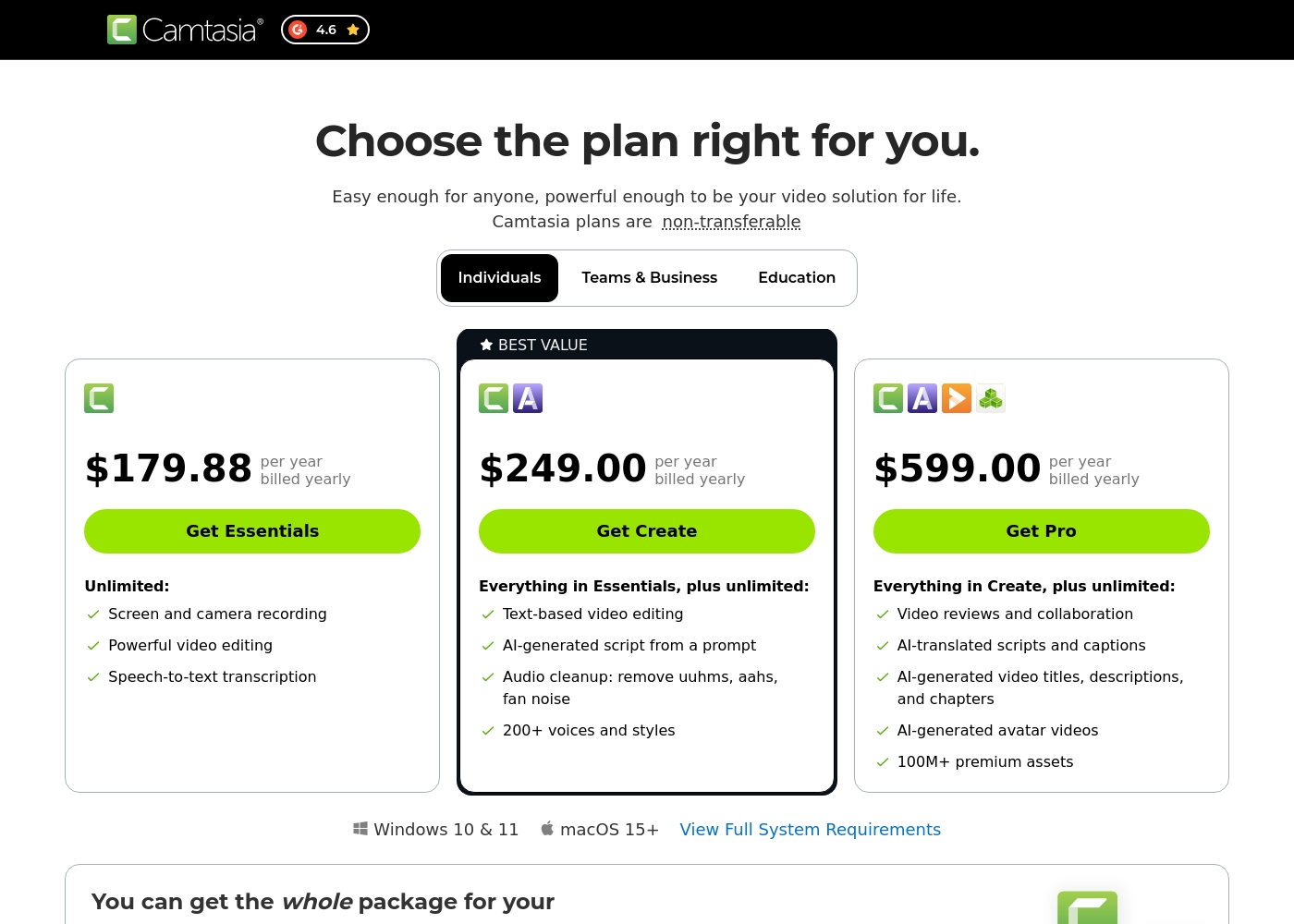
Camtasia costs between $179.88 and $599.00 per year with 3 plans: Essentials at $179.88, Create at $249.00, and Pro at $599.00. These plans cater to individuals, offering robust video and screen recording tools through an annual subscription model.
Essentials
Price: $179.88 per year billed yearly Websites Supported: Not explicitly stated Best For: Not explicitly stated Refund Policy: Not explicitly stated Other Features:
- Screen and camera recording
- Powerful video editing
- Speech-to-text transcription
The Essentials plan is perfect if you only need foundational tools for recording and editing videos. It provides unlimited screen and camera recording capabilities, which is great for beginners or those with basic needs.
- Screen and camera recording
- Powerful video editing
- Speech-to-text transcription
- Everything in Essentials
- Text-based video editing
- AI-generated script from a prompt
- Audio cleanup: remove uuhms, aahs, fan noise
- 200+ voices and styles
- Everything in Create
- Video reviews and collaboration
- AI-translated scripts and captions
- AI-generated video titles, descriptions, and chapters
- AI-generated avatar videos
Vyond có giá dao động từ Không được nêu rõ đến Không được nêu rõ mỗi Không được nêu rõ với 2 gói rõ ràng: Dùng thử Miễn phí với Giá Không được nêu rõ và Enterprise với Giá Không được nêu rõ.
You có thể khám phá các tùy chọn linh hoạt của Vyond được điều chỉnh cho người dùng cá nhân và các tổ chức lớn thông qua các dịch vụ chính này.
Dùng thử Miễn phí
Giá: Không được nêu rõ Trang web được hỗ trợ: Không được nêu rõ Tốt nhất cho: Người dùng muốn thử nghiệm các công cụ tạo video đa dạng của nền tảng. Chính sách hoàn tiền: Không được nêu rõ Các tính năng khác:
- Tạo video tức thì, dễ dàng
- Truy cập hình đại diện AI và các tính năng Gen AI
- Sử dụng thư viện mẫu toàn diện
- Khả năng chuyển đổi URL hoặc tài liệu thành video (Vyond Go)
- Tạo video tức thì, dễ dàng cho mọi người
- Truy cập hình đại diện AI, Gen AI và các kiểu giống như ảnh chụp
- Màn hình ghi hình và công cụ quay trên thiết bị di động
- Tạo tức thì bằng Vyond Go (chuyển đổi văn bản, tài liệu hoặc URL)
- Tạo nội dung phù hợp thương hiệu một cách hiệu quả ở quy mô lớn
- Quyền riêng tư hoàn toàn và bảo mật
- Hỗ trợ các yêu cầu bảo mật nghiêm ngặt của tổ chức doanh nghiệp
Pricing Notes
- Camtasia uses transparent, mandatory annual subscriptions, costing between $179.88 (Essentials) and $599.00 (Pro) yearly.
- Vyond offers a free trial to test features, but specific costs for standard paid subscription tiers are not publicly visible.
- Vyond requires users to contact the sales team directly for accurate usage-based figures and custom Enterprise pricing.
- The Camtasia Pro plan includes collaboration tools, AI localization, and 100 million premium assets for $599.00 annually.
Pricing Head-to-Head
Đánh giá của người dùng
Camtasia enjoys a long-standing reputation as an industry-standard tool, particularly for screen recording and tutorial creation. Users overwhelmingly praise the core software, noting it is dramatically simpler and more intuitive to use than complex alternatives like Adobe products, while still offering a deep feature set.
However, recent changes to the pricing model and licensing structure have caused significant user frustration. The shift to mandatory annual subscriptions, coupled with new restrictive single-device sign-in limits for individual users, is a major recurring complaint.
The software is great, the developers deserve five stars for the product quality. But management introduced a highly frustrating subscription model. The mandatory sign-in cycle when switching devices significantly harms my workflow.
Vyond phải đối mặt với sự đón nhận rất phân cực, phản ánh sự chia rẽ sâu sắc giữa sự hài lòng về tính năng và các hoạt động của công ty. Nhiều người dùng ca ngợi công cụ hoạt hình cốt lõi, lưu ý đến chất lượng tiêu chuẩn ngành, đồng bộ hóa giọng nói lý tưởng và việc tạo video giải thích nhanh chóng một cách đơn giản.
Họ đánh giá cao thư viện tài sản nhân vật sẵn có mạnh mẽ, làm cho nền tảng này tuyệt vời để tăng cường sự tương tác tiếp thị. Tuy nhiên, tình cảm tiêu cực, đặc biệt trên Trustpilot (nơi điểm là 2.0), tập trung nhiều vào giá cả và hỗ trợ.
Có rất nhiều lựa chọn nhân vật và môi trường sẵn có để bắt đầu nhanh chóng. Các hình ảnh động đạt tiêu chuẩn cao và việc kết hợp kịch bản văn bản cho âm thanh được tạo ra thật dễ dàng. Tôi thực sự hài lòng với công cụ này nói chung.
Phán quyết của chúng tôi
Choosing between Camtasia and Vyond is simple: decide between editing control or creation speed. Camtasia is your professional desktop editor for precision and recorded footage. You should pick Vyond if your primary need is scaling animation and corporate communication quickly. Camtasia’s superpower is granting users total post-production mastery over screen recordings. Its unique multitrack feature allows you to edit audio, camera, and screen entirely separately. You can use Camtasia’s AI audio cleanup to effortlessly remove filler words and distracting fan noise. This unmatched flexibility helps you deliver professional tutorials quickly. Vyond shines when you need speed and stylized, automated output for large audiences. Vyond Go instantly transforms existing text documents or URLs into captivating animated explainer videos. If your job involves L&D or HR communication, Vyond is far faster than human animators. It supports diverse visual styles and secure scaling for massive corporate teams. The key factor here is content type: Camtasia handles live realism; Vyond handles automation and stylized animation. If you require deep control over recorded footage and professional editing, Camtasia is the clear winner. If instant, secure, on-brand content generation is essential, Vyond is the appropriate platform. Final verdict: Pick Camtasia for high-stakes screen recordings and ultimate audio clarity. Go with Vyond if you prioritize rapid, scalable, animated content for training and internal marketing.
Câu hỏi thường gặp
Which is better for creating detailed software demonstrations: Camtasia or Vyond?
Camtasia is significantly better for software demonstrations and tutorials. Its multitrack recording separates audio from video, enabling precise edits after recording. Vyond focuses on animation from text prompts and does not offer this deep editing control.
Can Vyond easily create videos from my existing documents or URLs?
Yes, this is Vyond’s specific strength using the Vyond Go tool. Vyond instantly converts existing text documents, simple prompts, or URLs into effective video drafts. Camtasia only uses AI to generate initial scripts, not full moving visuals from outside inputs.
Is Camtasia generally more expensive than Vyond for individuals?
Camtasia lists its individual pricing publicly starting at $179.88 per year. Vyond’s specific subscription prices are not public, requiring you to contact sales. This often indicates a higher B2B price point, but a Vyond free trial is available.
Which tool has better customer support according to recent reviews?
Camtasia reports healthier customer support experiences, despite some inconsistency. Vyond faces heavy criticism from users regarding its customer service. Many Vyond reviewers report only automated responses or non-existent support.
Does Vyond offer dedicated support and security for enterprise teams?
Yes, Vyond maintains a specialized Enterprise solution for large organizations. This tier provides complete privacy, rigorous security guarantees, and support. Camtasia focuses on individual and small team collaboration tools instead of high-level security demands.
Which software is better for creating HR and L&D training content?
Vyond is explicitly designed for HR and L&D teams needing engaging, scalable content. Its animated styles boost learner attention better than static screen recordings. Camtasia is ideal if you need to record complex systems or detailed instructions precisely.
Sẵn sàng chọn?
Cả hai công cụ đều có điểm mạnh riêng. Chọn dựa trên nhu cầu cụ thể của bạn.