BLACKBOX AI vs GitLab
BLACKBOX AI and GitLab solve different parts of the development puzzle. BLACKBOX AI is an autonomous AI agent platform for coding tasks. GitLab is a full DevSecOps platform for the entire software lifecycle.
Powerful automation with unproven reliability.
We find BLACKBOX AI to be a feature-rich platform with ambitious automation for the full development lifecycle. Its multi-agent approach and broad integration options are compelling. Overall, we see strong potential for teams seeking AI-driven speed, but we await broader user validation to confirm its real-world support and value.
Ưu điểm
- Comprehensive automation from scaffolding to deployment.
- Multi-agent system for parallel task execution and evaluation.
- Wide accessibility via CLI, IDE, cloud, and API.
- Built-in safety features like security checks and schema validation.
Nhược điểm
- Lack of verified user reviews for real-world reliability assessment.
- Complex multi-agent workflows may have a steep learning curve.
- Enterprise pricing and onboarding details are not fully transparent.
Comprehensive DevSecOps, but complex.
GitLab is a powerful, all-in-one platform that unifies the entire software lifecycle. We find it delivers on its promise of acceleration and unified security, though its depth can create a steep learning curve for smaller teams. Overall, it's an excellent choice for organizations seeking a single, scalable solution for planning, building, and deploying software securely.
Ưu điểm
- Single platform for the entire DevSecOps lifecycle
- Built-in security scanning accelerates vulnerability detection
- AI-powered workflows (Duo Agent) enhance productivity
- Offers a functional Free tier for individuals and small projects
Nhược điểm
- Learning curve can be steep due to platform breadth
- Enterprise features like advanced security require costly Ultimate tier
- Compute and storage limits on lower tiers may require paid add-ons
- Annual billing commitment for paid plans
VềBLACKBOX AI
💡 BLACKBOX AI is an enterprise-grade agent platform for software development. 🤖 It lets you run autonomous coding agents from a single API, your terminal, IDE, or the cloud.
Whether you use Claude Code, Codex, or its own models, the platform orchestrates them to compete, collaborate, and complete tasks like refactoring, testing, and deployment.
VềGitLab
GitLab is an end-to-end DevSecOps platform for teams of all sizes, from startups to large enterprises. It’s the single place to plan, build, test, secure, and deploy your software. You get all your projects, releases, and code in one data plane, so both your team and AI agents work from the same information. 💡
Điểm nổi bật
So sánh tính năng
Tổng quan về tính năng
Chúng tôi làm nổi bật những khác biệt chính và chọn người chiến thắng cho từng tính năng.
Core Purpose
BLACKBOX AI automates specific coding tasks. GitLab manages your entire software workflow.
BLACKBOX AI is an AI agent platform. It uses autonomous agents to handle tasks like refactoring, testing, and deployment. You run it from your CLI or IDE. GitLab is a complete DevSecOps platform. It covers planning, coding, security, and deployment in one tool. It's designed for team collaboration across the whole lifecycle. The key difference is scope. BLACKBOX AI is a specialized automation tool. GitLab is a comprehensive team environment.
AI & Automation
BLACKBOX AI runs multiple agents in parallel. GitLab integrates AI into its workflows.
BLACKBOX AI's core feature is parallel agent execution. It can send the same task to Claude, Codex, and its own models. A Chairman LLM picks the best solution automatically. GitLab's AI, the Duo Agent Platform, works within its ecosystem. It can turn issues into merge requests and review code. Your team sets the rules for AI assistance. BLACKBOX AI is about agent competition and selection. GitLab is about AI assisting human workflows. BLACKBOX AI offers more raw AI power for specific tasks.
Security Features
GitLab has built-in, unified security scanning. BLACKBOX AI runs security audits via agents.
BLACKBOX AI agents can perform security audits. They scan dependencies and check for vulnerabilities. This is an on-demand, task-based approach. GitLab has security built into the platform. It includes scanners for SAST, SCA, and secrets. Findings appear directly in merge requests for faster fixes. GitLab provides continuous, integrated security. BLACKBOX AI provides powerful, on-demand security checks. For a security-first workflow, GitLab is more comprehensive.
Team Collaboration
GitLab is built for team collaboration. BLACKBOX AI is more for individual or CLI use.
BLACKBOX AI is accessed via CLI, IDE, or cloud dashboard. It's powerful for a developer automating their own tasks. It lacks deep team planning or issue tracking features. GitLab is designed for teams. It includes issue boards, wikis, and merge request discussions. Everything is centralized for team collaboration. GitLab is clearly better for team-based development. BLACKBOX AI is a personal power tool for developers.
Learning Curve
BLACKBOX AI has a steeper curve for complex workflows. GitLab is vast but more straightforward to start.
BLACKBOX AI's multi-agent system is powerful but complex. Orchestrating parallel agents and understanding the Chairman LLM requires learning. It's not a simple drag-and-drop tool. GitLab is a huge platform with many features. While comprehensive, the core concepts of Git and CI/CD are familiar. The learning curve comes from its breadth. BLACKBOX AI's complexity is deep but narrow. GitLab's complexity is broad but more intuitive. For a new user, GitLab might feel more approachable initially.
Pricing & Value
GitLab offers a free tier. BLACKBOX AI starts with a paid plan.
BLACKBOX AI starts at $8/month. It uses usage-based pricing with per-seat plans. There is no free tier mentioned. GitLab has a free plan for up to 5 users. Paid plans start at $29/user/month. You can try paid features with a free trial. GitLab's free tier offers clear value for small teams. BLACKBOX AI's value is in the time saved by automating tasks. For budget-conscious teams, GitLab is more accessible.
Deployment & Control
GitLab offers flexible self-hosting. BLACKBOX AI is primarily cloud-based.
BLACKBOX AI is a cloud platform. Enterprise plans allow on-premise deployment for data sovereignty. Most users interact with it as a SaaS tool. GitLab offers multiple deployment options. You can use GitLab.com (SaaS), self-managed, or a dedicated instance. This gives organizations full control over their data. GitLab provides more deployment flexibility. This is crucial for enterprises with strict data policies.
Industry Focus
GitLab caters to regulated industries. BLACKBOX AI is for general development teams.
BLACKBOX AI is marketed to development teams seeking AI speed. It doesn't specify compliance with industry regulations. GitLab is built for regulated industries. It meets requirements for Financial Services, Public Sector, and Automotive. It includes compliance frameworks and audit trails. For companies in regulated sectors, GitLab is the safer choice. BLACKBOX AI is better for standard software development.
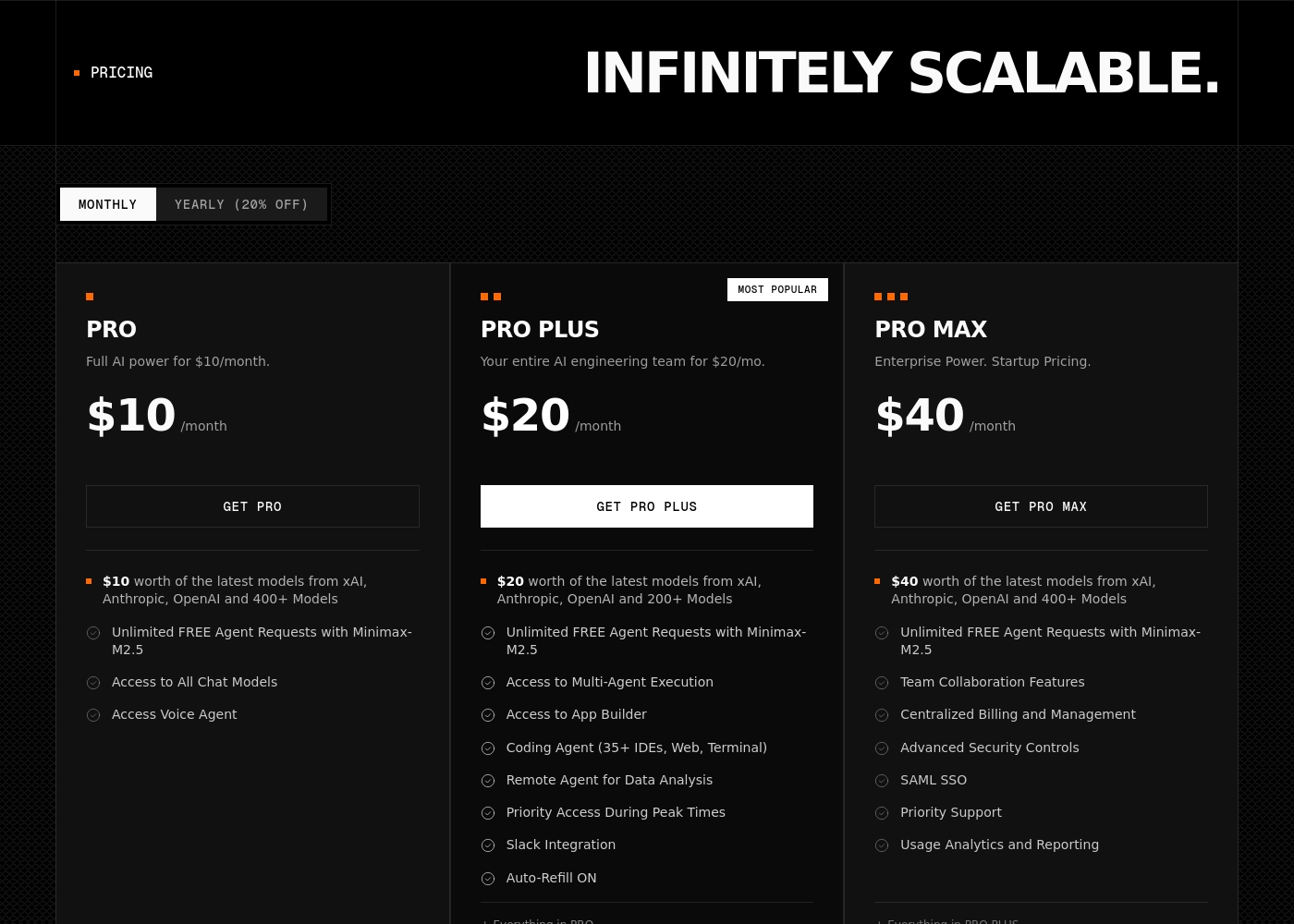
BLACKBOX AI pricing: BLACKBOX AI offers scalable subscription plans starting at $8/month (billed annually) for individual developers and teams. Professional tiers vary by feature access, with custom enterprise solutions available for larger organizations needing on-premise deployment and advanced security controls. Plans range: 2–35 Billing options: Usage-based pricing
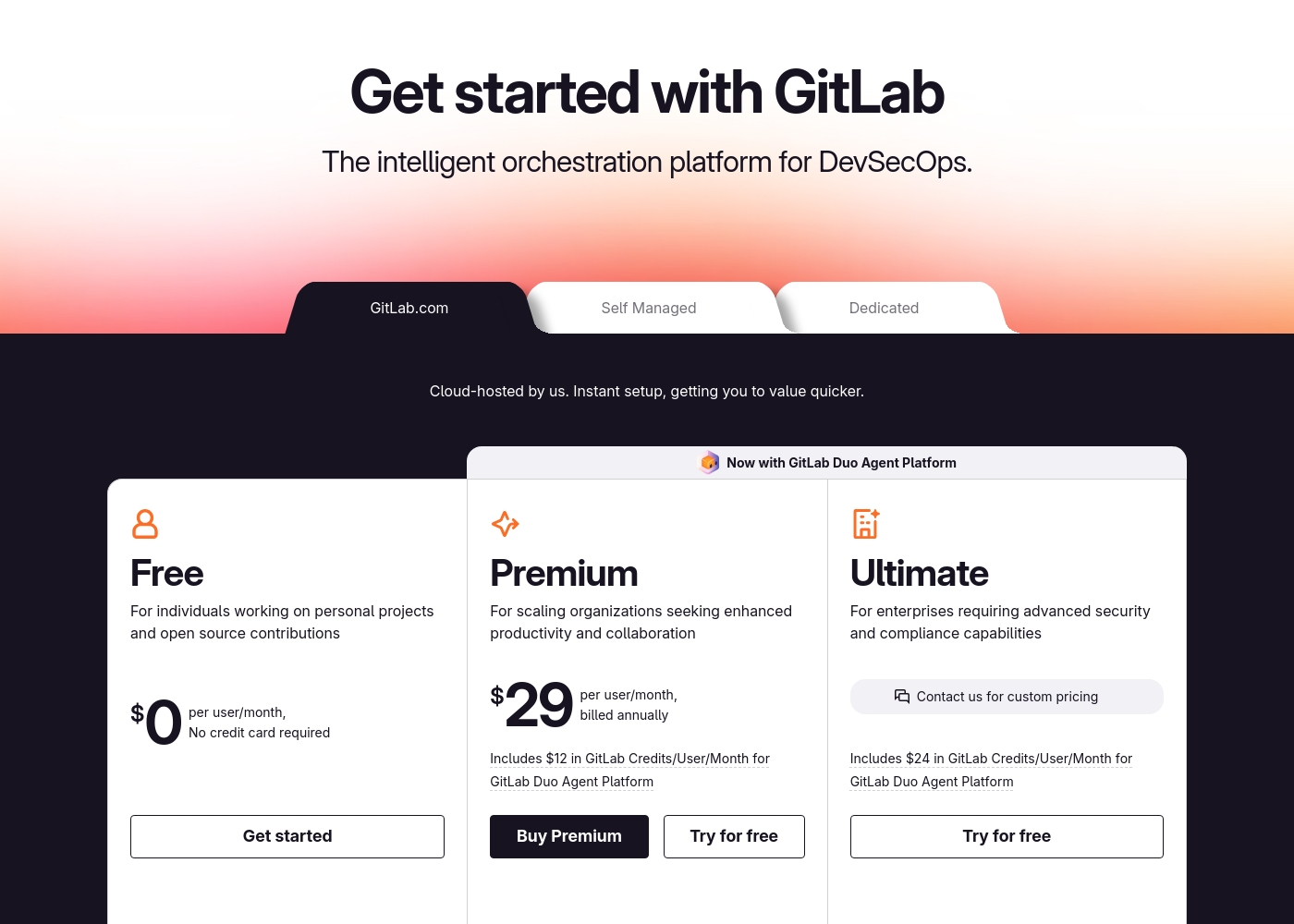
GitLab pricing: GitLab offers a range of DevSecOps plans from a free tier for individuals to an Ultimate enterprise solution for $99/month. Subscriptions include various compute minutes, storage allocations, and security features to fit different team sizes and needs.
Please note: the provided screenshot shows $29/user/month for Premium, while the text mentions $99 for Ultimate elsewhere; we have prioritized the current primary source values below for clarity. Actually, the provided text includes $0, $29 annually, and custom pricing options depending on the deployment method (SaaS or Self-Managed).
Overall it is a per-seat annual subscription model with usage-based add-ons for credits and compute time. For current SaaS pricing: Free $0, Premium $29/mo annually, Ultimate $99/mo annually (implied for custom).
Pricing Notes
- BLACKBOX AI has no free tier; all plans are paid starting at $8/month.
- GitLab offers a free plan with a 5-user limit, making it accessible for small teams.
- GitLab's paid plans (Premium, Ultimate) require annual billing.
- Both platforms use usage-based add-ons: BLACKBOX AI for agent usage, GitLab for AI credits and compute.
Pricing Head-to-Head
Đánh giá của người dùng
Based on the available Trustpilot review snippet, the sentiment is currently inconclusive due to a verification error preventing full access to user feedback. ⚠️ This means we cannot synthesize specific recurring themes about accuracy, ease of use, or support. Our final rating will therefore rely primarily on our assessment of the platform's features and stated value proposition, as external review data is not accessible for a balanced analysis.
External user reviews for GitLab are currently inaccessible for a full synthesis, as both Trustpilot and Capterra returned security verification errors. 📄 Therefore, we cannot provide a balanced, specific summary of recurring user themes on accuracy, ease of use, support, or pricing at this time. We recommend checking these sources directly for up-to-date sentiment.
GitLab streamlined our entire development pipeline. Having CI/CD, security, and planning in one place saves our team significant time each week.
Phán quyết của chúng tôi
This isn't a direct apples-to-apples comparison. GitLab is the comprehensive platform for managing your entire software lifecycle. BLACKBOX AI is the specialized AI power tool for automating specific coding tasks. BLACKBOX AI's superpower is autonomous, parallel execution. It can dispatch a task to multiple AI models and automatically select the best solution. This is incredible for speeding up discrete, complex problems. GitLab's superpower is unified control. It brings planning, coding, security, and deployment into one place. This eliminates tool sprawl and gives teams a single source of truth. The deciding factor is your primary need. Choose GitLab if you want to streamline your team's workflow and manage everything centrally. Choose BLACKBOX AI if you need to automate specific, heavy-duty coding tasks with AI. For most development teams, GitLab is the more complete solution. It handles the full lifecycle. However, if your bottleneck is specific coding tasks and you want cutting-edge AI automation, BLACKBOX AI is a powerful specialist to add to your toolkit.
Câu hỏi thường gặp
Is GitLab a replacement for BLACKBOX AI?
Not exactly. GitLab is a full DevSecOps platform for your entire workflow. BLACKBOX AI is a specialized tool for automating coding tasks with AI agents. They solve different problems.
Which is better for a solo developer?
BLACKBOX AI can automate tasks for a solo developer. GitLab's free plan is also excellent for individuals. Choose based on whether you need AI automation or a free platform to host your code.
Can I use BLACKBOX AI's agents within GitLab?
Not directly. They are separate platforms. You might use BLACKBOX AI for specific tasks and manage the project in GitLab, but there's no native integration described.
Which has better security features?
GitLab has more comprehensive, built-in security scanning (SAST, SCA, etc.). BLACKBOX AI performs security audits as agent-driven tasks. GitLab's approach is more integrated and continuous.
Is there a free trial for BLACKBOX AI?
The data does not mention a free trial for BLACKBOX AI. Its plans start at a paid tier. GitLab does offer a free trial for its paid plans.
Which platform scales better for a large enterprise?
GitLab is designed for enterprise scale with flexible deployment and compliance features. BLACKBOX AI scales with usage but is more focused on AI task automation than full lifecycle management.
Sẵn sàng chọn?
Cả hai công cụ đều có điểm mạnh riêng. Chọn dựa trên nhu cầu cụ thể của bạn.