PixCut

PixCut

AI-Powered Tools for Fast Photo Editing

#2 dans Photo Background Remover
2 okuma süresi · Güncelleme 10/3/2025
PixCut ana sayfa ekran görüntüsü

At a glance

Quick overview for PixCut: rating, pricing summary, key features, and highlights.

Ciroapp İncelemesi

2.5
Effective AI, but buyer beware.

PixCut provides quick, AI-powered tools for background removal and image scaling that many professional users will find valuable. However, we found recurring user reports detailing unauthorized charges and a failure to honor the 30-day refund promise. Overall, based on this severe trust friction, we advise caution despite the strong underlying technology.

Artılar

  • Pro:100% automatic AI background removal offers speed and accuracy.
  • Pro:Supports bulk processing for up to 20 images simultaneously.
  • Pro:Includes a powerful Photo Enhancer to enlarge images up to 8x.
  • Pro:API integration is available for customized applications and workflows.

Eksiler

  • Con:Widespread user reports of denied refunds, contradicting the stated guarantee.
  • Con:Users frequently cite unauthorized recurring charges and complex cancellation issues.
  • Con:Paid plan pricing is not transparent; specific costs require contacting the vendor.
  • Con:Some complaints mention software failure or system instability upon installation.
Para iade garantisi
Yes — 30 gün
Aralık: $0+Free plan, Monthly subscription, One-time payment, Usage-based pricing
This section is a summary. Detailed sections about features, use cases, pricing, and reviews follow below.

PixCut incelemesi, fiyatlandırma, özellikler, artıları ve eksileri

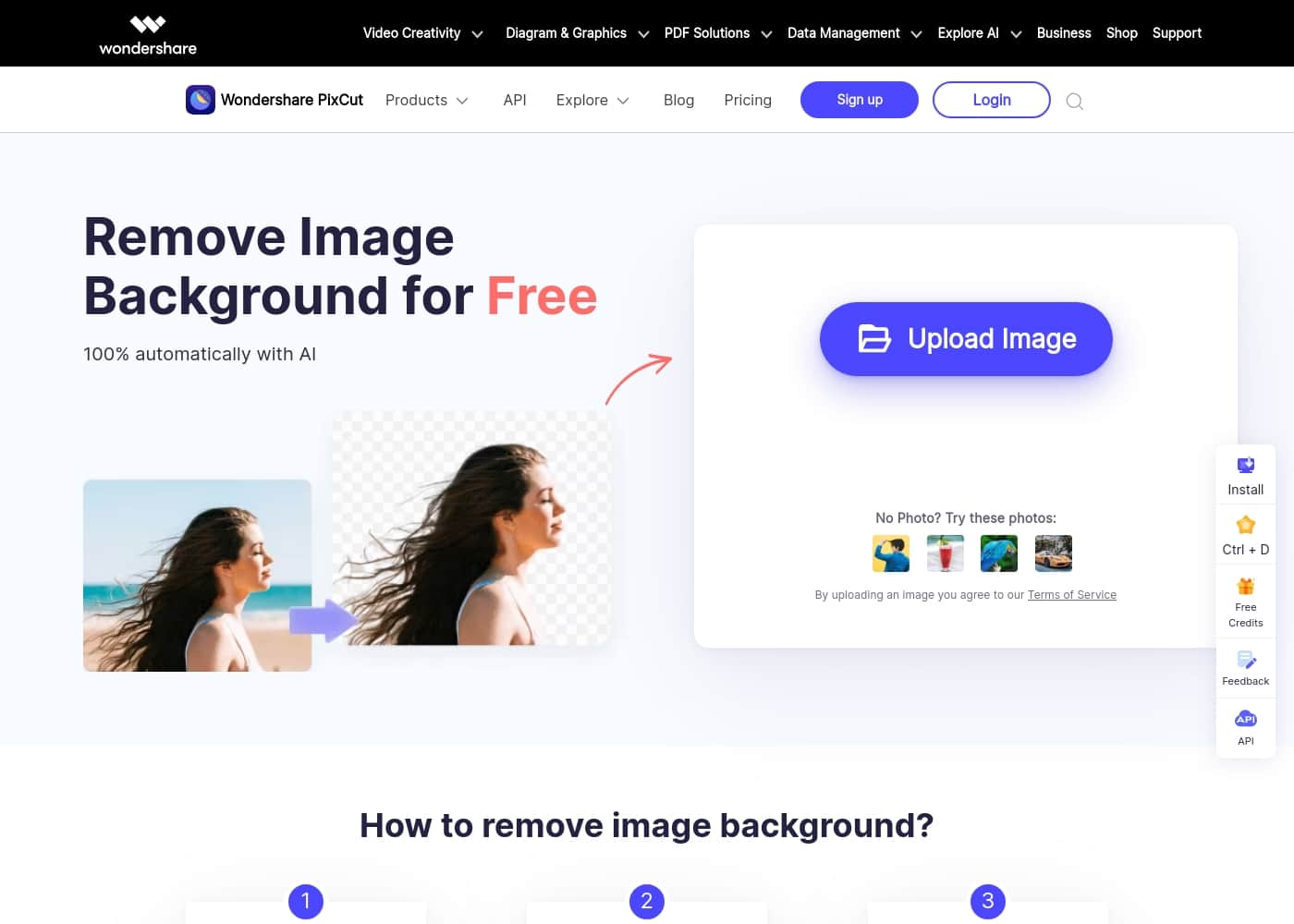
Are you tired of spending hours precisely clipping backgrounds from photos? Removing image backgrounds is often tedious and frustrating. ✨ PixCut solves this core problem by using advanced AI technology to handle the entire process 100% automatically and for free.

PixCut nedir?

PixCut is an intelligent photo editing utility designed to simplify complex visual tasks using artificial intelligence. Using the platform is incredibly straightforward. You simply upload your chosen image.

The AI engine instantly removes the background automatically. Finally, you can download the result image, which features a transparent background, making it ready for any new backdrop you choose. 💡 It's a fast, reliable solution for high-quality, clean images.

PixCut Ana Özellikler

✨ Effortless AI Background Removal

Achieve instant, clean background removal with powerful AI. PixCut makes complex image editing simple for everyone. The intelligent engine handles the entire process 100% automatically the moment you upload your photo. You no longer need to spend hours meticulously clipping out subjects by hand.

PixCut removes the background instantly, leaving a reliable, professional transparent result. This output image is immediately ready for any new backdrop or graphic design project you have planned. This core function reliably produces high-quality results quickly and efficiently.

✨ Seamless Integration and Bulk Processing

Boost your productivity with features designed for high-volume needs. If your workflow requires processing many photos, PixCut offers a convenient bulk removal capability. You can handle up to 20 images simultaneously, which saves significant time in large projects.

For developers and businesses, scalable integration is also available. The background removal API allows you to incorporate this powerful technology directly into your own application. You can use just a few lines of code to enable fast, automatic background removal within your custom software.

✨ Precision Content and Defect Removal

Easily clean up your images and remove unwanted elements with content-aware filling. PixCut goes far beyond just removing backgrounds from a photo. The advanced content-aware filling technology lets you remove specific objects that ruin an otherwise perfect picture.

You can quickly erase defects like scratch marks or textual overlays from the image. Use this tool to remove watermarks, minor objects, or other unwanted texts instantly. This specialized feature helps you achieve a clean, polished final image every time.

💡 Maintaining Clarity During Enlargement

Enlarge your photos significantly while actively maintaining crisp, original quality. Sometimes you need an image scaled up for high-resolution display or professional printing. The Photo Enhancer function addresses this need effectively.

This feature allows you to enlarge your images up to 8x their original size. Crucially, this enhancement happens without sacrificing the clarity or image quality. It is a perfect solution when a small source image must be scaled up for a much larger application.

Kullanım Durumları

🛍️ Boosting E-commerce Productivity Through Bulk Processing

Online sellers often require dozens of product photos with clean, uniform backgrounds. Manually preparing these images takes serious time and effort. Instead, you can use the Bulk Remove Background feature to upload up to 20 images at the same time.

The AI automatically strips away the original backdrops instantly, leaving transparent figures ready for placement. This greatly reduces your editing workflow, letting you focus more on selling and less on tedious clipping tasks.

Tip: Use the free option first to ensure standard quality removal meets your immediate needs before committing to paid credits for higher resolution.

✨ Restoring and Perfecting Damaged or Imperfect Imagery

Sometimes a great photo is ruined by small flaws, like scratches, misplaced text, or a distracting watermark. You don't need complicated graphics software to fix these issues. PixCut offers sophisticated content-aware filling tools for cleaning up these defects.

Process Flow:

  1. Upload the image containing the flaw (scratches, text, unwanted objects).
  2. Use the content-aware tool to highlight the area you need to remove.
  3. The AI intelligently fills the spot, making the defect disappear seamlessly.

Expected outcome: A flawless image, instantly cleaned without the hassle of manual cloning or patching.

🖼️ Scaling Small Images for High-Quality Printing

When you need to use a small image for a large print advertisement or high-resolution display, resizing often causes blurriness and pixelation. PixCut's Photo Enhancer solves this problem by allowing you to enlarge your image dramatically.

This tool can scale the photo up to eight times its original size. The intelligent enhancement ensures that even at extreme magnification, the clarity and image sharpness remain high. It's perfect for maximizing the usability of smaller source images.

🚀 Rapid Isolation for Marketing Graphics and Social Media

When designing a quick social media post or presentation slide, you often need to isolate a person or item from its background instantly. Spending hours precisely clipping paths is simply impractical for quick turnaround marketing.

PixCut handles background removal 100% automatically using AI. You upload the required image, and the system delivers a perfectly isolated result almost immediately. You can now place your subject onto any new color or scenic backdrop for your marketing materials.

💻 Integrating Automated Image Processing via API

Businesses and developers often need to incorporate advanced image editing capabilities directly into their own applications or websites. PixCut provides a robust API specifically for background removal.

By integrating the API, developers can bring powerful, automated image processing technology into their platform. This is achieved quickly with just a few lines of code, ensuring that the technology works seamlessly within the existing business application structure.

PixCut Fiyatlandırma Genel Bakışı

Fiyat aralığı
$0+
Fiyatlandırma türleri
Free plan, Monthly subscription, One-time payment, Usage-based pricing
Para iade garantisi
Evet — 30 gün

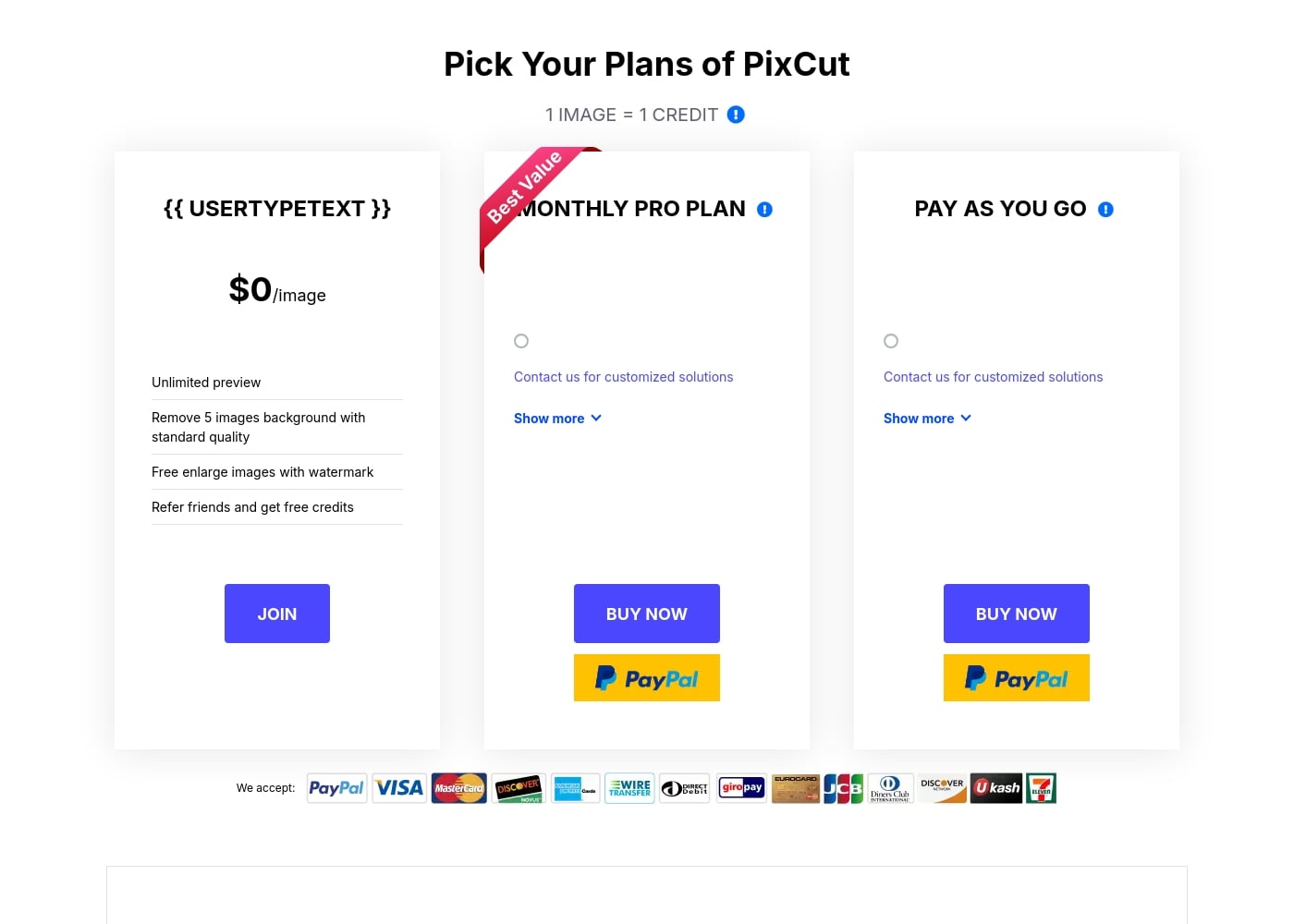
PixCut offers a free tier for basic usage, complemented by two advanced options: a Monthly Pro subscription and a flexible Pay As You Go plan. Prices for the paid plans are customized, requiring users to contact the vendor for a specific quote.

Planlar ve fiyatlandırma

Free Plan

Aylık0
5 standard quality removals
  • Unlimited image preview
  • Remove 5 images background with standard quality
  • Free enlarge images with watermark
  • Refer friends and get free credits

Monthly Pro Plan

Fiyatlandırma için iletişime geçin
Customized credit package
  • Best Value
  • Contact vendor for customized solutions
  • Unused credits roll over to the next month if subscription is maintained
  • 30-day money-back guarantee

Pay As You Go

Fiyatlandırma için iletişime geçin
Customized credit package
  • Contact vendor for customized solutions
  • Purchase credits as needed
  • 30-day money-back guarantee
  • Secure payment handling

PixCut costs $0 per image for basic features and offers subscription and pay-as-you-go options whose pricing is not explicitly stated.

PixCut offers three primary ways to access its powerful background removal tools, balancing free functionality with professional paid services.

Free Plan

Price: $0 /image Websites Supported: Not explicitly stated Best For: Users who need basic testing and limited downloads. Refund Policy: Not applicable Other Features: Unlimited preview, Remove 5 images background with standard quality, Free enlarge images with watermark, Refer friends and get free credits.

This $0 plan allows you to test PixCut's core capabilities instantly. It's perfect if you only need standard quality background removals for a few images or want to see exactly how the software works before investing. You can also gain extra credits by sharing the service with friends and colleagues.

Monthly Pro Plan

Price: Not explicitly stated (Contact vendor for customized solutions) Websites Supported: Not explicitly stated Best For: Users needing continuous, high-quality download access. Refund Policy: 30-day money-back guarantee Other Features: Contact us for customized solutions, Unused credits roll over to the next month if the subscription stays active, Free software updates.

The Monthly Pro Plan is marked as the "Best Value" for customers needing consistent access to high-quality image processing. While the monthly pricing is customized, this subscription model is great because any credits you don't use this month will automatically roll over, provided you keep your subscription active.

Pay As You Go

Price: Not explicitly stated (Contact vendor for customized solutions) Websites Supported: Not explicitly stated Best For: Users with fluctuating or high-volume, unpredictable needs. Refund Policy: 30-day money-back guarantee Other Features: Contact us for customized solutions, Secure payment handling, Support available via live chat and email (24-hour response).

If your need for background removal is project-based or varies widely month to month, the Pay As You Go option is a flexible choice. This plan lets you purchase credits as needed without committing to a recurring monthly subscription, giving you complete control over your usage and scheduling.

PixCut offers a generous free tier where you can test the basic functionality right away. For any paid purchase, your investment is protected by a 30-day money-back guarantee, ensuring a risk-free experience. You can also manage, upgrade, downgrade, or cancel any subscription easily through your Account Center at any time.
Kullanıcı İncelemeleri

User feedback on Trustpilot is highly critical, with an overall score of 2.0. The vast majority of complaints are related to billing practices and customer service policies associated with the parent company, Wondershare.

Recurring feedback highlights unauthorized charges for subscriptions users attempted to cancel or did not consent to. Users frequently state that the company failed to honor the 30-day money-back guarantee, often declining refund requests immediately.

Several reviewers labeled the company a scam due to the severe difficulties encountered when attempting to stop recurring payments or close accounts. Furthermore, some users reported that specific software failed to function as advertised or caused system crashes.

🚩 Amidst these serious issues, a handful of reviews offered praise, specifically noting that customer service teams were helpful and quick to resolve technical problems related to downloads or software activation. Despite these positive support mentions, the central themes of cancellation difficulty and refund denial create significant trust issues for potential buyers.

Başka yerlerdeki kullanıcı yorumları

Alex B.
· Trustpilot
1.0 / 5

This software wouldn't even work on my new laptop. I asked for a refund only two hours after receiving the download link, but they declined immediately. They kept sending instructions on how to try and fix the issue, completely ignoring the written 30-day guarantee.

Mike W.
· Trustpilot
1.0 / 5

It seriously feels like a virus, affecting my browser and signing me up without proper consent. I have zero trust in this company and its practices. There doesn’t appear to be an easy or obvious way to delete the account or stop the unwanted charges.

Henüz inceleme yok.

İnceleme Yaz

PixCut için yorum yazın
0/100 karakter
0/2000 karakter

PixCut'i neden kullanmalısınız?

Why should you choose PixCut over manual or standard photo tools? PixCut transforms image editing from a chore into a quick step, thanks to its powerful specialized features.

  • 100% Automatic Processing. The core task of background removal is handled entirely by AI, making the whole process swift and error-free right after you upload your photo.
  • 💡 Beyond Simple Removal. This tool offers more than just backgrounds. You can also utilize sophisticated content-aware filling to easily clean up images by removing specific elements like defects, scratch marks, texts, objects, or pesky watermarks.
  • 🚀 Scale Up Your Workflow. If you handle large volumes of photos, the bulk removal feature allows you to process up to 20 images simultaneously, greatly boosting productivity and saving valuable time.
  • Maintain Quality When Enlarging. If you need photos scaled up for printing or display, the Photo Enhancer allows you to enlarge your image up to 8x its original size without sacrificing the clarity or image quality.
  • 🛠️ Integration Ready. For developers and businesses, the background removal API offers a seamless way to incorporate this powerful technology directly into your own application with just a few lines of code.

PixCut truly excels by delivering speed and versatility. If you appreciate the quality of the results, you can easily earn free credits: invite friends to try the service, and both you and your friend will receive 30 free credits once they sign up. Start simplifying your image editing today! ➡️

PixCut ile iş akışınızı dönüştürmeye hazır mısınız?

PixCut Alternatif Araçlar

Photo Background Remover kategorisindeki diğer araçlar

Sık Sorulan Sorular

What exactly does one credit cover in the PixCut system?

One credit is required to download one high-quality result image with the background removed. Alternatively, one credit lets you download a single enlarged image without the PixCut watermark.

What is the size difference between standard-quality and high-quality result images?

Standard quality results have a maximum resolution of 250,000 pixels, such as a 625 x 400 image. High-quality results range from over 250,000 pixels up to 25 million pixels.

What happens if I don't use all my credits on the Monthly Pro Plan?

If you keep your Monthly Pro subscription active, any unused credits automatically roll over to the following month. This ensures you do not lose value if your usage fluctuates.

How can I cancel, upgrade, or downgrade my paid subscription?

You can manage your subscription status easily at any time through your Account Center. After unsubscribing, your account remains fully active until the end of the current settlement period.

If I use the background removal API, do I need to pay for access separately?

The official site confirms that an API is available and can be integrated with just a few lines of code. Pricing details for API access are not explicitly stated and likely require contacting the vendor for customized solutions.

What happens immediately after I successfully purchase a plan?

Within roughly ten minutes, you should receive an email containing a registration code. You can unlock all the features by signing in with your Wondershare account and activating the code.

How quickly can I expect a response from customer support?

Knowledgeable representatives are available via instant live chat and email. If you submit a request through the Support Center, they aim to provide an email response within 24 hours.

Can I redownload an image I’ve already paid for without using another credit?

Yes, re-downloading the same high-quality result image multiple times will not incur any additional credit costs.

What payment methods are accepted for purchasing credits?

PixCut accepts a wide array of payment methods. These include major cards like Visa and Mastercard, as well as PayPal, American Express, Discover, JCB, Alipay, and bank or wire transfers.

How does PixCut protect my personal and financial information?

They value your privacy and security. They use advanced encryption and robust fraud protection measures to safeguard your financial and personal data.

Is there a free trial or a way to test the high-quality resolution?

The free plan is essentially a trial; it allows for unlimited previews and the removal of five image backgrounds at standard quality. You can see the result before deciding to pay for the high-quality download.

Do I need to maintain a Monthly Pro subscription to purchase the Pay As You Go credits?

No. The Pay As You Go option allows you to purchase credits as needed without committing to a recurring monthly subscription plan.

PixCut denemek için hazır mısınız? Resmi siteye veya fiyatlandırmaya göz atın.