Camtasia vs Vyond
Camtasia and Vyond both create compelling video but in totally different ways. Camtasia is your reliable desktop powerhouse for screen recording and deep editing control. Vyond is an instant, AI-driven platform for scaling animated explainer content fast. Your project type will quickly dictate the winner between these two tools.
Powerful screen recording, premium price tag.
We find Camtasia to be an extremely capable, industry-standard tool for creating high-quality instructional video content. Its multitrack editing flexibility and AI enhancements effectively streamline complex workflows. Overall, Camtasia excels in core functionality, but its restrictive, mandatory subscription model significantly diminishes the overall value proposition for many loyal users.
Artılar
- Industry-standard platform for flexible screen recording and tutorial creation.
- Significantly simpler and more intuitive interface compared to advanced editors.
- Multitrack recording allows independent editing of screen, audio, and camera.
- Offers powerful AI features like text-based video editing and audio cleanup.
Eksiler
- Mandatory annual subscription model has replaced perpetual licenses.
- Users are frustrated by restrictive licensing (single-device sign-in limitations).
- Perceived as overly expensive compared to free or low-cost competitors.
- Inconsistent customer service experiences, including slow/non-responsive support.
Güçlü Yapay Zeka. Ölçeklenen İçerik. Zayıf Destek.
Vyond, güvenli, marka uyumlu içeriği hızla ölçeklendirmek için mükemmel, sektör lideri bir yapay zeka video oluşturma platformu sunar ve sayısız Fortune 500 şirketi tarafından güvenilmektedir. Ancak, bireysel kullanıcılar için değeri baltalayan müşteri desteği yanıt verme süresi ve abonelik şartlarındaki sorunlu değişiklikler konusunda tekrarlayan sorunlar tespit ettik. Genel olarak, Vyond, güvenli, yüksek hacimli prodüksiyon ihtiyacı olan yüksek bütçeli kurumsal ekipler için en uygun, güçlü bir araçtır.
Artılar
- Animasyonlu ve açıklayıcı içerik için endüstri standardı kalite.
- Basit komutlar veya URL'ler aracılığıyla yapay zeka (Vyond Go) ile hızlı video oluşturma.
- Metin betiklerinden mükemmel konuşma senkronizasyonu ve ses üretimi.
- Kullanıcı arayüzü kusursuz ve animasyon varlıkları birinci sınıf ve güzel olarak değerlendiriliyor.
Eksiler
- Sınırlı veya var olmayan müşteri desteği; yardım büyük ölçüde otomasyona dayanıyor.
- Otomatik yenilemeler ve zorunlu plan yükseltmeleri dahil olmak üzere etik olmayan uygulamalar bildirildi.
- Ödeme yapan kullanıcılar için özelliklerin (örneğin, topluluk forumları, temalar) sık sık kaldırılması veya sınırlandırılması.
- Sınırlı veya 'hayal kırıklığı yaratan' ücretsiz deneme deneyimi (örneğin, en fazla üç video sınırlaması).
HakkındaCamtasia
Camtasia is truly everything you need in one powerful tool. It combines screen recording with full video editing capabilities. This software uses AI-powered tools to simplify the creation process. It is designed to help you turn your existing knowledge into highly engaging videos. 💡
HakkındaVyond
Vyond, basit komutlardan birden çok stilde etkili videolar oluşturan hepsi bir arada yapay zeka video oluşturma platformudur. Fikrinizi, belgenizi veya URL'nizi anında videoya dönüştüren Vyond Go'yu ve hızlı düzeltmeler için bir anlık düzenleyici veya stüdyoyu içerir. Binlerce işletme ve milyonlarca kullanıcı Vyond'a güvenir ve Fortune 500'ün %65'i Vyond'a güvenir. 🎬
Öne çıkanlar
Özellik karşılaştırması
Özelliklere Genel Bakış
Ana farkları vurguluyoruz ve her özellik için bir kazanan seçiyoruz.
Core Production Focus
Camtasia is built for screen recordings; Vyond is an animation powerhouse.
Camtasia is the industry standard for polished tutorials and software demos. It provides unparalleled editing control over captured video and audio tracks. Vyond is an AI video factory designed primarily for producing animated explainer videos quickly at scale. It converts text and documents instantly into highly visual content for corporate use. Choose Camtasia for deep editing control; choose Vyond for automated animation speed. The best tool depends entirely on your content style.
Screen Recording Control
Camtasia offers specific multitrack separation; Vyond offers basic capture.
Camtasia's core strength is its powerful multitrack recording capability. It automatically separates screen, audio, and camera feeds into independent tracks. Vyond includes basic tools for screen recording and mobile capture. Its primary workflow does not focus on heavy post-production editing of live footage. Camtasia delivers maximum creative control after the recording session finishes. If you rely on detailed software demos, Camtasia is indispensable for precise refinement.
AI Video Generation
Vyond turns documents into videos; Camtasia uses AI for editing only.
Vyond leverages Vyond Go, instantly turning your documents, URLs, or prompts into video drafts. This drastically simplifies and speeds up initial content creation. Camtasia uses AI to refine recordings and generate initial scripts from prompts. It is not designed to create full visual animation scenes from text inputs. Vyond is engineered for scaling animated content through extreme automation and speed. The trade-off is production time versus precise editing power.
Audio Refinement
Camtasia’s AI removes filler words; Vyond focuses on speech sync.
Camtasia excels in audio refinement using specialized AI tools. It automatically removes background fan noise and common filler words like 'uuhms' and 'aahs.' Vyond focuses on achieving seamless speech synchronization and generating high-quality audio for its characters. Specific dedicated noise or filler word cleanup tools are not highlighted for Vyond. For cleaning up voiceovers from live screen recordings, Camtasia delivers a significantly more powerful solution. This robust feature set saves hours of required manual correction.
Visual Styles
Vyond offers diverse animation styles; Camtasia supports standard video effects.
Vyond provides great stylistic flexibility, specializing in animated explainer content. Styles include Photorealistic, Mixed Media, and Gen AI visuals, plus character assets. Camtasia focuses on editing real-world footage and screens. It provides professional transitions and effects for standard video but lacks extensive animation styles. If you need compelling, cartoon-style business videos, Vyond is clearly the superior choice. Camtasia is best for realism, not stylized animation.
Pricing Visibility
Camtasia publishes annual rates; Vyond hides all subscription costs.
Camtasia uses transparent, publicly listed annual subscription rates for all individual plans. Costs range clearly from $179.88 to $599.00 yearly. Vyond requires users to contact sales for standard plan costs, hiding crucial pricing details. This lack of visibility typically frustrates individuals or small teams on tight budgets. Camtasia’s published pricing is essential for budget planning and trust building. Vyond's pricing secrecy suggests a high B2B focus.
Enterprise Security
Vyond ensures security for large teams; Camtasia focuses on individual desktop use.
Vyond offers a specialized Enterprise solution focused on robust security and compliance standards. This plan provides complete privacy guarantees for large corporate organizations. Camtasia's feature set focuses on individual editing efficiency and collaboration features for small teams (Pro plan). It does not highlight rigorous, large-scale security compliance. If you are part of a massive organization needing high data integrity, the Vyond Enterprise solution is the designed fit. Camtasia is built for the solo instructional designer or small content department.
User Review Sentiment
Camtasia review scores are higher; Vyond's rating suffers from poor support.
Camtasia holds a significantly higher overall user rating (4.2 average across reviewed sites). Users highly praise its core editing capability and reliability. Vyond’s rating is much lower (3.2 average) due to highly polarized feedback. Loyal Vyond customers frequently complain about receiving automated or non-existent customer service. High user frustration over pricing changes and support severely impacts Vyond's perception of value.
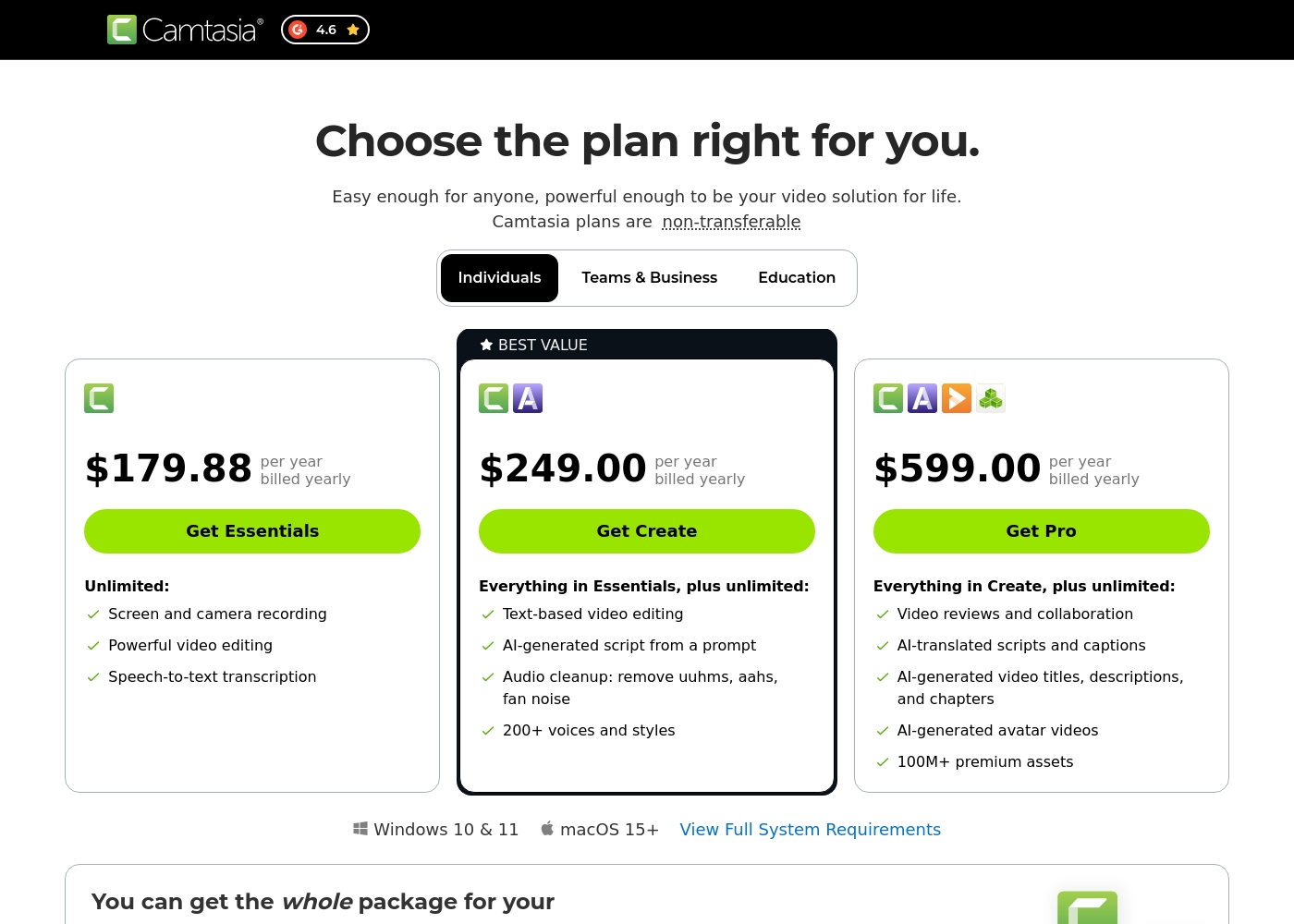
Camtasia costs between $179.88 and $599.00 per year with 3 plans: Essentials at $179.88, Create at $249.00, and Pro at $599.00. These plans cater to individuals, offering robust video and screen recording tools through an annual subscription model.
Essentials
Price: $179.88 per year billed yearly Websites Supported: Not explicitly stated Best For: Not explicitly stated Refund Policy: Not explicitly stated Other Features:
- Screen and camera recording
- Powerful video editing
- Speech-to-text transcription
The Essentials plan is perfect if you only need foundational tools for recording and editing videos. It provides unlimited screen and camera recording capabilities, which is great for beginners or those with basic needs.
- Screen and camera recording
- Powerful video editing
- Speech-to-text transcription
- Everything in Essentials
- Text-based video editing
- AI-generated script from a prompt
- Audio cleanup: remove uuhms, aahs, fan noise
- 200+ voices and styles
- Everything in Create
- Video reviews and collaboration
- AI-translated scripts and captions
- AI-generated video titles, descriptions, and chapters
- AI-generated avatar videos
Vyond'un maliyeti, Açıkça Belirtilmemiş ile Açıkça Belirtilmemiş arasında, Açıkça Belirtilmemiş başına olup, 2 belirgin planı vardır: Ücretsiz Deneme (Açıkça Belirtilmemiş) ve Kurumsal (Açıkça Belirtilmemiş).
Vyond'un bireysel kullanıcılara ve büyük kuruluşlara göre uyarlanmış esnek seçeneklerini bu ana teklifler aracılığıyla keşfedebilirsiniz.
Ücretsiz Deneme
Fiyat: Açıkça Belirtilmemiş Desteklenen Web Siteleri: Açıkça Belirtilmemiş En İyi Olduğu Alanlar: Platformun çeşitli video oluşturma araçlarını test etmek isteyen kullanıcılar. Geri Ödeme Politikası: Açıkça Belirtilmemiş Diğer Özellikler:
- Anlık, zahmetsiz video oluşturma
- Yapay zeka avatarlarına ve Gen Yapay Zeka özelliklerine erişim
- Kapsamlı şablon kütüphanesi kullanımı
- URL'leri veya belgeleri videoya dönüştürme olanağı (Vyond Go)
- Herkes için anlık, zahmetsiz video
- Yapay zeka avatarlarına, Gen AI'ya ve Fotogerçekçi stillere erişim
- Ekran kaydı ve mobil yakalama araçları
- Vyond Go (metin, belge veya URL dönüştürme) kullanarak anlık oluşturma
- Ölçekte zahmetsizce marka uyumlu içerik oluşturma
- Tam gizlilik ve güvenlik
- Kurumsal kuruluşların zorlu güvenlik gereksinimlerini destekleme
Pricing Notes
- Camtasia uses transparent, mandatory annual subscriptions, costing between $179.88 (Essentials) and $599.00 (Pro) yearly.
- Vyond offers a free trial to test features, but specific costs for standard paid subscription tiers are not publicly visible.
- Vyond requires users to contact the sales team directly for accurate usage-based figures and custom Enterprise pricing.
- The Camtasia Pro plan includes collaboration tools, AI localization, and 100 million premium assets for $599.00 annually.
Pricing Head-to-Head
Kullanıcı yorumları
Camtasia enjoys a long-standing reputation as an industry-standard tool, particularly for screen recording and tutorial creation. Users overwhelmingly praise the core software, noting it is dramatically simpler and more intuitive to use than complex alternatives like Adobe products, while still offering a deep feature set.
However, recent changes to the pricing model and licensing structure have caused significant user frustration. The shift to mandatory annual subscriptions, coupled with new restrictive single-device sign-in limits for individual users, is a major recurring complaint.
The software is great, the developers deserve five stars for the product quality. But management introduced a highly frustrating subscription model. The mandatory sign-in cycle when switching devices significantly harms my workflow.
Vyond, özellik memnuniyeti ile kurumsal uygulamalar arasındaki aşırı bir bölünmeyi yansıtan, oldukça kutuplaşmış bir alımla karşı karşıyadır. Birçok kullanıcı, endüstri standardı kalitesini, ideal konuşma senkronizasyonunu ve açıklayıcı videoların hızlı bir şekilde basitçe oluşturulmasını belirterek temel animasyon aracını övüyor.
Hazır karakter varlıklarının sağlam kütüphanesini takdir ediyorlar ve bu da platformu pazarlama etkileşimini artırmak için harika yapıyor. Ancak, Trustpilot'taki (puanın 2.0 olduğu yer) olumsuz duygu, büyük ölçüde fiyatlandırma ve desteğe odaklanmaktadır.
Hızlı başlamak için kullanıma hazır karakterler ve ortamlar harika bir seçime sahip. Animasyonlar birinci sınıftır ve oluşturulan ses için bir metin betiği eklemek zahmetsizdir. Bu araçtan genel olarak gerçekten memnunum.
Bizim Kararımız
Choosing between Camtasia and Vyond is simple: decide between editing control or creation speed. Camtasia is your professional desktop editor for precision and recorded footage. You should pick Vyond if your primary need is scaling animation and corporate communication quickly. Camtasia’s superpower is granting users total post-production mastery over screen recordings. Its unique multitrack feature allows you to edit audio, camera, and screen entirely separately. You can use Camtasia’s AI audio cleanup to effortlessly remove filler words and distracting fan noise. This unmatched flexibility helps you deliver professional tutorials quickly. Vyond shines when you need speed and stylized, automated output for large audiences. Vyond Go instantly transforms existing text documents or URLs into captivating animated explainer videos. If your job involves L&D or HR communication, Vyond is far faster than human animators. It supports diverse visual styles and secure scaling for massive corporate teams. The key factor here is content type: Camtasia handles live realism; Vyond handles automation and stylized animation. If you require deep control over recorded footage and professional editing, Camtasia is the clear winner. If instant, secure, on-brand content generation is essential, Vyond is the appropriate platform. Final verdict: Pick Camtasia for high-stakes screen recordings and ultimate audio clarity. Go with Vyond if you prioritize rapid, scalable, animated content for training and internal marketing.
Sıkça Sorulan Sorular
Which is better for creating detailed software demonstrations: Camtasia or Vyond?
Camtasia is significantly better for software demonstrations and tutorials. Its multitrack recording separates audio from video, enabling precise edits after recording. Vyond focuses on animation from text prompts and does not offer this deep editing control.
Can Vyond easily create videos from my existing documents or URLs?
Yes, this is Vyond’s specific strength using the Vyond Go tool. Vyond instantly converts existing text documents, simple prompts, or URLs into effective video drafts. Camtasia only uses AI to generate initial scripts, not full moving visuals from outside inputs.
Is Camtasia generally more expensive than Vyond for individuals?
Camtasia lists its individual pricing publicly starting at $179.88 per year. Vyond’s specific subscription prices are not public, requiring you to contact sales. This often indicates a higher B2B price point, but a Vyond free trial is available.
Which tool has better customer support according to recent reviews?
Camtasia reports healthier customer support experiences, despite some inconsistency. Vyond faces heavy criticism from users regarding its customer service. Many Vyond reviewers report only automated responses or non-existent support.
Does Vyond offer dedicated support and security for enterprise teams?
Yes, Vyond maintains a specialized Enterprise solution for large organizations. This tier provides complete privacy, rigorous security guarantees, and support. Camtasia focuses on individual and small team collaboration tools instead of high-level security demands.
Which software is better for creating HR and L&D training content?
Vyond is explicitly designed for HR and L&D teams needing engaging, scalable content. Its animated styles boost learner attention better than static screen recordings. Camtasia is ideal if you need to record complex systems or detailed instructions precisely.
Seçmeye hazır mısınız?
Her iki aracın da güçlü yönleri var. Özel ihtiyaçlarınıza göre seçin.