Camtasia vs VEED
Camtasia and VEED both use powerful AI to accelerate your video workflows. The core difference is where you work and how much control you need. Camtasia is installed desktop software built for deep control and long-form tutorials. VEED offers a fast, unified browser-based suite ideal for teams and short-form content. You must decide between editing depth and workflow accessibility.
Powerful screen recording, premium price tag.
We find Camtasia to be an extremely capable, industry-standard tool for creating high-quality instructional video content. Its multitrack editing flexibility and AI enhancements effectively streamline complex workflows. Overall, Camtasia excels in core functionality, but its restrictive, mandatory subscription model significantly diminishes the overall value proposition for many loyal users.
Artılar
- Industry-standard platform for flexible screen recording and tutorial creation.
- Significantly simpler and more intuitive interface compared to advanced editors.
- Multitrack recording allows independent editing of screen, audio, and camera.
- Offers powerful AI features like text-based video editing and audio cleanup.
Eksiler
- Mandatory annual subscription model has replaced perpetual licenses.
- Users are frustrated by restrictive licensing (single-device sign-in limitations).
- Perceived as overly expensive compared to free or low-cost competitors.
- Inconsistent customer service experiences, including slow/non-responsive support.
Tarayıcı tabanlı video düzenleme gücü.
VEED'i, güçlü yapay zekayı kullanarak içerik oluşturmayı kolaylaştıran, son derece erişilebilir, tarayıcı tabanlı bir video düzenleme çözümü olarak değerlendiriyoruz. Genel olarak, tam işlevsellik için gereken premium fiyatlandırmaya rağmen bu platformu, özellikle kısa biçimli içerikler için tavsiye ediyoruz.
Artılar
- Son derece sezgisel ve yeni başlayan dostu arayüz.
- Tamamen web tabanlıdır; yazılım kurulumu veya indirme gerektirmez.
- Otomatik alt yazılar, çeviriler ve video oluşturma için güçlü yapay zeka araçları.
- Kısa biçimli içerik oluşturma (örn. YouTube Shorts) için mükemmeldir.
Eksiler
- Abonelik maliyetleri sıklıkla sınırlayıcı bir faktör olarak belirtiliyor.
- Uzun biçimli video kaydı ve düzenleme için güvenilmez (potansiyel veri kaybı/aksaklıklar).
- 4K video dışa aktarımı daha yüksek katmanlı veya profesyonel planlarla sınırlıdır.
- Yapay zeka çevirileri (altyazılar) bazen yanlış veya manuel olarak düzenlenmesi zor olabiliyor.
HakkındaCamtasia
Camtasia is truly everything you need in one powerful tool. It combines screen recording with full video editing capabilities. This software uses AI-powered tools to simplify the creation process. It is designed to help you turn your existing knowledge into highly engaging videos. 💡
HakkındaVEED
VEED, yoğun ekipler ve içerik üreticileri için tasarlanmış eksiksiz bir uçtan uca video süitidir. Etkileyici videoları tamamen tarayıcınız içinden oluşturmanıza, işbirliği yapmanıza ve paylaşmanıza olanak tanır. Bu platform, bireysel içerik üreticilerinden Fortune 500 gibi büyük kuruluşlara kadar herkes için mükemmel olan kusursuz iş akışı konsolidasyonu sunar. Ekibinizin tutarlılığı korumasını sağlamak için akıllı işbirliği araçları ve özel bir Marka Kitini içerir. Ek olarak, 2 milyondan fazla video ve ses varlığı içeren geniş, telifsiz bir stok kütüphanesine erişim sağlarsınız. 💡
Öne çıkanlar
Özellik karşılaştırması
Özelliklere Genel Bakış
Ana farkları vurguluyoruz ve her özellik için bir kazanan seçiyoruz.
Platform & Access
VEED is fully browser-based; Camtasia requires a desktop install. VEED offers superior accessibility and mobile support.
Camtasia runs as desktop software on Windows and macOS systems. It offers reliable performance, but requires downloading and installation. It's built for users who prefer traditional, dedicated software licenses. VEED operates entirely within your web browser environment. This cloud-based design means you can edit from any computer, anywhere, instantly. VEED also offers a dedicated Captions App for mobile editing. If device flexibility is your priority, VEED is the clear choice for access anytime. Camtasia offers deeper native editing control that the desktop provides. The VEED Captions App empowers mobile editing, turning your phone into a publishing powerhouse.
Screen Recording Flexibility
Camtasia offers unmatched multitrack recording control; VEED provides simple, unified browser recording.
Camtasia's core strength is its powerful multitrack recording capability. It automatically separates screen, camera, and audio onto independent tracks. This separation allows you to fix a minor audio mistake without re-recording the visuals. VEED allows you to record yourself or your screen directly within the browser workspace. This one-stop approach simplifies the flow immediately after recording. The ability of Camtasia to edit every source independently saves significant time on complex tutorials. VEED is faster for straightforward captures but lacks that granular post-production control. This flexibility makes Camtasia the industry standard for detailed software demonstrations and educational content.
AI Content Generation
VEED excels at generating new content like Avatars; Camtasia focuses AI on editing efficiency and translation.
Camtasia heavily utilizes AI for workflow efficiency and polish in higher tiers. This includes text-based editing, cleaning up audio, and translating scripts in the Pro plan. Camtasia's AI focuses on perfecting existing recordings. VEED offers next-generation AI features like AI Avatars and the Clone Yourself capability. Users can quickly generate engaging videos without appearing on camera themselves. VEED's AI promotes brand-new content creation. The VEED platform provides immediate, high-volume content generation capabilities that Camtasia does not match. Camtasia’s text-based editing is highly efficient for refining long content. VEED helps you easily repurpose a single asset using AI translation and dubbing for global markets instantly.
Team Collaboration
VEED is built for modern teams with Brand Kits; Camtasia adds collaboration only in its most expensive tier.
Camtasia includes dedicated video review and collaboration features only in its premium Pro plan ($599/year). These tools streamline workflow feedback internally. VEED offers a robust, integrated Brand Kit ensuring consistency across all team output. It also provides Review Mode and Asset Sharing for easy internal feedback loops. VEED treats teamwork as a primary feature, integrating shared assets and controls for scaling production. Camtasia focuses primarily on the individual editor until the Pro level. If your primary need is scaling video production with consistent branding, VEED's architecture is better suited for team environments.
Audio Cleanup & Polish
Camtasia offers specific tools for deep cleaning; VEED uses lighter AI filler word removal.
Camtasia offers advanced, dedicated audio cleanup tools starting in the Create plan. These tools instantly and formally remove static, fan noise, and common filler words. This ensures professional-grade soundtracks. VEED includes a Filler Word Removal tool to quickly polish narration. It operates effectively within the browser environment for fast corrections. Accuracy and depth of cleaning are not as specified as Camtasia’s offerings. Camtasia’s dedicated expertise in training videos necessitates superior audio fidelity features. VEED's solution is fast but less detailed for complex sound environments. For videos where clear, professional speech is critical (like training), Camtasia arguably delivers a higher level of perfection.
Export Resolution Limits
Camtasia has no explicit 4K limit; VEED restricts 4K export to its highest paid plans.
Camtasia’s listed features do not explicitly restrict export resolution based on plan level. Users generally produce high-quality output on lower tiers. This supports professional presentation needs. VEED reviewers cite that 4K export capability is restricted to premium tiers. This forces users relying on 4K for YouTube bitrate enhancements into higher subscriptions. For creators requiring uncompromised output quality, VEED introduces friction and hidden costs. Camtasia allows professional export quality without tier restrictions mentioned. This restriction is a major pain point for VEED users focused on top-tier video hosting platforms like YouTube.
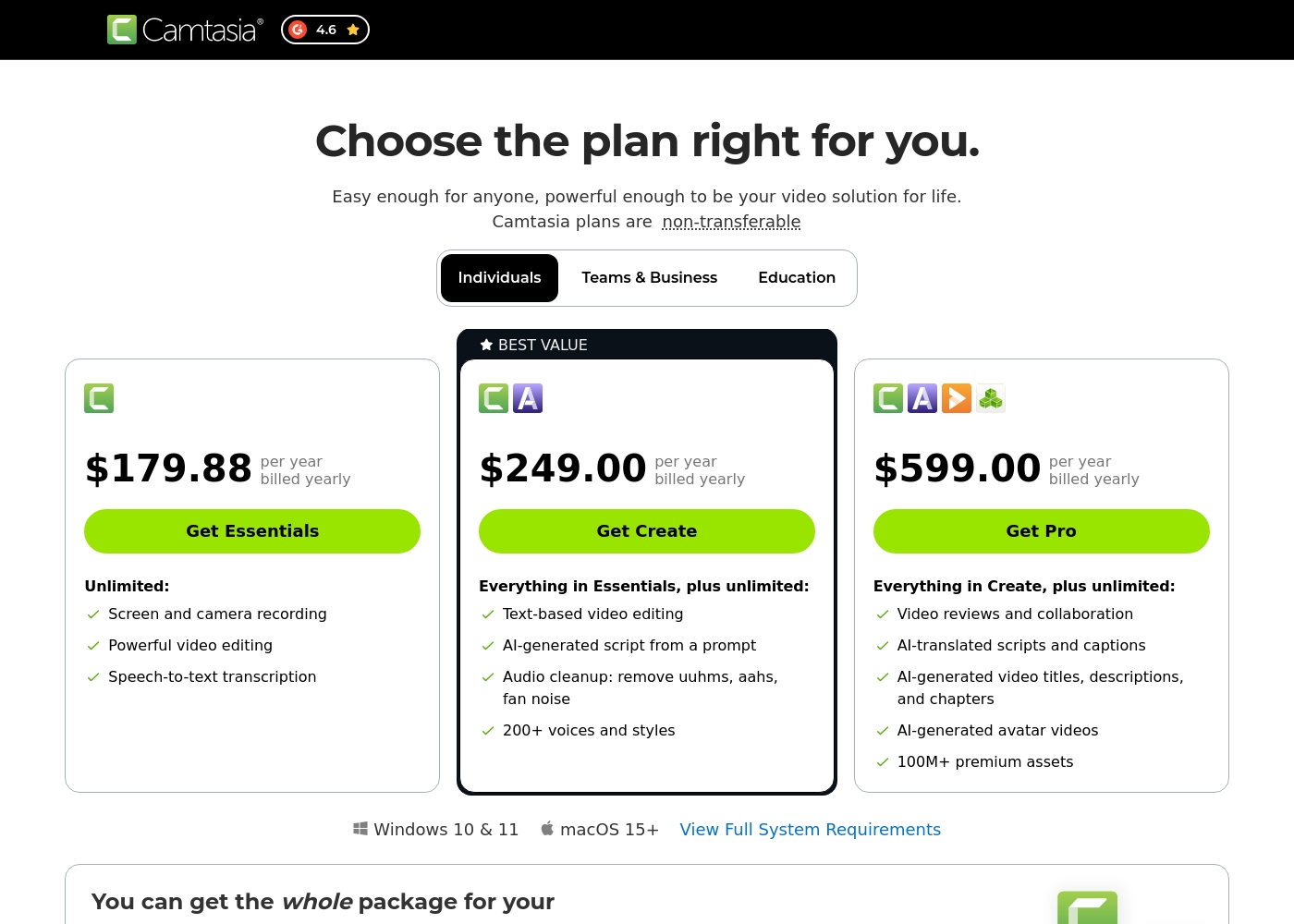
Camtasia costs between $179.88 and $599.00 per year with 3 plans: Essentials at $179.88, Create at $249.00, and Pro at $599.00. These plans cater to individuals, offering robust video and screen recording tools through an annual subscription model.
Essentials
Price: $179.88 per year billed yearly Websites Supported: Not explicitly stated Best For: Not explicitly stated Refund Policy: Not explicitly stated Other Features:
- Screen and camera recording
- Powerful video editing
- Speech-to-text transcription
The Essentials plan is perfect if you only need foundational tools for recording and editing videos. It provides unlimited screen and camera recording capabilities, which is great for beginners or those with basic needs.
- Screen and camera recording
- Powerful video editing
- Speech-to-text transcription
- Everything in Essentials
- Text-based video editing
- AI-generated script from a prompt
- Audio cleanup: remove uuhms, aahs, fan noise
- 200+ voices and styles
- Everything in Create
- Video reviews and collaboration
- AI-translated scripts and captions
- AI-generated video titles, descriptions, and chapters
- AI-generated avatar videos
VEED, Belirtilmemiş ve Belirtilmemiş arasında dönem başına Ücretlidir ve 0 planı vardır: Belirtilmemiş.
Belirli fiyat tabloları burada açıkça detaylandırılmamıştır, ancak VEED'in ücretsiz erişimden özel kurumsal çözümlere kadar ürünle etkileşim kurmanın birden fazla yolu sunduğu açıktır. Bu yapı, her büyüklükteki kullanıcının uygun bir giriş noktası bulmasını sağlar.
Ücretsiz Erişim
Fiyat: Ücretsiz Desteklenen Web Siteleri: Açıkça Belirtilmemiş En İyi Kullanım Alanı: Temel özellikleri test etmek isteyen kullanıcılar veya sınırlı kullanım ihtiyacı olan tekil içerik üreticileri. Geri Ödeme Politikası: Açıkça Belirtilmemiş Diğer Özellikler:
- Ücretsiz Başlayın * Kredi kartı gerekmez
- Video düzenleyiciyi kullanın
- Otomatik Altyazı Oluşturucu gibi Yapay Zeka araçlarına erişim
Pricing Notes
- Camtasia uses a mandatory annual subscription model; there is no monthly payment option.
- Camtasia’s licenses are strictly non-transferable, limiting flexibility and sign-in to a single user/device.
- VEED offers immediate free access to core editing features without requiring a credit card.
- VEED lacks publicly detailed pricing tables for standard paid plans; you must search or contact sales.
- Camtasia's Pro plan ($599/year) unlocks massive assets (100M+) and essential collaboration tools.
Pricing Head-to-Head
Kullanıcı yorumları
Camtasia enjoys a long-standing reputation as an industry-standard tool, particularly for screen recording and tutorial creation. Users overwhelmingly praise the core software, noting it is dramatically simpler and more intuitive to use than complex alternatives like Adobe products, while still offering a deep feature set.
However, recent changes to the pricing model and licensing structure have caused significant user frustration. The shift to mandatory annual subscriptions, coupled with new restrictive single-device sign-in limits for individual users, is a major recurring complaint.
The software is great, the developers deserve five stars for the product quality. But management introduced a highly frustrating subscription model. The mandatory sign-in cycle when switching devices significantly harms my workflow.
VEED genel olarak olumlu harici geri bildirimler almaktadır; bu geri bildirimler büyük ölçüde kullanım kolaylığına ve erişilebilirliğe odaklanmaktadır. İncelemeciler, web tabanlı platformun sezgisel, yeni başlayan dostu ve temiz bir arayüze sahip olduğunu sürekli olarak övüyorlar, bu da profesyonel videolar oluşturmayı hızlı ve basit hale getiriyor.
Kullanıcılar, sürükle-bırak işlevi, iyi animasyon seçenekleri ve özellikle içerik oluşturma ve hızlıca YouTube Shorts oluşturmak için güçlü yapay zeka araçları gibi sağlam özelliklerden memnunlar. Platformun yüksek doğruluklu transkripsiyonları işleme yeteneği de sık sık dile getiriliyor.
VEED, video oluşturma sürecini önemli ölçüde basitleştiriyor. Efekt eklemek ve özellikle yeni yapay zeka teknolojisini kullanmak, ürününüzü hızla ve kusursuz bir şekilde iyileştirmeyi sağlıyor. Bu platformu şiddetle tavsiye ederim.
Bizim Kararımız
Choosing between Camtasia and VEED depends entirely on your video strategy and platform preference. If you create complex, long-form content, Camtasia is undeniably the stronger tool. However, if speed, accessibility, and team collaboration are priorities, then VEED should be your choice. Camtasia’s superpower is its control over the recorded sources. It records your screen, camera, and audio on completely separate tracks for flawless editing. Fixing one sentence in your voice track will not require re-recording the entire visual demo. Camtasia is built to help professionals fully refine instructional content quickly. VEED’s standout advantage is its unified, browser-based workflow and powerful AI generation. It excels at creating high-volume, consistent short-form content for social media fast. VEED adds features like a central Brand Kit and AI Avatars for instant content creation. The deciding factor is your need for platform flexibility versus technical depth. Camtasia is an annual commitment for heavy-duty desktop editing. VEED offers superior team collaboration and accessibility through the browser and a dedicated mobile app. Pick Camtasia if you need to create detailed, perfect software tutorials or training. Go with VEED if your marketing team needs to churn out branded short-form videos quickly and efficiently. Both Camtasia and VEED offer excellent AI tools, but they cater to very different creator workflows.
Sıkça Sorulan Sorular
Which software is better for creating long-form educational courses?
Camtasia is generally superior for detailed educational content and courses. Its multitrack recording feature allows precise editing of audio and screen actions independently. VEED is fantastic for quick edits, but Camtasia offers the necessary depth for long, complex projects.
Does VEED offer a true free trial for its paid features like Camtasia?
VEED offers a 'Start for free' option, requiring no credit card to begin using core tools. Camtasia does not offer a public free trial or test period for its individual annual subscription plans. You can immediately access VEED features, unlike the mandatory purchase required for Camtasia.
Which tool provides better AI features for content generation, Camtasia or VEED?
VEED offers stronger AI tools focused on content *generation*, such as AI Avatars and the Clone Yourself feature. Camtasia focuses its AI on editing *efficiency*, including text-based editing and advanced audio cleanup. VEED wins for creating new content quickly.
Why are Camtasia licenses considered restrictive by some users?
Camtasia moved to a mandatory annual subscription, replacing older perpetual licenses. Furthermore, individual subscriptions are non-transferable and often limited to a single device sign-in. This restriction on device switching frustrates many loyal Camtasia users.
Can I edit videos on my phone with Camtasia or VEED?
VEED is the definite choice for mobile video editing. It offers the specialized VEED Captions App, allowing recording, editing, and publishing from your phone. Camtasia is primarily desktop software and does not offer a comparable professional mobile editing solution.
Does VEED restrict 4K video exports?
Yes, user reviews indicate that VEED restricts 4K resolution exports to only its premium or higher-tier paid plans. This is a crucial limitation if you upload to platforms like YouTube that benefit from 4K fidelity. Camtasia does not mention such specific resolution restrictions on its plans.
Seçmeye hazır mısınız?
Her iki aracın da güçlü yönleri var. Özel ihtiyaçlarınıza göre seçin.