กำลังแปลเต็มรูปแบบเร็วๆ นี้ — แสดงรายละเอียดผลิตภัณฑ์เป็นภาษาอังกฤษ พร้อมการนำทางภาษาท้องถิ่น
Wave.video

รีวิว Wave.video

An all-in-one browser studio for editing, recording, multistreaming, hosting, and thumbnails.

Wave.video ราคาเริ่มต้น US$16 (≈ ฿537.43)/เดือน · 4 แพ็กเกจ · มีแพ็กเกจฟรี · ตรวจสอบราคาเมื่อ 12 ต.ค. 2569

โดย Ciroapp Editorial Team · อัปเดตแล้ว 16 ก.ย. 2569

อาจมีค่าคอมมิชชั่นโดยไม่มีค่าใช้จ่ายเพิ่มเติม

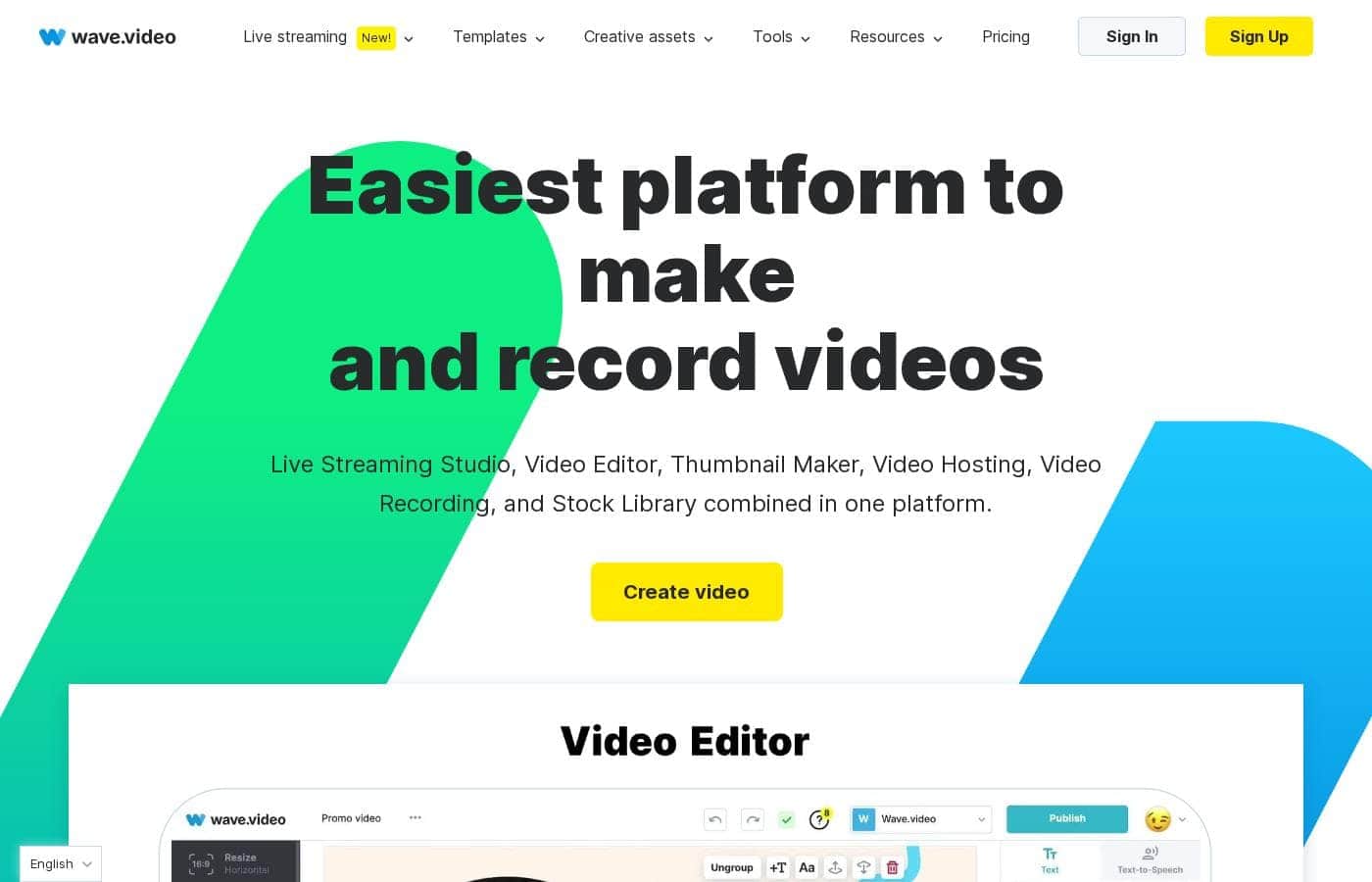
ภาพหน้าจอหลักของ Wave.video

สรุปอย่างรวดเร็ว

ภาพรวมอย่างรวดเร็วของ Wave.video: คะแนน สรุปราคา ฟีเจอร์หลัก และจุดเด่น
ตรวจสอบราคาเมื่อ 12 ต.ค. 2569

คะแนน Ciroapp

3.8/ 5

Wave.video bundles editing, screen recording, multistreaming, hosting, and thumbnails into one browser platform. Pricing is clear and runs $0 to $48 per month, with a genuinely free plan to test things out. Watermarks stick around until Creator, though, and there's no published refund policy. Overall, it's a smart consolidation pick for weekly publishers who check the caps first.

ข้อดี

  • ข้อดี:Five tools in one subscription — editor, multistreaming studio, recorder, hosting, and thumbnail maker — starting at $0
  • ข้อดี:Genuinely usable free plan with unlimited video creation, direct social publishing, and no trial countdown
  • ข้อดี:Generous streaming ceilings on higher tiers — Business supports 12-hour broadcasts at 1080p with 12 guests across 10 channels

ข้อเสีย

  • ข้อเสีย:Watermarks on edited videos, live streams, and recordings on every plan below Creator ($24/month)
  • ข้อเสีย:Hard caps per tier — Streamer edits stop at 5 minutes with 1-hour 720p streams, and even Business edits top out at 2 hours at 60fps
  • ข้อเสีย:No published refund policy or money-back guarantee, so an ill-fitting paid plan is a real risk
เหมาะที่สุดสำหรับ
  • Solo creators and small brands publishing short-form video weekly who want editing, thumbnails, and multistreaming without juggling separate subscriptions
  • Marketers running webinars, launches, and branded shows who need guest invitations, custom scenes, and pre-recorded 'live' broadcasts
  • Podcasters and interview shows recording remote guests with screen and tab sharing directly in the browser
ส่วนนี้เป็นสรุป รายละเอียดเกี่ยวกับฟีเจอร์ กรณีการใช้งาน ราคา และรีวิวจะแสดงต่อด้านล่าง

Wave.video คืออะไร?

Wave.video is an online video platform covering five jobs in one place: editing, camera and screen recording, multistreaming to multiple channels, video hosting with embeds and analytics, and thumbnail creation. Everything runs in the browser, supported by a stock library (2M assets on lower tiers, 200M on Creator and above) and AI helpers like text-to-video, auto captions, and background removal. A single project can flow into resized social exports, a branded live broadcast, and an embeddable hosted player.

Verdict

good-at-core-consolidation, unverified-elsewhere

Wave.video คุณสมบัติหลัก

✂️ Edit anything, without the learning curve

Publish anywhere without re-editing from scratch. Resize and trim clips, combine footage, and change layouts in a few clicks. Add text animations, stickers, transitions, and auto-generated captions that make videos work on mute.

Start from a template, a blog post, or a blank canvas — it's editing without the learning curve.

🎬 Stream live to every channel your audience uses

The streaming studio lets you broadcast to multiple platforms at once — no coding needed. Invite guests, switch between scenes, or play a pre-recorded video as if it were live. Add your branding, and your stream looks polished everywhere your audience happens to be.

✨ Hosting that puts your videos to work

Upload your videos once, then put them to work. Hosted videos come with tools that help them travel and perform:

  • Build easy-to-edit video landing pages
  • Personalize the player and embed videos on blogs or websites
  • Track video analytics to see what's landing

✨ Record once, polish it fast

Skip the back-and-forth of fixing raw footage. Record your screen, share tabs, and invite guests to pre-record podcasts or shows — layouts and scenes are planned upfront. Then pull from the built-in stock library of videos, images, and audio to finish.

Need a cover? The thumbnail maker adds catchy titles and removes photo backgrounds.

กรณีการใช้งาน

📱 Make one video fit every platform

You've shot one great clip, but every feed needs a different size. Resize and trim it once, add captions, and export a version for each channel. Expected outcome: consistent posts everywhere without redoing the work.

🎥 Host live events from one studio

Run webinars, shows, or launches right in your browser. Invite guests, brand your scenes, and stream live or pre-recorded video to several channels at once. No code required.

Tip: pre-recorded broadcasts are a lifesaver on shaky Wi-Fi.

🎙️ Record podcasts and interviews remotely

Invite guests, share your screen or tabs, and record episodes in the browser. Plan your scenes ahead so recording day stays calm and quick. Expected outcome: a ready-to-edit episode file, no studio booked.

📊 Embed videos people actually watch

Upload once, then embed on your blog or website with a personalized player. Build video landing pages, check analytics, and see what your audience really watches. It's hosting and insight in one place.

ราคา Wave.video

เริ่มต้นUS$16/เดือน≈ ฿537.43

  • 4 แพ็กเกจ
  • มีแพ็กเกจฟรี

ตรวจสอบราคาเมื่อ 12 ต.ค. 2569 จาก หน้าราคาของ Wave.video

ภาพหน้าจอหน้าราคาของ Wave.videoดูภาพหน้าจอหน้าราคา
แพ็กเกจรายเดือนรายปีรวม
Free
ฟรี
—
Videos up to 15 minutes with watermark; 5 embeds; 10GB monthly traffic; 10GB storage; no extra bandwidth or storage purchases
  • Basic video editor (videos up to 15 minutes with watermark)
  • Thumbnail maker
  • Stock library of 2M assets and templates
  • Live streaming with watermark
  • Video hosting with watermark: 5 embeds, 10GB traffic/month, 10GB storage
Streamer
US$16/เดือน
≈ ฿537.43
—
Edits capped at 5 minutes; streams up to 1 hour at 720p; 1 camera and screen share per guest; recorded videos carry a watermark
  • Videos and GIFs up to 5 minutes
  • Thumbnail maker
  • Stock library of 2M assets and templates
  • Live streaming: 2 channels, 6 guests, up to 1 hour/stream at 720p
  • Video recording with watermark up to 15 minutes
Creator
US$24/เดือน
≈ ฿806.15
—
Edits capped at 30 minutes; streams up to 4 hours at 1080p; 20 embeds; 150GB monthly traffic; 30GB storage; no extra storage purchases
  • Video editing up to 30 minutes
  • Stock library of 200M assets and templates
  • Stylish captions and subtitles, image background removal, text to speech
  • Live streaming: 5 channels, 10 guests, up to 4 hours/stream at 1080p, webinars and pre-recorded streaming
  • 20 embeds, 150GB traffic/month, 30GB storage
Business
US$48/เดือน
≈ ฿1,612.30
—
Streams up to 12 hours; 200 free embeds then 20¢/month each; 500GB monthly traffic then 1¢/GB; 500GB storage then 10¢/GB; 200 free captioning minutes/month then 5¢/minute
  • Video editing up to 2 hours at 60fps
  • Shared login for team collaboration
  • Live streaming: 10 channels, 12 guests, up to 12 hours/stream at 1080p, 4 cameras per guest
  • Advanced permissions and streaming scenes, presentations, webinars
  • Advanced hosting: 200 embeds, 500GB traffic/month, 500GB storage

แปลงตามอัตราอ้างอิงของ ECB วันที่ 13 ต.ค. 2569 ผู้ให้บริการอาจเรียกเก็บราคาท้องถิ่นที่ต่างออกไป

ประวัติราคา

ติดตามราคาตั้งแต่ 1 ต.ค. 2569 ยังไม่พบการเปลี่ยนแปลงราคา

ประเภทราคา: Free plan, Monthly subscription, Yearly subscription, Usage-based pricing

หมายเหตุเรื่องราคา

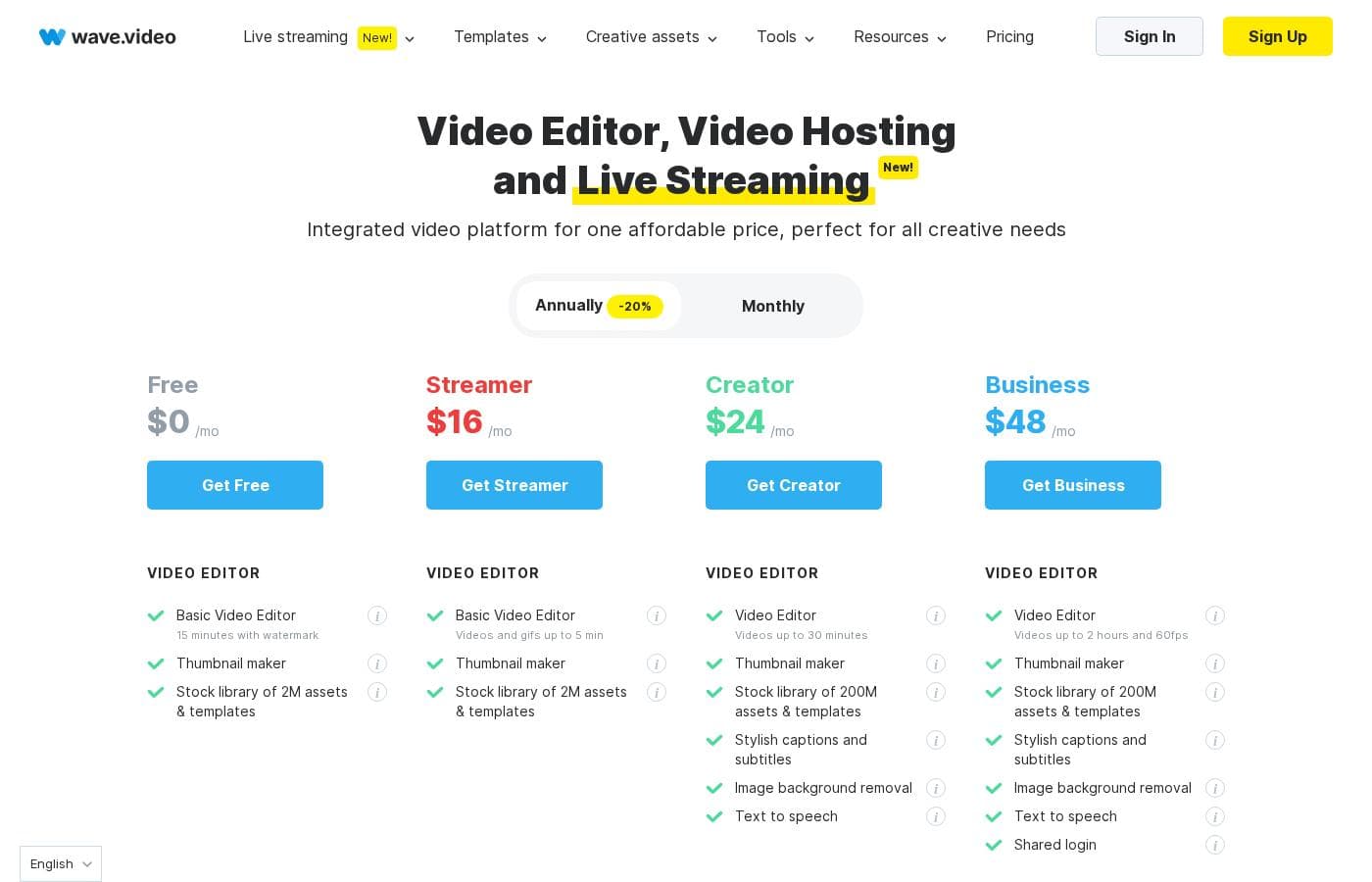
Wave.video offers four plans: a Free plan at $0, Streamer at $16/month, Creator at $24/month, and Business at $48/month. Annual billing saves you 20%, and each tier scales up with longer videos, bigger live streams, and more hosting.

Wave.video costs between $0 and $48 per month with 4 plans: Free at $0, Streamer at $16, Creator at $24, and Business at $48. Annual billing saves you 20%.

Here's what each plan includes. 👇

Free

Price: $0/mo Other Features:

  • Basic video editor — videos up to 15 minutes with watermark
  • Thumbnail maker plus a stock library of 2M assets and templates
  • Live streaming with a watermark
  • Video hosting with watermark: 5 embeds, 10GB traffic/month, 10GB storage

The Free plan is a solid way to test the waters. You can create unlimited videos and post them straight to social platforms without paying a cent. Just remember the Wave.video watermark stays on until you upgrade.

Streamer

Price: $16/mo Other Features:

  • Edit videos and GIFs up to 5 minutes
  • Thumbnail maker and the 2M asset stock library
  • Live streaming to 2 channels with 6 guests, up to 1 hour per stream at 720p
  • 1 camera and screen share per guest
  • Video recording with watermark up to 15 minutes

Streamer suits solo creators making short-form videos and dipping a toe into live streaming. If your broadcasts are brief and your audience is small, it's an easy, affordable entry point.

Creator

Price: $24/mo Other Features:

  • Edit videos up to 30 minutes
  • Full stock library of 200M assets and templates
  • Stylish captions and subtitles, image background removal, and text to speech
  • Live streaming to 5 channels with 10 guests, up to 4 hours per stream at 1080p
  • 20 embeds, 150GB traffic/month, and 30GB storage

Creator is the sweet spot for marketers and content creators who publish regularly. You lose the watermark, gain longer edits, and get real streaming tools like webinars, presentations, and pre-recorded broadcasts. It's the plan most growing brands land on.

Business

Price: $48/mo Other Features:

  • Edit videos up to 2 hours at 60fps
  • Shared login for team collaboration
  • Live streaming to 10 channels with 12 guests, up to 12 hours per stream
  • 4 cameras and 4 screen/video shares per guest, plus advanced permissions
  • Advanced hosting with 200 embeds, 500GB traffic/month, and 500GB storage

Business is built for teams and agencies producing video at scale. You get marketing tools for hosted videos, heavy-duty streaming, and unlimited embedded videos (the first 200 are free). If you only publish a clip or two a week, Creator will likely serve you better and cost less.

A few things worth knowing before you choose. Every plan lets you create unlimited videos, and all paid plans include.mp4 downloads. Hosting overages cost about 1¢ per extra GB of traffic, and Business pays 10¢ per extra GB of storage plus 20¢ per month for each embedded video past 200. Business also includes 200 minutes of free captioning each month, then 5¢ per minute after that.

There's a genuinely free plan here — no trial hoops, so you can explore before spending anything. Upgrades are prorated automatically, and billing runs through Stripe with all major cards. Before committing to a tier, confirm the video length and streaming limits match how you actually work. 🎬
เครื่องคำนวณค่าใช้จ่าย

ประเมินค่าใช้จ่าย Wave.video สำหรับทีมของคุณ

รอบการชำระเงิน
ต่อเดือน
US$16≈ ฿537.43
ต่อปี
US$192≈ ฿6,449.20

Streamer ไม่ได้ระบุจำนวนผู้ใช้สูงสุด: แสดงเป็นราคาเดียวสำหรับทั้งบัญชี โปรดตรวจสอบราคาสำหรับผู้ใช้ 5 คนกับผู้ให้บริการ ค่าประมาณจากราคาที่เผยแพร่ ไม่รวมภาษี ส่วนเสริม และส่วนลด

แปลงตามอัตราอ้างอิงของ ECB วันที่ 13 ต.ค. 2569 ผู้ให้บริการอาจเรียกเก็บราคาท้องถิ่นที่ต่างออกไป

วิธีจ่ายค่า Wave.video ให้น้อยลง

  • เริ่มจากแพ็กเกจฟรี แล้วอัปเกรดเมื่อใช้งานถึงขีดจำกัดเท่านั้น
ไปที่เว็บไซต์ Wave.video

แจ้งเตือนทางอีเมลเมื่อ Wave.video เปลี่ยนราคา

อีเมลหนึ่งฉบับเมื่อเราตรวจพบการเปลี่ยนแปลงบนหน้าราคาของผู้ให้บริการ ไม่มีจดหมายข่าว ไม่มีโปรโมชัน ยกเลิกได้ในคลิกเดียว

รีวิวผู้ใช้

ยังไม่มีรีวิว

เขียนรีวิว

เขียนรีวิวสำหรับ Wave.video
0/100 ตัวอักษร
0/2000 ตัวอักษร

ทำไมต้องใช้ Wave.video?

The core argument is consolidation: instead of subscribing to an editor, a streaming tool, and a host separately, one plan covers all three, starting at $0. The free plan has no trial countdown, so you can test the editor and thumbnail maker on real work before spending anything, and upgrades prorate automatically.

For anyone publishing video weekly across several channels, Creator at $24/month removes watermarks and adds captions, background removal, and 4-hour 1080p streams — replacing multiple single-purpose subscriptions.

ทางเลือกของ Wave.video

เครื่องมืออื่นๆ ในหมวดหมู่ ไลฟ์สตรีมมิ่ง

ดูเครื่องมือ ไลฟ์สตรีมมิ่ง ทั้งหมด
StreamYard

StreamYard

Live streaming4.2/5

แพลตฟอร์มสตรีมมิงและบันทึกวิดีโอบนเบราว์เซอร์ พร้อม multistream ในตัว

Switcher Studio

Switcher Studio

Live streaming4.2/5

การสตรีมหลายกล้อง หลายแพลตฟอร์ม — ทำให้เป็นเรื่องง่าย

คำถามที่พบบ่อยเกี่ยวกับ Wave.video

Wave.video ราคาเท่าไร?

แพ็กเกจแบบชำระเงินที่ถูกที่สุดของ Wave.video คือ Streamer ราคา US$16 (≈ ฿537.43) ต่อเดือน แพ็กเกจแบบชำระเงินมีราคาตั้งแต่ US$16 ถึง US$48 ต่อเดือน ตรวจสอบราคาเมื่อ 12 ต.ค. 2569 จากหน้าราคาของผู้ให้บริการ

Wave.video มีแพ็กเกจฟรีหรือไม่?

มี Wave.video มีแพ็กเกจฟรี (Free) และแพ็กเกจแบบชำระเงินเริ่มต้นที่ US$16 (≈ ฿537.43) ต่อเดือน

ราคาของ Wave.video เปลี่ยนแปลงเมื่อเร็ว ๆ นี้หรือไม่?

ไม่ เราไม่พบการเปลี่ยนแปลงราคาตั้งแต่เริ่มติดตามเมื่อ 1 ต.ค. 2569

Can I host long videos if my plan can't edit them?

Yes. You can upload videos of any length for hosting and sharing on every plan. Only editing is capped — it tops out at 2 hours and 60fps on Business.

Does Wave.video offer refunds or a money-back guarantee?

There's no money-back guarantee or refund policy published on the pricing pages. Before your first paid month, it's smart to confirm the cancellation and refund terms so you know your options.

พร้อมทดลองใช้ Wave.video หรือยัง? ดูเว็บไซต์ทางการหรือราคา

คุณคือ Wave.video ใช่ไหม? อ้างสิทธิ์รายการนี้ · รับป้าย