กำลังแปลเต็มรูปแบบเร็วๆ นี้ — แสดงรายละเอียดผลิตภัณฑ์เป็นภาษาอังกฤษ พร้อมการนำทางภาษาท้องถิ่น
Modge

รีวิว Modge

One desktop agent for time tracking, attendance, and profit visibility

Modge ราคาเริ่มต้น US$2 (≈ ฿67.46)/เดือน · 4 แพ็กเกจ · ตรวจสอบราคาเมื่อ 2 พ.ย. 2569

โดย Ciroapp Editorial Team · อัปเดตแล้ว 17 ก.ย. 2569

อาจมีค่าคอมมิชชั่นโดยไม่มีค่าใช้จ่ายเพิ่มเติม

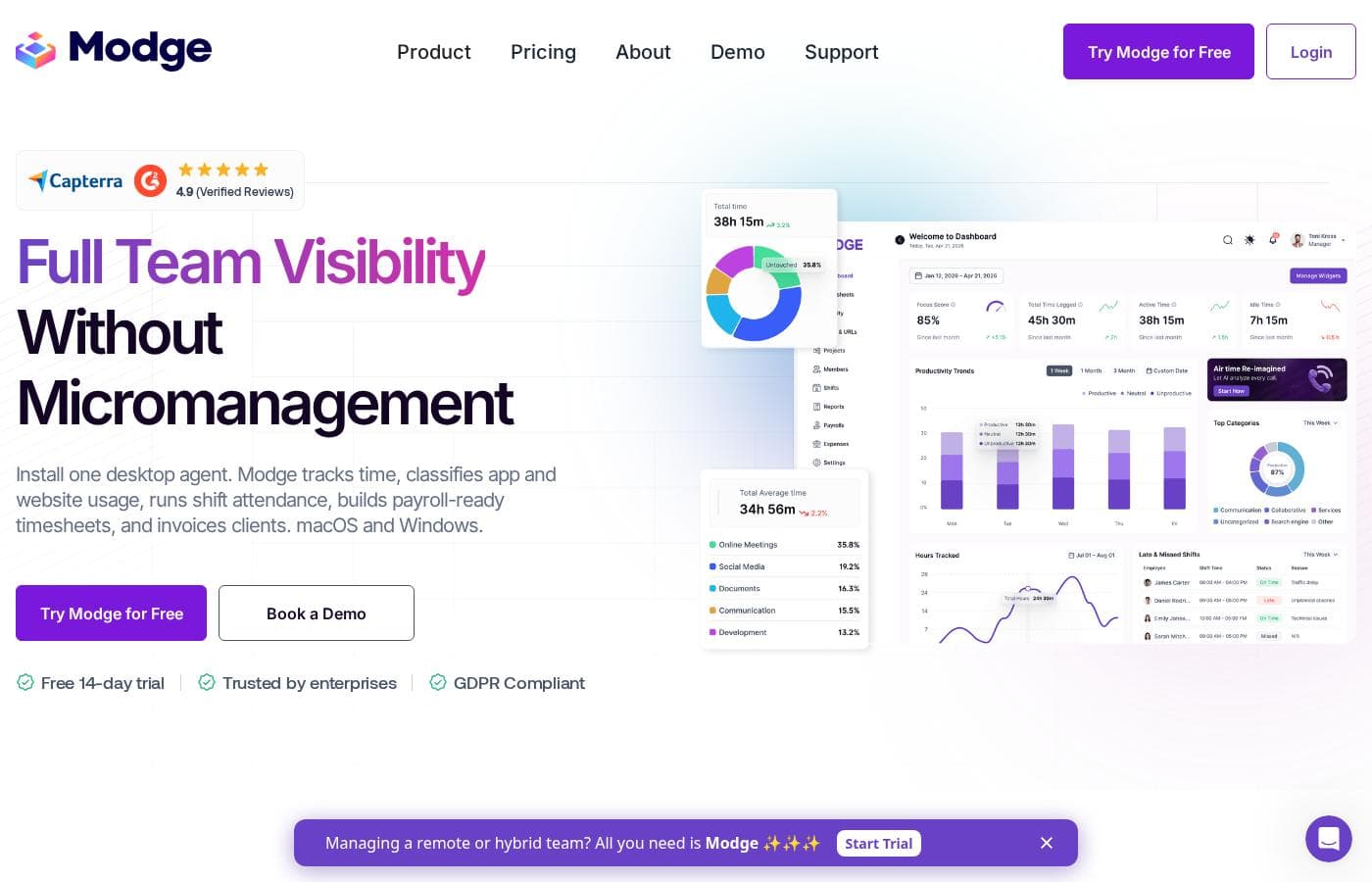
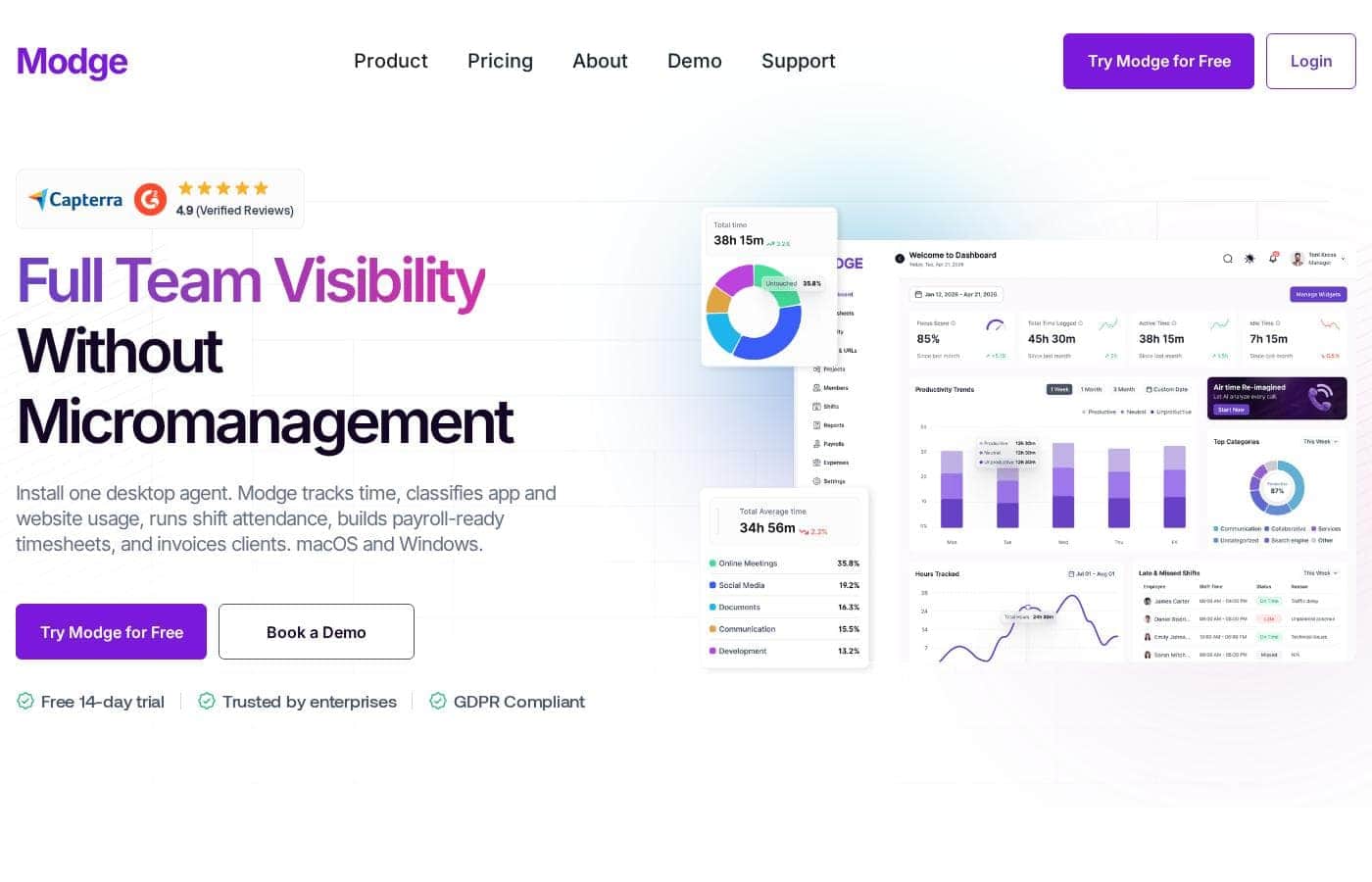
ภาพหน้าจอหลักของ Modge

สรุปอย่างรวดเร็ว

ภาพรวมอย่างรวดเร็วของ Modge: คะแนน สรุปราคา ฟีเจอร์หลัก และจุดเด่น
ตรวจสอบราคาเมื่อ 2 พ.ย. 2569

คะแนน Ciroapp

3.7/ 5

Modge packs automatic time tracking, app classification, scheduling, and profit-by-client reporting into one macOS and Windows agent, with privacy defaults that stand out, like no keystroke logging and blur-able screenshots. The catch is unpublished pricing and evidence that comes mostly from Modge itself. Overall, it's worth a trial if you're fine requesting a quote to see real costs.

ข้อดี

  • One desktop agent handles the full chain — time capture, app classification, scheduling, attendance, leave, timesheets, and profitability reporting — so teams don't stitch together a timer, scheduler, and spreadsheet
  • Anomaly detection flags idle streaks of 15+ minutes, mouse-jiggler patterns, frequent app switching, and logins that don't match anyone's calendar before those hours reach a client invoice
  • Profitability is computed from tracked hours multiplied by your bill and pay rates, giving real margin per project, client, and person across five exportable report types (CSV or PDF)

ข้อเสีย

  • Paid plan names and prices aren't published anywhere on the reviewed pages, so buyers can't budget or compare against alternatives without contacting sales
  • The desktop agent supports macOS and Windows only, excluding Linux, Chromebook, and mobile-only teams from coverage
  • There's no mention of a free-forever plan or a money-back guarantee, so the 14-day trial is the only risk-free evaluation window before committing
เหมาะที่สุดสำหรับ
  • Remote and hybrid teams that need visibility across time zones
  • Agencies and BPOs billing clients by the hour and needing proof of work
  • Operations and HR teams consolidating attendance, leave, and payroll data
ทดลองใช้ฟรี
Yes — 14 วัน
ส่วนนี้เป็นสรุป รายละเอียดเกี่ยวกับฟีเจอร์ กรณีการใช้งาน ราคา และรีวิวจะแสดงต่อด้านล่าง

Modge คืออะไร?

Chasing timesheets, guessing who's working, and rebuilding attendance by hand wears managers down. Modge puts time tracking, shift attendance, and productivity insight into one desktop agent for macOS and Windows. You get payroll-ready timesheets, automatic app classification, and optional screenshots — without chasing anyone.

Modge is time tracking and workforce monitoring software built around one desktop agent for macOS and Windows. The agent records work sessions, classifies app and website usage, builds timesheets, scores shift attendance, and calculates project profitability. It's designed for remote and hybrid teams, agencies and BPOs, tech companies, HR and operations, and enterprises.

The site says more than 1,000 teams use it, and a 14-day free trial needs no credit card.

ควรเลือก Modge หรือไม่?

คำแนะนำสั้นๆ ก่อนเปรียบเทียบแผนหรือกดไปยังเว็บไซต์

เลือกถ้า

  • Teams on macOS or Windows that can install a lightweight desktop agent
  • Managers who want payroll-ready timesheets without manual entry or roll calls
  • Client-facing firms that want an audit trail behind every invoice
  • Organizations with compliance needs like GDPR, HIPAA, or SOC 2
  • Leaders who want burnout and time-theft signals before they become costly

ข้ามถ้า

  • Teams on Linux, Chromebooks, or mobile-only workflows — the agent covers macOS and Windows only
  • Workplaces where any desktop monitoring would face employee resistance, even with privacy controls in place
  • Freelancers who just want a simple standalone timer without attendance or workforce management

ขั้นตอนถัดไปก่อนซื้อ

  1. 1Start the free 14-day trial — Modge advertises full access with no credit card required
  2. 2Confirm every teammate's device runs macOS or Windows before rolling out the agent
  3. 3Agree on your screenshot and classification policy with employees before install, since these settings shape trust
  4. 4Set up your bill and pay rates early so profitability reports are meaningful from week one

ความง่ายในการใช้งาน

Setup signals look strong. Modge says the agent installs in about two minutes on macOS or Windows, usually without admin rights, and that teams see useful insight within 48 hours. Timesheet approvals take one click, and reports export as CSV or PDF. This is based on the vendor's claims and high verified ratings (around 4.9 on several review platforms) — not hands-on testing.

Modge คุณสมบัติหลัก

⏱️ Timesheets that write themselves

Nobody loves chasing timesheets. Modge's desktop agent records each session — start, end, project, and active apps — with no timer to remember. Sessions roll into weekly or biweekly timesheets your team submits and managers approve in one click.

Payroll exports follow, so pay runs start from real tracked hours.

✨ App tracking without the labeling work

The agent classifies every app and website as productive, neutral, or unproductive automatically. You set one company-wide rule, then override per job title. Figma counts as productive for designers and neutral for QA — your call.

It's handy when different roles genuinely use different tools.

✨ Scheduling, attendance, and leave on one thread

Build your schedule once and Modge compares it against tracked sessions automatically:

  • Weekly, biweekly, or one-time shift patterns, per person or whole team
  • Attendance scored per shift, with grace windows you control
  • Approved paid leave inserts its hours into the matching timesheet

✨ Spot problems before they get expensive

The live dashboard shows who's working, on what, and how productive each session is right now. Modge also flags idle streaks of 15 minutes or more, frequent app switching, mouse-jiggler patterns, and logins that don't match anyone's calendar. Burnout signals, like long streaks without breaks, surface early too.

📊 See exactly what's profitable

Modge multiplies tracked time by your bill rates and pay rates, so you see real margin per project, client, and person. Five report types cover tracked hours, schedule adherence, app usage, manual time, and profitability. Every one exports as CSV or PDF in a single click.

กรณีการใช้งาน

💼 Bill clients with proof

Track hours, apps, and optional screenshots behind every invoice. Tracked hours multiply by your bill and pay rates to show real margin per client and project. Expected outcome: an audit trail that turns "trust us" into "here's the data." > Tip: Set bill and pay rates in week one.

⏱️ Skip the timesheet chase

The desktop agent logs start, end, project, and apps automatically. Employees submit, you approve in one click, and payroll exports follow. Approved leave hours land in the right pay period on their own.

Expected outcome: payroll-ready timesheets without roll calls.

🌍 See remote work clearly

Managers running distributed teams see who's working now, on which project, and how productive the session is — without hovering over anyone. Async approvals and time-zoned activity were built for this. Expected outcome: fewer status meetings and no more guessing.

🚩 Catch problems early

Modge flags idle streaks, frequent app switching, mouse-jigglers, and logins that don't match anyone's calendar. Burnout signals — long streaks, weeks without leave — surface before resignations do. Expected outcome: conversations you have early, not invoices you dispute later.

ราคา Modge

เริ่มต้นUS$2/เดือน≈ ฿67.46

  • จากหน้าราคาของผู้ให้บริการ ตรวจสอบเมื่อ 2 พ.ย. 2569
  • 4 แพ็กเกจ

ตรวจสอบราคาเมื่อ 2 พ.ย. 2569 จาก หน้าราคาของ Modge

ภาพหน้าจอหน้าราคาของ Modgeดูภาพหน้าจอหน้าราคา
แพ็กเกจรายเดือนรายปีรวม
Basic
ต่อผู้ใช้
US$5/เดือน
≈ ฿168.65
—
per user
Pro
ต่อผู้ใช้
US$7/เดือน
≈ ฿236.11
—
per user
More Screenshots
ต่อผู้ใช้
US$2/เดือน
≈ ฿67.46
—
per user
Extended Data Retention
ต่อผู้ใช้
US$2/เดือน
≈ ฿67.46
—
per user

แปลงตามอัตราอ้างอิงของ ECB วันที่ 30 ต.ค. 2569 ผู้ให้บริการอาจเรียกเก็บราคาท้องถิ่นที่ต่างออกไป

ประวัติราคา

ติดตามราคาตั้งแต่ 1 ต.ค. 2569 ยังไม่พบการเปลี่ยนแปลงราคา

ประเภทราคา: Free trial

หมายเหตุเรื่องราคา

Modge offers a free 14-day trial with full platform access and no credit card required. Paid plan prices aren't listed on the website, so exact rates should be confirmed with Modge directly.

Modge gives every new team a free 14-day trial with full platform access and no credit card required.

Detailed plan pricing isn't published on the site, so here's what we can confirm about getting started and what you'd be paying for.

Free 14-Day Trial

Price: Free for 14 days Best For: Any team that wants to test the full platform before paying Other Features:

  • Full access to every Modge feature for 14 days
  • No credit card required to sign up
  • Desktop agent installs in about two minutes on macOS or Windows

This isn't a stripped-down demo. You get the whole toolkit: automatic time tracking, app and website classification, shift scheduling, attendance scoring, payroll-ready timesheets, and optional screenshots. Modge says most teams hit their first useful insight within the first week, so two weeks is enough to judge fit.

That makes the trial the natural entry point for everyone — solo founders, agencies, and enterprise IT teams alike. You can run it with a small group before deciding whether to roll it out company-wide. If you're comparing workforce monitoring tools, it's the lowest-risk way to build your shortlist.

What the platform includes

Modge doesn't list plan names or prices on its website. It does spell out the product in detail:

  • Productivity dashboards with scores, hours logged, and leaderboards
  • App and URL tracking labeled productive, neutral, or unproductive
  • Weekly or biweekly timesheets with one-click manager approval
  • Shift scheduling, automatic attendance, and leave management
  • Profitability reports by project, client, and person
  • Five report types, exportable as CSV or PDF

Because exact tiers and rates aren't shown, confirm current pricing and any seat or usage limits with Modge before committing — especially if you're weighing an annual agreement. 📋

The clearest cost fact on the site is the trial itself: 14 days, full access, no card needed. There's no mention of a free-forever plan or a money-back guarantee, so the trial is your no-risk window to evaluate. Modge is GDPR compliant and certified to ISO 9001, HIPAA, PCI DSS, and SOC 2 Type II — useful reassurance if pricing talks turn into a longer contract.

เครื่องคำนวณค่าใช้จ่าย

ประเมินค่าใช้จ่าย Modge สำหรับทีมของคุณ

รอบการชำระเงิน
ต่อเดือน
US$25≈ ฿843.25
ต่อปี
US$300≈ ฿10,118.96

Basic คิดราคาต่อผู้ใช้: ราคา × 5 ที่นั่ง ค่าประมาณจากราคาที่เผยแพร่ ไม่รวมภาษี ส่วนเสริม และส่วนลด

แปลงตามอัตราอ้างอิงของ ECB วันที่ 30 ต.ค. 2569 ผู้ให้บริการอาจเรียกเก็บราคาท้องถิ่นที่ต่างออกไป

วิธีจ่ายค่า Modge ให้น้อยลง

  • ใช้ช่วงทดลองฟรี 14 วันก่อนชำระเงิน
  • บางแพ็กเกจคิดราคาต่อผู้ใช้: จ่ายเฉพาะที่นั่งที่ใช้งานจริง
เริ่มทดลองใช้ฟรี

แจ้งเตือนทางอีเมลเมื่อ Modge เปลี่ยนราคา

อีเมลหนึ่งฉบับเมื่อเราตรวจพบการเปลี่ยนแปลงบนหน้าราคาของผู้ให้บริการ ไม่มีจดหมายข่าว ไม่มีโปรโมชัน ยกเลิกได้ในคลิกเดียว

รีวิวผู้ใช้

ยังไม่มีรีวิว

เขียนรีวิว

เขียนรีวิวสำหรับ Modge
0/100 ตัวอักษร
0/2000 ตัวอักษร

ทำไมต้องใช้ Modge?

Most teams juggle a timer, a scheduler, and a spreadsheet to answer one question: who did what, and what did it cost? Modge runs that whole loop from a single install — and it lets you verify everything free for 14 days.

  • Time records itself. Sessions capture start, end, project, and active apps automatically, then roll into weekly or biweekly timesheets managers approve in one click, with payroll exports ready.
  • Classification is hands-off. Apps and websites are labeled productive, neutral, or unproductive automatically — with per-role overrides, since Figma isn't the same for designers and QA.
  • Red flags surface early. Idle streaks, frequent app switching, mouse jigglers, and logins that don't match anyone's calendar get flagged before they land on a client invoice.
  • Profit becomes visible. Tracked hours multiplied by your bill and pay rates show real margin per project, client, and person, and every report exports as CSV or PDF in one click.
  • Privacy is built in, not bolted on. No keystroke logging, screenshots off by default with blur options, plus ISO 9001, HIPAA, PCI DSS, and SOC 2 Type II certifications.
  • Onboarding is fast on paper. Modge claims a two-minute install and first insights within 48 hours — and the trial costs nothing to check that claim.

ทางเลือกของ Modge

เครื่องมืออื่นๆ ในหมวดหมู่ การติดตามพนักงาน

ดูเครื่องมือ การติดตามพนักงาน ทั้งหมด

คำถามที่พบบ่อยเกี่ยวกับ Modge

Modge ราคาเท่าไร?

แพ็กเกจแบบชำระเงินที่ถูกที่สุดของ Modge คือ More Screenshots ราคา US$2 (≈ ฿67.46) ต่อเดือน แพ็กเกจแบบชำระเงินมีราคาตั้งแต่ US$2 ถึง US$7 ต่อเดือน ตรวจสอบราคาเมื่อ 2 พ.ย. 2569 จากหน้าราคาของผู้ให้บริการ

Modge มีแพ็กเกจฟรีหรือไม่?

ไม่มี Modge ไม่ได้ระบุแพ็กเกจฟรี แพ็กเกจแบบชำระเงินที่ถูกที่สุดเริ่มต้นที่ US$2 (≈ ฿67.46) ต่อเดือน

Modge มีช่วงทดลองใช้ฟรีหรือการรับประกันคืนเงินหรือไม่?

Modge มีช่วงทดลองใช้ฟรี 14 วัน

ราคาของ Modge เปลี่ยนแปลงเมื่อเร็ว ๆ นี้หรือไม่?

ไม่ เราไม่พบการเปลี่ยนแปลงราคาตั้งแต่เริ่มติดตามเมื่อ 1 ต.ค. 2569

How does Modge protect our data?

Your data gets AES-256 encryption at rest and TLS 1.3 in transit. Row-level security means people only see what their role allows, and Modge runs annual penetration tests plus third-party security audits.

Can we control screenshots without going all-or-nothing?

Yes. You enable screenshots per team or per person, set a capture interval that fits your policy, and apply blur at the organization or individual level. They're optional, never always-on.

What if someone needs to log hours by hand?

Modge includes a manual time report. Every hand-entered hour comes with a full audit trail and reason codes, so each entry stays traceable and easy for a manager to review.

Do employees need admin rights to install it?

Usually not. You send teammates a download link, and most setups install without admin rights. The agent is up on macOS or Windows in about two minutes, capturing from the first session.

พร้อมทดลองใช้ Modge หรือยัง? ดูเว็บไซต์ทางการหรือราคา

คุณคือ Modge ใช่ไหม? อ้างสิทธิ์รายการนี้ · รับป้าย