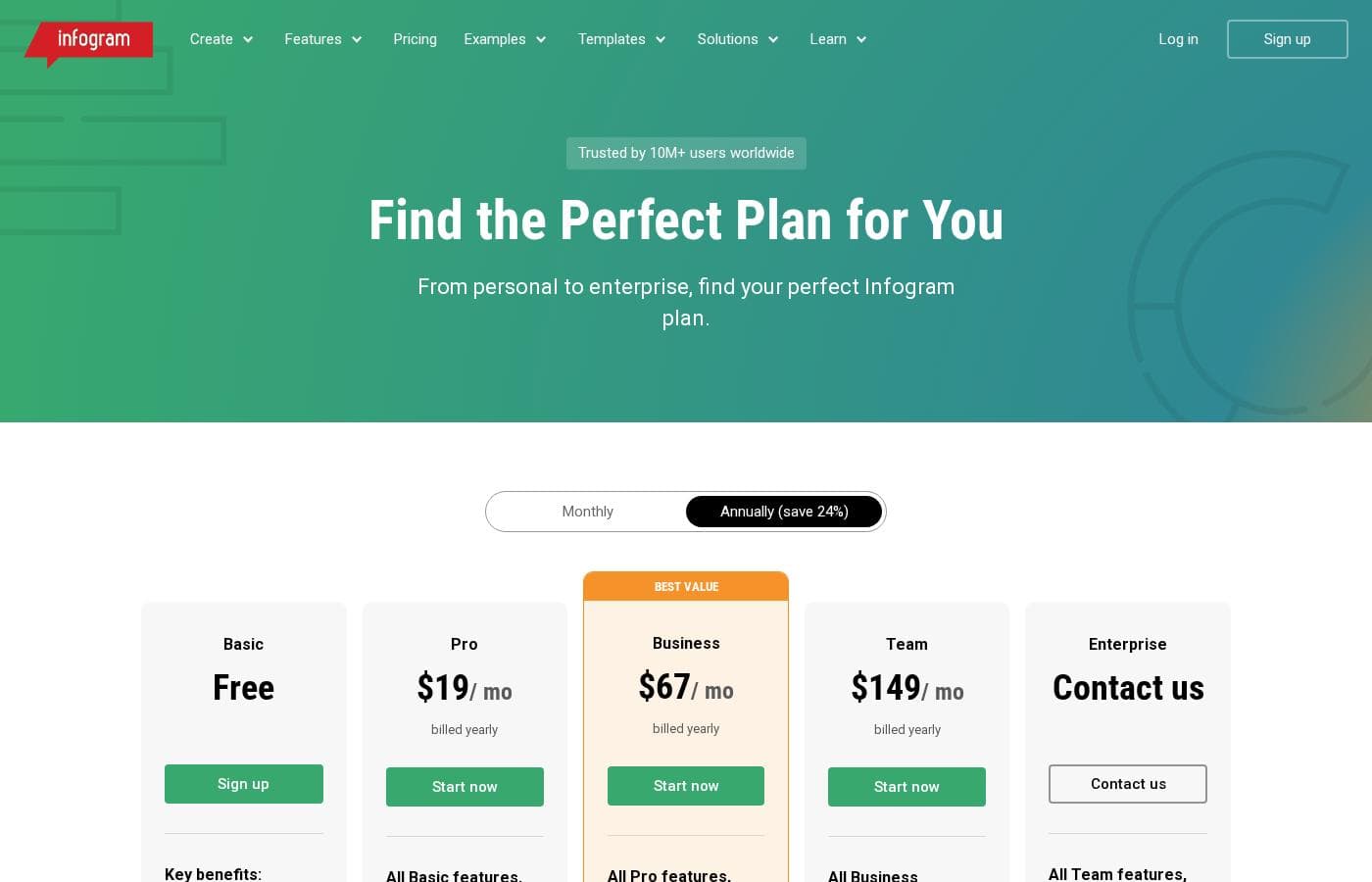
Infogram มีแผน Basic ฟรีที่เหมาะสำหรับการใช้งานส่วนตัว พร้อมการสมัครสมาชิกระดับที่ต้องชำระเงินอีกสี่ระดับ: Pro, Business, Team และ Enterprise คุณสามารถเลือกชำระเงินรายเดือน หรือรับส่วนลดมากหากเลือกการเรียกเก็บเงินรายปี
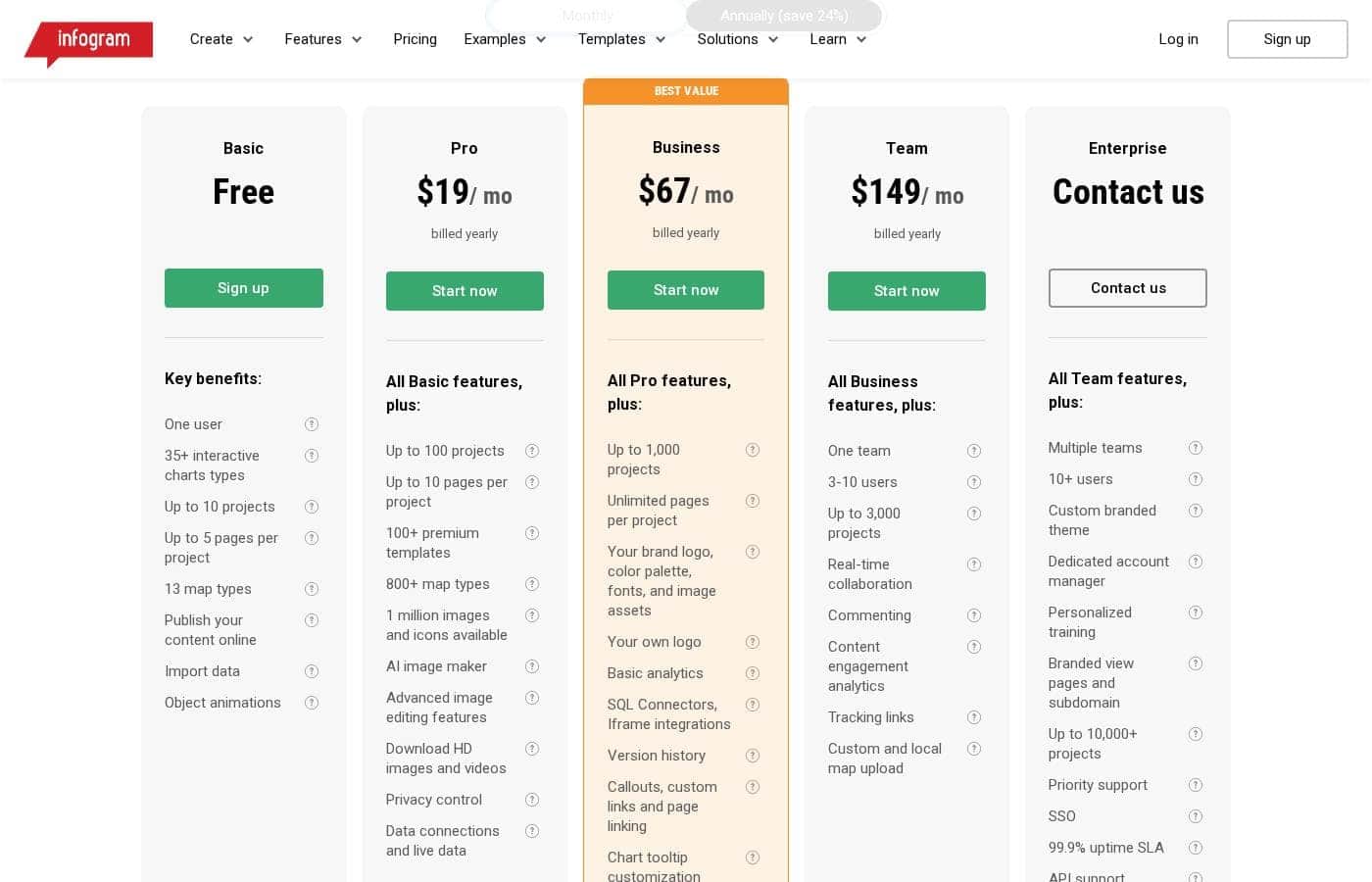
Infogram มีค่าใช้จ่ายระหว่าง $0 ถึง $149 ต่อเดือนด้วยห้าแผน: Basic ฟรี, Pro ที่ $9.50/เดือน, Business ที่ $46.90/เดือน, Team ที่ $149/เดือน และ Enterprise (ติดต่อเรา).
เรามาสำรวจคุณสมบัติหลักและกลุ่มเป้าหมายสำหรับแต่ละระดับการสมัครสมาชิก โดยเน้นที่อัตราการเรียกเก็บเงินรายปี
Basic (ฟรี)
ราคา: ฟรี
เว็บไซต์ที่รองรับ: ไม่ได้ระบุไว้ชัดเจน
เหมาะสำหรับ: การใช้งานส่วนตัว (บล็อกหรือการนำเสนอ)
นโยบายการคืนเงิน: ไม่ได้ระบุไว้ชัดเจน
คุณสมบัติอื่นๆ: ผู้ใช้ 1 คน, แผนภูมิอินเทอร์แอคทีฟ 35+ ประเภท, สูงสุด 10 โปรเจกต์, แผนที่ 13 ประเภท, เผยแพร่เนื้อหาออนไลน์
Pro
ราคา: $9.50 / เดือน (เรียกเก็บเงินรายปี)
เว็บไซต์ที่รองรับ: ไม่ได้ระบุไว้ชัดเจน
เหมาะสำหรับ: ไม่ได้ระบุไว้ชัดเจน
นโยบายการคืนเงิน: ไม่ได้ระบุไว้ชัดเจน
คุณสมบัติอื่นๆ: สูงสุด 100 โปรเจกต์, แม่แบบระดับพรีเมียม 100+ แบบ, แผนที่ 800+ ประเภท, ตัวสร้างภาพ AI, ดาวน์โหลดรูปภาพและวิดีโอ HD, การควบคุมความเป็นส่วนตัว, การเชื่อมต่อข้อมูลและข้อมูลสด
หากคุณต้องการผลิตเนื้อหามากขึ้นหรือต้องการส่งออกคุณภาพสูง Pro เป็นตัวเลือกที่ดี มีการอัปเกรดทรัพยากรที่สำคัญ และแนะนำคุณสมบัติการควบคุมความเป็นส่วนตัวสำหรับการใช้งานระดับมืออาชีพ แผนนี้ออกแบบมาสำหรับบุคคลที่พึ่งพาการสร้างภาพข้อมูลเป็นประจำ
Business
ราคา: $46.90 / เดือน (เรียกเก็บเงินรายปี)
เว็บไซต์ที่รองรับ: ไม่ได้ระบุไว้ชัดเจน
เหมาะสำหรับ: ธุรกิจและมืออาชีพที่ต้องการฟีเจอร์การสร้างแบรนด์
นโยบายการคืนเงิน: ไม่ได้ระบุไว้ชัดเจน
คุณสมบัติอื่นๆ: สูงสุด 1,000 โปรเจกต์, หน้าไม่จำกัดต่อโปรเจกต์, โลโก้แบรนด์ ชุดสี และฟอนต์ของคุณ, การวิเคราะห์พื้นฐาน, SQL Connectors, ประวัติเวอร์ชัน, ลิงก์ที่กำหนดเอง, บันทึกย่อสำหรับผู้นำเสนอ
แผน Business ปลดล็อกความสามารถในการสร้างแบรนด์ที่จำเป็นและเครื่องมือผสานรวมขั้นสูง เช่น SQL Connectors นี่คือการสมัครสมาชิกในอุดมคติสำหรับบุคคลหรือทีมขนาดเล็กที่ต้องรักษาภาพลักษณ์ของบริษัทที่เป็นมืออาชีพอย่างสม่ำเสมอในโครงการสร้างภาพของตน
Team
ราคา: $149 / เดือน (เรียกเก็บเงินรายปี)
เว็บไซต์ที่รองรับ: ไม่ได้ระบุไว้ชัดเจน
เหมาะสำหรับ: การทำงานร่วมกันระหว่างผู้ใช้ 3 ถึง 10 คน
นโยบายการคืนเงิน: ไม่ได้ระบุไว้ชัดเจน
คุณสมบัติอื่นๆ: สูงสุด 3,000 โปรเจกต์, ทีมเดียว/ผู้ใช้ 3-10 คน, การทำงานร่วมกันแบบเรียลไทม์, การแสดงความคิดเห็น, การวิเคราะห์การมีส่วนร่วมของเนื้อหา, ลิงก์ติดตาม, การอัปโหลดแผนที่ที่กำหนดเองและในพื้นที่
สำหรับองค์กรที่กำลังเติบโต แผน Team เน้นที่การทำงานร่วมกันที่ราบรื่นและโครงสร้างพื้นฐานที่ใช้ร่วมกัน ให้ผู้ใช้ 3 ถึง 10 คนสามารถทำงานร่วมกันได้อย่างมีประสิทธิภาพในโครงการจำนวนมาก คุณจะสามารถเข้าถึงคุณสมบัติที่สำคัญ เช่น การแสดงความคิดเห็นแบบเรียลไทม์และการติดตามเนื้อหา
Enterprise
ราคา: ติดต่อเรา
เว็บไซต์ที่รองรับ: ไม่ได้ระบุไว้ชัดเจน
เหมาะสำหรับ: องค์กรที่มีผู้ใช้ 10+ คนที่ต้องการความปลอดภัยและการปรับแต่งสูงสุด
นโยบายการคืนเงิน: ไม่ได้ระบุไว้ชัดเจน
คุณสมบัติอื่นๆ: หลายทีม/ผู้ใช้ 10+ คน, สูงสุด 10,000+ โปรเจกต์, ธีมแบรนด์ที่กำหนดเอง, ผู้จัดการบัญชีโดยเฉพาะ, การฝึกอบรมเฉพาะบุคคล, การสนับสนุนลำดับความสำคัญ, SSO, SLA Uptime 99.9%, การสนับสนุน API, การส่งออก HTML
Enterprise ถูกปรับแต่งสำหรับองค์กรที่ใหญ่ที่สุดที่ต้องการความปลอดภัยและการสนับสนุนเฉพาะทางที่ไม่เหมือนใคร แผนนี้รองรับปริมาณงานสูง นำเสนอคุณสมบัติพิเศษ เช่น SSO และการเข้าถึง API และให้ผู้จัดการบัญชีโดยเฉพาะสำหรับการช่วยเหลืออย่างต่อเนื่อง ติดต่อทีมขายเพื่อขอคำปรึกษาและใบเสนอราคาพิเศษ
Infogram มีแผน Basic ฟรีแบบถาวร สำหรับการใช้งานส่วนตัว ในขณะที่คุณสามารถยกเลิกการสมัครสมาชิกแบบชำระเงินใดๆ ได้อย่างง่ายดายผ่านการตั้งค่าบัญชี โปรดทราบว่า Infogram ระบุอย่างชัดเจนว่าจะไม่มีการคืนเงินตามข้อกำหนดในการให้บริการ หากคุณเลือกการสมัครสมาชิกรายปี คุณสามารถสอบถามเกี่ยวกับเงื่อนไขการออกใบแจ้งหนี้ได้โดยติดต่อทีมขายของพวกเขา