Netlify เทียบกับ Plesk
Netlify and Plesk serve very different web needs. Netlify is a modern, Git-first deployment platform for building and shipping sites instantly. Plesk is a traditional server control panel for managing websites and hosting infrastructure from one dashboard.
Best for: Developers building and deploying modern Jamstack sites, Teams needing instant preview deployments for collaboration
Best for: Web agencies managing dozens of client WordPress sites, IT administrators overseeing multiple servers across clouds
Streamlined, powerful deployment.
We find Netlify is a top-tier choice for modern web projects. It excels at taking you from code to a live site with incredible speed and simplicity. Overall, it's a robust, developer-friendly platform that delivers on its promise of unified, fast deployments, though its credit system requires mindful usage.
ข้อดี
- Extremely fast deployments, often under 30 seconds.
- Generous free tier perfect for side projects and experiments.
- Unified workflow: deploy from Git, API, or even AI prompts.
- Built-in features like HTTPS, forms, and image optimization.
ข้อเสีย
- Credit-based billing can be complex to predict and manage.
- Support access and response times vary significantly by plan.
- Advanced customization may require workarounds or higher-tier plans.
- Pausing all sites on an account if one project hits its limit.
ข้อดี
ข้อเสีย
เกี่ยวกับNetlify
It's a modern web development platform for teams and solo creators. ✨ Whether you're building a marketing site, a fullstack app, or an internal tool, Netlify handles the infrastructure. You focus on creating, and it manages deployment, scaling, and security on a global network.
เกี่ยวกับPlesk
ไฮไลต์
การเปรียบเทียบคุณสมบัติ
ภาพรวมคุณสมบัติ
เราเน้นความแตกต่างหลักและเลือกผู้ชนะสำหรับแต่ละคุณสมบัติ
Deployment Workflow
Netlify automates modern web deployment from Git. Plesk manages files on existing servers.
Netlify gives you a streamlined Git-based workflow. Push a code change and your site is live in under 30 seconds globally. It provides a unique preview URL for every branch for safe team review. Plesk is a server control panel. You upload files manually or via FTP. It provides tools to manage the underlying server, but deployment is not automated like a CI/CD pipeline. The key difference is automation versus manual control. Netlify handles the entire build and deploy process for you. Plesk gives you the server environment to manage deployments yourself.
Server & Site Management
Plesk excels at managing multiple sites and servers from one panel. Netlify abstracts away server management entirely.
Netlify is a managed platform. You never see or manage a server. It handles scaling, security, and infrastructure for you automatically. You focus only on your code and content. Plesk provides a unified dashboard to manage multiple sites, run updates, and monitor performance across servers. It includes tools like the WP Toolkit for WordPress and built-in security at the OS level. The trade-off is simplicity versus control. Netlify removes server complexity for faster shipping. Plesk gives admins deep control over server environments and multi-site portfolios.
Security Features
Both offer strong security but in different ways. Netlify provides managed infrastructure security. Plesk offers server-level tools you control.
Netlify includes automatic HTTPS, DDoS protection, and a 99.99% uptime SLA as part of its managed global network. Security is handled at the platform level. It also has SOC 2 certification. Plesk provides built-in security across OS, network, and application layers. It integrates with partners like DigiCert and Cloudflare. You manage security policies from the dashboard. Netlify's security is automatic and part of the hosting. Plesk's security is comprehensive but requires configuration and management by the user.
WordPress Support
Plesk offers a specialized, powerful toolkit for managing WordPress at scale. Netlify supports WordPress but as a standard static site.
Netlify can host WordPress sites as a static export or via plugins. It treats them like any other project. You get fast global hosting but no specialized WordPress management tools. Plesk's WP Toolkit is a standout feature. It allows one-click install, staging, cloning, and automated updates for all your WordPress sites from a single dashboard. It's built for managing multiple WordPress properties. If WordPress is your core platform, Plesk provides dedicated, time-saving tools. Netlify provides excellent hosting but lacks WordPress-specific management features.
Pricing Model
Netlify uses usage-based credits for flexible scaling. Plesk uses fixed per-server license fees for predictable management costs.
Netlify pricing starts with a free forever plan. Paid plans (Personal $9/mo, Pro $20/mo) use credits for bandwidth, builds, and deploys. Costs scale with usage. You can set spend controls. Plesk pricing is based on server licenses. VPS plans range from ~$15.57 to $57.74 per month billed annually. Costs are predictable per server. A 14-day free trial is available. Netlify is cost-effective for variable traffic and small projects. Plesk's model suits predictable budgets for managing multiple servers or client sites.
User Experience
Netlify offers a clean, developer-focused interface for deployment. Plesk provides a feature-rich dashboard for system administration.
Netlify's interface is modern and streamlined for developers. It focuses on project views, deploy logs, and configuration. The workflow is designed for speed and simplicity. Plesk's dashboard is comprehensive, with menus for sites, mail, databases, and security. It's powerful but can feel complex for beginners. It's designed for administrators managing many services. Netlify prioritizes a fast, uncluttered experience for shipping code. Plesk prioritizes access to a wide array of server management tools in one place.
Netlify pricing: Netlify offers a flexible pricing model starting with a free tier and scaling through Personal at $9/month and Pro at $20/month. Costs are primarily driven by monthly usage credits for bandwidth, builds, and AI inference targets side projects to enterprise teams alike-it's a system built for growth without friction-where you only pay for what you actually use while your sites stay live and protected on their global network infrastructure. To get the most from our platform check out our diverse plans designed specifically for developers like yourself wishing for ease-of-use or advanced security controls tailored for massive scale operations today-you can even start building right now without spending a dime on our robust free-forever plan which includes deployments across any framework you prefer using our intuitive tools and lightning-fast developer experience with zero upfront commitment needed from you today-or if your project demands more power then simply upgrade to one of our premium plans which offer enhanced performance and priority support for all your needs-and rest assured that we have you covered every step of the way with our industry-leading platform features and support for all major frameworks used globally by millions of developers like yourself every single day because we care about your success and want to help you achieve your goals as quickly and efficiently as possible without any unnecessary delays or complications along the way-so why wait any longer-start your journey with Netlify today and see the difference for yourself-it's time to build better web experiences for everyone-join our community and start building the future of the web together with us right now-you won't regret it and we are excited to see what amazing things you will create next-good luck and happy building-it's going to be great-really great-believe us-it will be-you'll see-it's the best decision you could make for your business or personal projects today-a
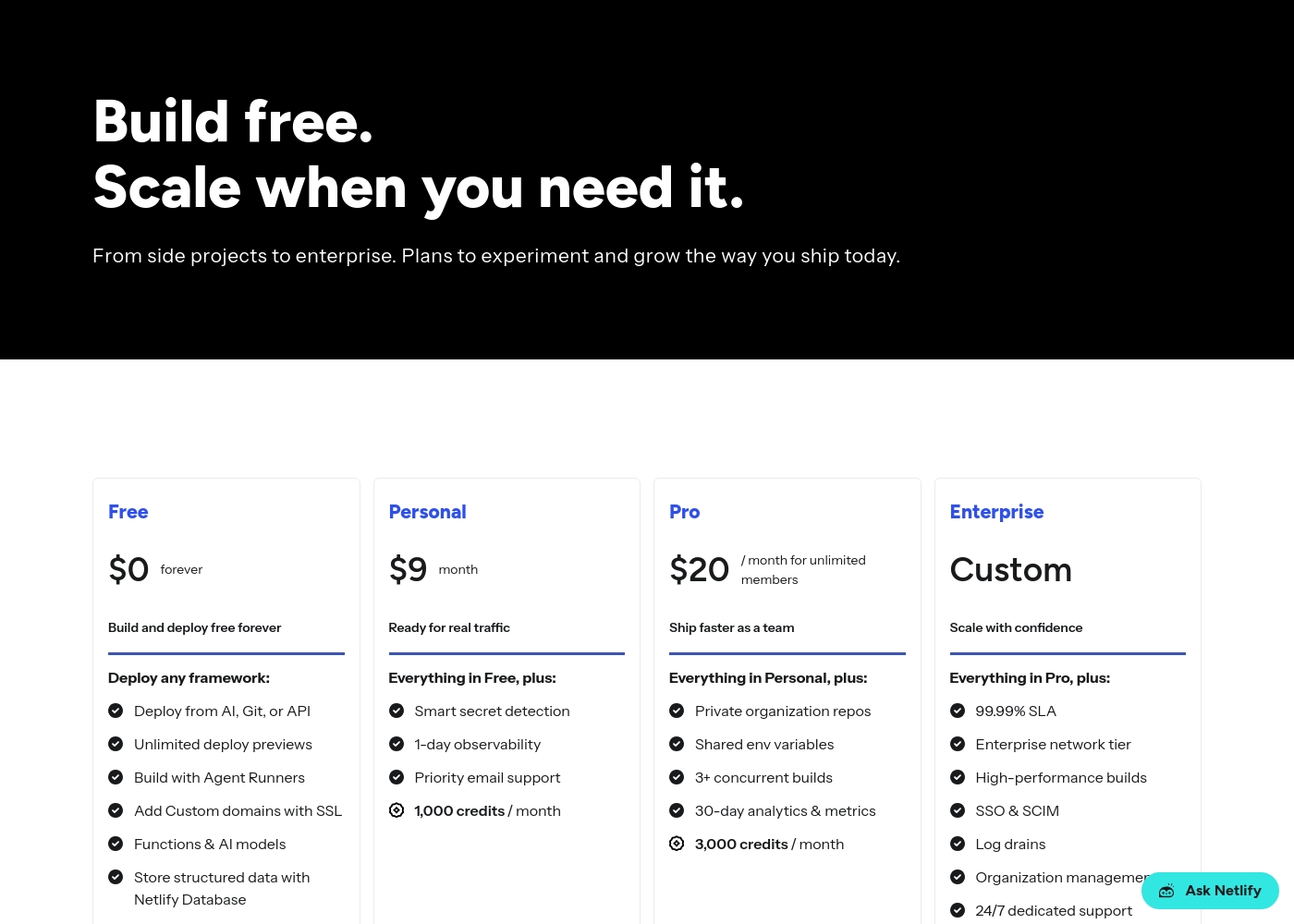
Pricing Notes
- Netlify offers a free forever plan with no trial period required.
- Plesk provides a 14-day free trial with no credit card needed.
- Netlify's costs are driven by usage credits (bandwidth, builds, deploys).
- Plesk's costs are fixed per-server license fees, billed monthly or yearly.
- Plesk pricing can be opaque; licenses auto-renew by default.
Pricing Head-to-Head
รีวิวจากผู้ใช้
We couldn't pull live reviews from Trustpilot or Capterra due to access restrictions. However, based on common user feedback themes for platforms like Netlify, users often praise ease of use 🚀, fast deployments, and a generous free tier.
Many appreciate the unified workflow and global performance. Potential drawbacks can include confusion over credit-based billing and support response times on lower tiers.
Netlify makes deployment incredibly simple. Push to Git and it's live. The preview deployments for every branch are a game-changer for our team's review process.
คำตัดสินของเรา
Netlify and Plesk aren't really competitors. They solve fundamentally different problems for different types of web builders. Netlify's superpower is modern, automated deployment. You push code to Git and get a live global site with previews in seconds. It's perfect for teams shipping web apps and marketing sites fast. Plesk's superpower is centralized server management. It brings hosting, security, WordPress tools, and client billing into one control panel. It's built for agencies and admins managing multiple servers and websites. The deciding factor is what you're building and managing. If you're a developer wanting to deploy code quickly without server hassle, choose Netlify. If you're an administrator needing to manage servers, security, and multiple client sites, choose Plesk. For most modern web projects and development teams, Netlify is the better choice. For web agencies and hosting providers managing infrastructure, Plesk is the essential tool.
คำถามที่พบบ่อย
Can I use Plesk to deploy websites like Netlify does?
No, Plesk is a server control panel, not an automated deployment platform. You manually upload files to your server. Netlify automates the entire build and deploy process from Git.
Which is better for managing WordPress sites?
Plesk is significantly better for managing multiple WordPress sites. Its WP Toolkit offers one-click staging, cloning, and bulk updates. Netlify can host WordPress sites but lacks specialized management tools.
Does Plesk provide hosting like Netlify?
No, Plesk is software you install on your own server. You must provide the server from a host or cloud provider like AWS or Azure. Netlify includes managed hosting on its global network.
Which tool is cheaper for a simple website?
Netlify's free plan is ideal for simple sites, with no cost for basic hosting. Plesk requires a server license starting at ~$15.57/month, plus your own server hosting costs.
Can I switch between Netlify and Plesk?
They serve different purposes, so a direct switch isn't typical. You might use Netlify to deploy a site and Plesk to manage the underlying server for other applications. They can complement each other.
Which has better security features?
Both offer strong security but differently. Netlify provides managed infrastructure security (HTTPS, DDoS). Plesk provides tools to manage OS, network, and application security yourself.
พร้อมที่จะเลือกแล้วหรือยัง?
ทั้งสองเครื่องมือมีจุดแข็งของตัวเอง เลือกตามความต้องการเฉพาะของคุณ