FamiSafe เทียบกับ Norton Family
FamiSafe and Norton Family both help parents manage their child's digital life. FamiSafe offers intense AI monitoring and advanced physical location tools. Norton Family provides reliable web oversight, time controls, and simplicity. Your choice depends on whether you prioritize features or technical rock-solidity.
Advanced parental controls, reliability needed.
We recognize FamiSafe's exceptionally comprehensive feature set, including AI monitoring and affordable plans that cover up to 40 devices. External feedback raises serious concerns regarding installation frustration, technical glitches, and overall reliability, especially on iOS devices. Overall, we recommend FamiSafe primarily for users who value advanced monitoring features and are comfortable managing potential technical challenges.
ข้อดี
- Flexible subscription tiers covering up to 40 devices ($4.99/mo annual rate).
- Features include AI-powered monitoring for social media, chats, and content safety.
- Robust physical safety tools like real-time location tracking and Geofence alerts.
- Customer support, when reached, is often highly professional and technically focused.
ข้อเสีย
- Users report significant issues with technical instability and app reliability.
- Setup process can be challenging, leading some users to report system disruption.
- Required iOS features/companion apps sometimes crash frequently upon opening.
- Initial refund procedures may be frustrating, requiring extensive troubleshooting and logs.
กลไกความปลอดภัยที่เชื่อถือได้เพื่อความปลอดภัยของครอบครัว
เราพบว่า Norton Family นำเสนอชุดเครื่องมือควบคุมโดยผู้ปกครองที่มีประสิทธิภาพและมีความเป็นผู้ใหญ่ โดยใช้ประโยชน์จากความเชี่ยวชาญด้านความปลอดภัยของ Norton มานานหลายทศวรรษ ซอฟต์แวร์นี้โดดเด่นในการสร้างสมดุลระหว่างการจัดการเวลาหน้าจอและความปลอดภัยบนเว็บ และให้การตรวจสอบตำแหน่งที่สำคัญ โดยรวมแล้ว นี่คือแพ็คเกจความปลอดภัยที่มีความน่าเชื่อถือสูงสำหรับครอบครัวที่กำลังมองหาคุณสมบัติการจัดการดิจิทัลที่ครอบคลุมภายในระบบนิเวศที่เชื่อถือได้
ข้อดี
- สร้างขึ้นบนแพลตฟอร์มความปลอดภัยที่แข็งแกร่ง พิสูจน์แล้ว และเชื่อถือได้สูง
- ฟีเจอร์ครอบคลุม รวมถึงการจำกัดเวลาหน้าจอ การติดตามตำแหน่ง และการกรองเนื้อหา
- ฟีเจอร์ 'School Time' โดยเฉพาะช่วยลดสิ่งรบกวนในการเรียนทางไกล
- จัดการได้ผ่าน Parent Portal และแอปบนมือถือที่ใช้งานง่าย
ข้อเสีย
- ค่าใช้จ่ายในการต่ออายุสูงกว่าราคาโปรโมชั่นเริ่มต้นอย่างมาก
- ดูเหมือนว่าโครงสร้างราคาไม่ได้ให้รางวัลแก่ความภักดีของลูกค้า
- ผู้ใช้ Norton ทั่วไปบางครั้งรายงานว่ามีการแจ้งเตือนมากเกินไป
- มีข้อเสนอแนะภายนอกเพียงเล็กน้อยเกี่ยวกับฟีเจอร์ผลิตภัณฑ์ Family โดยเฉพาะ
เกี่ยวกับFamiSafe
FamiSafe is a next-generation parental control application designed by Wondershare. It empowers families to establish positive digital habits together. The platform lets you see and guide your child's activities, balancing freedom with necessary protection. It is built for all parents who want reliable tools to manage screens, monitor device activity, and protect loved ones in real life. You’ll receive detailed reports on daily device usage and app activities effortlessly. 💡
เกี่ยวกับNorton Family
Norton Family เป็นชุดเครื่องมือที่ครอบคลุมซึ่งออกแบบมาเพื่อให้ผู้ปกครองรับรู้และควบคุมปฏิสัมพันธ์ทางดิจิทัลของบุตรหลาน โดยมุ่งเน้นที่การอำนวยความสะดวกในประสบการณ์ที่เป็นบวกและเหมาะสมตามวัยกับเทคโนโลยี ผู้ปกครองสามารถจัดการการป้องกันสำหรับอุปกรณ์ของบุตรหลานได้โดยใช้ Web Portal หรือแอปบนมือถือที่ใช้งานง่าย 📱 ภารกิจหลักคือการช่วยให้เด็กเรียนรู้วิธีสำรวจอินเทอร์เน็ตอย่างมีความรับผิดชอบและดีต่อสุขภาพ
ไฮไลต์
การเปรียบเทียบคุณสมบัติ
ภาพรวมคุณสมบัติ
เราเน้นความแตกต่างหลักและเลือกผู้ชนะสำหรับแต่ละคุณสมบัติ
Advanced Content Monitoring
FamiSafe excels in AI scanning chats; Norton Family focuses on search terms only.
FamiSafe uses AI to scan chats on over 14 social media platforms. It looks for specific keywords and alerts against risky content immediately. FamiSafe also detects and alerts parents about explicit pictures on the device. Norton Family primarily handles web filtering and monitors search terms. Norton Family does offer video supervision for YouTube snippets and Hulu viewing. Norton Family gives good visibility but lacks FamiSafe’s depth in chat monitoring. If deep AI surveillance is your goal, FamiSafe is the clear choice here.
Technical Reliability
Norton Family is reliably stable; FamiSafe users report frequent crashes and bugs.
FamiSafe users report significant issues with technical instability and app crashes. The setup process can be frustrating, especially when using companion apps on iOS. Norton Family is widely praised for being simple to set up and navigate. It provides a consistently reliable experience across supported devices. Norton Family is the safer bet if you prioritize ease of use over complex features. Installing FamiSafe requires managing glitches, which can quickly frustrate parents.
Physical Safety Tools
FamiSafe offers driving reports and SOS alerts; Norton Family provides basic GPS tracking.
FamiSafe stands out with advanced features like Driving Reports for new teens. These reports monitor speed, routes, and harsh braking habits. FamiSafe also includes an SOS Alert feature for instant emergency signaling. Norton Family allows Location Supervision with a 30-day history. It uses Favorite Locations for basic geofencing and check-ins. If you have driving teens or need immediate panic alerts, FamiSafe delivers superior physical safety tools.
System Compatibility
FamiSafe supports more platforms including Mac; Norton Family excludes Mac installation.
FamiSafe is widely compatible, working on iOS, Android, Windows, Mac, and Kindle Fire. This broad support makes it suitable for diverse household devices. Norton Family solely focuses on Windows (excluding S mode), Android, and iOS devices. You cannot install Norton Family directly on a Mac device for monitoring. FamiSafe is the winner if your family relies on Apple computers or Amazon tablets.
Screen Time / Focus
Norton Family has dedicated School Time mode; FamiSafe uses scheduled blocking.
Norton Family features a specific 'School Time' mode to manage remote learning environments. This helps limit distractions by controlling which sites are accessible during class. FamiSafe uses traditional time management with daily limits and scheduled blocks. App Rules let you instantly block specific, distracting applications. While both manage time, Norton Family provides a more tailored solution for focused learning. FamiSafe requires more manual scheduling for similar results.
Scaling and Pricing Model
FamiSafe scales affordably up to 40 devices; Norton Family is often bundled and less transparent.
FamiSafe provides excellent value for large households on its Yearly Plan. You can protect up to 40 devices for an effective monthly rate of $4.99. Norton Family is often bundled with Norton 360 Deluxe/Premium security suites. The individual pricing starts low but renewal costs are less clear and potentially high. FamiSafe’s device-based pricing is simple and dramatically cheaper per device at scale. Norton Family focuses pricing on its security ecosystem integration.
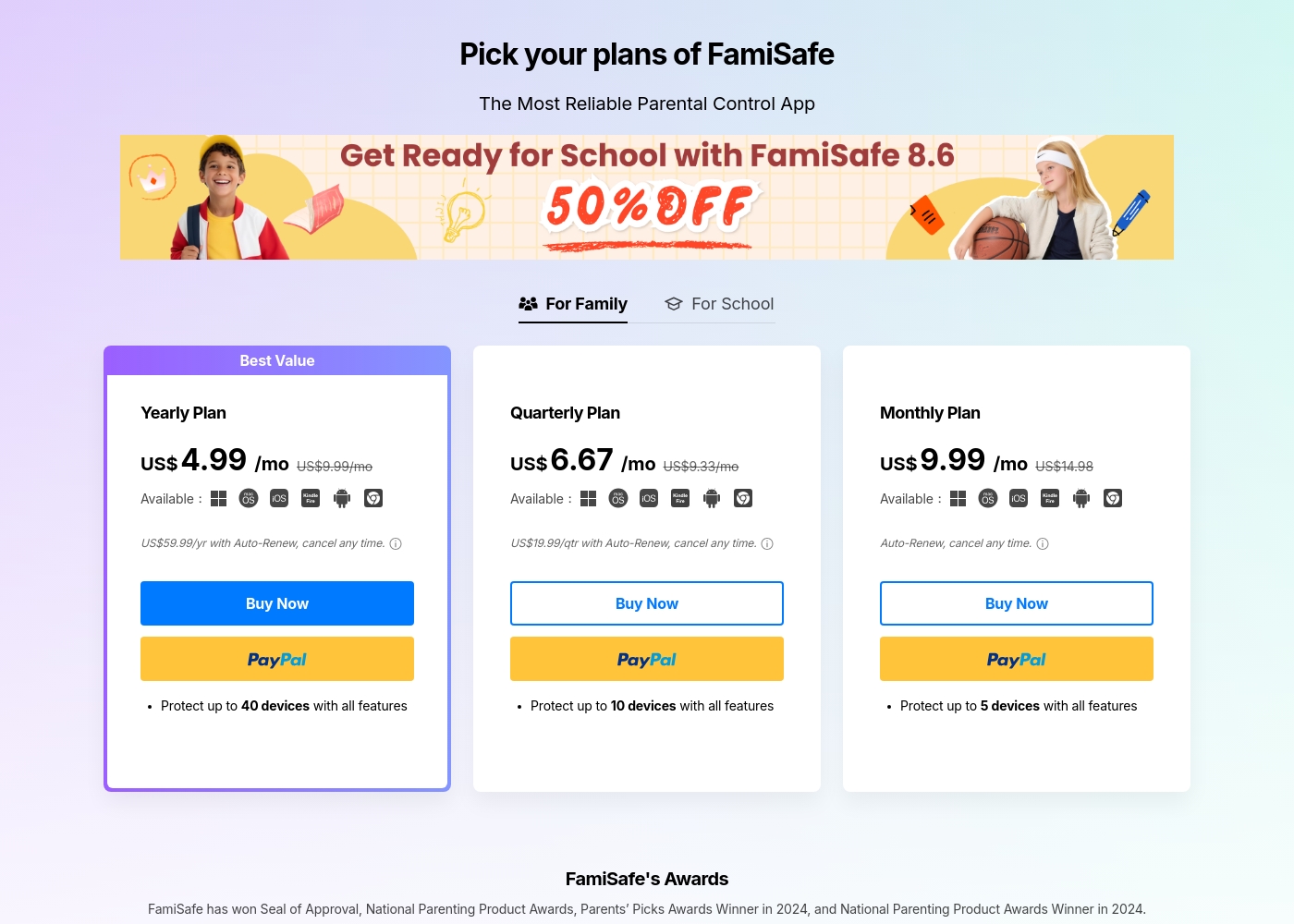
FamiSafe costs between US$4.99 and US$9.99 per month with three main plans: Yearly Plan at US$59.99/year, Quarterly Plan at US$19.99/quarter, and Monthly Plan at US$9.99/month.
FamiSafe provides simple, device-based plans for family monitoring. Here is a closer look at what each subscription offers.
Yearly Plan
Price: US$59.99 per year (effective US$4.99/mo) Websites Supported: Up to 40 devices Best For: Families needing comprehensive, long-term coverage Refund Policy: 7-day money-back guarantee Other Features:
- Includes all premium features
- Auto-Renews, cancel any time
- Protection for the highest number of devices
Norton Family มีค่าใช้จ่าย S$29.99 ต่อปีสำหรับปีแรก มีให้เป็นแผนสมัครสมาชิกรายปีแบบสแตนด์อโลนเดียวในราคา S$29.99
Norton Family ได้รับการออกแบบมาเพื่อช่วยให้ผู้ปกครองส่งเสริมพฤติกรรมออนไลน์ที่ดีต่อสุขภาพสำหรับบุตรหลานของตน
Norton Family (สมัครสมาชิก 1 ปี)
ราคา: S$29.99 ต่อปี (ราคาแนะนำ) เว็บไซต์ที่รองรับ: ไม่ได้ระบุไว้โดยชัดเจน เหมาะสำหรับ: ผู้ปกครองที่มองหาเครื่องมือเฉพาะเพื่อช่วยให้บุตรหลานสร้างสมดุลเวลาหน้าจอ นโยบายการคืนเงิน: รับประกันคืนเงิน 60 วัน (สำหรับการสมัครสมาชิกระยะยาว) คุณสมบัติอื่น ๆ :
- ตั้งค่าขีดจำกัดเวลาการใช้อุปกรณ์ (Time Supervision)
- ดูคำที่บุตรหลานค้นหา (Search Supervision)
- ติดตามวิดีโอที่ดูบน YouTube.com (Video Supervision)
- ตั้งค่ารายการบล็อกสำหรับเว็บไซต์ที่รบกวนสมาธิตอนเรียนทางไกล (School Time)
- ใช้ Location Supervision เพื่อทำแผนที่อุปกรณ์มือถือ
- Web Supervision (การบล็อกเนื้อหาที่ไม่เหมาะสม)
- Time Supervision (การตั้งค่าขีดจำกัดอุปกรณ์)
- Search Supervision (การดูคำที่บุตรหลานค้นหา)
- Video Supervision (การติดตามวิดีโอ YouTube)
- App Supervision (การจัดการแอปที่ดาวน์โหลด)
Pricing Notes
- FamiSafe offers a 7-day money-back guarantee on all purchased plans.
- FamiSafe's Yearly Plan protects up to 40 devices, providing the best per-device value.
- Norton Family is often included as a bundle with Norton 360 products.
- Norton Family trials require payment information provided at signup.
- Norton Family renewals may be significantly higher than the initial promotional pricing.
Pricing Head-to-Head
รีวิวจากผู้ใช้
FamiSafe holds a “Poor” 2.5 TrustScore, reflecting significant user frustration despite the company actively replying to 100% of negative feedback. The central issues revolve around technical operation and reliability. Users frequently cite major compatibility problems, including slow download speeds, app crashes—especially with the required “Wondershare Connect” tool for iPhone features—and reports of the application improperly installing or “ruining” device setup. The process to secure a refund can also be bureaucratic initially; customers sometimes had to “jump through hoops” by providing log files before the engineering team was convinced the product failed.
Conversely, nearly all positive feedback is centered on specific customer support agents, who are often described as outstanding, patient, fast, and technically competent (e.g., Mojoe, John, Angelo C). When a user successfully contacts a live agent, the problem is frequently resolved quickly or a full refund is processed, even covering taxes and VAT requested by European users. Overall, while the individual support experience is high-quality, the underlying product stability and the initial difficulty getting help contribute to the low external rating. 🤔
Mojoe was outstanding. He was technically competent, patient, and analytical, taking the time to walk me through every step. However, getting to a live person took too long, and I waited 30 minutes after being told it would be 13.
ผู้รีวิวต่างชื่นชมระบบนิเวศความปลอดภัยที่กว้างขึ้นของ Norton ซึ่งรวมถึง Norton Family ด้วย ลูกค้าต่างเน้นย้ำถึงการป้องกันที่แข็งแกร่งซึ่งช่วยให้มั่นใจว่าอุปกรณ์ของพวกเขาปลอดภัยจากภัยคุกคามและมัลแวร์ ผู้บริโภคมักกล่าวถึง ความสบายใจ ที่ได้รับจากการทำงานของซอฟต์แวร์อย่างมีประสิทธิภาพในเบื้องหลัง ทำให้มีการแจ้งเตือนและการสแกนเป็นประจำ ประสบการณ์ของผู้ใช้นั้นโดยทั่วไปถือว่าง่าย แม้แต่สำหรับผู้ใช้ที่ไม่เชี่ยวชาญด้านเทคโนโลยี และแพ็คเกจที่ครอบคลุม (รวมถึง VPN และบริการการโจรกรรมข้อมูลประจำตัว) ได้รับการประเมินค่าสูง อย่างไรก็ตาม ข้อร้องเรียนหลักจากผู้ใช้คือเรื่องราคา ลูกค้าที่อยู่มานานหลายคนรู้สึกว่าความภักดีของพวกเขาไม่ได้รับการตอบแทนจากบริษัท โดยสังเกตว่าราคาต่ออายุนั้นสูงกว่าราคาโปรโมชั่นเริ่มต้นอย่างมาก ผู้ใช้บางรายยังรายงานว่ามีการแจ้งเตือนบ่อยครั้งหรือมีคำศัพท์ที่ซับซ้อนมากเกินไป โดยเฉพาะลูกค้าที่อายุมาก โดยรวมแล้ว ความรู้สึกยังคงเป็นบวกอย่างยิ่งต่อความน่าเชื่อถือและประสิทธิภาพ 👍
ฉันใช้ Norton มาตั้งแต่เริ่มต้นและไม่เคยมีปัญหาด้านการป้องกัน ฉันได้ตรวจสอบตัวเลือกอื่น ๆ และไม่มีอะไรเทียบได้กับประสิทธิภาพและการป้องกันของ Norton
คำตัดสินของเรา
Choosing between FamiSafe and Norton Family is a clear trade-off: features versus reliability. If you need the absolute maximum features, navigate towards FamiSafe. If you need a tool that simply works and won't crash regularly, pick Norton Family. FamiSafe's superpower is its deep, modern surveillance capabilities. It monitors private chats on 14+ social platforms using advanced AI. FamiSafe is also the definitive choice for physical monitoring and teen driving safety reports. It supports up to 40 devices, perfect for very large connected families. Norton Family shines due to its unmatched stability and approachable design. Its simple reports and dedicated School Time feature make managing focus easy. Parents love that Norton Family integrates seamlessly if they already use Norton security products. It guarantees consistent, reliable performance where FamiSafe often struggles. If technical frustration is your biggest fear, choose Norton Family for peace of mind. However, if your child is on many social platforms and you need driving oversight, FamiSafe has the tools. FamiSafe offers superior features; Norton Family offers superior user experience and stability.
คำถามที่พบบ่อย
Which software is better for deep social media chat monitoring?
FamiSafe is far superior for chat monitoring using AI detection. It scans 14+ social platforms and checks for customized keywords and explicit images. Norton Family focuses mainly on monitoring searches and web activity history.
Is Norton Family more reliable than FamiSafe?
Yes, Norton Family has significantly better user reviews regarding technical reliability and setup. FamiSafe often faces user complaints about app instability and crashing, especially on iOS devices.
Does FamiSafe or Norton Family support Mac computers?
FamiSafe is compatible with Mac for installation and monitoring features. Norton Family only supports monitoring installs on Windows, Android, and iOS devices. FamiSafe is necessary for Mac users.
Which tool offers better value for families with many devices?
FamiSafe wins here by covering up to 40 devices on its annual plan. This large capacity makes FamiSafe drastically cheaper per device. Norton Family's capacity is geared toward standard family sizes.
Does either FamiSafe or Norton Family include a driving safety feature?
FamiSafe includes specialized Driving Reports for monitoring speeds and habits. The tool helps coach new teen drivers about their on-road safety. Norton Family does not offer any dedicated driving supervision features.
Which software includes a dedicated feature for remote learning?
Norton Family provides a dedicated 'School Time' feature to minimize distractions during class. FamiSafe requires setting manual schedules and using general app blocking controls.
พร้อมที่จะเลือกแล้วหรือยัง?
ทั้งสองเครื่องมือมีจุดแข็งของตัวเอง เลือกตามความต้องการเฉพาะของคุณ