Techinline

Techinline

Securely connect to any computer, anywhere, instantly.

1 время чтения · Обновлено 7 мая 2026 г.
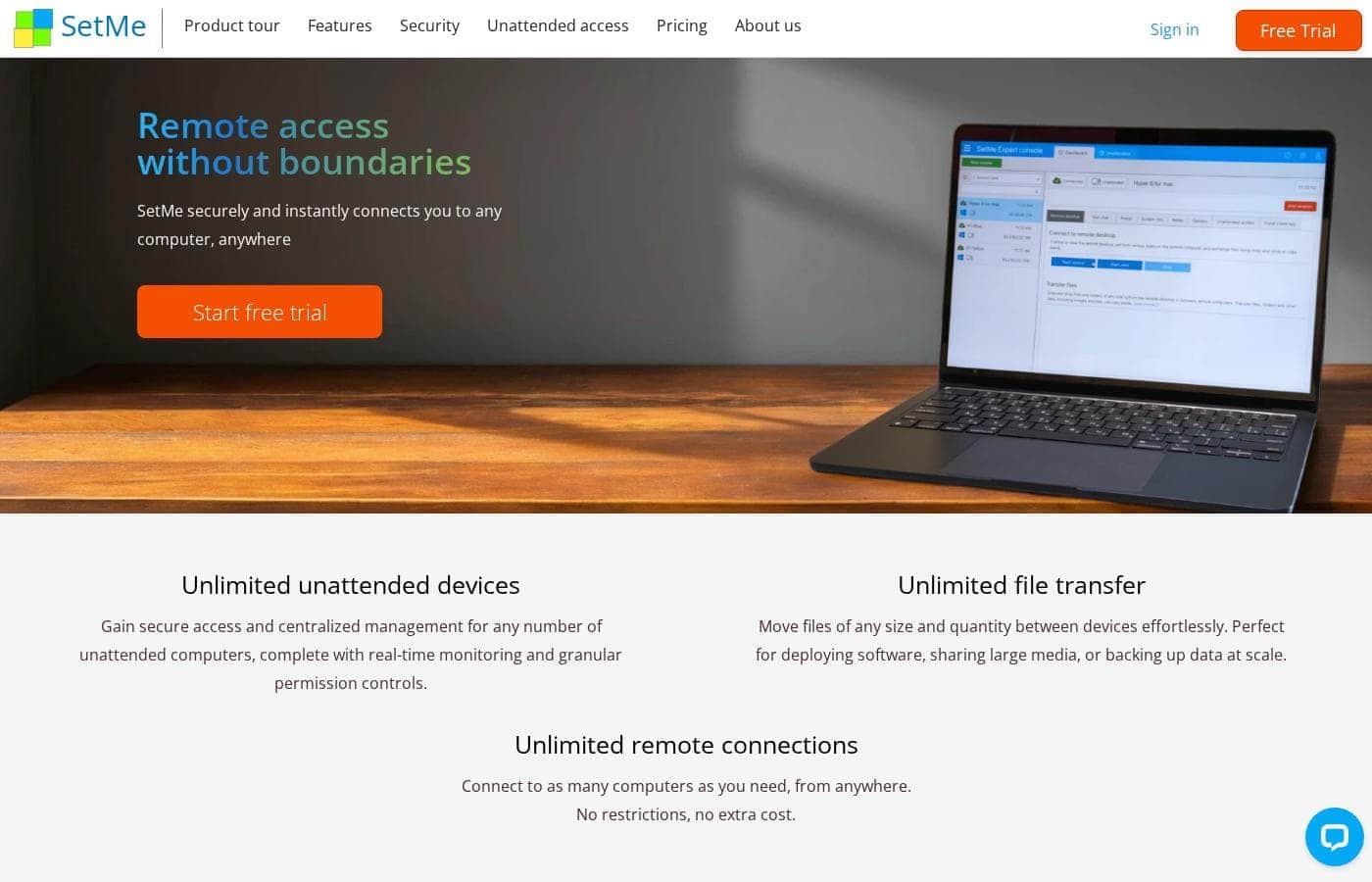
Скриншот главной страницы Techinline

At a glance

Quick overview for Techinline: rating, pricing summary, key features, and highlights.

Обзор Ciroapp

4.2
Solid remote support with scalable pricing.

We found Techinline SetMe to be a capable and secure remote access solution, especially for IT professionals and small teams needing reliable unattended and on-demand support. Its tiered pricing offers flexibility, but the lack of a clear refund policy is a notable gap for potential buyers.

Плюсы

  • Плюсы:Simple, instant client connections via a set.me link.
  • Плюсы:Scalable plans from individual use to enterprise-level team management.
  • Плюсы:Stable connections with auto-reconnect and multi-monitor support.

Минусы

  • Минусы:Limited public user reviews made independent sentiment analysis impossible.
  • Минусы:No explicit refund policy is detailed on the website.
  • Минусы:Advanced team features require upgrading to higher-tier, per-seat plans.
This section is a summary. Detailed sections about features, use cases, pricing, and reviews follow below.
Disclosure: This page may contain affiliate links for Techinline. If you click these links and make a purchase, Ciroapp may earn a commission at no additional cost to you.

Обзор Techinline, цены, функции, плюсы и минусы

Ever struggled with a clunky remote connection that drops mid-fix? 😫 Techinline SetMe cuts through the frustration, offering instant, secure access to any computer. It’s built for speed and stability, so you can resolve issues without the usual hassle.

Что такое Techinline?

SetMe is a remote support and management tool 🛠️ designed for IT professionals, support teams, and managed service providers. It lets you instantly connect to any computer, whether you’re providing live help or managing unattended servers and desktops from a central dashboard.

Compare Techinline with similar tools and browse the full category before choosing.

View all Remote Support tools

Techinline Ключевые функции

✨ Unlimited Unattended Access

Gain complete control over all your remote machines without limits. You can securely connect to and manage an unlimited number of unattended computers from a single dashboard. This gives you real-time monitoring and granular permission controls for every device, so you're always in charge.

✨ One-Click Connections for Instant Support

Speed up your support process with a simple, memorable link. Just tell your client to visit set.me in their web browser. Moments later, you're connected and ready to resolve their issue without any complex setup on their end.

✨ Stability That Never Quits

Work without worrying about your connection dropping. SetMe maintains a stable remote desktop session even on low-speed internet. If the network disconnects or the remote computer shuts down, the session automatically reconnects so you can pick up right where you left off.

✨ Zero-Lag Control and End-to-End Security

Experience smooth, real-time control over the remote desktop with no noticeable delay. Every session is protected by end-to-end encryption, ensuring that your support and management activities remain completely secure.

Варианты использования

🖥️ The Last-Minute Server Fix

It's 9 PM, and a client's server crashes. You're at home, but you have SetMe. You log into your dashboard, find the unattended server, and connect instantly. You diagnose the issue and get it back online before morning. Your client never even knew you were working from your couch.

Tip: Use session recording to document the fix for your own records or to show the client what was done.

🤝 Helping a Non-Technical Client

Your client is panicking. Their screen is frozen. Instead of walking them through a complex download, you just ask them to go to set.me in their web browser. That's it. Moments later, you're viewing their screen and solving the problem. It's a simple, human-friendly connection.

Expected outcome: A relieved client and a problem solved in minutes, not hours.

🌍 Managing a Global Fleet of Desktops

As an MSP, you manage desktops for offices in three countries. With SetMe, you have a single, centralized dashboard. You can monitor status, push updates, or hop on a machine in Tokyo or Toronto just as easily as one down the hall. It scales with you, no matter how many devices you add.

Tip: Group your devices by client or location in the dashboard for even faster navigation.

📡 The Spotty Wi-Fi Support Session

You're supporting a field technician from a coffee shop with bad Wi-Fi. In the past, the session would drop constantly. Now, SetMe maintains a stable connection. If the network blips, it auto-reconnects instantly, so you can finish the repair without starting over.

Expected outcome: Continuous work, even on unreliable networks.

🔑 Securely Sharing Access for a Specific Task

You need to let a contractor install specialized software on a workstation. Instead of giving them a permanent password, you use SetMe's permissions. You grant them just the access they need for that task, then revoke it when they're done.

It's simple, secure, and documented.

👥 Onboarding a New Team Member

Your support team is growing. You add a new technician to your SetMe Professional plan. Within minutes, you can assign them to specific client groups and set their access levels.

They're ready to start helping clients right away, using the same simple connection tools everyone else uses.

Обзор цен для Techinline

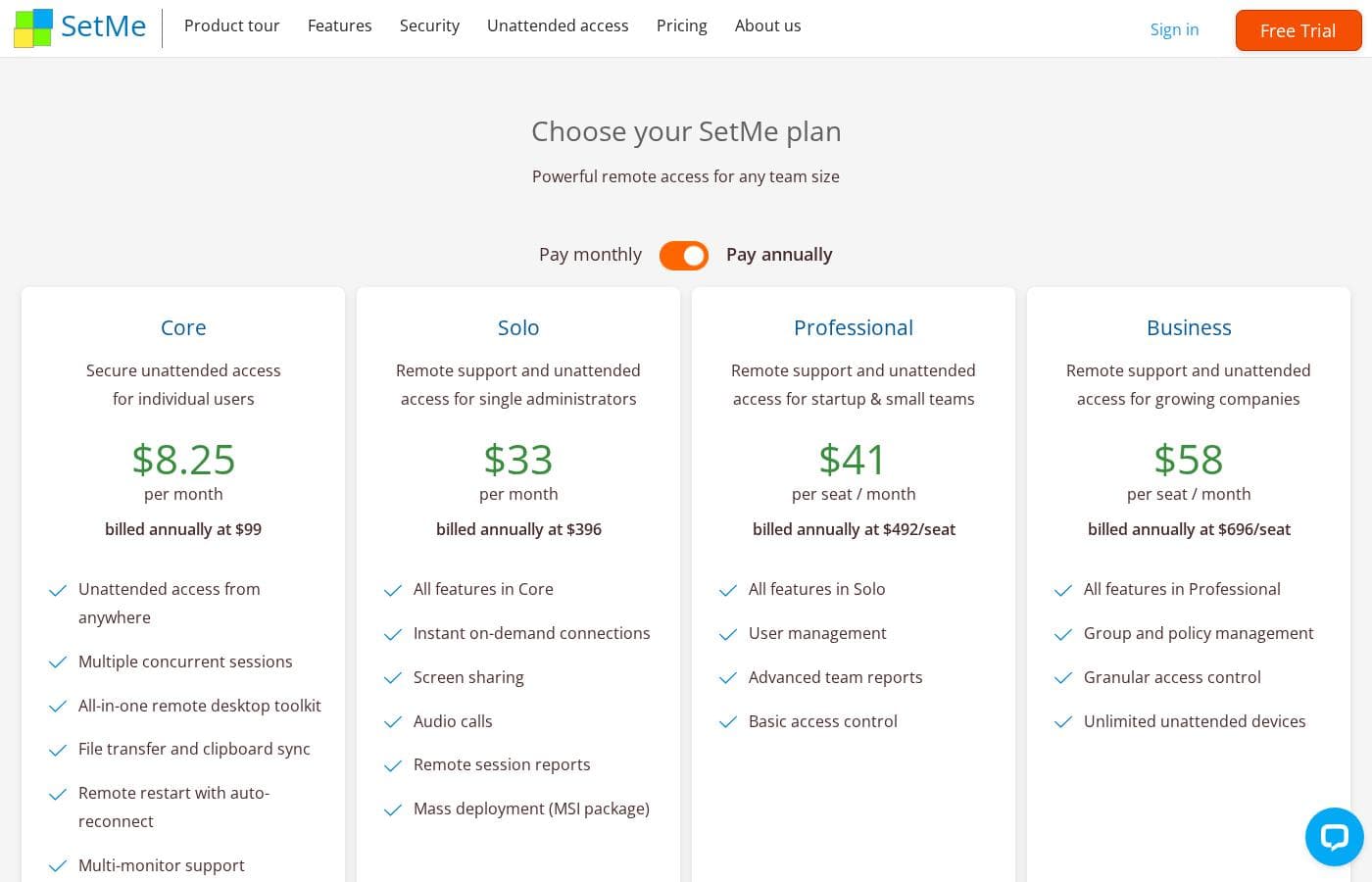
Techinline offers four SetMe plans starting at $8.25 per month (billed annually) for individual unattended access. Pricing scales based on features like on-demand support, seat count, and team management tools, with both monthly and yearly billing available for most tiers.

Core

Price: $8.25 per month (billed annually at $99) Websites Supported: Not explicitly stated Best For: Individual users needing secure unattended access Refund Policy: Not explicitly stated Other Features: Multiple concurrent sessions, File transfer and clipboard sync, Remote restart with auto-reconnect, Multi-monitor support, Session recording

This plan is perfect for individuals who only need to manage their own remote machines. It's a reliable choice if you don't need to provide instant on-demand support to new clients.

Solo

Price: $33 per month (billed annually at $396) Websites Supported: Not explicitly stated Best For: Single administrators providing remote support Refund Policy: Not explicitly stated Other Features: Instant on-demand connections, Remote session reports, Mass deployment (MSI package), All Core features

If you're an independent IT pro, this is likely your best fit. It adds the critical ability to start instant support sessions with anyone via a simple link.

Professional

Price: $41 per seat / month (billed annually at $492/seat) Websites Supported: Not explicitly stated Best For: Startups and small teams Refund Policy: Not explicitly stated Other Features: User management, Advanced team reports, Basic access control, All Solo features

Choose this tier if your team is expanding. The added management tools help you keep track of who is accessing what and when.

Business

Price: $58 per seat / month (billed annually at $696/seat) Websites Supported: Not explicitly stated Best For: Growing companies and larger teams Refund Policy: Not explicitly stated Other Features: Group and policy management, Granular access control, Unlimited unattended devices, All Professional features

This is the most robust option for organizations with strict security needs. It gives you the deepest level of control over permissions and unlimited device management.

SetMe offers a 15-day free trial with no credit card required, allowing you to test out the zero-lag remote control features. While a specific refund policy isn't detailed, the trial period provides a risk-free way to ensure the software meets your requirements before you pay.

pursuant de-fense. (In a legal setting, the term

Pricing

Techinline pricing: Techinline offers four SetMe plans starting at $8.25 per month (billed annually) for individual unattended access. Pricing scales based on features like on-demand support, seat count, and team management tools, with both monthly and yearly billing available for most tiers.

Core

Price: $8.25 per month (billed annually at $99) Websites Supported: Not explicitly stated Best For: Individual users needing secure unattended access Refund Policy: Not explicitly stated Other Features: Multiple concurrent sessions, File transfer and clipboard sync, Remote restart with auto-reconnect, Multi-monitor support, Session recording

This plan is perfect for individuals who only need to manage their own remote machines. It's a reliable choice if you don't need to provide instant on-demand support to new clients.

Solo

Price: $33 per month (billed annually at $396) Websites Supported: Not explicitly stated Best For: Single administrators providing remote support Refund Policy: Not explicitly stated Other Features: Instant on-demand connections, Remote session reports, Mass deployment (MSI package), All Core features

If you're an independent IT pro, this is likely your best fit. It adds the critical ability to start instant support sessions with anyone via a simple link.

Professional

Price: $41 per seat / month (billed annually at $492/seat) Websites Supported: Not explicitly stated Best For: Startups and small teams Refund Policy: Not explicitly stated Other Features: User management, Advanced team reports, Basic access control, All Solo features

Choose this tier if your team is expanding. The added management tools help you keep track of who is accessing what and when.

Business

Price: $58 per seat / month (billed annually at $696/seat) Websites Supported: Not explicitly stated Best For: Growing companies and larger teams Refund Policy: Not explicitly stated Other Features: Group and policy management, Granular access control, Unlimited unatte

Отзывы пользователей

External reviews for Techinline SetMe were not accessible during this review. The provided Trustpilot URL returned a 403 error, preventing access to user feedback.

Consequently, the review relies solely on the product's website information and our independent analysis of its features and pricing structure.

Обзоров пока нет.

Написать обзор

Написать отзыв для Techinline
0/100 символов
0/2000 символов

Почему использовать Techinline?

Here’s why SetMe stands out for your remote access needs: ✅

  • Unlimited Scalability: Manage any number of unattended computers without device limits, perfect for growing businesses.
  • Effortless Connections: Share a simple set.me link for instant access. Clients just visit the URL—no complex downloads or setup for them.
  • Rock-Solid Stability: Maintains a stable connection on low-speed internet and auto-reconnects if the network drops, so your work never stalls.
  • Centralized Control: Gain secure access and centralized management for all your devices, complete with real-time monitoring and permissions.
  • Zero-Lag Performance: Experience smooth, real-time control with end-to-end encryption, ensuring both speed and security.

Try it risk-free to see the difference for yourself. 💡

Готовы трансформировать свой рабочий процесс с Techinline?

Techinline alternatives

View all Remote Support tools

Другие инструменты в категории Remote Support

Popular comparisons

Similar tools

NinjaOne
NinjaOne
Help Desk4.6/5

Become a NinjaOne affiliate partner and empower your clients to streamline their IT operations! NinjaOne's RMM platform offers visibility, security & control, boosting client productivity & reducing IT costs. #1 for support, Ninja is a proven solution.

Viewabo
Viewabo
Remote Support3.8/5

Viewabo is a modern visual support platform designed for innovative customer care teams. It gives your staff instant visual context without needing complicated technology. The core idea is simple: you visualize the issue, so you can diagnose and resolve problems with confidence. It’s like being there, but you never leave your desk. This tool is trusted by forward-thinking companies, from fast-moving startups to established global brands. It empowers teams to modernize their support and improve customer satisfaction.💡

Часто задаваемые вопросы

Does SetMe integrate with other software or services?

Not explicitly stated on the official site. You may want to check the product documentation or contact support for details on integrations with ticketing or PSA systems.

How does SetMe handle data security and privacy?

SetMe uses end-to-end encryption for all remote sessions. Your data is protected in transit, ensuring secure remote control.

Are there limits on the number of devices or connections?

The Core and Solo plans have limits on unattended devices. The Business plan explicitly offers unlimited unattended devices for growing companies.

What is the refund policy for SetMe subscriptions?

Not explicitly stated on the official site. The 15-day free trial with no credit card required helps ensure the software meets your needs before purchase.

What does the 15-day free trial include?

The trial provides full access to SetMe's features, including zero-lag remote control and attended/unattended access. No credit card is needed to start.

Is pricing per user or per device?

Pricing is per user (seat) for the Professional and Business plans. The Core and Solo plans are priced per administrator, not per device.

How does onboarding or migration work for new teams?

Not explicitly stated on the official site. For mass deployment, the Solo plan and above include an MSI package to install SetMe across many devices at once.

What kind of customer support is offered?

Not explicitly stated on the official site. You should check the support page or contact their team to learn about response times and service level agreements.

In which languages or regions is SetMe available?

Not explicitly stated on the official site. The product is trusted by businesses globally, but specific language or regional availability details are not provided.

How do I cancel my SetMe subscription?

Not explicitly stated on the official site. You would typically manage your subscription through your account dashboard or by contacting their support team.

Which plan is best for a solo IT consultant?

The Solo plan is designed for a single administrator. It adds instant on-demand support connections to the core unattended access features.

What's the difference between the Professional and Business plans?

The Business plan adds group/policy management, granular access control, and unlimited unattended devices. It's for growing companies with stricter security needs.

Готовы попробовать Techinline? Посетите официальный сайт или узнайте цены.