Pngtree vs Shade
Pngtree and Shade serve very different creative needs. Pngtree is a massive library of downloadable PNG graphics. Shade is a centralized media hub for team storage and workflow. Your choice depends on whether you need assets or asset management.
Best for: Designers que frequentemente precisam de ativos PNG transparentes, Profissionais de marketing criando gráficos de campanha sazonais recorrentes
Best for: Creative and marketing teams, Video production departments
Acesso rápido ao PNG com detalhes da licença que você deve ler com atenção
Pngtree é útil para acesso rápido ao PNGs e modelos de design, mas os usuários comerciais devem verificar o escopo da licença, manter registros e avaliar as reclamações de clientes de terceiros antes de se comprometerem.
Prós
- Grande biblioteca de PNGs transparentes, modelos, planos de fundo e ativos de apresentação.
- Os planos pagos anunciam licenças de uso comercial, downloads mais rápidos e sem requisitos de atribuição.
- Ferramentas úteis de edição integrada e AI para remoção de fundo e variação rápida de imagem.
- O plano gratuito está disponível para testar a qualidade da pesquisa antes de pagar.
Contras
- Os termos de licença individuais são de uso único e podem não abranger o uso principal da equipe ou do cliente.
- Avaliações de terceiros mostram reclamações recorrentes sobre cobrança, suporte e avisos relacionados a direitos autorais.
- O preço promocional vitalício pode ser atraente, mas deve ser verificado em relação aos termos atuais.
- Ativos de estoque genéricos podem exigir edição para evitar uma aparência de marca padronizada.
Pesquisa inteligente, mas os preços são opacos.
Descobrimos que o Shade oferece um centro central convincente para equipas de multimédia, com pesquisa por IA e streaming inteligente de ficheiros de destaque. No geral, é uma ferramenta de fluxo de trabalho sólida, mas a falta de preços públicos para planos de equipa é um obstáculo significativo para os potenciais compradores.
Prós
- Plataforma completa para armazenamento, revisão e aprovação
- Streaming inteligente de ficheiros para acesso rápido a ficheiros grandes
- Pesquisa por IA poderosa e metadados automatizados
- Arquivamento seguro para armazenamento de projetos a longo prazo
Contras
- O preço para equipas e empresas não é divulgado publicamente
- Requer uma demonstração de vendas para orçamentos detalhados e escalabilidade
- Dados de revisão externa limitados para validação aprofundada
SobrePngtree
Pngtree é um mercado de gráficos de ações centrado em imagens, planos de fundo, modelos, ilustrações, efeitos de texto, ativos PowerPoint PNG e ferramentas AI mais recentes. Sua página de preços individual anuncia uma grande biblioteca de ativos com curadoria, downloads diários gratuitos, planos premium de uso comercial, velocidade de download mais rápida, remoção de plano de fundo, edição online e uma opção de plano vitalício. A plataforma é melhor entendida como uma biblioteca de recursos de design, em vez de um conjunto criativo completo.
SobreShade
💡 O Shade é uma plataforma completa para armazenamento e gestão de multimédia. Foi concebido para equipas criativas e de multimédia que lidam com ficheiros grandes diariamente. Combina streaming inteligente de ficheiros, ferramentas de revisão e pesquisa inteligente num só lugar.
Destaques
Comparação de recursos
Visão Geral de Recursos
Destacamos as principais diferenças e escolhemos um vencedor para cada recurso.
Core Purpose
Pngtree provides stock assets. Shade manages your own assets. They solve different problems.
Pngtree is a marketplace. You browse and download ready-to-use PNG images, templates, and backgrounds for your projects. It's like a giant library of creative ingredients. Shade is a storage and workflow hub. It's a central home for your team to upload, organize, search, and collaborate on your own media files like videos and graphics. The key difference is acquisition vs. management. Pngtree helps you get new assets. Shade helps you work with the assets you already have. A marketing team might use Pngtree to grab a Halloween graphic. That same team would use Shade to store and manage all their campaign videos.
Asset Library
Pngtree offers millions of downloadable assets. Shade has no library, only your own files.
Pngtree's main feature is its massive library. It specializes in transparent PNGs and has millions of items, including templates and illustrations. New assets are added daily. Shade does not provide any stock assets. Its library consists entirely of media files you and your team upload. It's a blank slate for your own content. This is the most fundamental difference. If you need graphics, Pngtree is the clear choice. If you need to organize existing files, Shade is the relevant tool. You'd choose Pngtree to find a specific birthday cake illustration. You'd choose Shade to archive last year's video project.
Search & Discovery
Shade's AI search finds files by description. Pngtree's search is for browsing its own library.
Pngtree has a search bar to find items within its own asset library. You search by keywords to discover new images and templates. Shade offers AI-powered search across your uploaded media. It uses automated metadata to help you find specific files even if you don't remember their name, based on content description. Shade's search is for management. Pngtree's search is for shopping. Shade helps you find what you have. Pngtree helps you find what you need to get. For example, you'd use Shade to find 'the sunset clip from the summer shoot.' You'd use Pngtree to search for 'transparent sunset graphic.'
Collaboration Tools
Shade has built-in review and approval workflows. Pngtree is a solo download experience.
Pngtree is designed for individual creators. The core action is browsing and downloading files for your own use. There are no team collaboration features. Shade includes tools for team review and approval. You can share media via secure links and gather time-stamped feedback directly on files, streamlining the approval process. This makes Pngtree a personal tool and Shade a team tool. Collaboration is a central part of Shade's value proposition. A freelance designer would use Pngtree. A video production team would need Shade to get client sign-offs on edits.
File Handling
Shade streams large files for instant access. Pngtree downloads standard-sized assets.
Pngtree downloads assets directly to your computer. Download speeds are high for premium users, but the action is a complete file transfer. Shade features intelligent file streaming. This allows team members to access and preview very large files like 4K video instantly in the browser without waiting for a full download. Streaming is a major advantage for media-heavy teams. It solves the bottleneck of working with huge files. Pngtree's assets are typically smaller and don't require this. Editing a video project in Shade can start immediately. Downloading a 5MB PNG from Pngtree is quick but a different workflow.
Commercial Licensing
Pngtree provides commercial licenses. Shade doesn't license assets—it stores your own.
Pngtree's paid plans include valid commercial licenses for their assets. You can also download official copyright certificates for legal protection on client work. Shade does not provide licenses. It is a storage platform. You are responsible for ensuring you have the rights to any files you upload and store in it. This is a critical difference for legal use. Pngtree handles the licensing for its own assets. Shade assumes you already have the rights to your files. Using a Pngtree image in a product design is covered by your subscription. Uploading your company's logo to Shade requires you to own that logo.
Learning Curve
Both are simple, but Pngtree is a familiar download site. Shade requires team onboarding.
Pngtree functions like any stock photo site. If you've used Shutterstock or Adobe Stock, you'll understand it instantly. It's a browse-and-download model. Shade is an all-in-one platform for storage and workflow. While reviews praise its intuitive interface, it requires setting up a central library and teaching team members the review and search processes. Pngtree has a lower initial learning curve for an individual. Shade has a higher setup curve but more long-term value for a team. An individual can be productive on Pngtree in minutes. A team might need a day to properly onboard to Shade.
Value Proposition
Pngtree's value is access to a huge asset library. Shade's value is team efficiency and organization.
Pngtree's value is clear: pay a fee to access millions of assets you can use commercially. The risk is whether the business practices (reports of aggressive upselling) undermine that value. Shade's value is efficiency and reduced chaos. It aims to save creative teams time searching for files and streamline feedback loops. Its value is harder to quantify but solves real workflow pain. The comparison is apples-to-oranges. One sells ingredients, the other sells a kitchen organization system. You'd calculate Pngtree's ROI on asset cost vs. hiring a designer. You'd calculate Shade's ROI on time saved searching and faster project turnarounds.
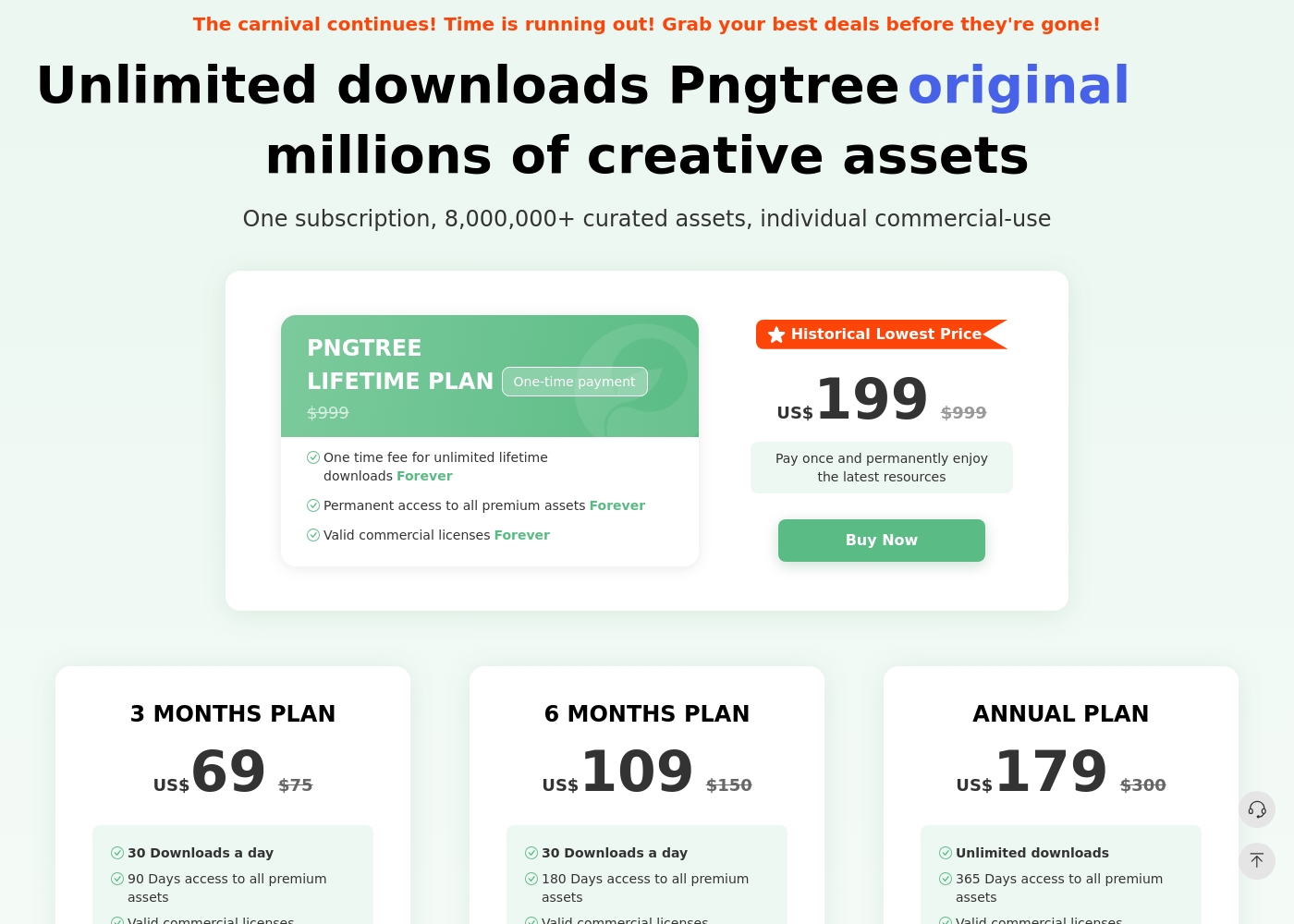
Pngtree possui um plano gratuito com downloads diários limitados e diversos planos individuais pagos. A página de preços lista atualmente um plano de 3 meses, um plano de 6 meses, um plano anual e um plano vitalício. O plano anual e o plano vitalício enfatizam downloads ilimitados, enquanto os planos pagos mais curtos listam limites diários de download. Os planos pagos anunciam licenças comerciais válidas, downloads mais rápidos, sem requisitos de atribuição e ativos premium. Os termos da licença ainda são importantes: a licença individual é de uso único e a autorização de equipe ou comercial mais ampla pode exigir um plano empresarial.
- 1 milhão de ativos gratuitos
- 2 downloads/dia
- Nenhuma atribuição necessária (para ativos gratuitos)
- Velocidade de download de até 0,5 MB/s
- 90 dias de acesso a todos os ativos premium
- Licenças comerciais válidas
- Downloads de alta velocidade (10 MB/s)
- Nenhuma atribuição necessária para conteúdo premium
- 180 dias de acesso a todos os ativos premium
- Licenças comerciais válidas
- Downloads de alta velocidade (10 MB/s)
- Nenhuma atribuição necessária para conteúdo premium
- Downloads ilimitados
- 365 dias de acesso a todos os ativos premium
- Licenças comerciais válidas
- Downloads de alta velocidade (10 MB/s)
- Nenhuma atribuição necessária para conteúdo premium
O Shade tem custos não divulgados com, pelo menos, 1 plano: Começar Grátis a $0.
Encontrar o plano certo depende das necessidades específicas de armazenamento de multimédia e do fluxo de trabalho da sua equipa.
Começar Grátis
Preço: $0 Websites Suportados: Não especificado Ideal Para: Indivíduos ou pequenas equipas a explorar a pesquisa por IA Política de Reembolso: Não especificada Outras Funcionalidades: Streaming inteligente de ficheiros, revisão e aprovação, metadados automatizados, pesquisa por IA, arquivo de multimédia
- Streaming inteligente de ficheiros
- Revisão e aprovação
- Metadados automatizados
- Pesquisa por IA
- Arquivo
Pricing Notes
- Pngtree offers clear, tiered pricing from $69 for 3 months to a $199 lifetime plan. All paid plans include commercial licenses.
- Shade has a free starting plan. Paid team/enterprise pricing is not public and requires contacting sales.
- Pngtree's free plan is very limited (2 downloads/day). Shade's free plan has no stated limits for initial testing.
- Pngtree has a 15-day money-back guarantee. Shade's refund policy is not stated.
Pricing Head-to-Head
Avaliações de usuários
Pngtree tem grande utilidade como uma biblioteca gráfica rápida, mas os compradores devem equilibrar essa utilidade com a complexidade da licença e o feedback negativo de clientes de terceiros. A abordagem mais segura é testar primeiro o catálogo, documentar cada download de uso comercial e evitar presumir que um plano individual cobre automaticamente todos os cenários de equipe ou cliente.
Em 2020, paguei $ 199 pelo plano vitalício de prêmio permanente. Agora eles exigem uma atualização para um novo Plano Empresarial, acusando-me de violação de direitos autorais. Lifetime deveria significar uma vida sem limites, mas eles tentam continuamente extorquir mais dinheiro.
As análises externas do Shade mostram um sentimento geralmente positivo, embora a amostra pareça pequena. Os utilizadores no Capterra destacam a facilidade de utilização da plataforma e a sua forte funcionalidade de pesquisa por IA, que ajuda as equipas a encontrar ficheiros rapidamente.
Algumas análises mencionam que o processo de integração foi tranquilo e que o suporte ao cliente foi reativo. Algumas referências apontam para o valor do centro de multimédia centralizado para colaboração.
Nosso veredicto
For most individuals, Pngtree offers quick access to the PNG assets they need. For teams managing their own media, Shade provides a more valuable and ethical workflow solution. Pngtree's superpower is its sheer volume of transparent PNG images and templates. It's the go-to when you need a specific graphic fast for a design project. Shade's superpower is intelligent media management. Its AI search and streaming turn a chaotic file server into a streamlined creative hub. The deciding factor is your core need. Do you need to *find and buy* assets, or do you need to *organize and collaborate* on assets you already have? Choose Pngtree for individual, on-demand stock assets. Choose Shade if your team wastes hours searching for files or juggling feedback. The right tool depends entirely on your workflow.
Perguntas Frequentes
Which is better for small teams: Pngtree or Shade?
Shade is built for team collaboration and centralized storage. Pngtree's plans are individual and lack team features like shared libraries or review tools.
Does Pngtree have AI search like Shade?
No. Pngtree's search is for browsing its own library. Shade's AI search helps you find files within your own uploaded media based on content description.
Is Shade worth the extra cost over Pngtree?
It's a different cost structure. Pngtree sells assets directly. Shade's cost is for a workflow platform. The value depends on whether you need asset storage or asset acquisition.
Can I use Pngtree images commercially?
Yes, but only with a paid premium plan. The free plan does not include commercial licenses. Paid plans also offer downloadable copyright certificates.
Does Shade have a free trial?
Yes. You can start with a free plan to explore core features like AI search and file streaming before committing to a paid team plan.
Which tool has better customer support?
User reviews are mixed for both. Pngtree has a 1.4-star rating with complaints about aggressive practices. Shade has a 3.8-star rating but notes can be slow.
Pronto para escolher?
Ambas as ferramentas têm seus pontos fortes. Escolha com base nas suas necessidades específicas.