Pngtree vs Shade
Pngtree and Shade serve very different creative needs. Pngtree is a massive library of downloadable PNG graphics. Shade is a centralized media hub for team storage and workflow. Your choice depends on whether you need assets or asset management.
Best for: Projektanci, którzy często potrzebują przejrzystych zasobów PNG, Marketerzy tworzą powtarzające się grafiki kampanii sezonowych
Best for: Creative and marketing teams, Video production departments
Szybki dostęp PNG ze szczegółami licencji, które należy uważnie przeczytać
Pngtree jest pomocny w szybkim dostępie do PNGs i szablonów projektów, ale użytkownicy komercyjni powinni przed zatwierdzeniem zweryfikować zakres licencji, prowadzić rejestry i rozważyć skargi klientów zewnętrznych.
Zalety
- Duża biblioteka przejrzystych PNGs, szablonów, teł i zasobów prezentacji.
- Płatne plany reklamują licencje do użytku komercyjnego, szybsze pobieranie i brak wymagań dotyczących przypisania.
- Przydatne wbudowane narzędzia do edycji i narzędzia AI do usuwania tła i szybkiej zmiany obrazu.
- Dostępny jest bezpłatny plan umożliwiający testowanie jakości wyszukiwania przed dokonaniem płatności.
Wady
- Indywidualne postanowienia licencyjne dotyczą pojedynczego stanowiska i mogą nie obejmować użytkowania zespołowego lub głównego klienta.
- Recenzje stron trzecich pokazują powtarzające się skargi dotyczące rozliczeń, wsparcia i informacji związanych z prawami autorskimi.
- Promocyjne ceny na całe życie mogą być atrakcyjne, ale należy je sprawdzić pod kątem aktualnych warunków.
- Ogólne zasoby magazynowe mogą wymagać edycji, aby uniknąć szablonowego wyglądu marki.
Inteligentne wyszukiwanie, ale cennik nie jest przejrzysty.
Uważamy, że Shade oferuje przekonujące scentralizowane centrum dla zespołów medialnych, z wyróżniającymi się funkcjami wyszukiwania AI i inteligentnego strumieniowania plików. Ogólnie rzecz biorąc, jest to solidne narzędzie do przepływu pracy, ale brak publicznych cen dla planów zespołowych jest znaczącą wadą dla potencjalnych nabywców.
Zalety
- Kompleksowa platforma do przechowywania, recenzowania i zatwierdzania
- Inteligentne strumieniowanie plików dla szybkiego dostępu do dużych plików
- Potężne wyszukiwanie AI i automatyczne metadane
- Bezpieczne archiwizowanie dla długoterminowego przechowywania projektów
Wady
- Ceny dla zespołów i korporacyjne nie są publicznie ujawnione
- Wymaga dema sprzedażowego dla szczegółowych wycen i skalowalności
- Ograniczone dane z zewnętrznych recenzji dla głębszej walidacji
OPngtree
Pngtree to giełda grafik stockowych skupiająca się na obrazach PNG, tłach, szablonach, ilustracjach, efektach tekstowych, zasobach PowerPoint i nowszych narzędziach AI. Indywidualna strona z cenami reklamuje dużą, wyselekcjonowaną bibliotekę zasobów, bezpłatne codzienne pobieranie, plany premium do użytku komercyjnego, większą prędkość pobierania, usuwanie tła, edycję online i opcję planu na całe życie. Platformę najlepiej rozumieć jako bibliotekę zasobów projektowych, a nie pełny pakiet kreatywny.
OShade
💡 Shade to kompleksowa platforma do przechowywania i zarządzania multimediami. Jest przeznaczona dla zespołów kreatywnych i medialnych, które codziennie obsługują duże pliki. Łączy inteligentne strumieniowanie plików, narzędzia do recenzji i inteligentne wyszukiwanie w jednym miejscu.
Najważniejsze
Porównanie funkcji
Przegląd funkcji
Podkreślamy główne różnice i wybieramy zwycięzcę dla każdej funkcji.
Core Purpose
Pngtree provides stock assets. Shade manages your own assets. They solve different problems.
Pngtree is a marketplace. You browse and download ready-to-use PNG images, templates, and backgrounds for your projects. It's like a giant library of creative ingredients. Shade is a storage and workflow hub. It's a central home for your team to upload, organize, search, and collaborate on your own media files like videos and graphics. The key difference is acquisition vs. management. Pngtree helps you get new assets. Shade helps you work with the assets you already have. A marketing team might use Pngtree to grab a Halloween graphic. That same team would use Shade to store and manage all their campaign videos.
Asset Library
Pngtree offers millions of downloadable assets. Shade has no library, only your own files.
Pngtree's main feature is its massive library. It specializes in transparent PNGs and has millions of items, including templates and illustrations. New assets are added daily. Shade does not provide any stock assets. Its library consists entirely of media files you and your team upload. It's a blank slate for your own content. This is the most fundamental difference. If you need graphics, Pngtree is the clear choice. If you need to organize existing files, Shade is the relevant tool. You'd choose Pngtree to find a specific birthday cake illustration. You'd choose Shade to archive last year's video project.
Search & Discovery
Shade's AI search finds files by description. Pngtree's search is for browsing its own library.
Pngtree has a search bar to find items within its own asset library. You search by keywords to discover new images and templates. Shade offers AI-powered search across your uploaded media. It uses automated metadata to help you find specific files even if you don't remember their name, based on content description. Shade's search is for management. Pngtree's search is for shopping. Shade helps you find what you have. Pngtree helps you find what you need to get. For example, you'd use Shade to find 'the sunset clip from the summer shoot.' You'd use Pngtree to search for 'transparent sunset graphic.'
Collaboration Tools
Shade has built-in review and approval workflows. Pngtree is a solo download experience.
Pngtree is designed for individual creators. The core action is browsing and downloading files for your own use. There are no team collaboration features. Shade includes tools for team review and approval. You can share media via secure links and gather time-stamped feedback directly on files, streamlining the approval process. This makes Pngtree a personal tool and Shade a team tool. Collaboration is a central part of Shade's value proposition. A freelance designer would use Pngtree. A video production team would need Shade to get client sign-offs on edits.
File Handling
Shade streams large files for instant access. Pngtree downloads standard-sized assets.
Pngtree downloads assets directly to your computer. Download speeds are high for premium users, but the action is a complete file transfer. Shade features intelligent file streaming. This allows team members to access and preview very large files like 4K video instantly in the browser without waiting for a full download. Streaming is a major advantage for media-heavy teams. It solves the bottleneck of working with huge files. Pngtree's assets are typically smaller and don't require this. Editing a video project in Shade can start immediately. Downloading a 5MB PNG from Pngtree is quick but a different workflow.
Commercial Licensing
Pngtree provides commercial licenses. Shade doesn't license assets—it stores your own.
Pngtree's paid plans include valid commercial licenses for their assets. You can also download official copyright certificates for legal protection on client work. Shade does not provide licenses. It is a storage platform. You are responsible for ensuring you have the rights to any files you upload and store in it. This is a critical difference for legal use. Pngtree handles the licensing for its own assets. Shade assumes you already have the rights to your files. Using a Pngtree image in a product design is covered by your subscription. Uploading your company's logo to Shade requires you to own that logo.
Learning Curve
Both are simple, but Pngtree is a familiar download site. Shade requires team onboarding.
Pngtree functions like any stock photo site. If you've used Shutterstock or Adobe Stock, you'll understand it instantly. It's a browse-and-download model. Shade is an all-in-one platform for storage and workflow. While reviews praise its intuitive interface, it requires setting up a central library and teaching team members the review and search processes. Pngtree has a lower initial learning curve for an individual. Shade has a higher setup curve but more long-term value for a team. An individual can be productive on Pngtree in minutes. A team might need a day to properly onboard to Shade.
Value Proposition
Pngtree's value is access to a huge asset library. Shade's value is team efficiency and organization.
Pngtree's value is clear: pay a fee to access millions of assets you can use commercially. The risk is whether the business practices (reports of aggressive upselling) undermine that value. Shade's value is efficiency and reduced chaos. It aims to save creative teams time searching for files and streamline feedback loops. Its value is harder to quantify but solves real workflow pain. The comparison is apples-to-oranges. One sells ingredients, the other sells a kitchen organization system. You'd calculate Pngtree's ROI on asset cost vs. hiring a designer. You'd calculate Shade's ROI on time saved searching and faster project turnarounds.
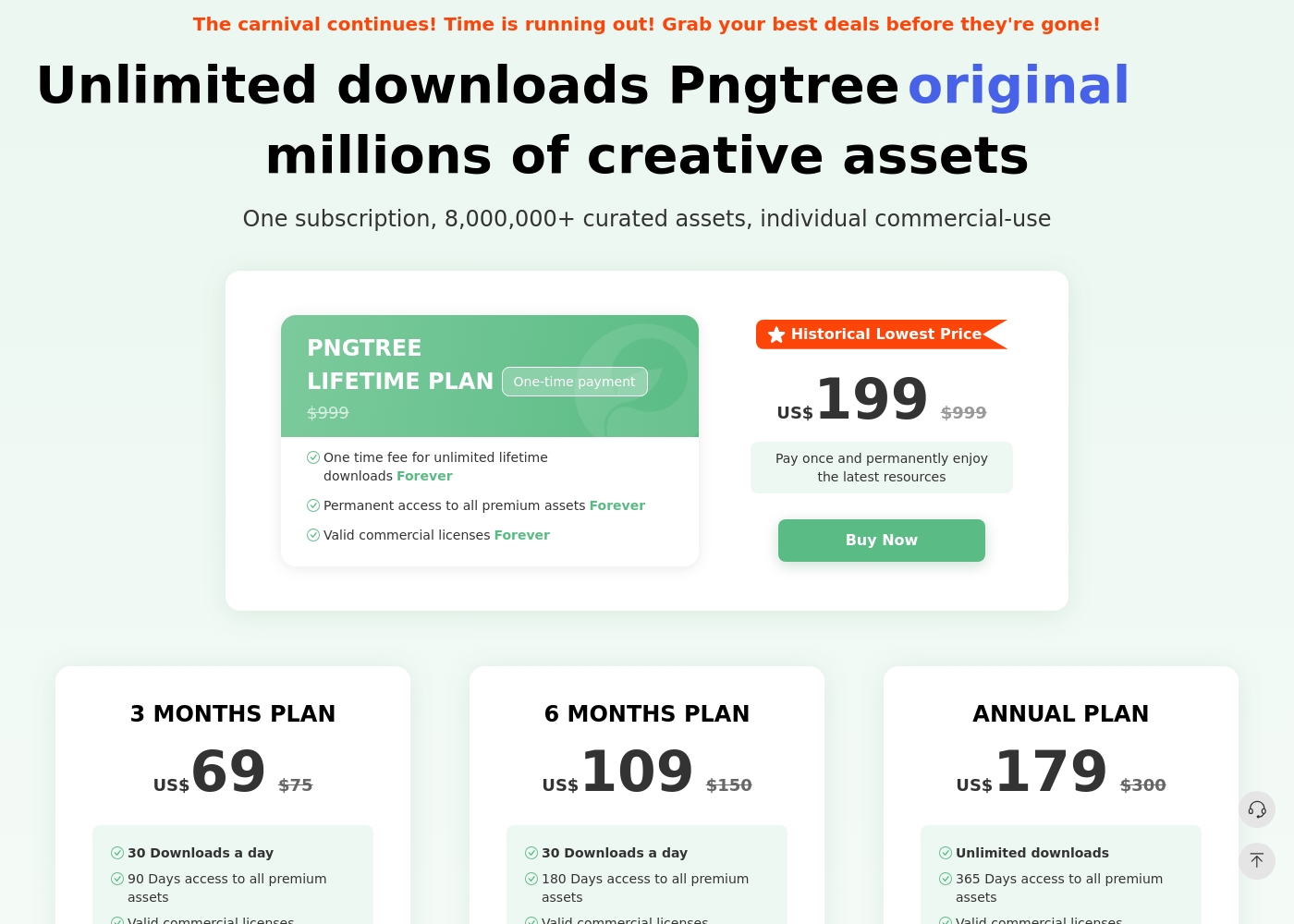
Pngtree ma bezpłatny plan z ograniczoną codzienną liczbą pobrań i kilkoma płatnymi planami indywidualnymi. Strona z cenami zawiera obecnie plan 3-miesięczny, 6-miesięczny, roczny i dożywotni. Plan roczny i plan dożywotni kładą nacisk na nieograniczoną liczbę pobrań, podczas gdy krótsze plany płatne zawierają dzienne limity pobierania. Płatne plany reklamują ważne licencje komercyjne, szybsze pobieranie, brak wymagań dotyczących przypisania i zasoby premium. Warunki licencji nadal mają znaczenie: licencja indywidualna jest jednostanowiskowa, a autoryzacja zespołowa lub szersza działalność biznesowa może wymagać planu korporacyjnego.
- 1 milion darmowych zasobów
- 2 pobrania dziennie
- Nie jest wymagane uznanie autorstwa (w przypadku bezpłatnych zasobów)
- Prędkość pobierania do 0,5 MB/s
- 90-dniowy dostęp do wszystkich zasobów premium
- Ważne licencje komercyjne
- Szybkie pobieranie (10 MB/s)
- W przypadku treści premium nie jest wymagane podanie źródła
- 180-dniowy dostęp do wszystkich zasobów premium
- Ważne licencje komercyjne
- Szybkie pobieranie (10MB/s)
- W przypadku treści premium nie jest wymagane podanie źródła
- Nieograniczone pobieranie
- 365-dniowy dostęp do wszystkich zasobów premium
- Ważne licencje komercyjne
- Szybkie pobieranie (10 MB/s)
- W przypadku treści premium nie jest wymagane podanie źródła
Shade kosztuje kwotę nieujawnioną, z co najmniej 1 planem: Start for Free za 0 USD.
Znalezienie odpowiedniego planu zależy od konkretnych potrzeb Twojego zespołu w zakresie przechowywania multimediów i przepływu pracy.
Start for Free
Cena: 0 USD Wspierane strony: Nieokreślone Najlepsze dla: Osób indywidualnych lub małych zespołów eksplorujących wyszukiwanie AI Polityka zwrotów: Nieokreślona Inne funkcje: Inteligentne strumieniowanie plików, recenzja i zatwierdzanie, automatyczne metadane, wyszukiwanie AI, archiwizacja multimediów
- Inteligentne strumieniowanie plików
- Recenzja i zatwierdzanie
- Automatyczne metadane
- Wyszukiwanie AI
- Archiwum
Pricing Notes
- Pngtree offers clear, tiered pricing from $69 for 3 months to a $199 lifetime plan. All paid plans include commercial licenses.
- Shade has a free starting plan. Paid team/enterprise pricing is not public and requires contacting sales.
- Pngtree's free plan is very limited (2 downloads/day). Shade's free plan has no stated limits for initial testing.
- Pngtree has a 15-day money-back guarantee. Shade's refund policy is not stated.
Pricing Head-to-Head
Opinie użytkowników
Pngtree ma dużą użyteczność jako szybka biblioteka graficzna, ale kupujący powinni zrównoważyć tę użyteczność ze złożonością licencji i negatywnymi opiniami klientów zewnętrznych. Najbezpieczniejszym podejściem jest najpierw przetestowanie katalogu, udokumentowanie każdego pobrania do użytku komercyjnego i unikanie założenia, że indywidualny plan automatycznie obejmuje wszystkie scenariusze zespołu lub klienta.
W 2020 roku zapłaciłem 199 USD za dożywotni plan Premium Premium. Teraz żądają przejścia na nowy plan Enterprise, oskarżając mnie o naruszenie praw autorskich. Życie powinno oznaczać życie bez ograniczeń, ale oni ciągle próbują wyłudzić więcej pieniędzy.
Zewnętrzne recenzje Shade pokazują ogólnie pozytywne nastawienie, chociaż próba wydaje się mała. Użytkownicy na Capterra podkreślają łatwość użycia platformy i jej silną funkcję wyszukiwania opartego na AI, która pomaga zespołom szybko znajdować pliki.
Niektórzy recenzenci zauważają, że proces wdrożenia przebiegł sprawnie, a wsparcie klienta było szybkie w reakcji. Kilka opinii dotyczy wartości scentralizowanego centrum multimedialnego dla współpracy.
Wyszukiwanie AI to coś, co całkowicie zmienia zasady gry. Potrafimy zlokalizować dowolne ujęcie w kilka sekund, bez przeglądania niezliczonych folderów. Oszczędziło to naszemu zespołowi mnóstwo czasu przy projektach.
Nasz werdykt
For most individuals, Pngtree offers quick access to the PNG assets they need. For teams managing their own media, Shade provides a more valuable and ethical workflow solution. Pngtree's superpower is its sheer volume of transparent PNG images and templates. It's the go-to when you need a specific graphic fast for a design project. Shade's superpower is intelligent media management. Its AI search and streaming turn a chaotic file server into a streamlined creative hub. The deciding factor is your core need. Do you need to *find and buy* assets, or do you need to *organize and collaborate* on assets you already have? Choose Pngtree for individual, on-demand stock assets. Choose Shade if your team wastes hours searching for files or juggling feedback. The right tool depends entirely on your workflow.
Często zadawane pytania
Which is better for small teams: Pngtree or Shade?
Shade is built for team collaboration and centralized storage. Pngtree's plans are individual and lack team features like shared libraries or review tools.
Does Pngtree have AI search like Shade?
No. Pngtree's search is for browsing its own library. Shade's AI search helps you find files within your own uploaded media based on content description.
Is Shade worth the extra cost over Pngtree?
It's a different cost structure. Pngtree sells assets directly. Shade's cost is for a workflow platform. The value depends on whether you need asset storage or asset acquisition.
Can I use Pngtree images commercially?
Yes, but only with a paid premium plan. The free plan does not include commercial licenses. Paid plans also offer downloadable copyright certificates.
Does Shade have a free trial?
Yes. You can start with a free plan to explore core features like AI search and file streaming before committing to a paid team plan.
Which tool has better customer support?
User reviews are mixed for both. Pngtree has a 1.4-star rating with complaints about aggressive practices. Shade has a 3.8-star rating but notes can be slow.
Gotowy do wyboru?
Oba narzędzia mają swoje mocne strony. Wybierz w oparciu o swoje konkretne potrzeby.