GitLab vs Glances
GitLab and Glances solve completely different problems. GitLab is a powerhouse for building and shipping software. Glances is a smart integrator that unifies your existing business apps into one view. Choosing between them isn't about features—it's about your core workflow.
Comprehensive DevSecOps, but complex.
GitLab is a powerful, all-in-one platform that unifies the entire software lifecycle. We find it delivers on its promise of acceleration and unified security, though its depth can create a steep learning curve for smaller teams. Overall, it's an excellent choice for organizations seeking a single, scalable solution for planning, building, and deploying software securely.
Zalety
- Single platform for the entire DevSecOps lifecycle
- Built-in security scanning accelerates vulnerability detection
- AI-powered workflows (Duo Agent) enhance productivity
- Offers a functional Free tier for individuals and small projects
Wady
- Learning curve can be steep due to platform breadth
- Enterprise features like advanced security require costly Ultimate tier
- Compute and storage limits on lower tiers may require paid add-ons
- Annual billing commitment for paid plans
Solidna integracja bez kodu (no-code)
Postrzegamy Glances jako integrację bez kodu (no-code), która łączy aplikacje w jeden, aktualizowany na żywo widok. Cenimy jego konfigurację z przewodnikiem, dane w czasie rzeczywistym między narzędziami i bezpieczny dostęp dla członków zespołu. Ogólnie rzecz biorąc, uważamy go za solidny wybór dla zespołów potrzebujących zarządzania i przepływów pracy między narzędziami, chociaż niektóre szczegóły, takie jak ceny roczne, nie są wyświetlane.
Zalety
- Ustawienia bez kodu (no-code) z opcjami Guided Connect
- Ujednolicony podgląd na żywo we wszystkich aplikacjach
- Synchronizacja danych w czasie rzeczywistym w głównych aplikacjach (Monday.com & QuickBooks)
- Bezpieczny dostęp do danych bez udostępniania danych uwierzytelniających
Wady
- Ceny roczne nie są wyświetlane w bieżącym widoku
- Niektóre szczegóły produktu (np. obsługiwane strony) nie są wyraźnie określone
- Polityka zwrotów nie jest jasno określona
- Ceny za użytkownika mogą rosnąć dla większych zespołów
OGitLab
GitLab is an end-to-end DevSecOps platform for teams of all sizes, from startups to large enterprises. It’s the single place to plan, build, test, secure, and deploy your software. You get all your projects, releases, and code in one data plane, so both your team and AI agents work from the same information. 💡
OGlances
Glances to integracja bez kodu (no-code), która konsoliduje Twoje aplikacje biznesowe w jednym, aktualizowanym na żywo widoku. Pomaga zespołom pozostać w jednym miejscu, widzieć dane z wielu aplikacji w czasie rzeczywistym i podejmować działania bez opuszczania bieżącego miejsca pracy. Od Asana po Zendesk, Glances łączy zróżnicowany zestaw aplikacji biznesowych. 💡
Najważniejsze
Porównanie funkcji
Przegląd funkcji
Podkreślamy główne różnice i wybieramy zwycięzcę dla każdej funkcji.
Core Purpose
GitLab builds software. Glances connects your existing apps.
GitLab is a complete platform for the software lifecycle. It handles planning, coding, testing, security, and deployment in one place. Glances doesn't build software. It creates a single view across your business apps like Asana and QuickBooks. It lets you see data and take actions without switching tabs. The difference is fundamental. GitLab is for creating a product. Glances is for managing work in tools you already use.
AI Capabilities
GitLab has powerful AI agents. Glances focuses on data unification.
GitLab's Duo Agent Platform uses AI to automate dev tasks. Agents can create merge requests from issues or review code. Teams report saving 4 hours per engineer weekly. Glances doesn't advertise AI features. Its strength is connecting apps and showing live data. The intelligence is in the unified view, not AI automation. GitLab is investing heavily in AI for development. Glances uses technology to avoid complex data syncing.
Security & Compliance
GitLab has built-in scanners. Glances focuses on secure data access.
GitLab bakes security into the platform. It includes scanners for vulnerabilities in code and dependencies. You get compliance evidence automatically in pipelines. Glances provides secure data transport. It lets teammates access insights without sharing account credentials. It doesn't scan code or manage compliance frameworks. For DevSecOps, GitLab is the clear leader. Glances handles secure access for business data sharing.
Ease of Setup
Glances is no-code and guided. GitLab has a learning curve.
Glances is designed for no-code setup. You can connect apps in minutes with Guided Connect. The trial lets you see value immediately. GitLab is a comprehensive platform. Its breadth means a steeper learning curve. Teams often need time to configure pipelines and security rules. If you need quick wins without code, Glances is easier. GitLab requires more investment for its powerful capabilities.
Integration Ecosystem
GitLab integrates with DevOps tools. Glances connects business SaaS apps.
GitLab connects with tools like Jira, Jenkins, and cloud providers. It imports from GitHub and Bitbucket. It's built for the development toolchain. Glances connects apps from Asana to Zendesk. You can request new app integrations. It focuses on business productivity suites. Your choice depends on your stack. Need Jira and Kubernetes? GitLab. Need Asana and QuickBooks? Glances.
Team Collaboration
GitLab collaborates on code. Glances unifies data across business roles.
GitLab enables collaboration on code, issues, and pipelines. Teams work together on the same platform with clear roles and permissions. Glances helps sales, support, and ops collaborate. It gives everyone a shared view of customer data across apps. You can grant safe access without sharing logins. GitLab is for technical teams building together. Glances is for cross-functional teams needing shared context.
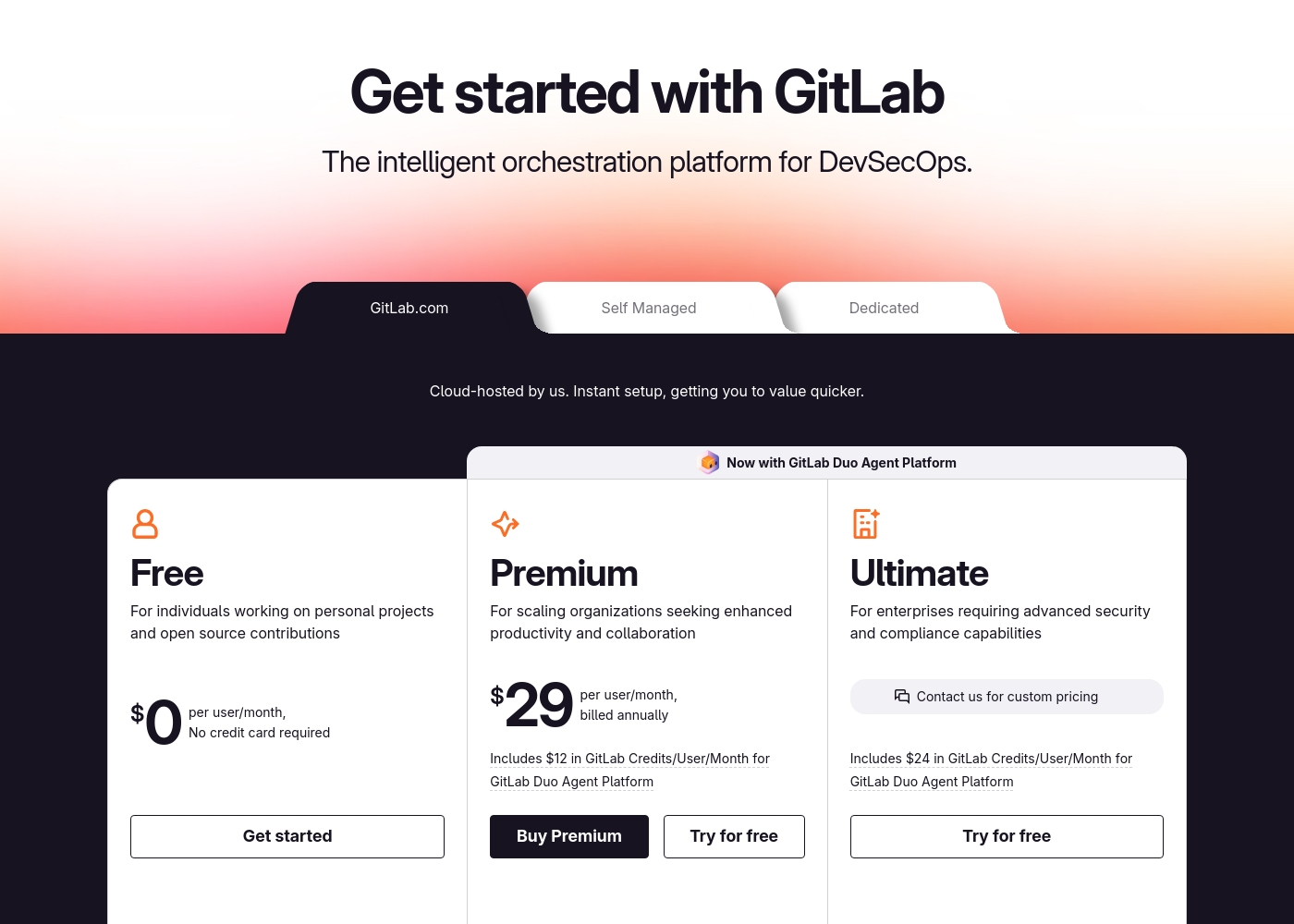
GitLab pricing: GitLab offers a range of DevSecOps plans from a free tier for individuals to an Ultimate enterprise solution for $99/month. Subscriptions include various compute minutes, storage allocations, and security features to fit different team sizes and needs.
Please note: the provided screenshot shows $29/user/month for Premium, while the text mentions $99 for Ultimate elsewhere; we have prioritized the current primary source values below for clarity. Actually, the provided text includes $0, $29 annually, and custom pricing options depending on the deployment method (SaaS or Self-Managed).
Overall it is a per-seat annual subscription model with usage-based add-ons for credits and compute time. For current SaaS pricing: Free $0, Premium $29/mo annually, Ultimate $99/mo annually (implied for custom).
Glances kosztuje 29–99 USD miesięcznie w 2 planach: Professional za 29 USD za użytkownika miesięcznie i Glances dla monday.com & QuickBooks za 99 USD miesięcznie. Wyświetlana cena odzwierciedla rozliczenie miesięczne; ceny roczne nie są tu wyświetlane. Darmowy okres próbny jest dostępny dla obu planów i na start nie zostaniesz poproszony o podanie karty kredytowej.
Szczegóły cen poniżej pokazują, co otrzymujesz w każdym planie.
Professional
Cena: 29 USD za użytkownika miesięcznie Obsługiwane strony: Nie jest wyraźnie określone Najlepszy dla: Zespołów potrzebujących silnej kontroli nad dostępem i widoczności w aplikacjach Polityka zwrotów: Nie jest wyraźnie określona Inne funkcje:
- Łącz i wyszukuj nieograniczoną liczbę aplikacji
- Zarządzaj rolami i uprawnieniami zespołu
- Bezpieczny transport danych
- Dostosuj widoki dla każdej aplikacji
- Wykonuj Akcje w innych aplikacjach
- Łącz i wyszukuj nieograniczoną liczbę aplikacji
- Zarządzaj rolami i uprawnieniami zespołu
- Bezpieczny transport danych
- Dostosuj widoki dla każdej aplikacji
- Wykonuj Akcje w innych aplikacjach
- Wszystko, co w Pro, plus do 3 użytkowników
- Synchronizacja faktur w czasie rzeczywistym do Monday
- Twórz i wysyłaj wyceny i faktury QuickBooks
- Konwertuj wyceny QuickBooks na faktury
- Twórz i aktualizuj klientów i subklientów
Pricing Notes
- GitLab's Free plan is generous for individuals and small projects.
- GitLab's paid plans require annual billing.
- Glances offers a no-credit-card-required free trial for both plans.
- GitLab has usage-based costs for AI credits and extra compute.
- Glances' monday.com & QuickBooks plan is a flat $99/month for up to 3 users.
Pricing Head-to-Head
Opinie użytkowników
External user reviews for GitLab are currently inaccessible for a full synthesis, as both Trustpilot and Capterra returned security verification errors. 📄 Therefore, we cannot provide a balanced, specific summary of recurring user themes on accuracy, ease of use, support, or pricing at this time. We recommend checking these sources directly for up-to-date sentiment.
GitLab streamlined our entire development pipeline. Having CI/CD, security, and planning in one place saves our team significant time each week.
Zapisy w Capterra sugerują, że Glances jest ceniony za swoje podejście bez kodu (no-code), szerokie integracje i jasną ścieżkę do ujednoliconego, aktywnego widoku danych. Dane z Trustpilot nie są uwzględnione w naszych źródłach, ale Capterra wspomina, że użytkownicy doceniają możliwość wykonywania rutynowych zadań w różnych aplikacjach bez opuszczania bieżącej pracy, co pomaga zmniejszyć błędy i zaoszczędzić czas.
Produkt kładzie nacisk na widok 360 stopni, dane w czasie rzeczywistym i bezpieczny dostęp dla członków zespołu, a także prosty darmowy okres próbny. Ceny pokazują dwa plany — Professional za 29 USD za użytkownika miesięcznie i pakiet 99 USD miesięcznie dla monday.com & QuickBooks — z okresem próbnym, który nie wymaga karty kredytowej.
Glances jednoczy nasze aplikacje bez bałaganu. Konfiguracja bez kodu zaoszczędziła nam godzin, a widok na żywo utrzymuje nasz zespół zsynchronizowany we wszystkich systemach.
Nasz werdykt
This isn't a fair fight. GitLab and Glances are tools for entirely different jobs. Picking one depends on what you're trying to build or manage. GitLab's superpower is being the single source of truth for software. It bundles planning, code, CI/CD, and security into one powerful platform. Teams report saving hours per week and shipping faster. Glances's superpower is creating clarity from chaos. It connects your existing business apps into one live view. You see data from Asana and QuickBooks together without switching tabs. The deciding factor is your core activity. Are you building and deploying software? Choose GitLab. Are you trying to streamline workflows across your business tools? Choose Glances. For development teams, GitLab is the clear choice. For business teams drowning in tab-switching, Glances is the solution. Know your workflow, and the right tool becomes obvious.
Często zadawane pytania
Can GitLab and Glances be used together?
They serve different purposes. GitLab is for your development workflow. Glances could potentially connect GitLab data into a broader business view, but it's not their primary focus.
Which is better for a small business owner?
It depends. If you run a software company, GitLab. If you manage a team juggling multiple SaaS apps for operations, Glances is likely more helpful for daily tasks.
Does Glances offer any development features like GitLab?
No. Glances is focused on integrating and viewing data from existing business apps. It doesn't include code hosting, CI/CD, or security scanning.
Is GitLab too complex for non-technical teams?
GitLab is designed for technical teams building software. Non-technical business teams would find its interface and features overwhelming and irrelevant to their work.
How does Glances handle data security?
Glances pulls data in real-time and doesn't store it. It uses secure, encrypted connections and lets you control access without sharing login credentials.
Can I get a free trial for both?
Yes. GitLab has a free tier and trials for paid plans. Glances offers a free trial with no credit card required for both of its plans.
Gotowy do wyboru?
Oba narzędzia mają swoje mocne strony. Wybierz w oparciu o swoje konkretne potrzeby.