전체 번역 준비 중 — 제품 세부 정보는 영어로 표시되며 탐색은 한국어로 제공됩니다.
Todoist

Todoist 리뷰

A simple, powerful to-do list for clarity and calm.

Todoist 가격: 월 US$7 (≈ ₩9,442)부터 · 요금제 3개 · 무료 요금제 있음 · 2026년 11월 23일 가격 확인

작성자: Ciroapp Editorial Team · 업데이트됨 2026년 5월 15일

추가 비용 없이 수수료가 적용될 수 있습니다

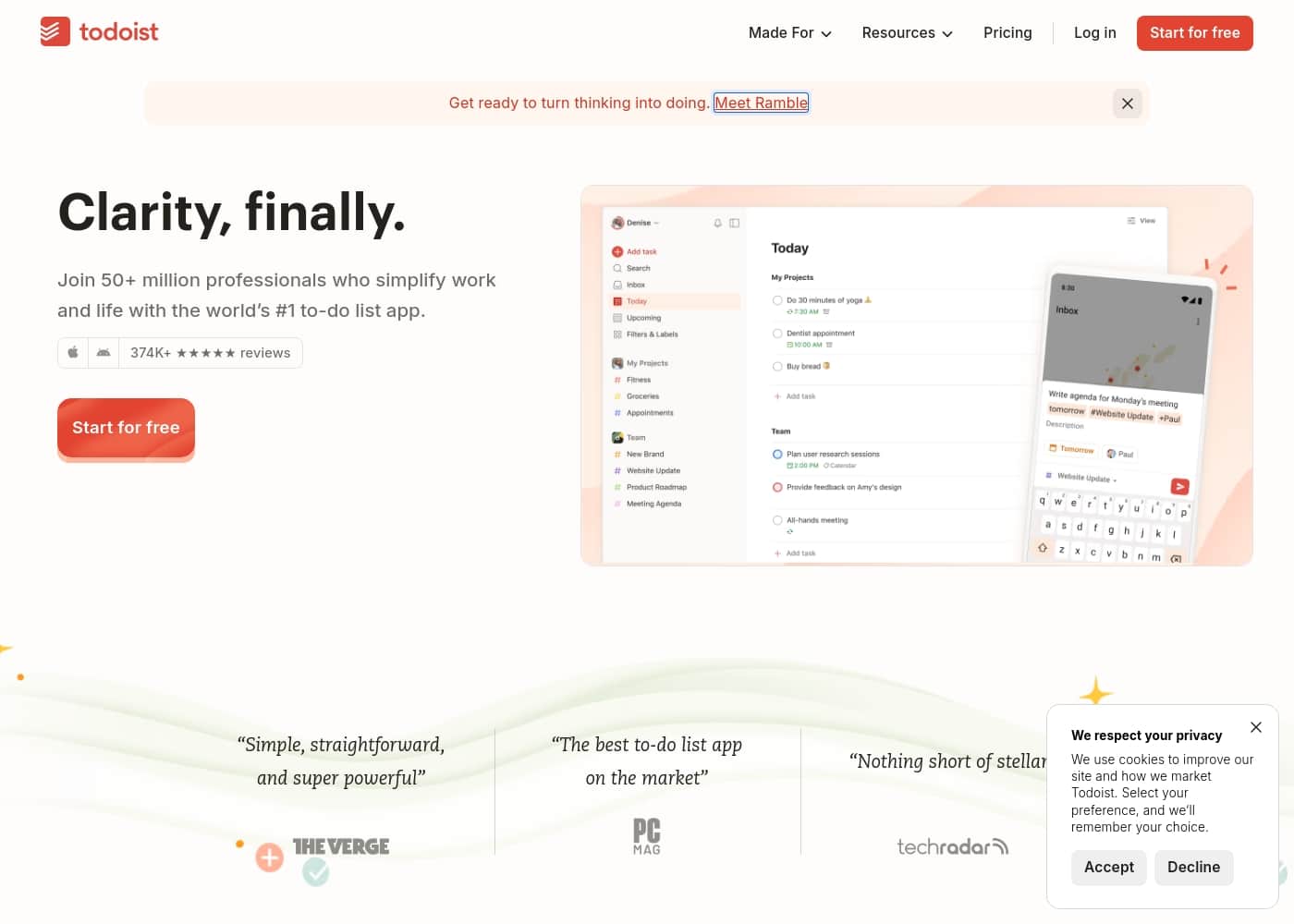
Todoist 홈페이지 스크린샷

한눈에 보기

Todoist의 평점, 가격 요약, 주요 기능, 핵심 포인트를 빠르게 확인하세요.
가격 확인일 2026년 11월 23일

Ciroapp 점수

4.2/ 5

Clean, focused, and reliable task management.

We found Todoist excels as a straightforward, powerful to-do list for individuals and teams. Its natural language input and clean design reduce clutter, though the free tier is quite limited and support can be slow. Overall, it's a dependable choice for prioritizing clarity over complexity.

장점

  • Intuitive, natural language task entry.
  • Clean, focused interface aids clarity.
  • Strong integration ecosystem with popular apps.

단점

  • Free plan is restrictive with low project limits.
  • Customer support can be slow to respond.
  • Lacks built-in advanced features like time-tracking.
가장 적합
  • Busy professionals and teams seeking a simple, powerful task manager
  • Individuals wanting to form better habits and organize personal life
  • Teams needing a shared space for collaborative project management
이 섹션은 요약입니다. 기능, 사용 사례, 가격, 리뷰에 대한 자세한 내용은 아래에 이어집니다.

Todoist은(는) 무엇인가요?

Feeling scattered by endless tasks and mental clutter? Todoist is designed to be a clear extension of your mind. It helps you capture thoughts instantly and organize your work and life, aiming to deliver the mental clarity you've been searching for.

✨

Todoist is a to-do list and task management app used by over 50 million people. It's for anyone seeking a straightforward tool to organize personal tasks, professional projects, and team workflows. The platform focuses on natural language input and thoughtful organization to simplify planning.

Todoist을(를) 선택해야 할까요?

요금제를 비교하거나 사이트로 이동하기 전에 확인할 빠른 구매 가이드입니다.

선택하면 좋은 경우

  • Users who value a clean, intuitive interface over complex features
  • People who think and plan using natural language
  • Teams that require secure, compliant task management (SOC2 certified)
  • Anyone looking for a long-term tool with a proven, stable track record

피하는 것이 좋은 경우

  • Users who need a completely free, feature-rich solution without considering Pro upgrades
  • Those requiring deep, built-in time-tracking or complex Gantt chart features without integrations
  • Teams whose workflows depend on very niche or non-standard software integrations not listed

구매 전 다음 단계

  1. 1Visit the Todoist website and review the free vs. Pro plan pricing and features.
  2. 2Check if it integrates with the other apps you already use daily.
  3. 3Compare its template offerings to your most pressing organizational needs.
  4. 4Start with the free version to test the core workflow and interface.
  5. 5If trying Pro, review any trial period or refund terms before purchasing.

사용 편의성

Todoist emphasizes a simple, straightforward setup. Its natural language input and template library are designed to minimize friction and get you organized quickly, suggesting a low barrier to entry.

Todoist 주요 기능

✨ Capture Thoughts Instantly

Todoist acts as a clear extension of your mind. You can capture tasks at the speed of thought using natural language. Just type what you need to do, and Todoist understands it.

This means nothing important slips away, and you start with a clear, empty slate. It’s designed to feel like a simple, powerful list for clarity and calm.

✨ Focus on What Matters Now

Todoist helps you see only what's relevant, right when you need it. Tasks are sorted into intuitive views like Today and Upcoming. You can also use custom filters to create your own focused lists.

This keeps you organized and prevents overwhelm, letting you concentrate on the current priority.

✨ Plan Your Week with Confidence

Simplify your planning by scheduling due dates and visualizing your week. Todoist offers a calendar view to see your tasks laid out. You can also set recurring tasks to automate your routine.

This combination lets you plan ahead effectively and make the most of your time.

✨ A Home for Team Tasks

Give your team a dedicated, shared workspace for collaboration. Team projects and tasks live alongside your personal lists but stay separate. This keeps professional and personal work organized in one place, without confusion.

It’s a secure space for teamwork, meeting enterprise-grade compliance standards.

✨ Skip the Setup with Templates

You don’t have to create projects from scratch. Todoist provides over 50 templates for work, personal life, and education. Whether you’re planning a blog post, managing a hiring pipeline, or organizing class plans, there’s a template ready to go.

Just pick one and start filling in your tasks.

✨ Smart Features That Feel Magical

Behind the scenes, Todoist Assist works intelligently to help you. It transforms scattered tasks into clear action plans. This smart assistance is part of Todoist’s thoughtful approach to simplifying your workflow without adding complexity.

✨ Built for the Long Haul

Todoist has been in development for over 19 years. The company has a mission to stick around and not sell out. With over 30 million app downloads and 2 billion tasks completed, it’s a tool you can trust for years to come.

사용 사례

💼 The Busy Professional's Daily Focus

Meet Alex, a project manager juggling client calls, team deadlines, and personal errands. Instead of a scattered list of mental notes, Alex uses Todoist to capture every thought instantly. "Review the Q3 report" and "Call the plumber" are added in seconds using natural language.

During the day, Alex sorts tasks into 'Today' and 'Upcoming' views. This clears the mental clutter and shows exactly what needs attention now. By the end of the day, tasks are organized, and the mental space is free for deep work.

Expected outcome: A clear plan for the day, reduced stress, and more focus on high-value work.

🚀 Launching a Team Project in Four Steps

  1. Set up a shared workspace: A team lead creates a new project in the Business plan workspace, inviting members for secure collaboration. 2.

Use a template: Instead of starting from scratch, they select the 'Campaign Tracker' template to instantly create boards for ideas, in-progress, and published content. 3. Assign and schedule: Tasks are assigned to team members with clear due dates and reminders.

Everyone sees their responsibilities. 4. Monitor progress: The team uses the shared view to track updates, ensuring nothing falls through the cracks.

🌿 Building Personal Habits & Routines

Jordan wants to get healthier and more organized. Using the free version of Todoist, they start with the 'Fitness' template to log workouts. They also add a 'Grocery List' project for weekly shopping.

Tip: Setting recurring tasks for "Take vitamins" every morning or "Plan meals" every Sunday builds consistent habits without extra thinking.

By seeing these tasks in their daily view, Jordan builds routines that stick, moving from intention to action.

✈️ Organizing Life's Complex Events

Planning a wedding or a big move can feel overwhelming. Todoist turns a mountain of details into a manageable plan. Someone organizing a 'Business Travel' trip uses the dedicated template to ensure they never forget their passport, lucky shoes, or laptop charger.

Each item becomes a checklist within a single project. Due dates can be set for booking flights or arranging pet care. Everything lives in one place, separate from work tasks but easily accessible on the go.

🎓 From Classroom to Home Office

An educator uses Todoist to manage both their professional and personal life. For school, the 'Class Planning' template helps organize lesson plans and grading. The 'Student Planning' template ensures no assignment detail is missed.

After hours, a separate personal project tracks family appointments and home projects. The clean interface keeps everything separate, providing clarity without the chaos of mixing work and home lists.

⏳ The Long-Term, Reliable System

For over 19 years, Todoist has been a stable tool for millions. This longevity means you can build a system on it with confidence. It's designed to be a simple, powerful extension of your mind that you can trust for years.

Whether you're tracking a multi-year goal with the 'Goal Tracker' template or just managing daily errands, the tool's focus on clarity and calm ensures it grows with you, not against you.

Todoist 가격

최저US$7/월≈ ₩9,442

  • 공급업체 요금 페이지 기준, 2026년 11월 23일 확인
  • 요금제 3개
  • 무료 요금제 있음
  • 연간 결제 시 최대 29% 절약

2026년 11월 23일에 다음 페이지에서 가격 확인: Todoist 가격 페이지

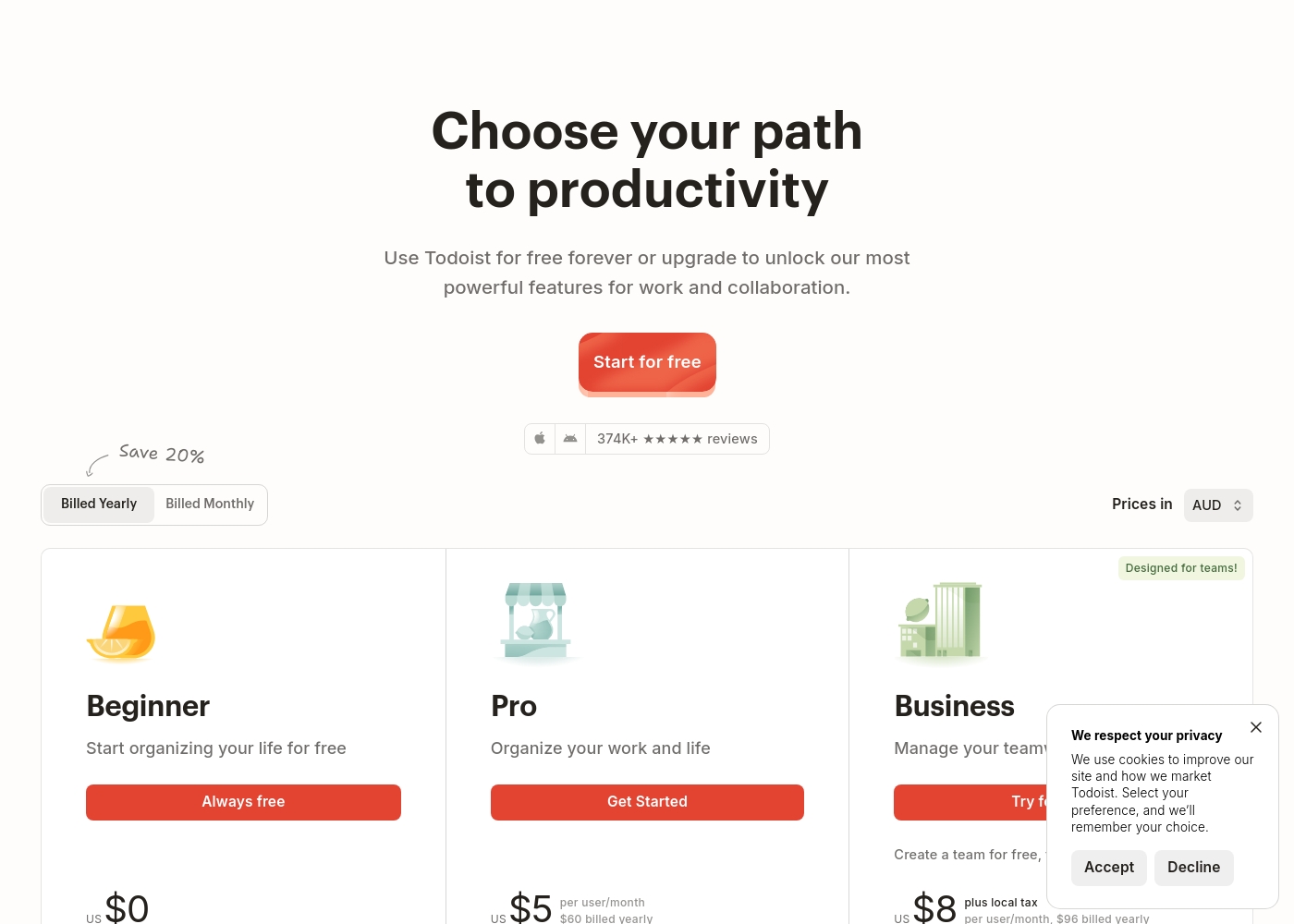
Todoist 가격 페이지 스크린샷가격 페이지 스크린샷 보기
요금제월간 결제연간 결제포함 기능
Beginner
무료
—
Pro
US$7/월
≈ ₩9,442
US$5/월
≈ ₩6,744
연 US$60
연간 결제 시 최대 29% 절약
Business
US$10/월
≈ ₩13,489
US$8/월
≈ ₩10,791
연 US$96
연간 결제 시 최대 20% 절약

2026년 11월 23일 ECB 기준 환율로 환산했습니다. 공급업체의 현지 가격은 다를 수 있습니다.

가격 변동 내역

2026년 10월 1일부터 가격을 추적 중입니다. 아직 가격 변동이 없습니다.

가격 유형: Free plan, Monthly subscription, Per seat pricing

가격 참고 사항

Todoist offers a tiered subscription model ranging from a free version for individuals to $8 per user/month for teams. Professionals can unlock advanced features like calendar views and 300 projects for $5 per month when billed annually for a 20% savings over monthly billing. Billing is per-user and includes localized tax for business accounts.

How much does it cost at each tier?

There are three primary tiers: Beginner (free forever), Pro ($5 per user/month annually or $6 monthly), and Business ($8 per user/month annually or $10 monthly). The Beginner tier is ideal for getting started with up to 5 personal projects, while the Pro tier increases that limit to 300 projects and adds custom reminders. For teams, the Business plan manages up to 500 team projects and includes roles, permissions, and SOC2 Type II security. Monthly billing is available for roughly 20% more than the annual rate across both paid tiers.

Beginner

Price: $0 always free

Best For: Individuals starting to organize their life

Other Features: 5 personal projects, Smart Quick Add, Task reminders, 3 filter views, 1 week activity history

This plan is perfect if you’re looking to digitize your basic habits or daily errands. It keeps things simple while providing the essential tools to capture tasks instantly on any device. 🚀

Pro

Price: $5 per user/month billed yearly

Best For: Productivity power users organizing work and life

Other Features: 300 personal projects, Calendar layout, Task duration, 150 filter views, AI Task Assist

If you find yourself juggling multiple complex projects, the Pro plan provides the extra space you need. You'll gain a full reporting history and custom reminders to stay on top of your busiest weeks.

Business

Price: $8 per user/month billed yearly

Best For: Teams and organizations requiring collaboration

Other Features: Shared team workspace, 500 team projects, Team roles and permissions, Centralized billing, SOC2 security

Teams should pick this tier to centralize communication and manage shared files up to 100MB. It offers the granular control and security audit logs required for professional organizations. ✨

Todoist is available as a free plan forever, allowing you to explore the interface before committing to a paid subscription. Be sure to confirm specific license limits for team members before finalizing your purchase as prices involve local tax additions.

Pricing Detail Table

FeatureBeginnerProBusiness
Monthly Price$0$5 / month$8 / month
Annual Price$0$4 / month$6 / month
Projects5300500
Upload Limit5 MB100 MB100 MB
Key BenefitEasy startPersonal powerTeam control

Todoist pricing: Todoist offers a tiered subscription model ranging from a free version for individuals to $8 per user/month for teams. Professionals can unlock advanced features like calendar views and 300 projects for $5 per month when billed annually for a 20% savings over monthly billing. Billing is per-user and includes localized tax for business accounts.

How much does it cost at each tier?

There are three primary tiers: Beginner (free forever), Pro ($5 per user/month annually or $6 monthly), and Business ($8 per user/month annually or $10 monthly). The Beginner tier is ideal for getting started with up to 5 personal projects, while the Pro tier increases that limit to 300 projects and adds custom reminders. For teams, the Business plan manages up to 500 team projects and includes roles, permissions, and SOC2 Type II security. Monthly billing is available for roughly 20% more than the annual rate across both paid tiers.

Beginner

Price: $0 always free

Best For: Individuals starting to organize their life

Other Features: 5 personal projects, Smart Quick Add, Task reminders, 3 filter views, 1 week activity history

This plan is perfect if you’re looking to digitize your basic habits or daily errands. It keeps things simple while providing the essential tools to capture tasks instantly on any device. 🚀

Pro

Price: $5 per user/month billed yearly

Best For: Productivity power users organizing work and life

Other Features: 300 personal projects, Calendar layout, Task duration, 150 filter views, AI Task Assist

If you find yourself juggling multiple complex projects, the Pro plan provides the extra space you need. You'll gain a full reporting history and custom reminders to stay on top of your busiest weeks.

Business

Price: $8 per user/month billed yearly Websites Sup

비용 계산기

팀에서 Todoist을(를) 사용할 때의 비용을 계산해 보세요.

결제 주기
월
US$7≈ ₩9,442
연
US$84≈ ₩113,304

Pro은(는) 정액 요금이라 좌석 수가 합계에 영향을 주지 않습니다. 공개된 정가 기준 추정치이며 세금, 애드온, 할인은 포함되지 않습니다.

2026년 11월 23일 ECB 기준 환율로 환산했습니다. 공급업체의 현지 가격은 다를 수 있습니다.

Todoist 비용을 줄이는 방법

  • 연간 결제: 월간 결제보다 최대 29% 절약됩니다.
  • 무료 요금제로 시작하고 한도에 도달했을 때만 업그레이드하세요.
  • 이 카테고리의 더 저렴한 도구는 월 US$5부터 시작합니다.
Todoist 방문하기

Todoist 가격이 바뀌면 이메일로 알림 받기

공급업체의 가격 페이지에서 변경을 감지하면 이메일 한 통을 보내드립니다. 뉴스레터나 할인 정보는 없습니다. 클릭 한 번으로 해지할 수 있습니다.

사용자 리뷰

We looked at user feedback on Trustpilot and Capterra to gauge real-world sentiment. On Trustpilot, Todoist holds a mixed reputation.

Many users praise its ease of use, clean interface, and powerful features for personal productivity. However, a recurring theme is frustration with customer support responsiveness and the free plan's limitations, which some find restrictive.

Some professional users note it lacks advanced time-tracking or complex Gantt chart features without add-ons. The consensus points to a solid, intuitive tool for individuals and small teams, though support and pricing for power users are common pain points.

공개 리뷰 요약 출처: Trustpilot, Capterra

아직 리뷰가 없습니다.

리뷰 작성

Todoist에 대한 리뷰 작성
0/100자
0/2000자

Todoist을(를) 사용해야 하는 이유는?

Ready for genuine mental clarity? Todoist transforms scattered tasks into focused action. Here’s why it stands out:

  • Capture Tasks Instantly: Use natural language to add tasks as quickly as you think them, so nothing slips away.
  • See What Matters Now: Stay focused by sorting tasks into Today, Upcoming, or custom filters. You see only what's relevant.
  • Plan with Confidence: Schedule due dates, view your week in a calendar, and set recurring tasks to plan ahead effectively.
  • Collaborate Seamlessly: Give your team a shared workspace for projects, separate from your personal lists but always accessible.
  • Start with a Template: Skip the setup. Choose from 50+ templates for work, personal life, or education to get organized immediately.
  • Trust in Longevity: Todoist has been built for over 19 years, with a mission to stick around—not sell out. It's a tool you can rely on.

Todoist 대안

프로젝트 관리 카테고리의 다른 도구

모든 프로젝트 관리 도구 보기
Trello

Trello

Project Management4.2/5최저 US$6/월 (≈ ₩8,093)

정리되지 않은 것을 극복하고 생산성을 높여주는 강력한 도구입니다.

Notion

Notion

Project Management4.2/5

AI 기반 올인원 워크스페이스. 생산성은 높이고, 도구는 줄이세요.

Asana

Asana

Project Management4.2/5

팀의 작업, 프로젝트 및 작업을 온라인으로 관리하세요.

ClickUp

ClickUp

Project Management4.1/5

업무를 위한 만능 앱.

Monday.com

Monday.com

Project Management4.1/5

모든 종류의 업무를 위한 단일 AI 작업 플랫폼입니다.

Backlog by Nulab Inc

Backlog by Nulab Inc

Project Management4/5

코드 호스팅과 AI 어시스턴트가 내장된 정액제 프로젝트 관리 도구.

Hive

Hive

최저 US$5/월 (≈ ₩6,744)
Ora

Ora

최저 US$5.99/월 (≈ ₩8,080)
사용자 1~25명용 가장 저렴한 프로젝트 관리 소프트웨어

Todoist 자주 묻는 질문

Todoist의 가격은 얼마인가요?

Todoist의 가장 저렴한 유료 요금제인 Pro은(는) 월 US$7 (≈ ₩9,442)입니다. 유료 요금제는 월 US$7부터 US$10까지입니다. 2026년 11월 23일에 공급업체의 가격 페이지에서 가격을 확인했습니다.

Todoist에 무료 요금제가 있나요?

네. Todoist에는 무료 요금제(Beginner)가 있으며 유료 요금제는 월 US$7 (≈ ₩9,442)부터 시작합니다.

Todoist을(를) 연간 결제하면 얼마나 절약되나요?

Todoist의 정가 기준으로 연간 결제 시 월간 결제보다 최대 29% 절약됩니다.

Todoist의 가격이 최근에 바뀌었나요?

아니요. 2026년 10월 1일에 추적을 시작한 이후 가격 변경이 감지되지 않았습니다.

Does Todoist offer a free trial for the Pro plan?

You can start with the free plan to explore the interface. Before upgrading, confirm any trial period or refund terms on the subscription page.

How does billing work for teams on the Business plan?

Billing is per-user and includes localized tax for business accounts. You can choose between annual or monthly billing. Annual billing offers a 20% savings over the monthly rate.

What integrations does Todoist support?

Todoist integrates with over 90 popular apps. This includes email, calendars, and other productivity tools. You can connect it to services like Slack and Google Calendar.

How many users can a team have on the Business plan?

The Business plan supports up to 1,000 team members and 1,000 guests. It also allows up to 500 team projects with 250 people per project.

Is Todoist secure for business use?

Yes. The Business plan includes SOC2 Type II certification. This meets enterprise-grade compliance standards for security and data protection.

Can I cancel my subscription at any time?

The website does not explicitly state the cancellation policy. You should confirm this in the terms and conditions before purchasing. Manage your subscription from your account settings.

Does Todoist have a mobile app?

Yes. Todoist is available on iOS, Android, and other platforms. The website states it has over 30 million app downloads worldwide.

What languages does Todoist support?

The app is used in over 160 countries. You can likely find language settings within the application.

How responsive is customer support?

External reviews note that support can be slow to respond. The official site does not list a specific support SLA. You can access help through the Help Center.

Who is Todoist best suited for?

It's ideal for busy professionals, individuals forming habits, and teams needing secure collaboration. It's best for those who value a clean, intuitive interface over complex features like built-in time tracking.

Todoist을(를) 사용해볼 준비가 되셨나요? 공식 사이트 또는 가격을 확인하세요.

Todoist 담당자이신가요? 이 목록 소유권 주장 · 배지 받기