전체 번역 준비 중 — 제품 세부 정보는 영어로 표시되며 탐색은 한국어로 제공됩니다.
IDrive

IDrive 리뷰

One cloud backup account for your computers, phones, and servers.

IDrive 가격: 월 US$1.67 (≈ ₩2,229)부터 · 요금제 7개 · 2026년 11월 27일 가격 확인

작성자: Ciroapp Editorial Team · 업데이트됨 2026년 9월 17일

추가 비용 없이 수수료가 적용될 수 있습니다

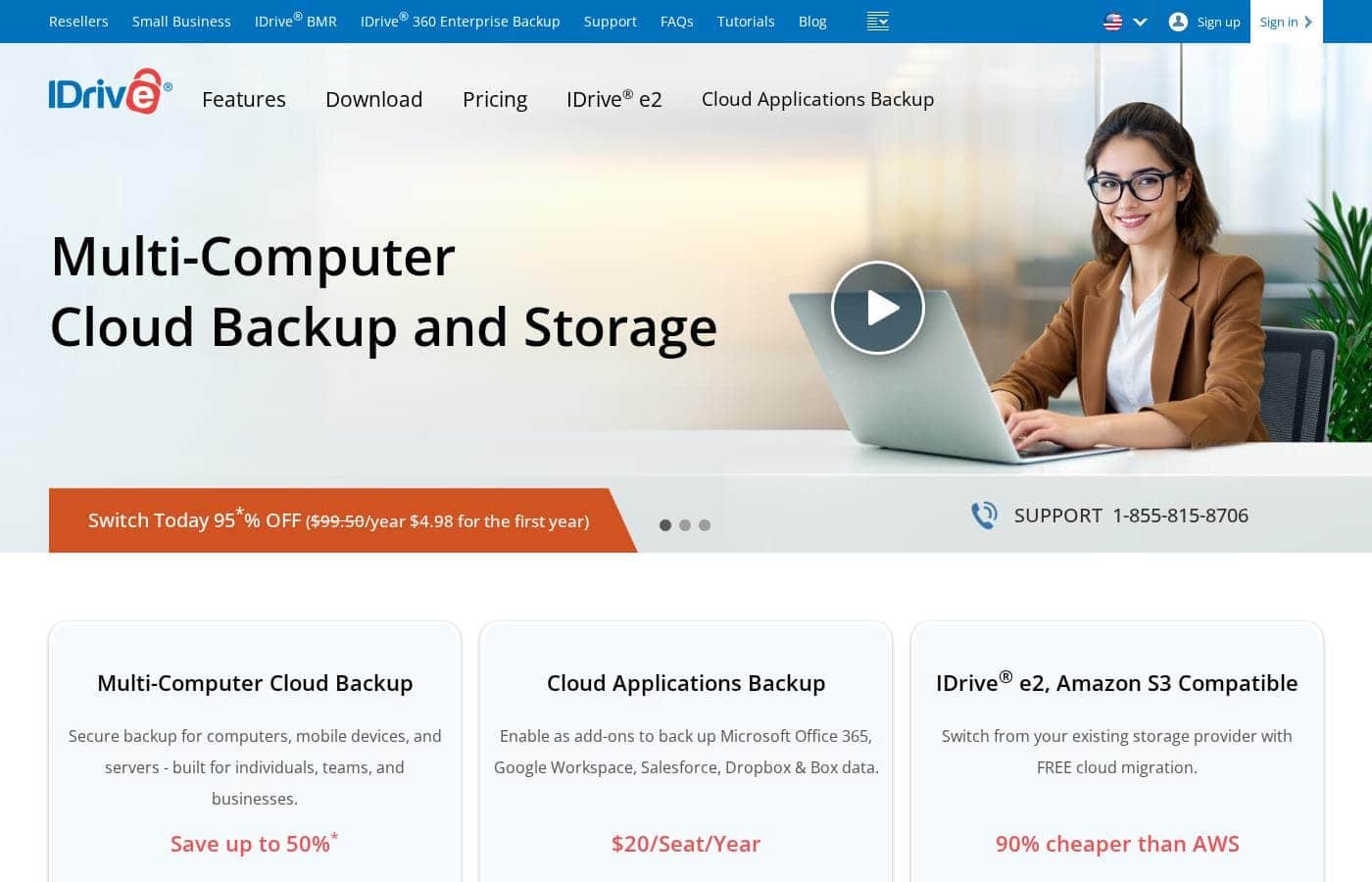
IDrive 홈페이지 스크린샷

한눈에 보기

IDrive의 평점, 가격 요약, 주요 기능, 핵심 포인트를 빠르게 확인하세요.
가격 확인일 2026년 11월 27일

Ciroapp 점수

4.1/ 5

IDrive packs backup for computers, phones, servers, NAS units, and cloud apps into one account, with promotional rates from $2.50/month billed annually and 12 PCMag Editors' Choice awards to its name. Renewal pricing, storage caps, and per-tier costs stay hidden until checkout, and overage fees apply. Overall, it's a strong value pick if you confirm the fine print first.

장점

  • Backs up unlimited PCs, Macs, Linux machines, iPhones, iPads, and Android devices into a single account, avoiding per-device pricing
  • Covers infrastructure most competitors skip at this price — SQL Server, Exchange, SharePoint, Oracle, Hyper-V, and VMware via a $5/month-per-server add-on, plus direct backup for Synology and QNAP NAS units
  • Includes IDrive Express physical drive shipping — free once a year on Personal plans and three times a year on Team/Business — for fast initial uploads or large restores without waiting days on bandwidth

단점

  • Exceeding your storage limit triggers per-GB overage fees — $0.25/GB/month on Personal and $0.50/GB/month on Team and Business plans — rather than hard caps or throttling
  • Headline rates like $2.50/month are first-term promotional pricing billed annually; standard rates return from the second year, and the pricing page reviewed doesn't display per-tier prices or storage caps upfront
  • SaaS backup for Microsoft 365, Google Workspace, and Salesforce costs extra at $20/seat/year rather than being included, and only the cloud application add-on offers a visible 7-day trial — not the core backup service
가장 적합
  • Households with several computers and phones to protect on one plan
  • Small businesses backing up workstations and servers together
  • IT teams and MSPs managing many endpoints through IDrive 360
무료 체험
Yes — 7 일
이 섹션은 요약입니다. 기능, 사용 사례, 가격, 리뷰에 대한 자세한 내용은 아래에 이어집니다.

IDrive은(는) 무엇인가요?

A crashed drive or ransomware attack can erase years of files in seconds. IDrive aims to stop that with one account that backs up your computers, phones, and servers, plan tiers for homes through enterprises, and pricing that reviewers keep ranking as top value per terabyte.

IDrive is a cloud backup and storage service for individuals, teams, and businesses. One account protects computers, mobile devices, servers, and NAS units like Synology and QNAP. You can also back up cloud apps such as Microsoft 365, Google Workspace, and Salesforce, or use IDrive e2, an S3-compatible object storage service aimed at developers and IT teams.

IDrive을(를) 선택해야 할까요?

요금제를 비교하거나 사이트로 이동하기 전에 확인할 빠른 구매 가이드입니다.

선택하면 좋은 경우

  • People who want one account for many devices instead of per-device pricing
  • Budget-conscious buyers — advertised plans start at $2.50/month billed annually
  • Businesses running SQL Server, Exchange, SharePoint, Oracle, Hyper-V, or VMware
  • Teams adding SaaS backup at a flat $20/seat/year with unlimited storage
  • Buyers who weigh third-party recognition, like 12 PCMag Editors' Choice awards

피하는 것이 좋은 경우

  • Month-to-month shoppers — headline rates like $4.98 are first-year deals billed annually, so check renewal pricing
  • Anyone expecting a general free trial — only the cloud application backup add-on shows a visible 7-day trial
  • Users who assumed SaaS backup is included — Microsoft 365, Google Workspace, and Salesforce coverage are paid add-ons

구매 전 다음 단계

  1. 1Open the pricing page and compare Personal, Team, and Business tiers against your storage and device needs
  2. 2Confirm your platforms are covered — desktops, mobile, NAS, or the specific servers you run
  3. 3Try the 7-day free trial of the Microsoft 365 or Google Workspace add-on if SaaS backup matters to you
  4. 4Check whether the advertised rate is first-year only and what standard renewal costs before checkout
  5. 5Skim the FAQs and video tutorials so you know the setup steps before you commit

사용 편의성

The site positions IDrive as simple: install the app, manage computers from a web dashboard, and get help through tutorials, FAQs, and a phone line. Reviewers quoted on the site repeatedly describe it as fast, easy to set up, and simple to use. That's encouraging for non-technical buyers, though it's reviewer commentary, not hands-on testing.

IDrive 주요 기능

🖥️ One account for every device

You shouldn't need one account per device. IDrive backs up Windows PCs, Macs, Linux machines, iPhones, iPads, Android devices, and even Synology or QNAP NAS units into a single account. Install the app on each device, then manage everything from a web dashboard.

It's a good fit for households and teams juggling several machines.

✨ Backups that keep pace as you work

A crash right before a deadline shouldn't cost you the day's work. IDrive runs continuous, near real-time backup, so file changes are captured as they happen rather than waiting for a manual run. Cloud Drive adds sync, so you can open your files from the web or the iOS and Android apps wherever you are.

✨ Server and full-machine coverage

Businesses need more than laptop backup. Add-on server coverage handles SQL Server, on-premise Exchange and SharePoint, Oracle, System State, Hyper-V, and VMware. You can also back up an entire machine as a disk image and use IDrive BMR for bare-metal recovery.

That means one vendor can cover endpoints and the servers behind them.

✨ Backups for your cloud apps

Cloud apps need their own backups — a deleted file in Microsoft 365 won't reappear on its own. Add-ons copy SaaS data into your account, and there's a 7-day free trial:

  • Productivity: Microsoft 365, Microsoft Entra ID, and Google Workspace
  • CRM and files: Salesforce, plus Dropbox or Box data
  • Everything lands in one IDrive account.

🗄️ IDrive e2: S3-compatible object storage

Developers and IT teams get IDrive e2, an S3-compatible object storage service. It offers immutable storage to guard against ransomware, no fees for egress or API calls, and locations worldwide. Compliance badges include SOC 2, GDPR, and HIPAA, it's Veeam-ready, and IDrive provides free migration from your current provider.

사용 사례

💻 Protect every device at home

You've got a laptop, a phone or two, and a tablet. IDrive's Personal plan backs them all into one account. You also get Cloud Drive sync and one free IDrive Express™ drive shipment a year.

Expected outcome: one safe copy of everything, ready if a drive crashes.

🏢 Cover workstations and servers together

Running a small business? The Team plan adds user management and priority support. The Server Backup add-on covers SQL Server, Exchange, SharePoint, Oracle, Hyper-V, and VMware at $5 per server monthly.

Tip: check renewal pricing, since first-year discounts don't last.

☁️ Back up your cloud apps

Microsoft 365, Google Workspace, Entra ID, and Salesforce data live in the cloud, but it can still be lost. Add SaaS backup at $20 per seat per year with unlimited storage, and try it free for 7 days.

🗄️ Store data on IDrive e2

Developers and IT teams get S3-compatible object storage with no egress or API fees. e2 offers immutable storage for ransomware protection, plus free migration if you're switching providers. It's advertised as 90% cheaper than AWS.

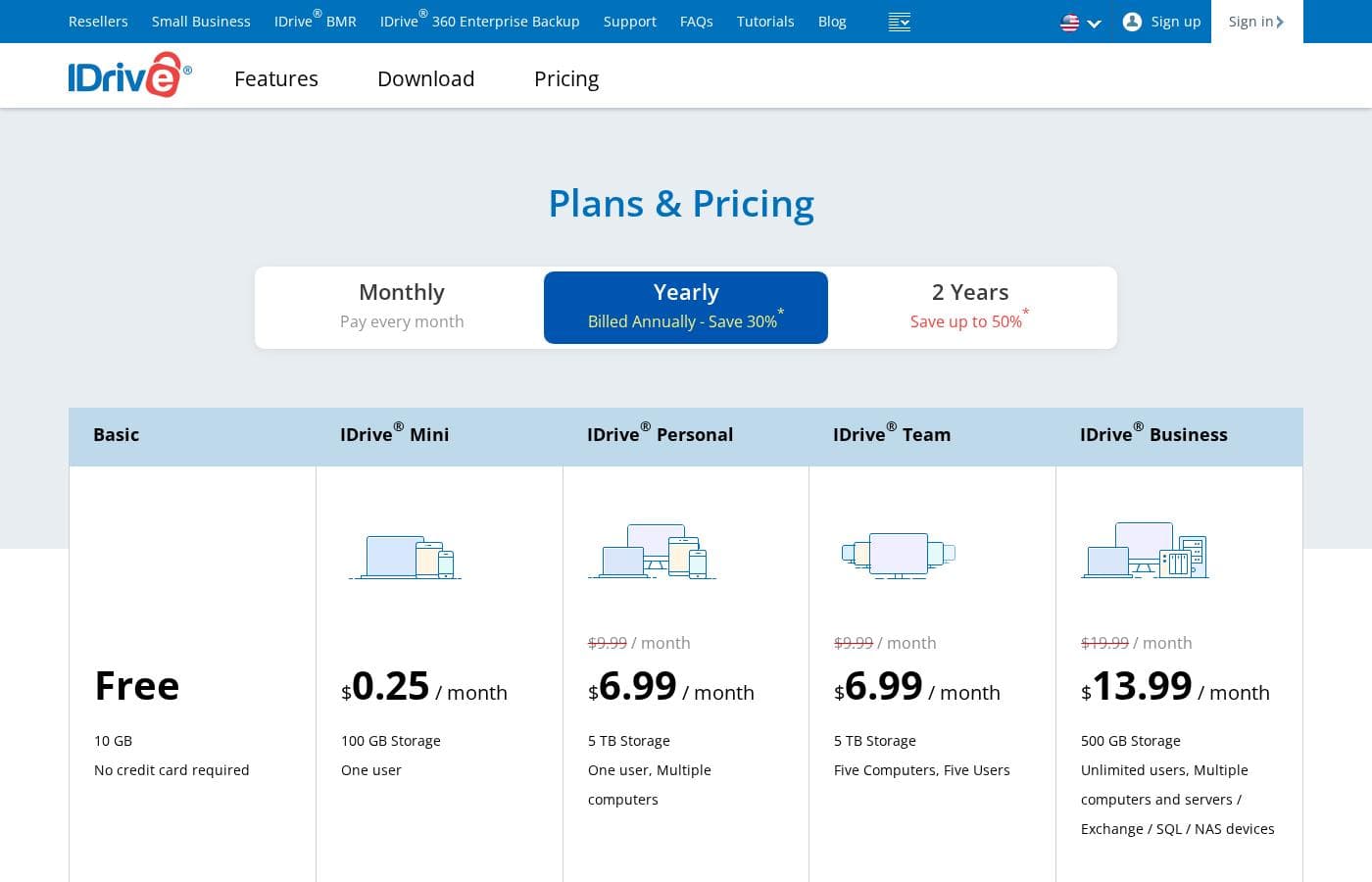
IDrive 가격

최저US$1.67/월≈ ₩2,229

  • 공급업체 요금 페이지 기준, 2026년 11월 27일 확인
  • 요금제 7개

2026년 11월 27일에 다음 페이지에서 가격 확인: IDrive 가격 페이지

IDrive 가격 페이지 스크린샷가격 페이지 스크린샷 보기
요금제월간 결제연간 결제포함 기능
IDrive ® Personal
US$11.99/월
≈ ₩16,005
—
IDrive ® Team
US$11.99/월
≈ ₩16,005
—
IDrive ® Business
US$59.99/월
≈ ₩80,081
—
IDrive ® Mini
$0.25 month
—
Server Backup
US$5/월
≈ ₩6,675
—
Microsoft Office 365 Backup
사용자당
—
US$1.67/월
≈ ₩2,229
연 US$20
per user
Google Workspace Backup
사용자당
—
US$1.67/월
≈ ₩2,229
연 US$20
per user

2026년 11월 27일 ECB 기준 환율로 환산했습니다. 공급업체의 현지 가격은 다를 수 있습니다.

가격 변동 내역

2026년 10월 1일부터 가격을 추적 중입니다. 아직 가격 변동이 없습니다.

가격 유형: Free plan, Free trial, Monthly subscription, Yearly subscription, Per seat pricing

가격 참고 사항

IDrive offers four cloud backup plans — Mini, Personal, Team, and Business — with promotional pricing starting at $2.50/month billed annually. Optional add-ons include Server Backup at $5/month per server and Cloud Applications Backup at $20/seat/year, and a free 10 GB Basic plan is also available.

IDrive's cloud backup starts at $2.50 per month (billed annually) with four plans — Mini, Personal, Team, and Business — plus add-ons like Server Backup at $5 per month per server and Cloud Applications Backup at $20 per seat per year.

Here's a closer look at what each tier covers.

IDrive Mini

Other Features:

  • Entry point for IDrive's backup service, with limits based on the plan you pick
  • Backs up PCs, Macs, Linux machines, iPhones, iPads, and Android devices into one account
  • Server Backup add-on available at $5/month per server
  • 24/7 support via live chat, email, and phone

Mini fits light personal use or anyone who wants to try IDrive before committing to more storage. Since it supports the add-ons too, you can add server coverage later if your needs grow.

IDrive Personal

Best For: individuals and home users with backup and sync needs Other Features:

  • IDrive Express™ free physical backup once a year (later requests cost $59.95)
  • Cloud Drive file sync, plus access via web, iOS, and Android
  • Continuous, near real-time backup of file changes
  • Overuse charge of $0.25/GB/month beyond your storage limit

Personal is the natural pick for home offices and everyday device backup. It covers your computers, phones, and tablets under one plan. Just watch your storage total, because going over it triggers a per-GB fee.

IDrive Team

Best For: small teams Other Features:

  • Choose a plan based on the number of computers and amount of data
  • Add and manage users from a central Dashboard
  • Priority support alongside 24/7 live chat, email, and phone
  • IDrive Express™ free backup three times a year

Team works well when a few colleagues need coverage and simple admin tools. You get the same backup engine as Personal, with user management layered on top. Note that storage overages cost more here, at $0.50 per GB per month.

IDrive Business

Best For: medium to large businesses Other Features:

  • No restrictions on the number of computers backed up to one account
  • Multiple users managed under a single administrative account
  • Compliance support for HIPAA, SOX, GLBA, and SEC/FINRA, including a signed BAA
  • Priority support and IDrive Express™ free backup three times a year

Business suits companies with many machines and stricter rules to follow. If departments or auditors are in the picture, this tier removes the per-account computer cap. Smaller teams without those demands can usually stay on Team.

Billing runs monthly, yearly, or every two years, and new signups get 30% off the first year or 50% off with a 2-year plan. The discount covers the first term only — standard pricing applies from the second year onward. There's also a free 10 GB IDrive Basic account, which doubles as the base for add-on services like IDrive Mirror and Cloud Applications Backup, and the Microsoft 365 and Google Workspace add-ons come with a 7-day free trial. Exact per-tier prices aren't shown in this view, so confirm the current rate and storage cap at checkout before you buy.

비용 계산기

팀에서 IDrive을(를) 사용할 때의 비용을 계산해 보세요.

결제 주기
월
US$11.99≈ ₩16,005
연
US$143.88≈ ₩192,065

IDrive ® Personal은(는) 사용자 수 제한을 명시하지 않아 계정 전체에 하나의 가격으로 표시했습니다. 사용자 5명 기준 요금은 공급업체에 확인하세요. 공개된 정가 기준 추정치이며 세금, 애드온, 할인은 포함되지 않습니다.

2026년 11월 27일 ECB 기준 환율로 환산했습니다. 공급업체의 현지 가격은 다를 수 있습니다.

IDrive 비용을 줄이는 방법

  • 결제 전에 7일 무료 체험을 이용하세요.
  • 일부 요금제는 사용자당 요금입니다: 실제 사용하는 좌석만 결제하세요.
무료 체험 시작

IDrive 가격이 바뀌면 이메일로 알림 받기

공급업체의 가격 페이지에서 변경을 감지하면 이메일 한 통을 보내드립니다. 뉴스레터나 할인 정보는 없습니다. 클릭 한 번으로 해지할 수 있습니다.

사용자 리뷰

아직 리뷰가 없습니다.

리뷰 작성

IDrive에 대한 리뷰 작성
0/100자
0/2000자

IDrive을(를) 사용해야 하는 이유는?

Most backup services ask you to compromise. IDrive doesn't. It combines multi-device backup, server coverage, and cloud storage in plans that keep winning on price — including a 12th PCMag Editors' Choice award.

  • One service for nearly everything. Back up computers, mobile devices, servers, and NAS units like Synology and QNAP, plus cloud apps such as Microsoft 365 and Google Workspace.
  • Pricing built for value. Plans are advertised from $2.50/month billed annually, and a current switch offer drops the first year to $4.98.
  • Recognized by reviewers. PCMag calls it fast, easy to set up, and hard to beat on price per terabyte for PCs and mobile devices.
  • Server-ready for business. Cover SQL Server, Exchange, SharePoint, Oracle, Hyper-V, and VMware, with an enterprise tier built for MSPs and IT teams.
  • Transparent cloud storage. IDrive e2 charges no egress or API fees, offers immutable storage, and is advertised as 90% cheaper than AWS.
  • Low-risk entry points. The cloud application backup add-on includes a 7-day free trial, and phone support is listed right on the site.

IDrive 대안

백업 카테고리의 다른 도구

모든 백업 도구 보기
AOMEI

AOMEI

Backup4/5

AOMEI는 항상 전 세계 데이터를 더 안전하게 보호합니다

Genie9

Genie9

Backup3.7/5

강력한 데이터 보호와 지능형 AI 서비스를 위한 종합 플랫폼입니다.

IDrive 자주 묻는 질문

IDrive의 가격은 얼마인가요?

IDrive의 가장 저렴한 유료 요금제인 Microsoft Office 365 Backup은(는) 월 US$1.67 (≈ ₩2,229)입니다. 유료 요금제는 월 US$1.67부터 US$59.99까지입니다. 2026년 11월 27일에 공급업체의 가격 페이지에서 가격을 확인했습니다.

IDrive은(는) 무료 체험이나 환불 보장을 제공하나요?

IDrive은(는) 7일 무료 체험을 제공합니다.

IDrive의 가격이 최근에 바뀌었나요?

아니요. 2026년 10월 1일에 추적을 시작한 이후 가격 변경이 감지되지 않았습니다.

What happens if I go over my storage limit?

IDrive charges overage fees. Personal plans cost $0.25 per GB per month over your limit, while Team and Business plans charge $0.50. You can upgrade to a higher storage plan to avoid them.

How do I back up a lot of data for the first time?

Use IDrive Express. It ships you a temporary storage device for bulk backup or restore, within about a week. Personal plans include one free shipment yearly; Team and Business get three. Extra requests cost $59.95.

Can IDrive help with compliance rules like HIPAA?

Yes. IDrive helps organizations meet HIPAA, SOX, GLBA, and SEC/FINRA requirements, and it signs a Business Associate Agreement for HIPAA. Its e2 object storage also lists SOC 2 and GDPR compliance plus ransomware protection.

What support options does IDrive provide?

You can reach support 24/7 via live chat, email, and phone. Team and Business plans add priority support. The site also runs in Spanish, French, and German, with dedicated pages for Canada and the UK.

IDrive을(를) 사용해볼 준비가 되셨나요? 공식 사이트 또는 가격을 확인하세요.

IDrive 담당자이신가요? 이 목록 소유권 주장 · 배지 받기