Proton Drive vs Shade
Proton Drive and Shade are built for very different battles. Proton Drive fights for your absolute privacy with Swiss encryption. Shade is a media team's command center for fast file access and collaboration. The choice is about your core need: security or workflow speed.
Best for: 민감한 개인 파일을 저장하는 개인 정보 보호 중심 사용자, 암호화된 파일 공유가 필요한 전문가
Best for: Media and video production teams, Creative agencies managing large asset libraries
테스트를 위한 협업 트레이드오프가 포함된 프라이빗 클라우드 스토리지
장점
- 엔드투엔드 및 제로 액세스 암호화는 추가 기능이 아닌 제품의 핵심입니다.
- 무료 5GB 요금제를 사용하면 사용자가 업그레이드하기 전에 작업 흐름을 테스트할 수 있습니다.
- 유료 요금제에는 개인, 가족, 기업을 위한 유용한 스토리지 계층이 포함되어 있습니다.
- 보안 공유 및 Proton 에코시스템 번들은 개인 정보 보호에 중점을 둔 사용자를 위한 도구 확장을 줄일 수 있습니다.
단점
- 규모가 큰 팀의 경우 협업 기능이 Google Drive 또는 Microsoft 365보다 덜 성숙하다고 느낄 수 있습니다.
- 정확한 결제 가격은 통화 및 청구 기간에 따라 다를 수 있습니다.
- 저렴한 스토리지만 원하는 사용자는 다른 곳에서 더 나은 원시 용량 거래를 찾을 수 있습니다.
- 일부 공개 사용자 피드백은 여전히 플랫폼 및 동기화 성숙도 문제를 지적합니다.
스마트 검색 기능은 훌륭하지만 가격 정책이 불투명합니다.
Shade는 AI 검색 및 지능형 파일 스트리밍 기능이 뛰어난 다짐직한 중앙 집중식 미디어 허브를 제공하는 것으로 보입니다. 전반적으로 강력한 워크플로우 도구이지만, 팀 요금제에 대한 공개 가격 정보 부재는 잠재 구매자에게 중대한 단점입니다.
장점
- 스토리지, 검토, 승인을 위한 올인원 플랫폼
- 대용량 파일에 빠른 액세스를 위한 지능형 파일 스트리밍
- 강력한 AI 검색 및 자동 메타데이터
- 장기 프로젝트 저장을 위한 안전한 보관
단점
- 팀 및 엔터프라이즈 가격이 공개적으로 명시되어 있지 않음
- 자세한 견적 및 확장성을 얻으려면 데모를 예약해야 함
- 깊은 검증을 위한 외부 검토 데이터가 제한적임
소개Proton Drive
Proton Drive은 Proton의 엔드 투 엔드 암호화 클라우드 스토리지 서비스입니다. Proton은 Proton조차도 허가 없이 사용자 파일 및 폴더에 액세스하거나 해당 이름을 볼 수 없다고 말합니다.
소개Shade
💡 Shade는 미디어 스토리지 및 관리를 위한 올인원 플랫폼입니다. 매일 대용량 파일을 다루는 크리에이티브 및 미디어 팀을 위해 설계되었습니다. 지능형 파일 스트리밍, 검토 도구, 스마트 검색 기능을 한곳에 결합합니다.
하이라이트
기능 비교
기능 개요
주요 차이점을 강조하고 각 기능에 대한 승자를 선택합니다.
Security & Privacy
Proton Drive offers zero-knowledge encryption. Shade's security details are not public.
Proton Drive uses end-to-end encryption for all files, names, and metadata on your device before upload. Only you hold the keys. It's based in Switzerland with strong legal privacy protection and open-source code. Shade emphasizes secure archiving but doesn't detail its encryption standards publicly. You must request specifics during a sales demo about data handling and compliance. The key difference is verifiable transparency vs. trust-based security. Proton Drive is for those who demand cryptographic proof. Shade is for teams prioritizing workflow over public security audits.
Core Purpose & Workflow
Proton Drive is secure storage. Shade is a creative workflow hub.
Proton Drive is a cloud locker focused on privacy. You upload files, share them securely with password-protected links, and collaborate on basic docs. Its strength is keeping files safe. Shade is built for media teams. It combines storage with fast streaming, AI search, and review/approval tools in one platform. It aims to replace multiple tools. Choose Proton Drive if your main goal is protection. Choose Shade if you need to speed up a video editing or review process for a team.
Search & Organization
Shade's AI search finds files fast. Proton Drive offers basic organization.
Proton Drive lets you organize files into folders and albums, with search for file names. It's a standard, manual process. Shade uses AI to generate metadata automatically upon upload. Its powerful search lets you find files by description, not just name. This is a huge time-saver for large libraries. For a personal photo collection, Proton Drive is fine. For a team with 10,000 video clips, Shade's AI search is a game-changer.
Collaboration & Sharing
Proton Drive shares securely. Shade enables collaborative workflows.
Proton Drive excels at secure sharing. You can create password-protected, expiring links and revoke access instantly. It also has a basic online doc editor. Shade includes built-in review and approval tools. Team members can give feedback directly on media files, centralizing the approval process. It's designed for team collaboration on assets. Proton Drive is for sending a confidential file to one person. Shade is for a team of five editors to work together on a project.
Pricing & Value
Proton Drive has a clear free tier. Shade's pricing is hidden.
Proton Drive offers a permanent free plan with 5 GB. Paid plans are listed, though exact prices aren't shown. A 30-day money-back guarantee exists. Shade has a free starting plan, but team/enterprise costs are not public. You must book a demo for a quote. There's no mentioned refund policy. Proton Drive offers more pricing transparency upfront. Shade's value depends on how much it saves your team in time and tool consolidation.
Customer Support
Both have mixed reviews. Proton Drive's support is heavily criticized.
Proton Drive's support is a major con. Users report slow, generic, and unhelpful responses for complex issues. It's a frequent pain point in reviews. Shade's reviews mention responsive support, but details on SLAs are not public. The sample size is smaller. Proton Drive's known support issues are a risk. Shade's support reputation is better but less documented.
Mobile Experience
Proton Drive has mobile apps. Shade's mobile support is unknown.
Proton Drive is available on iOS and Android, allowing access to encrypted files on the go. This is essential for personal cloud storage. Shade's website does not specify mobile apps. Its focus on streaming large media files might suggest a desktop-first approach. If you need to access or manage files from your phone, Proton Drive is the clear choice.
Ease of Getting Started
Both have free plans. Shade's specialized focus has a steeper learning curve.
Proton Drive's free plan is easy to sign up for. You can start uploading encrypted files immediately. The interface is straightforward for basic storage. Shade's free plan also allows exploration, but it's a platform for a specific workflow. Understanding its streaming and review tools may take more setup. Proton Drive is simpler for basic use. Shade is more powerful but requires investment to master for its intended team purpose.
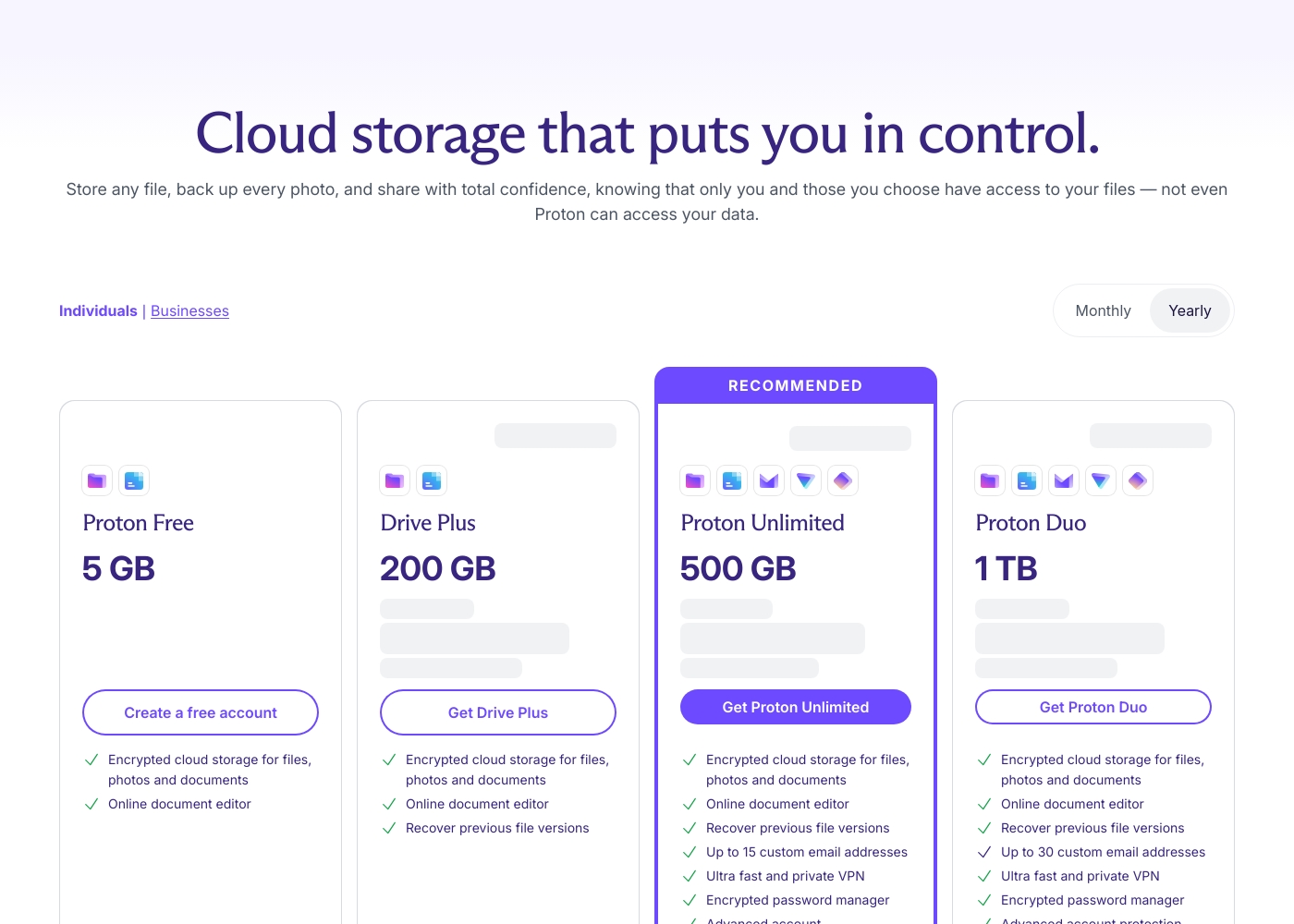
Proton Drive은 무료 5GB 요금제와 다양한 유료 옵션을 제공합니다. 현재 공개 계획 라벨에는 200GB의 Drive Plus, 500GB의 Proton Unlimited, 2TB의 Proton Duo, 최대 6명의 사용자를 위한 3TB의 Proton Family, 사용자당 1TB의 Drive Professional이 포함됩니다. Proton은 가격 페이지에 30일 환불 보장도 표시합니다. 정확한 가격은 통화, 청구 기간, 국가, 프로모션에 따라 다를 수 있으므로 구매하기 전에 결제를 확인하세요.
- 5GB 스토리지
- 암호화된 클라우드 스토리지
- 온라인 문서 및 스프레드시트 편집기
- 200GB 스토리지
- 파일, 사진, 문서를 위한 암호화된 저장소
- 버전 복구
- 문서 및 스프레드시트
- 500GB 스토리지
- Drive와 Proton 메일, VPN, Pass 및 계정 보호 기능
- 최대 6명의 사용자를 위한 가족 스토리지
- 사용자당 비즈니스 저장용량
- 암호화된 공유 및 생산성 도구
Shade는 최소 1개의 요금제(Start for Free, $0)를 제공하지만, 팀 및 엔터프라이즈 요금은 비공개입니다.
적합한 요금제를 찾는 것은 팀의 특정 미디어 스토리지 및 워크플로우 요구 사항에 따라 달라집니다.
Start for Free
가격: $0 지원되는 웹사이트: 명시되지 않음 최적 사용자: AI 검색을 탐색하는 개인 또는 소규모 팀 환불 정책: 명시되지 않음 기타 기능: 지능형 파일 스트리밍, 검토 및 승인, 자동 메타데이터, AI 검색, 미디어 보관
- 지능형 파일 스트리밍
- 검토 및 승인
- 자동 메타데이터
- AI 검색
- 보관
Pricing Notes
- Proton Drive has a permanent free plan with 5 GB storage, unlike a limited trial.
- Proton Drive's exact paid plan prices are not listed, but tiers are clearly defined (Plus, Unlimited, etc.).
- Shade requires booking a sales demo to get any pricing for team or enterprise plans.
- Proton Drive offers a 30-day money-back guarantee. Shade does not state a refund policy.
- Shade's 'Start for Free' plan is a permanent tier, not a time-limited trial.
Pricing Head-to-Head
사용자 리뷰
Proton Drive은 개인정보 보호를 최우선으로 하는 클라우드 스토리지를 위한 가장 확실한 선택 중 하나입니다. 가장 중요한 질문은 안전한지 여부가 아니라 앱 성숙도와 협업 모델이 독자의 작업 흐름에 적합한지 여부입니다.
제품은 정말 훌륭합니다. 특히 VPN과 메일이 그렇습니다. 저는 회사의 개인 정보 보호 정신을 좋아하며 구독이 제공하는 가치는 훌륭합니다. 나는 그들의 향후 업데이트를 기대하고 있습니다.
Shade에 대한 외부 평가는 전반적으로 긍정적이지만, 표본 크기는 작은 것으로 보입니다. Capterra의 사용자들은 플랫폼의 사용 용이성과 팀의 시간을 절약해 주는 강력한 AI 기반 검색 기능을 높이 평가합니다.
일부 리뷰어는 온보딩 프로세스가 원활했고 고객 지원이 신속했다고 언급합니다. 중앙 집중식 미디어 허브가 협업에 유용하다는 의견도 있습니다.
우리의 판정
This isn't a fight between similar tools. It's a choice between two different priorities. Proton Drive wins on absolute privacy. Shade wins on creative workflow speed. Proton Drive's superpower is its security. It's built on Swiss law and open-source encryption that you can verify. Your files are hidden from everyone, including Proton. It's a digital vault. Shade's superpower is its intelligent workflow. It turns a chaotic media library into a searchable, streamable hub. AI finds your footage, and built-in tools handle team reviews. It's a creative command center. The deciding factor is your main pain point. Are you worried about who sees your files? Choose Proton Drive. Are you wasting hours searching for footage and chasing approvals? Choose Shade. For most individuals and businesses needing secure storage, Proton Drive is the safer bet. For media teams drowning in files, Shade could save their workflow. Pick the tool that solves your biggest headache.
자주 묻는 질문
Which is better for small teams: Proton Drive or Shade?
It depends on the team's work. A small legal team handling sensitive documents would benefit from Proton Drive's security. A small video production team would thrive with Shade's search and collaboration tools.
Does Proton Drive have AI search like Shade?
No, Proton Drive offers standard file and folder search. It does not have AI-powered search or automated metadata tagging. Shade is built around this smart organization feature.
Is Shade worth the extra cost over Proton Drive?
You can't directly compare costs without a Shade demo quote. However, if Shade saves your media team 10 hours per week on searches and reviews, its value could far outweigh the expense. Proton Drive is cheaper for basic secure storage.
Can I migrate from Proton Drive to Shade easily?
Migration ease is not detailed for either platform. You would need to download all files from one service and upload to the other. Shade might assist with large media library migrations if you contact their support.
Which has better privacy: Proton Drive or Shade?
Proton Drive is clearly superior for privacy. It uses end-to-end encryption by default, is open-source, and protected by Swiss law. Shade does not disclose similar technical privacy details.
Can I use Shade for personal photo storage?
Shade is designed for media teams, not personal use. Its free plan might work, but features like AI search and streaming are optimized for large, collaborative projects, not personal photo albums.
선택할 준비가 되셨나요?
두 도구 모두 강점이 있습니다. 특정 요구 사항에 따라 선택하세요.