Pngtree vs Shade
Pngtree and Shade serve very different creative needs. Pngtree is a massive library of downloadable PNG graphics. Shade is a centralized media hub for team storage and workflow. Your choice depends on whether you need assets or asset management.
Best for: 투명한 PNG 자산이 자주 필요한 디자이너, 반복되는 시즌 캠페인 그래픽을 만드는 마케터
Best for: Creative and marketing teams, Video production departments
주의 깊게 읽어야 할 라이선스 세부 정보가 포함된 빠른 PNG 액세스
Pngtree은 PNGs 및 디자인 템플릿에 빠르게 액세스하는 데 도움이 되지만 상용 사용자는 라이선스 범위를 확인하고, 기록을 유지하고, 커밋하기 전에 제3자 고객 불만 사항을 평가해야 합니다.
장점
- 투명한 PNGs, 템플릿, 배경 및 프레젠테이션 자산으로 구성된 대규모 라이브러리입니다.
- 유료 플랜은 상업용 라이센스, 더 빠른 다운로드 및 저작자 표시 요구 사항이 없음을 광고합니다.
- 배경 제거 및 빠른 이미지 변형을 위한 유용한 내장 편집 및 AI 도구.
- 결제 전 검색 품질을 테스트할 수 있는 무료 플랜이 제공됩니다.
단점
- 개별 라이선스 조건은 단일 시트이며 팀 또는 클라이언트 주체의 사용에는 적용되지 않을 수 있습니다.
- 제3자 검토에는 청구, 지원 및 저작권 관련 고지 사항에 대한 반복적인 불만 사항이 표시됩니다.
- 프로모션 평생 가격은 매력적일 수 있지만 현재 조건과 비교하여 확인해야 합니다.
- 템플릿 기반 브랜드 디자인을 피하기 위해 일반 스톡 자산을 편집해야 할 수도 있습니다.
스마트 검색 기능은 훌륭하지만 가격 정책이 불투명합니다.
Shade는 AI 검색 및 지능형 파일 스트리밍 기능이 뛰어난 다짐직한 중앙 집중식 미디어 허브를 제공하는 것으로 보입니다. 전반적으로 강력한 워크플로우 도구이지만, 팀 요금제에 대한 공개 가격 정보 부재는 잠재 구매자에게 중대한 단점입니다.
장점
- 스토리지, 검토, 승인을 위한 올인원 플랫폼
- 대용량 파일에 빠른 액세스를 위한 지능형 파일 스트리밍
- 강력한 AI 검색 및 자동 메타데이터
- 장기 프로젝트 저장을 위한 안전한 보관
단점
- 팀 및 엔터프라이즈 가격이 공개적으로 명시되어 있지 않음
- 자세한 견적 및 확장성을 얻으려면 데모를 예약해야 함
- 깊은 검증을 위한 외부 검토 데이터가 제한적임
소개Pngtree
Pngtree은 PNG 이미지, 배경, 템플릿, 일러스트레이션, 텍스트 효과, PowerPoint 자산 및 최신 AI 도구를 중심으로 하는 스톡 그래픽 마켓플레이스입니다. 개별 가격 페이지에는 선별된 대규모 자산 라이브러리, 무료 일일 다운로드, 프리미엄 상업용 계획, 더 빠른 다운로드 속도, 배경 제거, 온라인 편집 및 평생 계획 옵션이 광고됩니다. 플랫폼은 완전한 크리에이티브 제품군이라기보다는 디자인 리소스 라이브러리로 가장 잘 이해됩니다.
소개Shade
💡 Shade는 미디어 스토리지 및 관리를 위한 올인원 플랫폼입니다. 매일 대용량 파일을 다루는 크리에이티브 및 미디어 팀을 위해 설계되었습니다. 지능형 파일 스트리밍, 검토 도구, 스마트 검색 기능을 한곳에 결합합니다.
하이라이트
기능 비교
기능 개요
주요 차이점을 강조하고 각 기능에 대한 승자를 선택합니다.
Core Purpose
Pngtree provides stock assets. Shade manages your own assets. They solve different problems.
Pngtree is a marketplace. You browse and download ready-to-use PNG images, templates, and backgrounds for your projects. It's like a giant library of creative ingredients. Shade is a storage and workflow hub. It's a central home for your team to upload, organize, search, and collaborate on your own media files like videos and graphics. The key difference is acquisition vs. management. Pngtree helps you get new assets. Shade helps you work with the assets you already have. A marketing team might use Pngtree to grab a Halloween graphic. That same team would use Shade to store and manage all their campaign videos.
Asset Library
Pngtree offers millions of downloadable assets. Shade has no library, only your own files.
Pngtree's main feature is its massive library. It specializes in transparent PNGs and has millions of items, including templates and illustrations. New assets are added daily. Shade does not provide any stock assets. Its library consists entirely of media files you and your team upload. It's a blank slate for your own content. This is the most fundamental difference. If you need graphics, Pngtree is the clear choice. If you need to organize existing files, Shade is the relevant tool. You'd choose Pngtree to find a specific birthday cake illustration. You'd choose Shade to archive last year's video project.
Search & Discovery
Shade's AI search finds files by description. Pngtree's search is for browsing its own library.
Pngtree has a search bar to find items within its own asset library. You search by keywords to discover new images and templates. Shade offers AI-powered search across your uploaded media. It uses automated metadata to help you find specific files even if you don't remember their name, based on content description. Shade's search is for management. Pngtree's search is for shopping. Shade helps you find what you have. Pngtree helps you find what you need to get. For example, you'd use Shade to find 'the sunset clip from the summer shoot.' You'd use Pngtree to search for 'transparent sunset graphic.'
Collaboration Tools
Shade has built-in review and approval workflows. Pngtree is a solo download experience.
Pngtree is designed for individual creators. The core action is browsing and downloading files for your own use. There are no team collaboration features. Shade includes tools for team review and approval. You can share media via secure links and gather time-stamped feedback directly on files, streamlining the approval process. This makes Pngtree a personal tool and Shade a team tool. Collaboration is a central part of Shade's value proposition. A freelance designer would use Pngtree. A video production team would need Shade to get client sign-offs on edits.
File Handling
Shade streams large files for instant access. Pngtree downloads standard-sized assets.
Pngtree downloads assets directly to your computer. Download speeds are high for premium users, but the action is a complete file transfer. Shade features intelligent file streaming. This allows team members to access and preview very large files like 4K video instantly in the browser without waiting for a full download. Streaming is a major advantage for media-heavy teams. It solves the bottleneck of working with huge files. Pngtree's assets are typically smaller and don't require this. Editing a video project in Shade can start immediately. Downloading a 5MB PNG from Pngtree is quick but a different workflow.
Commercial Licensing
Pngtree provides commercial licenses. Shade doesn't license assets—it stores your own.
Pngtree's paid plans include valid commercial licenses for their assets. You can also download official copyright certificates for legal protection on client work. Shade does not provide licenses. It is a storage platform. You are responsible for ensuring you have the rights to any files you upload and store in it. This is a critical difference for legal use. Pngtree handles the licensing for its own assets. Shade assumes you already have the rights to your files. Using a Pngtree image in a product design is covered by your subscription. Uploading your company's logo to Shade requires you to own that logo.
Learning Curve
Both are simple, but Pngtree is a familiar download site. Shade requires team onboarding.
Pngtree functions like any stock photo site. If you've used Shutterstock or Adobe Stock, you'll understand it instantly. It's a browse-and-download model. Shade is an all-in-one platform for storage and workflow. While reviews praise its intuitive interface, it requires setting up a central library and teaching team members the review and search processes. Pngtree has a lower initial learning curve for an individual. Shade has a higher setup curve but more long-term value for a team. An individual can be productive on Pngtree in minutes. A team might need a day to properly onboard to Shade.
Value Proposition
Pngtree's value is access to a huge asset library. Shade's value is team efficiency and organization.
Pngtree's value is clear: pay a fee to access millions of assets you can use commercially. The risk is whether the business practices (reports of aggressive upselling) undermine that value. Shade's value is efficiency and reduced chaos. It aims to save creative teams time searching for files and streamline feedback loops. Its value is harder to quantify but solves real workflow pain. The comparison is apples-to-oranges. One sells ingredients, the other sells a kitchen organization system. You'd calculate Pngtree's ROI on asset cost vs. hiring a designer. You'd calculate Shade's ROI on time saved searching and faster project turnarounds.
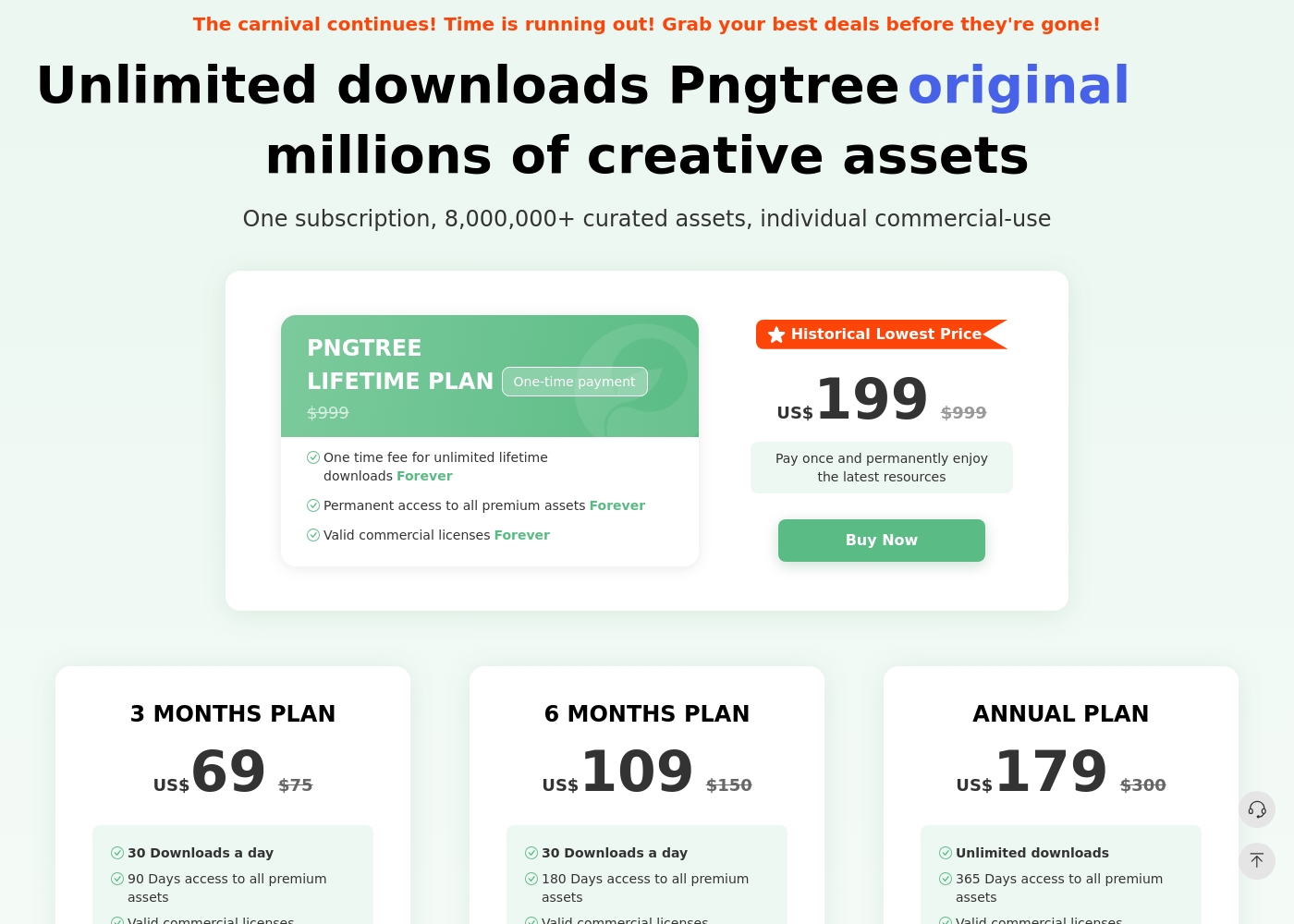
Pngtree에는 일일 다운로드가 제한된 무료 요금제와 여러 유료 개인 요금제가 있습니다. 가격 페이지에는 현재 3개월 요금제, 6개월 요금제, 연간 요금제, 평생 요금제가 나열되어 있습니다. 연간 요금제와 평생 요금제는 무제한 다운로드를 강조하는 반면, 더 짧은 유료 요금제에는 일일 다운로드 한도가 명시되어 있습니다. 유료 플랜은 유효한 상업용 라이센스, 더 빠른 다운로드, 귀속 요구 사항 없음 및 프리미엄 자산을 광고합니다. 라이선스 조건은 여전히 중요합니다. 개별 라이선스는 단일 시트이며 팀 또는 더 광범위한 비즈니스 승인에는 엔터프라이즈 계획이 필요할 수 있습니다.
- 1백만 개의 무료 자산
- 2 다운로드/일
- 저작자 표시 필요 없음(무료 자산의 경우)
- 다운로드 속도 최대 0.5MB/s
- 모든 프리미엄 자산에 90일간 액세스 가능
- 유효한 상업용 라이센스
- 고속 다운로드(10MB/s)
- 프리미엄 콘텐츠에는 저작자 표시가 필요하지 않습니다.
- 모든 프리미엄 자산에 180일 액세스 가능
- 유효한 상업용 라이센스
- 고속 다운로드(10MB/s)
- 프리미엄 콘텐츠에는 저작자 표시가 필요하지 않습니다.
- 무제한 다운로드
- 모든 프리미엄 자산에 365일 액세스 가능
- 유효한 상업용 라이센스
- 고속 다운로드(10MB/s)
- 프리미엄 콘텐츠에는 저작자 표시가 필요하지 않습니다.
Shade는 최소 1개의 요금제(Start for Free, $0)를 제공하지만, 팀 및 엔터프라이즈 요금은 비공개입니다.
적합한 요금제를 찾는 것은 팀의 특정 미디어 스토리지 및 워크플로우 요구 사항에 따라 달라집니다.
Start for Free
가격: $0 지원되는 웹사이트: 명시되지 않음 최적 사용자: AI 검색을 탐색하는 개인 또는 소규모 팀 환불 정책: 명시되지 않음 기타 기능: 지능형 파일 스트리밍, 검토 및 승인, 자동 메타데이터, AI 검색, 미디어 보관
- 지능형 파일 스트리밍
- 검토 및 승인
- 자동 메타데이터
- AI 검색
- 보관
Pricing Notes
- Pngtree offers clear, tiered pricing from $69 for 3 months to a $199 lifetime plan. All paid plans include commercial licenses.
- Shade has a free starting plan. Paid team/enterprise pricing is not public and requires contacting sales.
- Pngtree's free plan is very limited (2 downloads/day). Shade's free plan has no stated limits for initial testing.
- Pngtree has a 15-day money-back guarantee. Shade's refund policy is not stated.
Pricing Head-to-Head
사용자 리뷰
Pngtree은 빠른 그래픽 라이브러리라는 강력한 유틸리티를 가지고 있지만 구매자는 라이선스 복잡성 및 부정적인 제3자 고객 피드백과 유틸리티 간의 균형을 맞춰야 합니다. 가장 안전한 접근 방식은 먼저 카탈로그를 테스트하고 모든 상업용 다운로드를 문서화하며 개별 계획이 모든 팀 또는 클라이언트 시나리오를 자동으로 포함한다고 가정하지 않는 것입니다.
2020년에 저는 영구 프리미엄 평생 플랜에 대해 $199를 지불했습니다. 이제 그들은 저작권 침해 혐의로 새로운 기업 계획으로의 업그레이드를 요구합니다. 평생은 무제한의 평생을 의미해야 하는데 그들은 계속해서 더 많은 돈을 갈취하려고 합니다.
Shade에 대한 외부 평가는 전반적으로 긍정적이지만, 표본 크기는 작은 것으로 보입니다. Capterra의 사용자들은 플랫폼의 사용 용이성과 팀의 시간을 절약해 주는 강력한 AI 기반 검색 기능을 높이 평가합니다.
일부 리뷰어는 온보딩 프로세스가 원활했고 고객 지원이 신속했다고 언급합니다. 중앙 집중식 미디어 허브가 협업에 유용하다는 의견도 있습니다.
우리의 판정
For most individuals, Pngtree offers quick access to the PNG assets they need. For teams managing their own media, Shade provides a more valuable and ethical workflow solution. Pngtree's superpower is its sheer volume of transparent PNG images and templates. It's the go-to when you need a specific graphic fast for a design project. Shade's superpower is intelligent media management. Its AI search and streaming turn a chaotic file server into a streamlined creative hub. The deciding factor is your core need. Do you need to *find and buy* assets, or do you need to *organize and collaborate* on assets you already have? Choose Pngtree for individual, on-demand stock assets. Choose Shade if your team wastes hours searching for files or juggling feedback. The right tool depends entirely on your workflow.
자주 묻는 질문
Which is better for small teams: Pngtree or Shade?
Shade is built for team collaboration and centralized storage. Pngtree's plans are individual and lack team features like shared libraries or review tools.
Does Pngtree have AI search like Shade?
No. Pngtree's search is for browsing its own library. Shade's AI search helps you find files within your own uploaded media based on content description.
Is Shade worth the extra cost over Pngtree?
It's a different cost structure. Pngtree sells assets directly. Shade's cost is for a workflow platform. The value depends on whether you need asset storage or asset acquisition.
Can I use Pngtree images commercially?
Yes, but only with a paid premium plan. The free plan does not include commercial licenses. Paid plans also offer downloadable copyright certificates.
Does Shade have a free trial?
Yes. You can start with a free plan to explore core features like AI search and file streaming before committing to a paid team plan.
Which tool has better customer support?
User reviews are mixed for both. Pngtree has a 1.4-star rating with complaints about aggressive practices. Shade has a 3.8-star rating but notes can be slow.
선택할 준비가 되셨나요?
두 도구 모두 강점이 있습니다. 특정 요구 사항에 따라 선택하세요.