Parallels vs Techinline
Parallels and Techinline solve completely different problems. Parallels runs Windows on your Mac, while Techinline connects you to any computer remotely. If you need to run Windows apps on a Mac, Parallels is your only choice. If you need to support or manage remote computers, Techinline wins hands down.
Best for: Mac users who need to run Windows-only applications (e.g., specific design or government software), Developers and creators who need to test across multiple operating systems (Windows, Linux, macOS)
Best for: IT professionals and support teams providing remote assistance to clients, Managed service providers (MSPs) managing fleets of unattended servers and desktops
훌륭한 가상화, 높은 구독 위험
Parallels Desktop은 인상적이고 매끄러운 가상화를 제공하여 Mac 사용자가 재부팅 없이 전문 Windows 응용 프로그램을 효율적으로 실행할 수 있도록 합니다. 그러나 우리는 잠재 고객에게 회사의 만연한 착취적 자동 갱신 관행과 응답하지 않는 고객 서비스에 대한 보고서에 대해 강력하게 경고해야 합니다. 전반적으로 기술적인 해결책은 훌륭하지만 운영 및 청구 문제는 상당한 위험을 제기합니다.
장점
- Windows와 macOS 간의 탁월한 성능과 원활한 통합.
- 다른 OS 요구 사항을 위해 두 대의 별도 컴퓨터가 필요하다는 중요한 문제 해결.
- Pro/Business 에디션에서 높은 리소스 할당 가능(가상 머신당 최대 128GB vRAM).
- macOS 환경을 위한 최고 등급의 가상화 도구로 인정받음.
단점
- 만연한 착취적이고 불투명한 자동 갱신 및 청구 문제 보고서.
- 긴급한 비즈니스 문의에 응답하지 못하는 등 고객 서비스가 심각하게 부족함.
- 많은 환불 요청이 30일 기간 내에 제출되더라도 거부되었다는 보고가 있음.
- 영구(일회성) 라이선스가 작동하지 않아 비용이 많이 드는 업그레이드를 강요할 수 있음.
Solid remote support with scalable pricing.
We found Techinline SetMe to be a capable and secure remote access solution, especially for IT professionals and small teams needing reliable unattended and on-demand support. Its tiered pricing offers flexibility, but the lack of a clear refund policy is a notable gap for potential buyers.
장점
- Simple, instant client connections via a set.me link.
- Scalable plans from individual use to enterprise-level team management.
- Stable connections with auto-reconnect and multi-monitor support.
- Centralized dashboard for managing all devices and permissions.
단점
- Limited public user reviews made independent sentiment analysis impossible.
- No explicit refund policy is detailed on the website.
- Advanced team features require upgrading to higher-tier, per-seat plans.
- The 'Core' plan for individual use lacks on-demand support features.
소개Parallels
Parallels Desktop for Mac을 사용하면 Intel 또는 Apple silicon 머신에서 Windows를 바로 실행할 수 있습니다. 전 세계 7백만 명 이상의 Mac 사용자가 그 안정성을 신뢰하며 Mac 사용자에게 수많은 문제를 해결해 왔습니다. 기본적으로 이 소프트웨어는 두 대의 별도 컴퓨터를 구매하거나 사용할 필요성을 없애줍니다. 즉, Mac 전용이든 Windows 전용이든 필요한 모든 응용 프로그램에 하나의 강력한 작업 공간에서 액세스할 수 있습니다. 여러 운영 체제를 Mac에서 실행하는 최고의 선택으로 널리 인정받고 있습니다. ✅
소개Techinline
SetMe is a remote support and management tool 🛠️ designed for IT professionals, support teams, and managed service providers. It lets you instantly connect to any computer, whether you’re providing live help or managing unattended servers and desktops from a central dashboard.
기능 비교
기능 개요
주요 차이점을 강조하고 각 기능에 대한 승자를 선택합니다.
Core Purpose
Parallels runs Windows on your Mac. Techinline provides remote computer access and support.
Parallels is a virtualization tool that lets you run Windows, Linux, or another macOS instance directly on your Mac. It eliminates the need for two separate computers. Techinline (SetMe) is a remote support and management platform. It lets IT professionals connect to any computer to provide live help or manage unattended machines. The fundamental difference is that Parallels runs software locally on your machine, while Techinline connects you to another machine over the internet. They solve entirely different problems. If you need to run a Windows-only application on your Mac, Parallels is the answer. If you need to fix a client's computer from your office, Techinline is the tool.
Target Audience
Parallels is for Mac users needing Windows. Techinline is for IT teams needing remote access.
Parallels targets Mac users who need to run Windows-specific applications, from e-Learning platforms to government design software. It's built for individual or business use on a single Mac. Techinline targets IT professionals, managed service providers, and support teams. It's designed for managing fleets of computers, providing remote help, and handling unattended server maintenance. You won't choose between these two based on features alone. Your decision depends entirely on whether you need to run software locally or access remote computers. A graphic designer needing Windows-only CAD software will pick Parallels. An IT consultant managing 50 office desktops will pick Techinline.
Performance & Stability
Parallels offers high-performance virtualization. Techinline provides stable remote connections on low-speed internet.
Parallels delivers fast, seamless integration between Windows and macOS. The Pro Edition supports up to 128 GB vRAM and 32 vCPUs, enabling graphics-intensive apps and multiple VMs. Techinline focuses on connection stability. It maintains a stable remote session even on low-speed internet and automatically reconnects if the network drops. This is crucial for support scenarios. The key trade-off is local vs. remote performance. Parallels optimizes for running software on your Mac. Techinline optimizes for maintaining a connection to another computer. If you're running demanding Windows apps on your Mac, Parallels's resource allocation matters. If you're troubleshooting a client's slow network, Techinline's auto-reconnect is more valuable.
Ease of Use
Parallels is praised for user-friendliness. Techinline offers simple one-click connections via a URL.
Parallels is known for its user-friendly interface that makes running Windows on a Mac straightforward. Users report a stable, easy-to-use experience. Techinline simplifies remote support with a simple set.me link. Clients just visit the URL in their browser—no complex downloads or setup required. This is a major win for non-technical end-users. Both tools aim to reduce friction, but in different ways. Parallels simplifies dual-OS management. Techinline simplifies establishing remote connections. For a user needing to run Windows, Parallels is easy. For a support technician helping a panicked client, Techinline's one-click link is incredibly effective.
Collaboration & Team Tools
Parallels Business Edition offers license management. Techinline offers detailed team management and permissions.
Parallels Business Edition provides centralized administration, license management, and CI/CD workflow automation. It supports volume licensing for organizations. Techinline offers more granular team tools. The Professional plan adds user management and advanced reports. The Business plan adds group/policy management and granular access control. For teams, Techinline's tools are more focused on managing who can access which remote machines. Parallels's tools are more focused on managing software licenses on Macs. If you're an MSP managing client devices, Techinline's team features are essential. If you're an IT team deploying Parallels to 100 Macs, the Business Edition's license management is key.
Pricing & Value
Parallels is cheaper for individuals. Techinline scales per seat for teams.
Parallels offers annual subscriptions from $49.99 to $97.49 per year. A one-time purchase is also available for the Standard Edition. It's a fixed annual cost. Techinline's pricing is per admin or per seat, starting at $8.25/month (annual) for the Core plan and going up to $58/seat/month for the Business plan. It scales with your team size. The value proposition is different. Parallels is a one-time or annual fee for local software. Techinline is a recurring per-user cost for a service. For a solo Mac user, Parallels is more affordable. For a growing IT team, Techinline's per-seat model might become expensive but offers powerful remote management.
Security & Compliance
Parallels has SOC 2 certification. Techinline uses end-to-end encryption.
Parallels Desktop is SOC 2 certified, indicating adherence to strict organizational security standards. This is important for enterprise compliance. Techinline uses end-to-end encryption for all remote sessions. This ensures data is protected in transit, which is critical for secure remote control. Both tools prioritize security, but for different threats. Parallels focuses on the security of the virtualization environment. Techinline focuses on securing the remote connection itself. For a business needing compliance, Parallels's SOC 2 is a strong point. For an IT team worried about data breaches during remote support, Techinline's encryption is essential.
User Reviews & Sentiment
Parallels has polarized reviews, with complaints about billing. Techinline lacks detailed external reviews.
Parallels has a 2.4/5 rating on Trustpilot. Reviews are deeply polarized. Some users praise performance, but many report predatory auto-renewal and unresponsive support. Techinline has a 4.2/5 rating, but external reviews were not accessible for this analysis. The data relies on product information and features. The most striking difference is the volume of negative feedback for Parallels. Users frequently mention denied refunds and billing issues. Techinline's review data is limited. If you're concerned about billing practices, Parallels's reviews are a red flag. If you want more user feedback, Techinline's limited data makes it harder to judge.
Integration Ecosystem
Parallels integrates with Jamf and Intune. Techinline's integrations are not detailed.
Parallels Business Edition integrates with enterprise management tools like Jamf and Intune for automated deployment and updates. This is crucial for IT teams managing many Macs. Techinline's integration capabilities are not detailed in the provided data. Users may need to check documentation or contact support. For organizations with existing IT infrastructure, Parallels's specific integrations with MDM tools are a clear advantage. Techinline's lack of detailed integration info is a gap. If your company uses Jamf to manage Macs, Parallels fits right in. If you need to integrate remote support with a PSA tool, Techinline's data doesn't confirm it.
Mobile Experience
Neither tool focuses on mobile apps. Parallels is desktop-only. Techinline may have mobile clients for remote access.
Parallels is a desktop application for Mac. It does not have a dedicated mobile app for managing or accessing VMs from a phone. Techinline is a remote access tool, which typically includes mobile clients for managing machines on the go. However, the data does not specify mobile app details. The comparison is limited here. Parallels is inherently a local desktop tool. Techinline's remote nature likely includes mobile access, but it's not confirmed. If you need to access your Mac's Windows apps from your phone, neither tool is the answer. If you need to manage remote servers from your tablet, Techinline is more likely to support it.
Parallels는 세 가지 연간 구독 요금제(Standard Edition $49.99, Pro Edition $59.99, Business Edition $97.49)로 연간 $49.99에서 $97.49 사이의 비용이 듭니다.
귀하에게 적합한 요금제를 선택할 수 있도록 가용 옵션을 자세히 살펴보겠습니다.
Parallels Desktop Standard Edition
가격: 연간 $49.99(구독) 또는 일회성 구매(가격 미정) 지원되는 웹사이트: 명시되지 않음 최적: 가정 및 개인용(또는 가벼운 가정용) 환불 정책: 30일 환불 보장 기타 기능:
- 8GB vRAM 및 4 vCPU
- Windows 및 Windows 응용 프로그램 실행
- 가상 머신에서 Linux 및 macOS 사용
- 무제한 전화 및 이메일 지원(구독 사용자만 해당)
- 8 GB vRAM 및 4 vCPU
- Windows 및 Windows 응용 프로그램 실행
- 가상 머신에서 Linux 및 macOS 사용
- Mac에서 Windows Excel 기능 사용
- 무제한 전화 및 이메일 지원(구독 전용)
- Standard Edition의 모든 기능 및 다음 사항:
- 각 VM에 대해 128 GB vRAM 및 32 VCPU
- 명령줄 인터페이스
- 그래픽 집약적인 Windows 앱 및 여러 VM 실행
- 여러 운영 체제에서 동시에 개발, 자동화, 테스트 및 디버깅
- Pro Edition의 모든 기능 및 다음 사항:
- 중앙 집중식 관리 및 라이선스 관리
- CI/CD 워크플로 자동화
- Mac 관리 도구를 사용한 프로비저닝
- 조직 및 팀을 위한 볼륨 라이선스 관리 사용
Techinline pricing: Techinline offers four SetMe plans starting at $8.25 per month (billed annually) for individual unattended access. Pricing scales based on features like on-demand support, seat count, and team management tools, with both monthly and yearly billing available for most tiers.
Core
Price: $8.25 per month (billed annually at $99) Best For: Individual users needing secure unattended access Other Features: Multiple concurrent sessions, File transfer and clipboard sync, Remote restart with auto-reconnect, Multi-monitor support, Session recording
This plan is perfect for individuals who only need to manage their own remote machines. It's a reliable choice if you don't need to provide instant on-demand support to new clients.
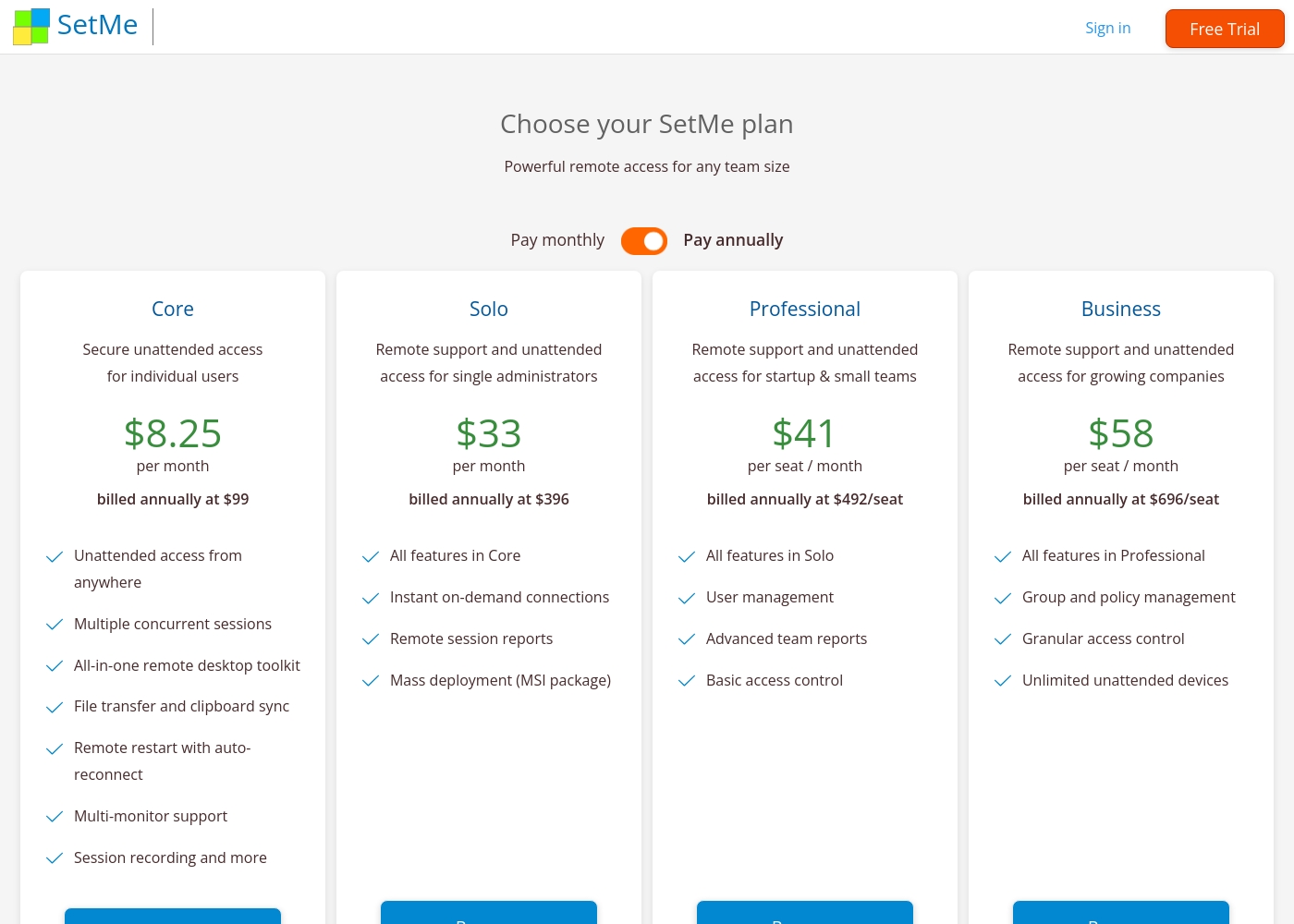
Pricing Head-to-Head
사용자 리뷰
Parallels Desktop에 대한 사용자 피드백은 극도로 양극화되어 있습니다. 일부 사용자는 제품이 잘 작동한다고 보고하며 Mac에서 필수 Windows 앱(예: MS Excel)을 실행하는 안정적인 성능과 원활한 작동을 칭찬하지만, 외부 리뷰의 대다수는 회사의 비즈니스 관행에 대해 극도의 불만을 표현합니다.
가장 일반적인 불만 사항은 만연한 착취적 청구, 특히 불투명하고 원치 않는 자동 갱신에 집중되어 있습니다. 사용자는 명확한 알림 없이 매년 비용이 청구되는 경우가 많으며, 30일 기간 내에 제출된 환불 요청조차도 일관되게 거부된다고 말합니다.
25년 동안 PC 사용자로 일하다가 MAC으로 전환했지만 Excel을 광범위하게 사용했습니다. Mac 버전이 사용자 친화적이지 않았기 때문에 Parallels는 Windows Excel을 Mac에 추가하는 데 도움이 되었습니다. 이제 정말로 양쪽의 장점을 모두 누리고 있습니다.
External reviews for Techinline SetMe were not accessible during this review. The provided Trustpilot URL returned a 403 error, preventing access to user feedback. Consequently, the review relies solely on the product's website information and our independent analysis of its features and pricing structure.
우리의 판정
This isn't a close race—it's a category confusion. Parallels and Techinline solve completely different problems. You won't choose between them based on features. Your decision depends on whether you need to run Windows on your Mac or remotely support other computers. Parallels's superpower is virtualization. It runs Windows seamlessly on your Mac, so you can use both OS environments on one machine. This is perfect if you need a specific Windows app for work but love your Mac. It's a top-rated tool for this exact use case. Techinline's superpower is remote access. It lets you connect to any computer instantly via a simple URL. This is ideal for IT support teams and MSPs who need to fix issues quickly, even on low-speed internet. Its stable connections and centralized dashboard are built for that job. The deciding factor is your workflow. If you're a Mac user needing Windows software, Parallels is the only choice. If you're an IT pro managing remote devices, Techinline is the clear winner. There's no overlap in their core functions. Final verdict: Pick Parallels if you need Windows on your Mac. Pick Techinline if you need to remotely access and manage computers. For most people, one will be essential and the other irrelevant.
자주 묻는 질문
Which is better for small teams: Parallels or Techinline?
It depends on your needs. Parallels Business Edition ($97.49/year) is for teams needing to run Windows on Macs. Techinline's Professional plan ($41/seat/month) is for small teams needing remote access and support.
Does Parallels have remote access like Techinline?
No. Parallels is a virtualization tool for running Windows on your Mac. It does not provide remote access to other computers. Techinline is built specifically for remote support and management.
Is Techinline worth the extra cost over Parallels?
They aren't competitors. Parallels costs $49.99–$97.49/year for local virtualization. Techinline costs $8.25–$58/seat/month for remote access. The cost is for a completely different service.
Can I migrate from Parallels to Techinline easily?
Migration isn't applicable. Parallels runs software on your Mac. Techinline connects you to remote computers. They serve different purposes and aren't interchangeable.
What are the biggest drawbacks of Parallels?
Parallels has serious billing issues. Users report predatory auto-renewals, denied refunds, and unresponsive support. The product works, but the business practices are a major risk.
Does Techinline offer a free trial?
Yes. Techinline offers a 15-day free trial with no credit card required. You get full access to zero-lag remote control features during the trial period.
선택할 준비가 되셨나요?
두 도구 모두 강점이 있습니다. 특정 요구 사항에 따라 선택하세요.