Maileroo vs Sender
Maileroo and Sender are both solid email platforms, but they serve different masters. Maileroo is a powerhouse for transactional delivery and developer-friendly API work. Sender shines as a simple, all-in-one marketing tool for small businesses. Here's how to pick the right one.
Best for: Developers and technical teams sending transactional emails, Businesses needing guaranteed high-volume email delivery
Best for: Small businesses and beginners in email marketing, Marketing teams needing collaboration tools
Maileroo는 진정으로 뛰어난 고객 서비스로 지원되는 고성능 전송을 제공합니다. 설정이 놀라울 정도로 쉬워 개발자와 일반 사용자 모두에게 복잡한 거래 이메일을 간단하게 만듭니다. 전반적으로 Maileroo는 모든 규모의 비즈니스에 매우 신뢰할 수 있고 사용자 중심적인 솔루션입니다.
장점
- 무료 요금제에서도 탁월하고 응답성이 뛰어난 고객 지원
- 극히 높은 도달률; 이메일이 일관되게 스팸을 피함
- 통합 및 설정 프로세스가 빠르고 매우 간단함
- 깔끔하고 우아하며 전문적인 사용자 인터페이스
단점
- 고가용량 등급에 대한 정확한 가격은 계산기 또는 맞춤 견적을 통해서만 확인할 수 있습니다.
- 기존의 고급 플랫폼과 비교했을 때 일부 고급 기능의 깊이가 부족할 수 있습니다.
Simple, free, and effective for basics.
We found Sender to be a solid, no-frills tool for core email marketing tasks. Its free plan is a major draw for startups and small businesses. Overall, it delivers good value with a straightforward interface, though it may lack some advanced features for power users.
장점
- Extremely generous free plan (2,500 contacts, 15k emails/month).
- Clean, user-friendly interface that's easy to learn.
- Transparent, affordable pricing with no hidden fees.
- Includes essential automation features from the start.
단점
- Advanced features and segmentation are limited on lower tiers.
- Some users report occasional email deliverability issues.
- Integrations can be inconsistent with certain platforms.
- Free plan lacks SMS marketing capabilities.
소개Maileroo
Maileroo는 더 좋고 빠른 이메일 전송을 위해 설계된 강력한 플랫폼입니다. 모든 규모의 비즈니스가 정교한 마케팅 캠페인과 필수 거래 이메일을 모두 원활하게 보낼 수 있도록 돕습니다. 프로모션을 공지하든 필수 주문 확인을 보내든 커뮤니케이션을 쉽게 만들고, 관리하고, 보낼 수 있습니다. 💡 설정이 간단하여 기술적 복잡성에 대해 걱정하는 대신 효과적인 메시지 작성에 집중할 수 있도록 해줍니다.
소개Sender
Sender is an email marketing platform designed for businesses of all sizes. It helps you build, automate, and send email campaigns that people actually want to read. Think of it as your straightforward tool for staying in touch with your audience and driving sales. 🚀
하이라이트
기능 비교
기능 개요
주요 차이점을 강조하고 각 기능에 대한 승자를 선택합니다.
Free Plan Value
Sender's free plan is more generous for marketing. Maileroo's is perfect for transactional testing.
Maileroo's Free Plan includes 3,000 outbound emails monthly. It also gives you unlimited contacts and basic automations. Sender's Free Forever plan offers 15,000 emails per month for up to 2,500 subscribers. This includes 24/7 support and full automation. The key difference is volume and audience size. Sender lets you email a larger list more often. Maileroo's plan is ideal for developers testing transactional workflows. If you're a blogger, Sender's free tier is a clear win. If you're an app needing reliable emails, Maileroo's is plenty.
Ease of Setup
Maileroo wins for developers. Sender wins for non-technical users.
Maileroo setup involves API keys or SDK integration. It's trivially simple if you're a developer. You can be sending within minutes. Sender offers a 5-minute setup with a visual builder. You can connect WordPress or WooCommerce with no code. It's built for beginners. The trade-off is technical skill vs. simplicity. Maileroo assumes you can handle code. Sender assumes you want a point-and-click experience. Choose Maileroo if your team includes a developer. Choose Sender if your marketing team runs the show.
Deliverability Focus
Maileroo's infrastructure is built for inbox placement. Sender focuses on marketing reach.
Maileroo runs its own email infrastructure. This guarantees high deliverability and speed. It's designed to keep you out of spam. Sender's reviews note occasional deliverability hiccups. Their focus is on campaign tools and ease-of-use, not infrastructure purity. Maileroo also offers free dedicated IPs for high-volume senders (250K+ emails). Sender doesn't mention this. For critical transactional emails, Maileroo's reliability is its superpower. Sender is fine for promotional blasts.
Marketing Features
Sender offers a more complete marketing toolkit out-of-the-box.
Sender includes landing pages, 100+ templates, and SMS marketing. You can run omnichannel campaigns from one dashboard. Maileroo focuses on email delivery and campaigns. It has segmentation and A/B testing, but lacks landing pages and templates. The gap is in breadth. Sender is a mini marketing suite. Maileroo is a specialized delivery engine. If you need to capture leads with pop-ups, Sender is your tool. If you just need to send great emails, Maileroo excels.
Pricing Transparency
Sender's prices are clear. Maileroo's higher tiers require a quote.
Sender publishes full pricing. You see $10/month for 1,000 subscribers. No hidden fees. Maileroo's costs for over 3,000 emails are hidden. You must use a calculator or contact sales. This is common for usage-based models. The difference affects budgeting. Sender lets you predict costs. Maileroo requires a conversation for scale. For predictable budgets, Sender wins. For custom enterprise needs, Maileroo's model might be better.
Team Collaboration
Sender includes multi-user seats. Maileroo doesn't specify team features.
Sender's paid plans include 3 to 10 user seats. Teams can collaborate on campaigns with role-based access. Maileroo's data doesn't mention multi-user access or team features. It seems focused on individual developers or single accounts. This is a critical difference for growing teams. Sender supports collaboration natively. Maileroo may require separate logins. If you have a marketing team of 5, Sender's Professional plan is built for you. Maileroo is for individual or technical use.
Advanced Segmentation
Maileroo offers deeper, behavior-based segmentation. Sender's is more basic.
Maileroo highlights advanced segmentation based on user behavior. You can create precise segments for targeted campaigns. Sender's advanced features are limited on lower tiers. You may need the Professional plan for robust segmentation. The difference is depth vs. accessibility. Maileroo provides powerful tools upfront. Seller gates them behind higher costs. For data-driven marketers who live in analytics, Maileroo's segmentation is superior.
Maileroo는 무료 요금제의 경우 월 0달러이며 최대 3,000개의 이메일 전송이 포함됩니다. 이 볼륨을 초과하면 가격이 확장되지만 이러한 상위 등급에 대한 정확한 비용은 명시되어 있지 않습니다.
적합한 요금제를 선택하는 데 도움이 되도록 무료 서비스 및 일반적인 확장 구조를 간략하게 설명해 드립니다.
무료 요금제
가격: 월 0달러 지원 웹사이트: 명시되지 않음 적합 대상: 월 3,000개 미만의 이메일이 필요한 새로운 사용자, 개발자 또는 소규모 스타트업. 환불 정책: 해당 없음(무료) 기타 기능:
- 월 3,000회 발신 이메일
- 월 1,000회 수신 이메일
- 모든 요금제에서 무제한 연락처
- 자동화
- 시작 시 신용카드 불필요
- 월 3,000회 발신 이메일
- 월 1,000회 수신 이메일
- 무제한 연락처
- 자동화
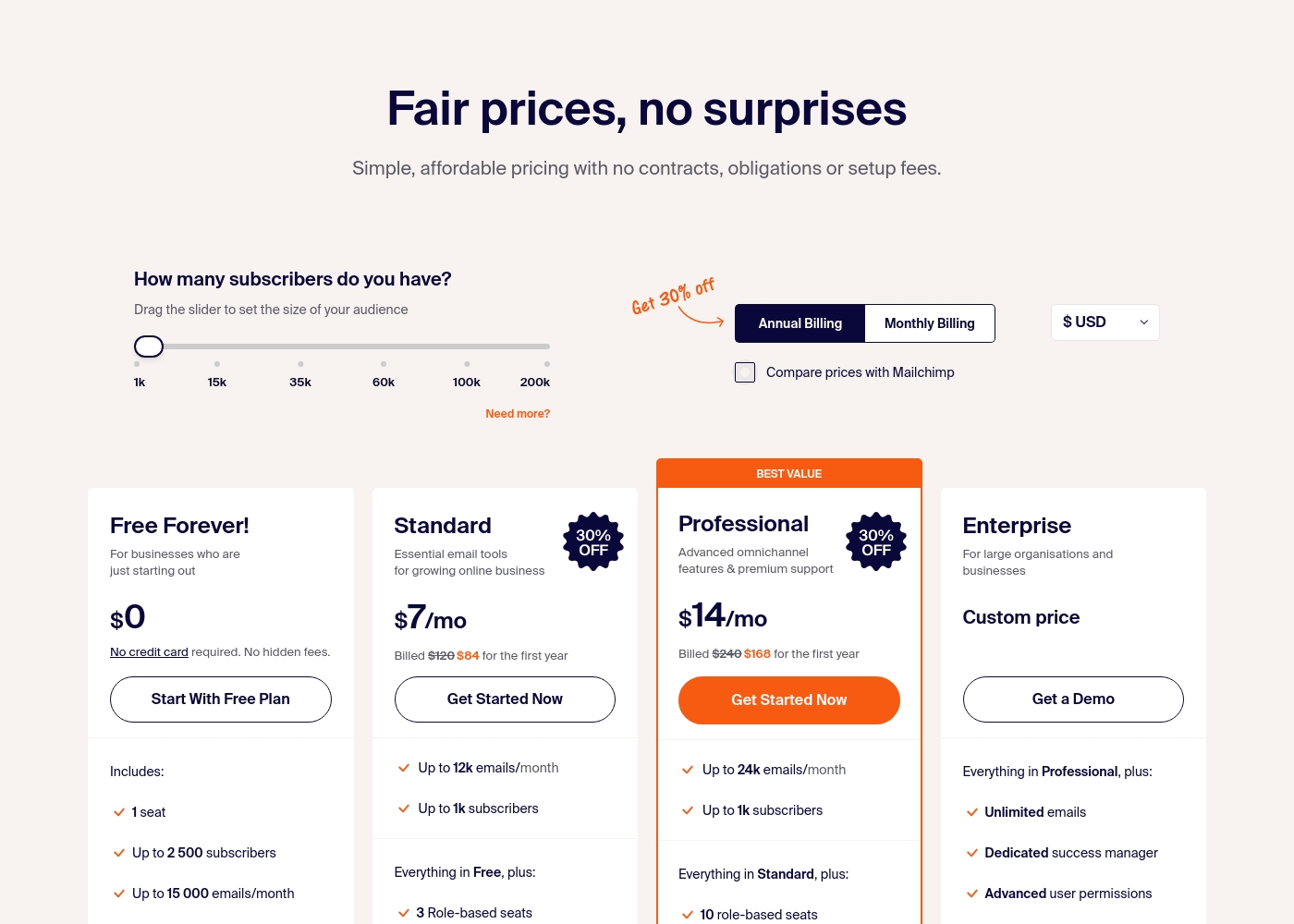
Sender costs between $0 and a custom price per month with 4 plans: Free Forever at $0, Standard at $7, Professional at $14, and Enterprise at Custom price.
Take a look at the specific features and limits included in each plan tier below.
Free Forever!
Price: $0 monthly Best For: Businesses who are just starting out Other Features: 1 seat, up to 2,500 subscribers, 15,000 emails/month, 24/7 live support, email automation.
- 1 seat
- Up to 2,500 subscribers
- Up to 15,000 emails/month
- 24/7 live support
- Email automation
- Up to 12k emails/month
- Up to 1k subscribers
- 3 Role-based seats
- Automated sequences
- Up to 24k emails/month
- Up to 1k subscribers
- 10 role-based seats
- Premium support
- Unlimited emails
- Dedicated success manager
- Advanced user permissions
Pricing Notes
- Maileroo's Free Plan is permanent with 3,000 emails. No credit card needed.
- Sender's Free Forever plan is permanent with 15,000 emails. Also no credit card.
- Maileroo's paid pricing is volume-based and not public. You must contact sales.
- Sender's paid plans start at $10/month (billed annually) for 1,000 subscribers.
- Maileroo includes Unlimited Contacts on all plans, saving money for large lists.
- Sender's plans cap subscribers (e.g., 1,000 on Standard), but offer multi-user seats.
Pricing Head-to-Head
사용자 리뷰
Maileroo에 대한 사용자 피드백은 압도적으로 긍정적이며 Trustpilot에서 훌륭한 별점 4.6점을 받았습니다. 리뷰어들은 일관되게 뛰어난 고객 지원 수준을 강조하며, Areeb과 같은 직원은 무료 등급 사용자나 비개발자에게도 참을성 있고 시의적절하며 상세한 도움을 제공한다고 언급합니다.
이러한 적극적인 응답성은 주요 차별점입니다. Postmark, Mailjet 및 Amazon SES와 같은 제공업체로부터 이전하는 사용자는 마이그레이션 프로세스가 놀라울 정도로 쉽다고 보고하며 통합을 매우 간단하다고 묘사하는 경우가 많습니다.
고객 지원에 정말 놀랐습니다. 저는 무료 등급에 가입했고 설정에 도움이 필요했는데 Maileroo가 자세한 지침으로 모든 단계를 지원해 주었습니다. 분명히 회사와 함께했던 최고의 경험 중 하나였습니다.
User sentiment on Trustpilot and Capterra highlights Sender's generous free plan and ease of setup as major positives. Many praise the intuitive interface and reliable automation.
😊 However, some note occasional deliverability hiccups and a learning curve for advanced features. Customer support is frequently mentioned as responsive, though a few users report slow responses during peak times.
The free plan is unbeatable for a new business. I set up my first automation in minutes. The platform is simple and gets the job done without fuss.
우리의 판정
For most people, **Sender** is the easier, more complete tool. It's the clear winner if you're doing traditional email marketing. But **Maileroo** isn't really competing in that arena. Its superpower is bulletproof transactional email delivery. It's the engine you trust for password resets and receipts. The deciding factor is your core need. Pick **Sender** if you want to build campaigns, automate sequences, and collaborate with a team. Pick **Maileroo** if you're a developer or business obsessed with email landing in the inbox, every single time. **Final verdict:** Choose **Sender** for straightforward, affordable email marketing. Choose **Maileroo** for mission-critical transactional email delivery and API simplicity.
자주 묻는 질문
Which is better for transactional emails: Maileroo or Sender?
Maileroo is built specifically for transactional email delivery with high reliability. Sender also supports transactional emails, but its focus is on marketing campaigns. For critical messages like password resets, Maileroo's infrastructure is superior.
Does Sender have a free plan like Maileroo?
Yes, Sender's Free Forever plan is more generous, offering 15,000 emails per month for 2,500 subscribers. Maileroo's free plan includes 3,000 emails. Both are permanent and don't require a credit card.
Is Maileroo worth it if I just need email marketing?
Probably not. Maileroo excels at email delivery and API work, but lacks marketing tools like landing pages and templates. Sender is a better fit for basic email marketing needs.
Can I migrate from Maileroo to Sender easily?
Migration details aren't specified for either platform. However, both offer straightforward setups. You'd need to re-import your contacts and rebuild campaigns in Sender's visual builder.
Which tool is easier for a non-technical user?
Sender is significantly easier for non-technical users. It offers a 5-minute setup and a drag-and-drop interface. Maileroo requires some technical knowledge to use its API and developer tools.
Does Sender support SMS marketing?
Yes, Sender offers SMS marketing credits that you can purchase separately. The cost depends on the destination country. Maileroo does not mention SMS capabilities.
선택할 준비가 되셨나요?
두 도구 모두 강점이 있습니다. 특정 요구 사항에 따라 선택하세요.