GitLab vs Glances
GitLab and Glances solve completely different problems. GitLab is a powerhouse for building and shipping software. Glances is a smart integrator that unifies your existing business apps into one view. Choosing between them isn't about features—it's about your core workflow.
Comprehensive DevSecOps, but complex.
GitLab is a powerful, all-in-one platform that unifies the entire software lifecycle. We find it delivers on its promise of acceleration and unified security, though its depth can create a steep learning curve for smaller teams. Overall, it's an excellent choice for organizations seeking a single, scalable solution for planning, building, and deploying software securely.
장점
- Single platform for the entire DevSecOps lifecycle
- Built-in security scanning accelerates vulnerability detection
- AI-powered workflows (Duo Agent) enhance productivity
- Offers a functional Free tier for individuals and small projects
단점
- Learning curve can be steep due to platform breadth
- Enterprise features like advanced security require costly Ultimate tier
- Compute and storage limits on lower tiers may require paid add-ons
- Annual billing commitment for paid plans
강력한 노코드 통합
Glances를 노코드 통합으로, 앱을 라이브의 단일 뷰로 통합하는 것으로 파악합니다. Guided 설정, 도구 전반의 실시간 데이터 및 팀원을 위한 안전한 액세스에 가치를 둡니다. 전반적으로 거버넌스와 교차 도구 워크플로를 필요로 하는 팀에 좋은 선택이지만, 연간 가격과 같은 일부 세부 사항은 표시되지 않습니다.
장점
- Guided Connect 옵션을 통한 노코드 설정
- 앱 전반의 통합된 라이브 뷰
- 주요 앱(Monday.com & QuickBooks) 전반의 실시간 데이터 동기화
- 자격 증명 공유 없는 안전한 데이터 액세스
단점
- 연간 가격은 현재 보기에 표시되지 않음
- 일부 제품 세부 정보(예: 지원되는 웹사이트)가 명시적으로 나와 있지 않음
- 환불 정책이 명확하게 명시되어 있지 않음
- 사용자별 가격 책정은 대규모 팀의 경우 부담이 될 수 있음
소개GitLab
GitLab is an end-to-end DevSecOps platform for teams of all sizes, from startups to large enterprises. It’s the single place to plan, build, test, secure, and deploy your software. You get all your projects, releases, and code in one data plane, so both your team and AI agents work from the same information. 💡
소개Glances
Glances는 노코드 통합 솔루션으로, 비즈니스 앱을 단일의 실시간 뷰로 통합합니다. 팀이 한 곳에 머무르면서 여러 앱의 데이터를 실시간으로 보고 현재 워크플로를 떠나지 않고도 작업을 수행할 수 있도록 돕습니다. Asana부터 Zendesk까지, Glances는 다양한 비즈니스 앱을 연결합니다. 💡
하이라이트
기능 비교
기능 개요
주요 차이점을 강조하고 각 기능에 대한 승자를 선택합니다.
Core Purpose
GitLab builds software. Glances connects your existing apps.
GitLab is a complete platform for the software lifecycle. It handles planning, coding, testing, security, and deployment in one place. Glances doesn't build software. It creates a single view across your business apps like Asana and QuickBooks. It lets you see data and take actions without switching tabs. The difference is fundamental. GitLab is for creating a product. Glances is for managing work in tools you already use.
AI Capabilities
GitLab has powerful AI agents. Glances focuses on data unification.
GitLab's Duo Agent Platform uses AI to automate dev tasks. Agents can create merge requests from issues or review code. Teams report saving 4 hours per engineer weekly. Glances doesn't advertise AI features. Its strength is connecting apps and showing live data. The intelligence is in the unified view, not AI automation. GitLab is investing heavily in AI for development. Glances uses technology to avoid complex data syncing.
Security & Compliance
GitLab has built-in scanners. Glances focuses on secure data access.
GitLab bakes security into the platform. It includes scanners for vulnerabilities in code and dependencies. You get compliance evidence automatically in pipelines. Glances provides secure data transport. It lets teammates access insights without sharing account credentials. It doesn't scan code or manage compliance frameworks. For DevSecOps, GitLab is the clear leader. Glances handles secure access for business data sharing.
Ease of Setup
Glances is no-code and guided. GitLab has a learning curve.
Glances is designed for no-code setup. You can connect apps in minutes with Guided Connect. The trial lets you see value immediately. GitLab is a comprehensive platform. Its breadth means a steeper learning curve. Teams often need time to configure pipelines and security rules. If you need quick wins without code, Glances is easier. GitLab requires more investment for its powerful capabilities.
Integration Ecosystem
GitLab integrates with DevOps tools. Glances connects business SaaS apps.
GitLab connects with tools like Jira, Jenkins, and cloud providers. It imports from GitHub and Bitbucket. It's built for the development toolchain. Glances connects apps from Asana to Zendesk. You can request new app integrations. It focuses on business productivity suites. Your choice depends on your stack. Need Jira and Kubernetes? GitLab. Need Asana and QuickBooks? Glances.
Team Collaboration
GitLab collaborates on code. Glances unifies data across business roles.
GitLab enables collaboration on code, issues, and pipelines. Teams work together on the same platform with clear roles and permissions. Glances helps sales, support, and ops collaborate. It gives everyone a shared view of customer data across apps. You can grant safe access without sharing logins. GitLab is for technical teams building together. Glances is for cross-functional teams needing shared context.
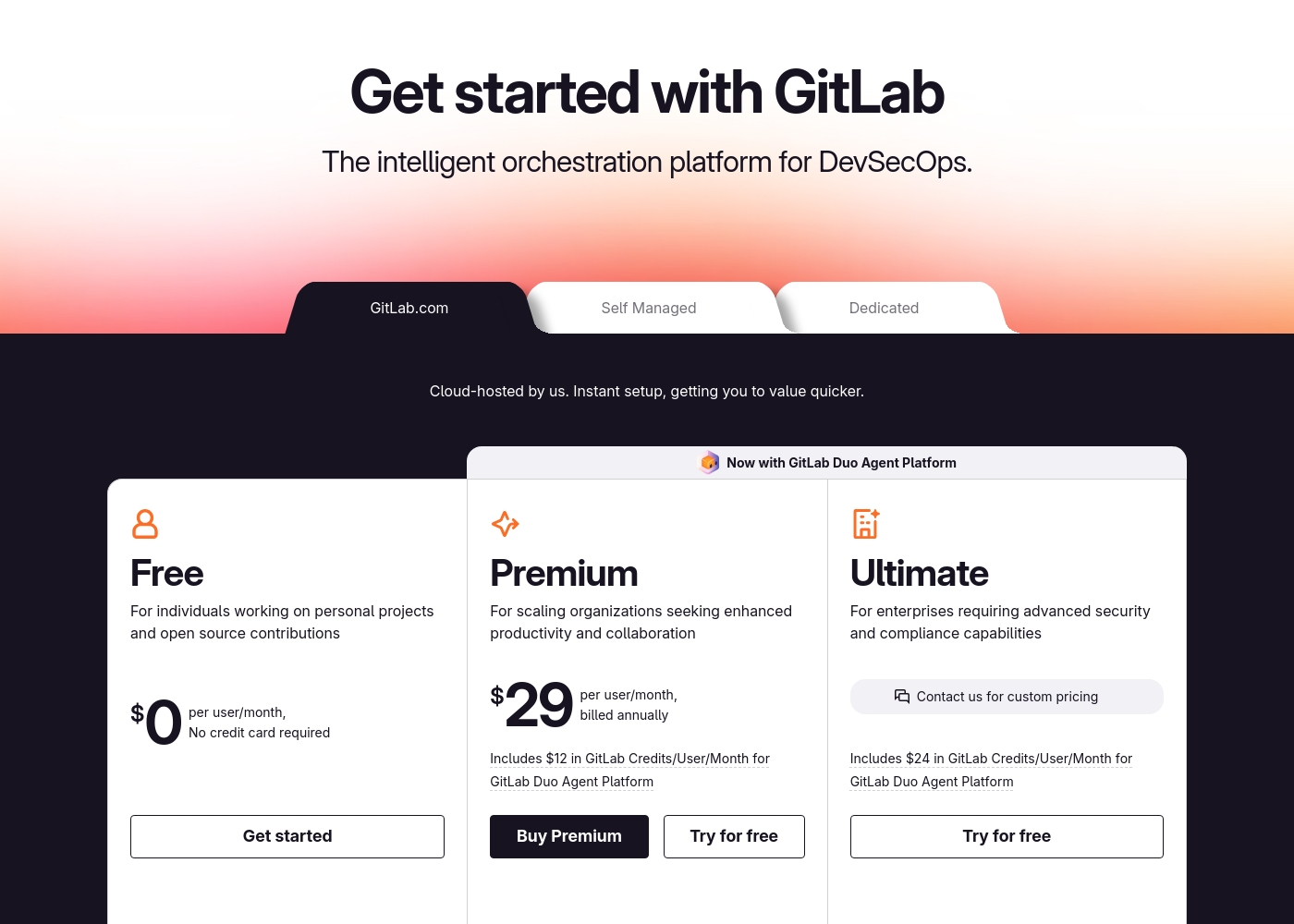
GitLab pricing: GitLab offers a range of DevSecOps plans from a free tier for individuals to an Ultimate enterprise solution for $99/month. Subscriptions include various compute minutes, storage allocations, and security features to fit different team sizes and needs.
Please note: the provided screenshot shows $29/user/month for Premium, while the text mentions $99 for Ultimate elsewhere; we have prioritized the current primary source values below for clarity. Actually, the provided text includes $0, $29 annually, and custom pricing options depending on the deployment method (SaaS or Self-Managed).
Overall it is a per-seat annual subscription model with usage-based add-ons for credits and compute time. For current SaaS pricing: Free $0, Premium $29/mo annually, Ultimate $99/mo annually (implied for custom).
Glances는 월 $29–$99이며, 프로페셔널($29/사용자/월)과 monday.com & QuickBooks용 Glances($99/월)의 2가지 플랜이 있습니다. 표시된 가격은 월별 청구를 기준으로 하며 연간 가격은 여기에 나와 있지 않습니다. 두 플랜 모두 무료 체험이 제공되며 시작 시 신용카드가 필요하지 않습니다.
아래 가격 세부 정보에서 각 플랜의 내용을 자세히 확인할 수 있습니다.
Professional
가격: 사용자당 월 $29 지원 웹사이트: 명시적으로 나와 있지 않음 적합 대상: 액세스에 대한 강력한 제어 및 앱 전반의 가시성을 필요로 하는 팀 환불 정책: 명시적으로 나와 있지 않음 기타 기능:
- 무제한 앱 연결 및 검색
- 팀 역할 및 권한 관리
- 안전한 데이터 전송
- 각 앱에 대한 보기 사용자 지정
- 다른 앱에서 작업 수행
- 무제한 앱 연결 및 검색
- 팀 역할 및 권한 관리
- 안전한 데이터 전송
- 각 앱에 대한 보기 사용자 지정
- 다른 앱에서 작업 수행
- Pro의 모든 기능, 플러스 사용자 최대 3명
- Monday로 인보이스 실시간 동기화
- QuickBooks 견적서 및 인보이스 생성 및 전송
- QuickBooks 견적서를 인보이스로 변환
- 고객 및 하위 고객 생성 및 업데이트
Pricing Notes
- GitLab's Free plan is generous for individuals and small projects.
- GitLab's paid plans require annual billing.
- Glances offers a no-credit-card-required free trial for both plans.
- GitLab has usage-based costs for AI credits and extra compute.
- Glances' monday.com & QuickBooks plan is a flat $99/month for up to 3 users.
Pricing Head-to-Head
사용자 리뷰
External user reviews for GitLab are currently inaccessible for a full synthesis, as both Trustpilot and Capterra returned security verification errors. 📄 Therefore, we cannot provide a balanced, specific summary of recurring user themes on accuracy, ease of use, support, or pricing at this time. We recommend checking these sources directly for up-to-date sentiment.
GitLab streamlined our entire development pipeline. Having CI/CD, security, and planning in one place saves our team significant time each week.
Capterra 목록에 따르면 Glances는 노코드 접근 방식, 광범위한 통합, 통합된 라이브 데이터 뷰로의 명확한 경로 덕분에 높이 평가받고 있습니다. Trustpilot 데이터는 입력 정보에 제공되지 않지만, Capterra에서는 사용자들이 끝없이 탭을 전환하지 않고 앱 전반에서 일상적인 작업을 실행할 수 있다는 점을 높이 평가하고 있으며, 이는 오류를 줄이고 시간을 절약하는 데 도움이 된다고 언급합니다.
이 제품은 360도 뷰, 실시간 데이터 및 팀원을 위한 안전한 액세스를 제공하며, 간편한 무료 체험을 제공합니다. 가격은 프로페셔널($29/사용자/월)과 monday.com & QuickBooks용 $99/월 번들 등 두 가지 플랜을 보여주며, 카드 없이 바로 시작할 수 있는 무료 체험이 제공됩니다.
Glances는 앱을 깔끔하게 통합해 줍니다. 노코드 설정 덕분에 몇 시간을 절약했고, 라이브 뷰 덕분에 우리 팀이 여러 시스템에서 정렬 상태를 유지할 수 있었습니다.
우리의 판정
This isn't a fair fight. GitLab and Glances are tools for entirely different jobs. Picking one depends on what you're trying to build or manage. GitLab's superpower is being the single source of truth for software. It bundles planning, code, CI/CD, and security into one powerful platform. Teams report saving hours per week and shipping faster. Glances's superpower is creating clarity from chaos. It connects your existing business apps into one live view. You see data from Asana and QuickBooks together without switching tabs. The deciding factor is your core activity. Are you building and deploying software? Choose GitLab. Are you trying to streamline workflows across your business tools? Choose Glances. For development teams, GitLab is the clear choice. For business teams drowning in tab-switching, Glances is the solution. Know your workflow, and the right tool becomes obvious.
자주 묻는 질문
Can GitLab and Glances be used together?
They serve different purposes. GitLab is for your development workflow. Glances could potentially connect GitLab data into a broader business view, but it's not their primary focus.
Which is better for a small business owner?
It depends. If you run a software company, GitLab. If you manage a team juggling multiple SaaS apps for operations, Glances is likely more helpful for daily tasks.
Does Glances offer any development features like GitLab?
No. Glances is focused on integrating and viewing data from existing business apps. It doesn't include code hosting, CI/CD, or security scanning.
Is GitLab too complex for non-technical teams?
GitLab is designed for technical teams building software. Non-technical business teams would find its interface and features overwhelming and irrelevant to their work.
How does Glances handle data security?
Glances pulls data in real-time and doesn't store it. It uses secure, encrypted connections and lets you control access without sharing login credentials.
Can I get a free trial for both?
Yes. GitLab has a free tier and trials for paid plans. Glances offers a free trial with no credit card required for both of its plans.
선택할 준비가 되셨나요?
두 도구 모두 강점이 있습니다. 특정 요구 사항에 따라 선택하세요.