Backlog by Nulab Inc vs GitLab
Backlog by Nulab Inc and GitLab both manage projects, but for very different teams. Backlog is a simple hub for tasks, issues, and code. GitLab is a full DevSecOps powerhouse for the entire software lifecycle.
Solid all-in-one for dev teams.
Overall, we find Backlog to be a capable and cost-effective platform that effectively merges project management, issue tracking, and code collaboration into a single tool. It's a strong choice for small to mid-sized teams looking to simplify their workflow without per-user costs.
장점
- All-in-one platform combining project management, issue tracking, and Git/SVN repositories.
- Transparent, flat-fee pricing with no per-user charges, making it affordable for growing teams.
- Built-in AI assistant to help with summaries, file retrieval, and task drafting.
- Integrates with popular tools like Slack, Microsoft Teams, and Google Drive.
단점
- External review sources were inaccessible, limiting our ability to gauge user sentiment on support or reliability.
- The platform's breadth might be overwhelming for very simple project tracking needs.
- Advanced features are only available on higher-priced plans.
- Specific details on performance with very large teams or complex codebases are unclear from provided materials.
Comprehensive DevSecOps, but complex.
GitLab is a powerful, all-in-one platform that unifies the entire software lifecycle. We find it delivers on its promise of acceleration and unified security, though its depth can create a steep learning curve for smaller teams. Overall, it's an excellent choice for organizations seeking a single, scalable solution for planning, building, and deploying software securely.
장점
- Single platform for the entire DevSecOps lifecycle
- Built-in security scanning accelerates vulnerability detection
- AI-powered workflows (Duo Agent) enhance productivity
- Offers a functional Free tier for individuals and small projects
단점
- Learning curve can be steep due to platform breadth
- Enterprise features like advanced security require costly Ultimate tier
- Compute and storage limits on lower tiers may require paid add-ons
- Annual billing commitment for paid plans
소개Backlog by Nulab Inc
Backlog is an all-in-one work management platform built for teams that build, plan, or create. 🚀 It combines project management, issue tracking, and team collaboration into a single, powerful tool. This makes it ideal for development teams managing code and bugs, design teams planning sprints, marketing teams running campaigns, and small businesses seeking a straightforward solution without user limits.
소개GitLab
GitLab is an end-to-end DevSecOps platform for teams of all sizes, from startups to large enterprises. It’s the single place to plan, build, test, secure, and deploy your software. You get all your projects, releases, and code in one data plane, so both your team and AI agents work from the same information. 💡
하이라이트
기능 비교
기능 개요
주요 차이점을 강조하고 각 기능에 대한 승자를 선택합니다.
Core Platform
Backlog is a unified project and code hub. GitLab is a complete DevSecOps platform.
Backlog by Nulab Inc combines project management, issue tracking, and Git/SVN into one simple tool. It's designed for teams that build, plan, or create. You manage tasks and code without switching apps. GitLab provides a single platform for the entire software lifecycle. You can plan, code, test, secure, and deploy all from one interface. It aims to be the only tool your engineering team needs. The key difference is scope. Backlog by Nulab Inc focuses on making collaboration easy for diverse teams. GitLab focuses on accelerating and securing the entire software delivery process.
Version Control
Both offer Git hosting. Backlog also supports SVN, while GitLab focuses solely on Git.
Backlog by Nulab Inc includes built-in Git and SVN repositories. You can manage code, track issues tied to commits, and handle bugs in one place. This flexibility supports legacy and modern projects. GitLab is built around Git. It provides powerful branching, merge requests, and a robust code review workflow. It's optimized for modern Git-based development teams. If you need SVN support, Backlog by Nulab Inc is the clear choice. For a Git-native experience with deeper code collaboration features, GitLab excels.
CI/CD & Automation
GitLab has a built-in, powerful CI/CD engine. Backlog requires external integrations.
Backlog by Nulab Inc does not include native CI/CD pipelines. You can integrate with external tools like Jenkins for automation. The focus remains on planning and tracking. GitLab includes a complete built-in CI/CD platform. You can define complex pipelines in a .gitlab-ci.yml file. It automates builds, tests, and deployments directly within the platform. This is a major difference for software teams. GitLab by Nulab Inc handles the build and deploy process end-to-end. Backlog by Nulab Inc is better at managing the work around the code.
Security Features
GitLab has security scanning built into the core. Backlog offers standard enterprise access controls.
Backlog by Nulab Inc provides enterprise security like SAML authentication on higher-tier plans. It focuses on secure access and centralized user management. It does not scan code for vulnerabilities. GitLab integrates security scanning directly into the development workflow. It includes SAST, DAST, Secret Detection, and more. Findings appear right in merge requests for fast fixes. GitLab makes security a proactive part of development. Backlog by Nulab Inc secures the platform access. For code-level security, GitLab is far more advanced.
AI Capabilities
Both offer AI help. Backlog's is for task summaries; GitLab's automates code workflows.
Backlog by Nulab Inc includes an AI Assistant. It helps create summaries, retrieve files, and draft daily to-do lists. It's designed to reduce administrative busywork for project managers. GitLab offers the Duo Agent Platform. AI agents can review code, turn issues into merge requests, and help fix vulnerabilities. It's designed to automate parts of the development lifecycle. Backlog's AI is a helpful assistant for planning. GitLab's AI is an active participant in the coding process. The sophistication and impact differ significantly.
Ease of Use
Backlog aims for simplicity and quick setup. GitLab's power comes with a steeper learning curve.
Backlog by Nulab Inc is designed to be straightforward. Teams can typically get started quickly. It's ideal for managing projects without a complex setup process. GitLab is incredibly feature-rich. Setting up pipelines, security rules, and runners can be complex. Users report it takes time to learn and configure fully. If you want simple project tracking fast, Backlog by Nulab Inc wins. If you need a powerful, configurable DevOps engine, GitLab's complexity is a worthwhile trade-off.
Reporting & Analytics
GitLab offers advanced DevOps analytics. Backlog provides standard project reporting.
Backlog by Nulab Inc offers core project reports like burndown charts and cumulative flow diagrams. It helps you track progress against sprints and tasks. The reporting is solid for project management. GitLab provides Value Stream Analytics, CI/CD analytics, and security dashboards. You can measure cycle time, lead time, and deployment frequency. It gives deep insights into the entire software process. For software delivery metrics, GitLab's analytics are far more powerful. For basic project health metrics, Backlog by Nulab Inc is sufficient.
Mobile Experience
Both have mobile apps. Backlog's is for task checks; GitLab's covers broader DevOps needs.
Backlog by Nulab Inc has a mobile app for iOS and Android. You can view issues, update tasks, and comment on the go. It's handy for quick checks away from your desk. GitLab also offers a mobile app. You can view projects, merge requests, and pipelines. It allows you to stay connected to your development workflow from your phone. Both provide functional mobile access. The core use case differs: Backlog by Nulab Inc for task management, GitLab for monitoring software delivery.
Pricing Value
Backlog has flat-fee pricing. GitLab's per-user cost scales with team size.
Backlog by Nulab Inc uses a flat-fee pricing model. You pay a fixed price per plan, regardless of team size. This makes costs predictable as you add users. GitLab charges per user per month, billed annually. The cost increases linearly with each team member. Higher tiers for security and compliance are expensive. Backlog by Nulab Inc offers better value for growing teams. GitLab's value comes from its extensive feature set, justifying the per-user cost for serious DevOps.
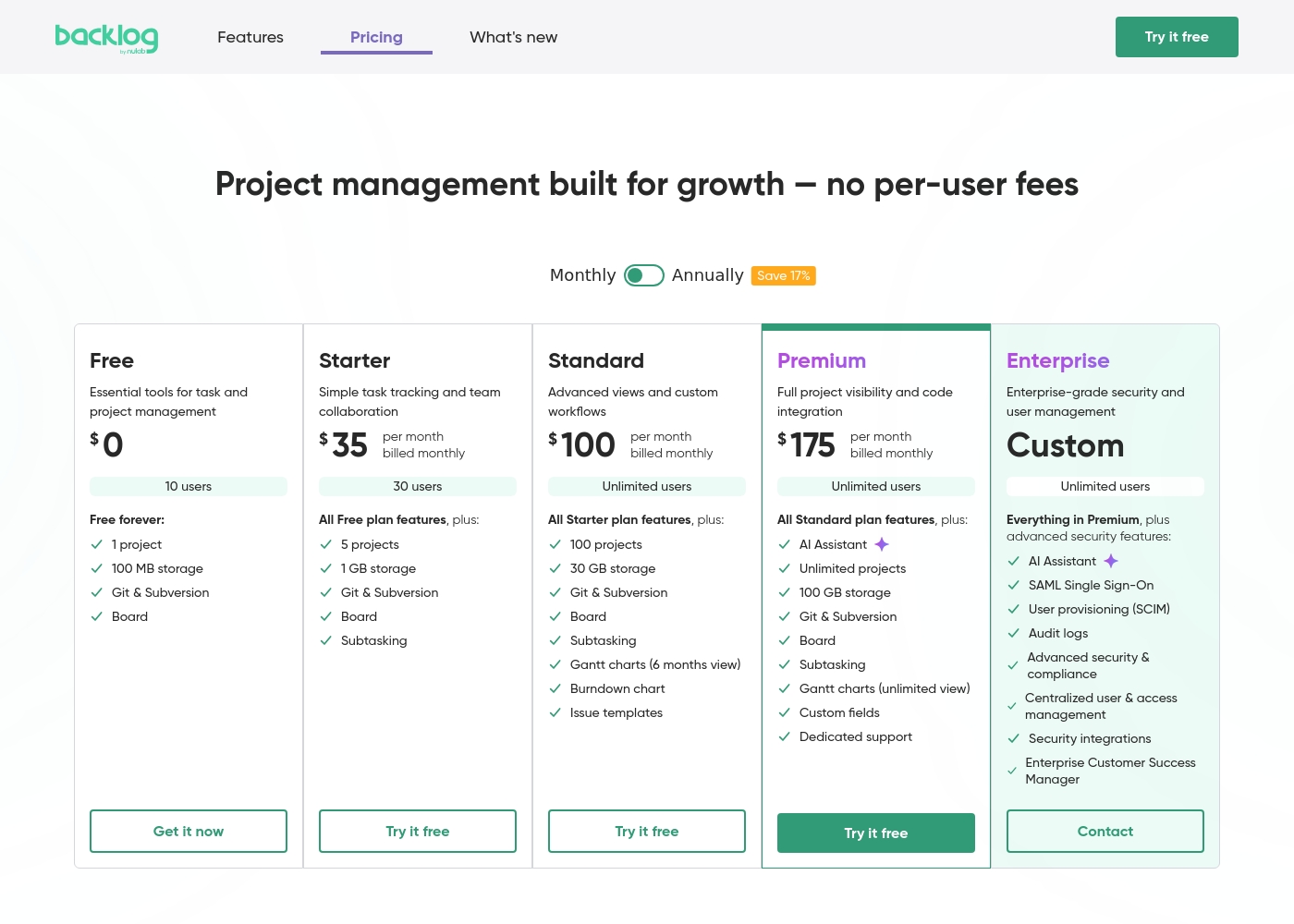
Backlog by Nulab Inc pricing: Backlog by Nulab Inc offers a range of flat-fee plans starting from a free tier up to $175 per month, with no per-user fees. You can save 17% by choosing annual billing for any paid plan level reached by your team's needs. Plans range: $0–$210/month Billing options: Free plan, Free trial, Monthly subscription, Yearly subscription, Per seat pricing, Usage-based pricing
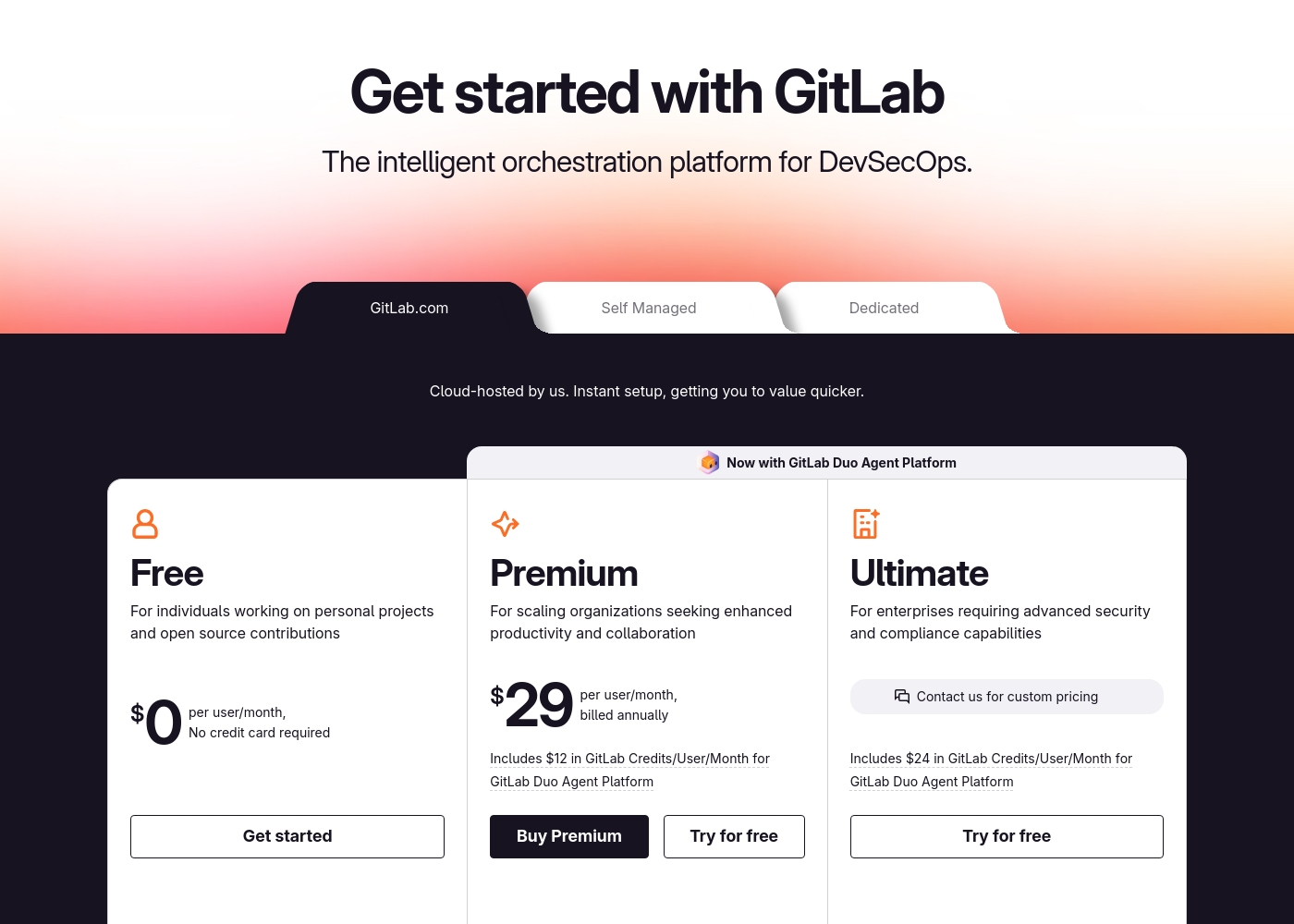
GitLab pricing: GitLab offers a range of DevSecOps plans from a free tier for individuals to an Ultimate enterprise solution for $99/month. Subscriptions include various compute minutes, storage allocations, and security features to fit different team sizes and needs.
Please note: the provided screenshot shows $29/user/month for Premium, while the text mentions $99 for Ultimate elsewhere; we have prioritized the current primary source values below for clarity. Actually, the provided text includes $0, $29 annually, and custom pricing options depending on the deployment method (SaaS or Self-Managed).
Overall it is a per-seat annual subscription model with usage-based add-ons for credits and compute time. For current SaaS pricing: Free $0, Premium $29/mo annually, Ultimate $99/mo annually (implied for custom).
Pricing Notes
- Backlog by Nulab Inc's flat-fee model means no per-user costs. Adding a 50th person doesn't change your bill.
- GitLab's cost scales directly with team size. A 20-person team on Premium costs $580/month ($29/user).
- GitLab Ultimate ($99/user/month) unlocks advanced security and compliance, but is a significant investment.
- Both offer free tiers, but GitLab's includes 400 compute minutes vs. Backlog's simpler storage/user limits.
Pricing Head-to-Head
사용자 리뷰
We found that external review platforms like Trustpilot were not accessible due to verification errors, preventing us from gathering specific user sentiment from those sources. Capterra was not provided.
Therefore, our review is based solely on the official product information and pricing details from Nulab. ✅ We can confirm Backlog offers a unified platform for project management, issue tracking, and collaboration with built-in Git/SVN support and no per-user fees.
Backlog is great for keeping all our code and tasks in one place. The Git integration is seamless, and my team stopped switching between five different apps. It just works for our sprint planning.
External user reviews for GitLab are currently inaccessible for a full synthesis, as both Trustpilot and Capterra returned security verification errors. 📄 Therefore, we cannot provide a balanced, specific summary of recurring user themes on accuracy, ease of use, support, or pricing at this time. We recommend checking these sources directly for up-to-date sentiment.
GitLab streamlined our entire development pipeline. Having CI/CD, security, and planning in one place saves our team significant time each week.
우리의 판정
Choosing between Backlog by Nulab Inc and GitLab is really about choosing your team's primary challenge. Backlog by Nulab Inc wins for teams that need a simple, affordable hub for projects and code. Its flat-fee pricing is a game-changer for growing teams. GitLab's superpower is being a complete DevOps factory. It unifies planning, coding, security, and deployment. Teams report saving 4 hours per engineer weekly and deploying 6x faster. The deciding factor is whether you need deep software automation. Pick Backlog by Nulab Inc if your main work is managing tasks, issues, and code collaboration. Pick GitLab if you need to build, test, and deploy software securely at scale. For a 10-person dev team focused on shipping features, GitLab is the powerhouse. For a 30-person mixed team of developers and marketers, Backlog by Nulab Inc offers better value and simplicity. Try the free tiers to see which workflow fits.
자주 묻는 질문
Which is better for small teams: Backlog by Nulab Inc or GitLab?
Backlog by Nulab Inc is often better for small teams. Its flat-fee pricing means no per-user costs. GitLab's free plan is limited to 5 private users.
Does Backlog by Nulab Inc have CI/CD like GitLab?
No, Backlog by Nulab Inc does not have built-in CI/CD. You can integrate with external tools like Jenkins. GitLab has a complete CI/CD platform included.
Is GitLab worth the extra cost over Backlog by Nulab Inc?
It depends on your needs. GitLab is worth it if you need integrated security scanning, CI/CD pipelines, and compliance tools. For basic project tracking, Backlog by Nulab Inc is more cost-effective.
Can I migrate from Backlog by Nulab Inc to GitLab easily?
GitLab provides importers for projects from many platforms, including GitHub and Bitbucket. Migration from Backlog by Nulab Inc is possible but may require manual data transfer for issues and comments.
Which tool has better security features?
GitLab has more advanced security. It includes built-in code scanning (SAST/DAST) and compliance automation. Backlog by Nulab Inc offers standard enterprise security like SAML.
Do both tools offer free plans?
Yes, both have free tiers. Backlog by Nulab Inc's free plan allows 10 users and 1 project. GitLab's free plan allows 5 private users and includes 400 compute minutes.
선택할 준비가 되셨나요?
두 도구 모두 강점이 있습니다. 특정 요구 사항에 따라 선택하세요.