Amadine vs Stencil
Amadine and Stencil solve very different visual challenges for creators. Amadine is a sophisticated tool emphasizing deep vector design precision, primarily for Apple users. Stencil emphasizes speed and simplicity, rapidly creating high-volume social media visuals. It’s a clear choice between professional vector fidelity and rapid asset creation for content publishers.
Best for: Professional designers rooted in the Apple ecosystem, Users requiring precise vector editing and CMYK support
Best for: Content authors requiring high-volume daily image production, Business owners needing quick, appealing social media visuals
Apple 디자이너를 위한 강력한 벡터 디자인.
저희는 Amadine이 Apple 생태계에 전념하는 사용자를 위해 강력함과 단순성 간의 훌륭한 균형을 이루고 있다고 생각합니다. 전반적으로, 우리는 평생 라이선스 옵션을 통한 탁월한 합리적인 가격과 강력한 기능 세트로 이 소프트웨어를 강력히 추천합니다.
장점
- Mac 평생 라이선스는 훌륭한 장기적 가치를 제공합니다.
- 직관적인 UI가 디자인 워크플로우를 획기적으로 단순화합니다.
- 모든 Apple 기기(Mac, iPad, iPhone)에서 완벽한 기능 패리티를 제공합니다.
- CMYK 지원 및 혁신적인 Fusion Tool과 같은 전문 도구를 포함합니다.
단점
- 소프트웨어는 전적으로 Apple 운영 체제 생태계로 제한됩니다.
- iPad/iPhone 사용은 Mac 버전과 달리 구독 또는 별도 구매가 필요합니다.
- Apple 외부 서비스와의 구체적인 통합 기능이 명확하게 자세히 설명되어 있지 않습니다.
Fast, simple, powerful visual creation.
We found Stencil perfectly lives up to its promise of being the quickest way to create appealing visual content. It is exceptionally straightforward to master and offers a powerful suite of high-quality, royalty-free assets at a competitive price point. Overall, Stencil is an essential resource for authors, founders, and content publishers seeking reliable, high-volume graphic creation.
장점
- Super simple and highly intuitive user experience.
- Recognized as the quickest way to create social media graphics swiftly.
- Access to huge libraries of assets (5M+ photos, 3M+ icons).
- Exceptional pricing model provides great value for resources.
단점
- A dedicated mobile application is not yet available.
- Templates and photo organization could be clearer for some users.
- Paid plans are targeted and designed primarily for single users.
소개Amadine
Amadine은 Mac, iPad 및 iPhone용으로 특별히 설계된 포괄적인 벡터 그래픽 애플리케이션입니다. 이 앱은 숙련된 디자인 전문가와 창의적인 아마추어 모두에게 서비스를 제공합니다. 개발자들은 정밀도와 사용자 요구 사항에 중점을 두었고, 그 결과 창의적인 아이디어를 훨씬 더 쉽게 현실로 가져올 수 있는 소프트웨어가 탄생했습니다. 다양한 Apple 플랫폼 간의 원활한 균형을 통해 창의력이 발동하는 어디에서나 작업할 수 있습니다. 💡
소개Stencil
Stencil is an acclaimed tool dedicated to rapid visual content creation. Users consistently describe it as a "super simple tool" that significantly reduces workload complexities. The platform is designed for professionals like strategic speakers, authors, and founders who need to produce high-quality images consistently. For many active users, it functions truly as an incredibly powerful business tool. 💡
하이라이트
기능 비교
기능 개요
주요 차이점을 강조하고 각 기능에 대한 승자를 선택합니다.
Core Design Type
Amadine is built for complex vector drawing and design precision. Stencil creates quick raster images perfect for digital publishing.
Amadine is a professional vector graphics application designed for Mac, iPad, and iPhone. It uses core features like paths and the Fusion Tool for complex shape creation. Stencil is optimized entirely for rapid visual content creation workflow. It provides immediate results by optimizing image resizing and text overlay functions. Amadine is for designers who draw; Stencil is for publishers who compose. Amadine fully supports professional print outputs using the CMYK color model. Stencil focuses purely on assets for digital screens and social media formats. This makes Amadine non-negotiable for serious brand and print work. Stencil is the simplest way to prettify images for quick social sharing.
Asset Libraries
Stencil provides millions of assets instantly; Amadine focuses on creation from scratch. Stencil removes the need to source external stock photography.
Amadine focuses on pure vector creation and uses local file storage for user control. It does not provide built-in libraries of stock photos or icons. Stencil paid plans give access to over 5 million high-quality stock photos. Users also receive 3.1 million icons and graphics instantly within Stencil. This difference defines the workflow: Amadine is blank canvas mastery. Stencil is quick template customization using massive built-in resources. Stencil allows high-volume creators to source professional visuals instantly within the app. Amadine requires external sourcing or creation of every asset.
Platform Commitment
Amadine offers native apps on all Apple devices, ensuring mobility. Stencil is web-only and currently lacks a dedicated mobile application.
Amadine provides true cross-platform functionality with feature parity across Mac, iPad, and iPhone. You can start a design on your Mac and finish it easily on your iPad using an Apple Pencil. Stencil is a web-browser application designed for desktop use only. External feedback notes the absence of a current dedicated mobile application for Stencil. This means Amadine users have full power on the go wherever creativity strikes. Stencil users must rely solely on a desktop browser environment. For designers needing to work remotely on location, Amadine provides superior flexibility.
Pricing Structure
Amadine’s Mac lifetime license offers exceptional long-term value. Stencil uses simple subscriptions, focused on unlimited volume creation.
Amadine offers a Mac lifetime license starting at $29.99 for a single-user payment. This removes the worry of consistent recurring monthly payments forever. Stencil is subscription-based, with plans ranging from $0 (Free) up to $12 per month annually. Stencil's pricing supports high-volume users needing unlimited output capabilities. Amadine provides a lengthy 30-day guarantee for direct Mac purchases for peace of mind. Stencil only offers a narrow 7-day refund policy, applicable only to yearly subscriptions. The Amadine lifetime model guarantees value, minimizing spending over time.
Speed & Volume
Stencil enables rapid, high-volume production for daily publishers. Amadine is optimized for deep precision in complex, fewer visual projects.
Stencil is recognized as the quickest way to craft appealing visual content, saving precious time. Its design facilitates creating unlimited images on the top-tier plan. Amadine's design process is complex due to its vector focus, emphasizing accuracy over sheer speed. This means Amadine requires longer time commitments per visual asset. High-volume content creators often rely on Stencil to make about a pic a day. Amadine is for the intricate logo or illustration that requires detailed attention. If your focus is quantity and velocity for social media, Stencil is undeniably faster.
Advanced Shaping
Amadine offers advanced vector shaping tools absent in Stencil’s raster environment. Amadine provides features for complex, scalable illustration.
Amadine includes a powerful Fusion Tool that easily merges complex contours for new shapes. Users can also finely tune rounded corners using presets like Concave arc or Elliptic. Stencil does not offer specialized advanced shaping tools, as its focus is on composition and raster output. Stencil relies on combining existing photographic and graphic elements instead of intricate drawing. Designers requiring custom typography or detailed character illustration need Amadine. For crafting detailed UI icons or logos, Amadine’s precision tools are essential. Stencil offers 7,400+ Google Fonts, but no advanced vector text manipulation.
Customer Support
Stencil’s customer support is reportedly excellent and very responsive. Amadine does not publish specific customer support response metrics.
Stencil users consistently report highly positive experiences with customer support responsiveness. One user reported receiving a full resolution and refund notification within 15 minutes. Amadine's official site does not publicly detail guaranteed support response times or service level agreements (SLAs). The company provides tutorials, but user feedback on support quality is currently limited. This responsiveness benchmark makes Stencil a safer bet if rapid problem resolution is crucial. While Amadine aims for self-sufficiency, Stencil provides proven customer delight.
Ready-Made Templates
Stencil provides over 1,350 professional templates for immediate use. Template access is not a highlighted feature within Amadine.
Stencil helps users avoid starting from scratch by offering over 1,350 professionally designed templates. These templates speed up creation immensely for busy users. Amadine is geared toward proprietary vector creation, meaning templates are not its focus. Designers must manually set up repetitive visual structures within Amadine. If you need a reliable starting point for social media campaigns, Stencil delivers instantly. Amadine demands mastery of its tools to achieve professional layouts efficiently. Stencil’s template library is a key differentiator for speed-focused content creators.
Amadine은 월 $2.99에서 평생 $49.99 사이의 가격이며 세 가지 주요 요금제가 있습니다. Mac 싱글 사용자는 평생 $29.99, Mac 패밀리 라이선스는 평생 $49.99, iPad/iPhone은 월 $2.99부터 시작합니다.
이제 각 플랫폼에서 사용할 수 있는 특정 가격 옵션에 대한 자세한 분석은 다음과 같습니다.
Amadine for Mac
가격: $29.99 (평생 라이선스) 지원 웹사이트: 명시되지 않음 최적: 단일 Mac 기기에서 강력한 벡터 그래픽 소프트웨어가 필요한 개인 사용자. 환불 정책: 30일 환불 보장(공식 웹사이트에서 구매 시) 기타 기능:
- 단일 사용자 평생 라이선스
- 단일 사용자 라이선스
- 평생 라이선스
- 5개 좌석 라이선스
- 평생 라이선스
- 67% 절약
- 인앱 구매 제공: 월별, 연간 및 평생
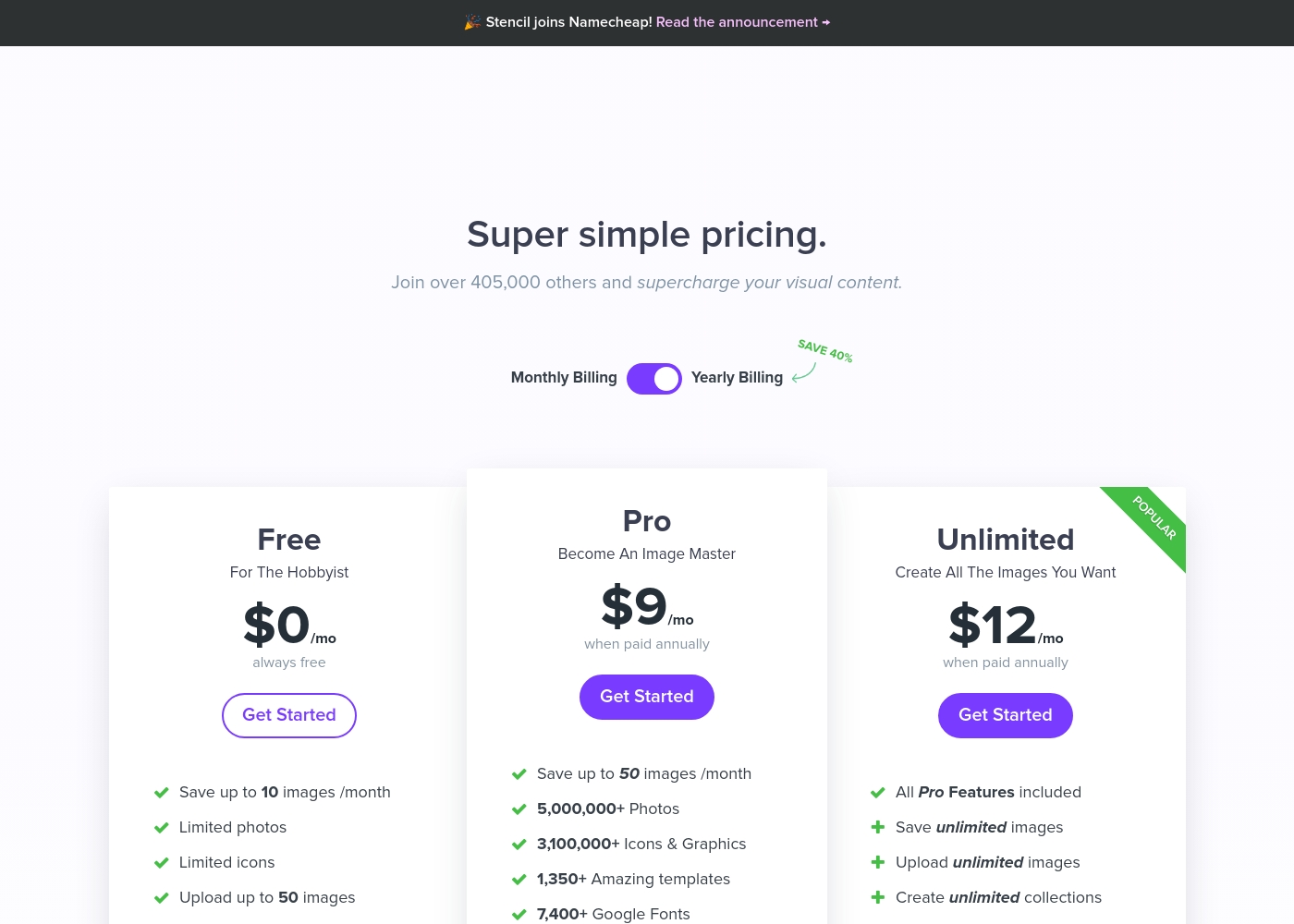
Stencil costs between $0 and $12 per month (billed annually) with three plans: Free at $0/month, Pro at $9/month, and Unlimited at $12/month.
Let's break down exactly what you get with each tier.
Free
Price: $0/month (always free) Best For: The Hobbyist Refund Policy: Not applicable Other Features:
- Save up to 10 images/month
- Limited access to photos and icons
- Upload maximum 50 images
- Save up to 10 images /month
- Limited photos
- Limited icons
- Upload up to 50 images
- Save up to 50 images /month
- 5,000,000+ Photos
- 3,100,000+ Icons & Graphics
- 1,350+ Amazing templates
- 7,400+ Google Fonts
- All Pro Features included
- Save unlimited images
- Upload unlimited images
- Create unlimited collections
Pricing Notes
- Amadine’s Mac lifetime license starts at $29.99, offering significant, long-term financial value.
- Stencil's annual billing saves users approximately 40%, dropping the Unlimited plan to just $12/month.
- Amadine offers a generous 30-day money-back guarantee for Mac purchases made directly from their website.
- Stencil offers only a narrow 7-day refund policy limited to users who subscribe to an annual plan.
- Stencil’s perpetual Free plan allows users to save 10 images monthly for hobbyists and experimentation.
Pricing Head-to-Head
사용자 리뷰
외부 플랫폼의 리뷰 데이터는 현재 매우 제한적입니다. Trustpilot 또는 Capterra에서 분석할 사용자 스니펫이 제공되지 않았기 때문입니다.
따라서 고객 지원 응답성, 업데이트 안정성 또는 통합 기능과 같은 주요 주제에 대한 일반적인 대중의 심리를 종합하여 제공할 수 없습니다. 제품 자체 설명만을 바탕으로, Mac 사용자에게 일회성 평생 결제를 통해 깔끔하고 편리한 UI와 훌륭한 가치를 제공하는 데 중점을 두고 있습니다.
Users across Trustpilot universally praise Stencil for its simplicity and efficiency, frequently calling it the “best app” in their marketing arsenal. The dominant theme is ease of use; Stencil enables users without advanced graphic skills to "whip out a customised image" in minutes, saving significant time and money.
Customers are highly satisfied with the massive library of assets, including over 5 million photos and 3.1 million icons, noting the quality is better than higher-priced alternatives. Value is strong, especially as premium subscriptions cover all assets.
I use Stencil every single day. The selection and quality of stock photos are much better than expensive alternatives. Organizing images into my own collections is my favorite feature. It's an indispensable tool.
우리의 판정
The decision between Amadine and Stencil is simple: are you a professional designer or a high-volume publisher? Amadine delivers deep vector precision for the Apple ecosystem designer. Stencil delivers rapid results and massive content libraries for marketers and authors. Both tools offer tremendous value, but they serve distinct creative specialties. Amadine is a vector powerhouse focusing on professional quality and absolute control. It offers CMYK color support and includes advanced vector tools like the Fusion Tool for complex shapes. The remarkable lifetime license for Amadine on Mac provides superb long-term value. Amadine’s native apps ensure seamless and powerful work across Mac, iPad, and iPhone. Stencil is the champion of speed and simplicity, optimizing the visual content workflow. It gives users immediate access to over 5 million photos and 1,350 professional templates. Users love that Stencil is a 'super simple tool' for creating content consistently. Stencil is perfect for pumping out 50+ daily visuals quickly and affordably. Choose Amadine if precision and control over vector files are essential to your design trade. Pick Stencil if you need to create high-volume social media assets using vast stock libraries quickly. While Amadine favors one-time payment ownership, Stencil uses flexible subscriptions to eliminate usage limits. Content creators demanding fast, high-volume social media assets must choose Stencil over Amadine.
자주 묻는 질문
Which is better for professional print work: Amadine or Stencil?
Amadine is better because it fully supports the professional CMYK color model. Stencil focuses heavily on digital assets and does not list CMYK support. Amadine also exports industry-standard PDF and SVG vector files seamlessly.
Does Stencil offer a mobile application like Amadine?
No, Stencil is a web-based tool and currently lacks a dedicated mobile app. Amadine offers full native feature parity on Mac, iPad, and iPhone. Amadine maximizes mobility for design professionals.
Amadine offers a lifetime license; is a lifetime option available for Stencil?
Amadine provides a remarkable Mac lifetime license starting at just $29.99 for one user. Stencil always operates on a subscription model, though it offers discounts for annual commitment.
Which tool provides better access to stock images and templates: Amadine or Stencil?
Stencil is clearly superior, granting paid users access to over 5 million photos and 1,350 templates. Amadine focuses on creation from scratch and does not provide these massive content libraries.
Is Amadine's vector design easier to learn than traditional design software?
Users praise Amadine's neat and intuitive user interface highly. It aims to simplify the vector workflow compared to overly complex programs. Amadine provides a smooth learning curve for aspiring vector artists.
Which software is better suited for high-volume content creation?
Stencil is specifically designed for high-volume output, allowing unlimited image saves on their top plan. Amadine is better for slower, high-precision, detailed design projects. Stencil is known for its speed and daily output.
선택할 준비가 되셨나요?
두 도구 모두 강점이 있습니다. 특정 요구 사항에 따라 선택하세요.