Piktochart

Piktochart

Create visually compelling and easily understandable visuals.

#1 dans Infographic Maker
2 分読了 · 更新日 10/3/2025
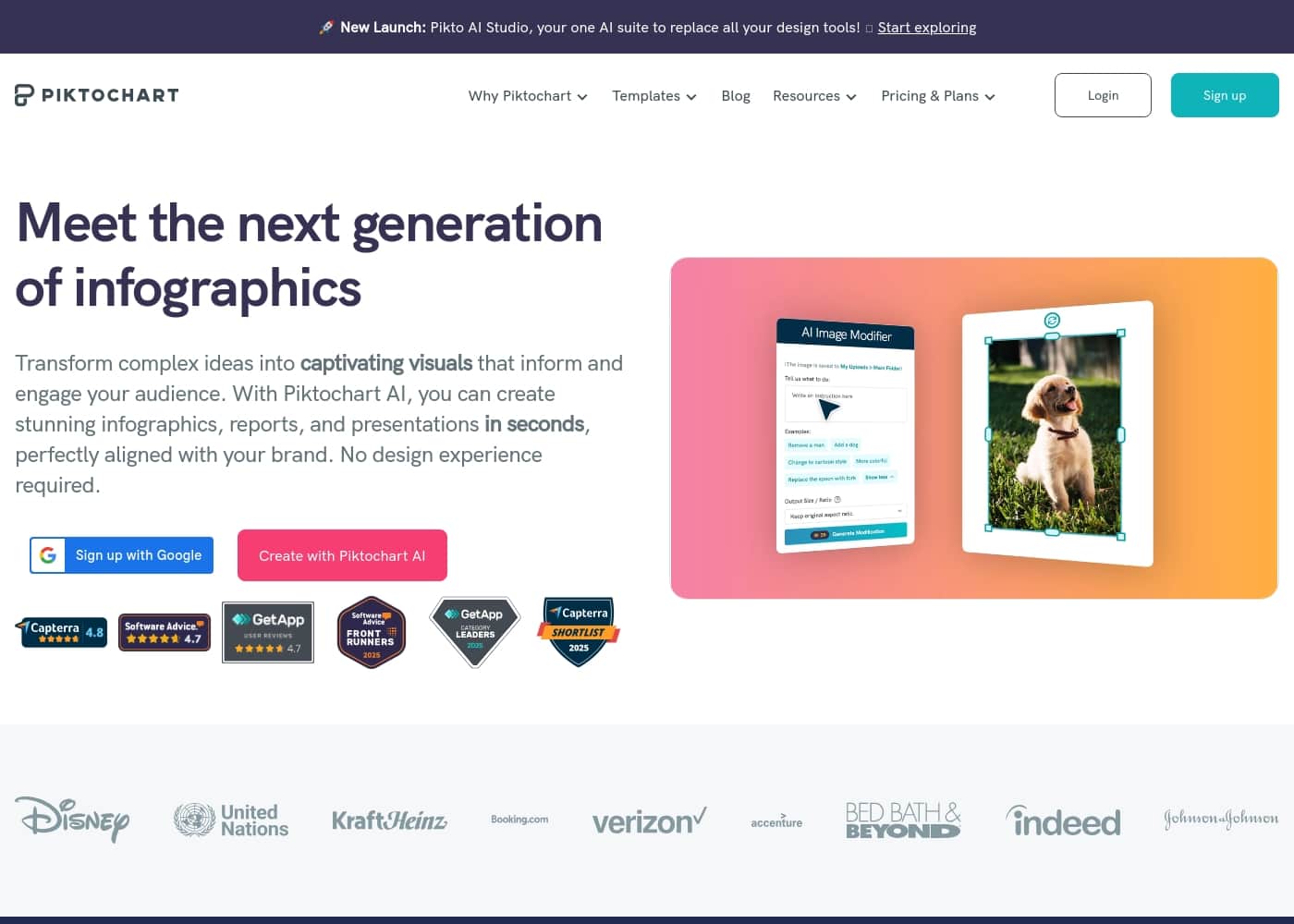
Piktochartのホームページスクリーンショット

At a glance

Quick overview for Piktochart: rating, pricing summary, key features, and highlights.

Ciroappレビュー

4.7
AI-Driven Visuals, Superior Design, and Prompt Support.

We find Piktochart delivers an exceptional balance of powerful AI-driven visual creation and excellent usability, successful even for users without sophisticated design skills. Overall, we confidently recommend this platform for both individuals and teams seeking professional visual communication tools supported by genuinely proactive customer service.

長所

  • Pro:Extremely intuitive and user-friendly interface that requires little onboarding time.
  • Pro:Powerful AI tool instantly transforms documents and text into visual designs.
  • Pro:Customer support is exceptionally fast, friendly, informative, and proactive.
  • Pro:Ensures brand consistency using centralized Brand Kit features and on-brand templates.

短所

  • Con:Some users reported minor difficulties with specific regional payment processing methods.
  • Con:The core content creation editor, while highly functional, could benefit from further polish.
無料トライアル
Yes — 7 日間
範囲: $0–$49/member/monthFree plan, Monthly subscription, Yearly subscription, Per seat pricing, Quote based
This section is a summary. Detailed sections about features, use cases, pricing, and reviews follow below.

Piktochartのレビュー、価格、機能、メリット・デメリット

Trying to transform complex data or a lengthy report into a clear visual can feel tedious and slow. If you need to secure funding or communicate key metrics, your visuals must be persuasive. Piktochart streamlines this process.

It helps you convey complex information easily, resulting in visual communication that drives engagement and secures support. ✨

Piktochartとは?

Piktochart provides an intuitive platform for visual creation, designed to make complex data understandable. It targets anyone needing professional-quality visuals, often without requiring design experience. The platform powers your entire creative workflow, notably through Pikto AI.

This generative AI transforms simple text prompts into stunning visual content in under ten seconds. Whether you're building infographics, designing reports, or creating social media graphics, Piktochart helps enhance your internal and external messaging. 💡

Piktochart 主な機能

✨ Pikto AI: Effortless Visual Generation

Watch your creative ideas come to life quickly using Pikto AI. This powerful generative AI drastically streamlines your workflow. You simply type your prompt, and the AI builds stunning visual content in under 10 seconds.

This functionality offers several specialized AI tools. You get features like the AI Image Generator, the AI Image Upscaler, and the AI Background Remover built right into the platform. Use these tools to instantly generate required visuals for campaigns without ever needing to search for stock photos again.

✨ Transform Complex Data into Clear Visuals

Piktochart gives you the tools needed to turn raw data into compelling visuals that tell a story. You can create high-quality graphs or charts in a matter of minutes. Select and customize different chart types, including pictographs, pie charts, and bar charts.

It’s also easy to build clear diagrams to visualize complex structures or concepts, requiring no prior design experience. Use the Interactive Map Maker to visualize geographical data effortlessly. You can customize the maps to your specific needs and transform complex insights into captivating visuals for any audience.

✨ Maintaining Perfect Brand Consistency

Say goodbye to inconsistent designs and ensure your brand looks professional every time. Piktochart makes managing brand assets simple and centralized. Brand Assets is your dedicated hub for immediate access to your required logos, colors, and brand fonts.

You can take your organizational branding even further with Branded Templates. This feature automatically transforms all Piktochart templates into thousands of stylish, on-brand designs. This ensures consistency across all your projects and visuals instantly.

✨ Seamless Team Collaboration in a Shared Workspace

Revolutionize how your team creates and aligns on visual content. Piktochart is an easy-to-use solution that offers a streamlined collaborative environment within a single workspace. This means everyone can access shared libraries of images and brand assets.

Team members can align and review effortlessly with features made for commenting and making revisions. This experience feels just like collaborating in tools such as Microsoft Teams or Google Docs, enabling smooth sharing and approval processes for your projects.

✨ Versatile Design Components and Creative Assets

Enhance your visual message efficiently with a deep library of design components. Select from an extensive collection of illustrations, photos, icons, and shapes, or upload your own unique images. You can make your visuals look better quickly using versatile design components available.

To help display information clearly, you can use customizable tables that organize data effectively for your audience. You can also create diagrams, flowcharts, and organizational charts using the Flowchart Maker. Choose from premade templates or design your own structure using customizable lines and shapes.

Other useful creative components include:

使用例

💡 Instant Marketing Visuals with Pikto AI

You often need fresh, on-brand visuals for immediate social media campaigns, but hunting for stock photos takes too long. Piktochart solves this using generative AI. You simply type a descriptive prompt, and the platform delivers a stunning visual in under ten seconds.

This instant generation capability ensures you never miss a chance to engage your audience online.

📊 Streamlining HR Metric Communication

HR departments need to share complex data on employee engagement or performance seamlessly. Piktochart lets you transform this raw data into clear, compelling visualizations. You can create bar charts or tables quickly to organize information better, making key metrics easier for the entire organization to read and understand. This leads to clearer internal communication.

Tip: Use the collaboration features to align easily with your HR team before distributing important performance reports.

✅ Achieving Professional Brand Consistency

Maintaining a strong, unified brand across all reports and materials is essential for trust. With Piktochart’s Brand Assets hub, your team centralizes logos, brand fonts, and colors in one location. This ensures that every visual created is automatically applied with your specific branding.

You can even transform Piktochart templates into thousands of stylish, approved, on-brand designs instantly.

💰 Creating Persuasive Reports for Funding and Proposals

When you need to secure funding or make a persuasive proposal, clear visual communication is critical. Piktochart helps transform complex project data and insights into powerful reports and presentations. These visuals drive engagement and secure support because stakeholders grasp the impact immediately, helping your message speak louder than dozens of pages of text.

🧠 Educators Engaging Students with Complex Concepts

Teachers often struggle to keep students engaged when discussing difficult or dry concepts. Piktochart allows educators to design engaging visual aids, diagrams, and educational materials. This feature helps simplify complex concepts for students, ensuring they stay focused for longer periods, whether you are teaching 9th grade English or advanced concepts.

🚀 Consulting Firms Rivaling Large Agencies

Small consulting firms need to deliver high-caliber reports and pitch decks that rival those from larger agencies with huge graphic design teams. Piktochart provides the design tools necessary to produce professional-quality visuals in a fraction of the time. This eliminates the significant cost and time previously spent on external graphic support, letting small firms compete effectively.

Piktochartの価格概要

価格帯
$0–$49/member/month
価格タイプ
Free plan, Monthly subscription, Yearly subscription, Per seat pricing, Quote based

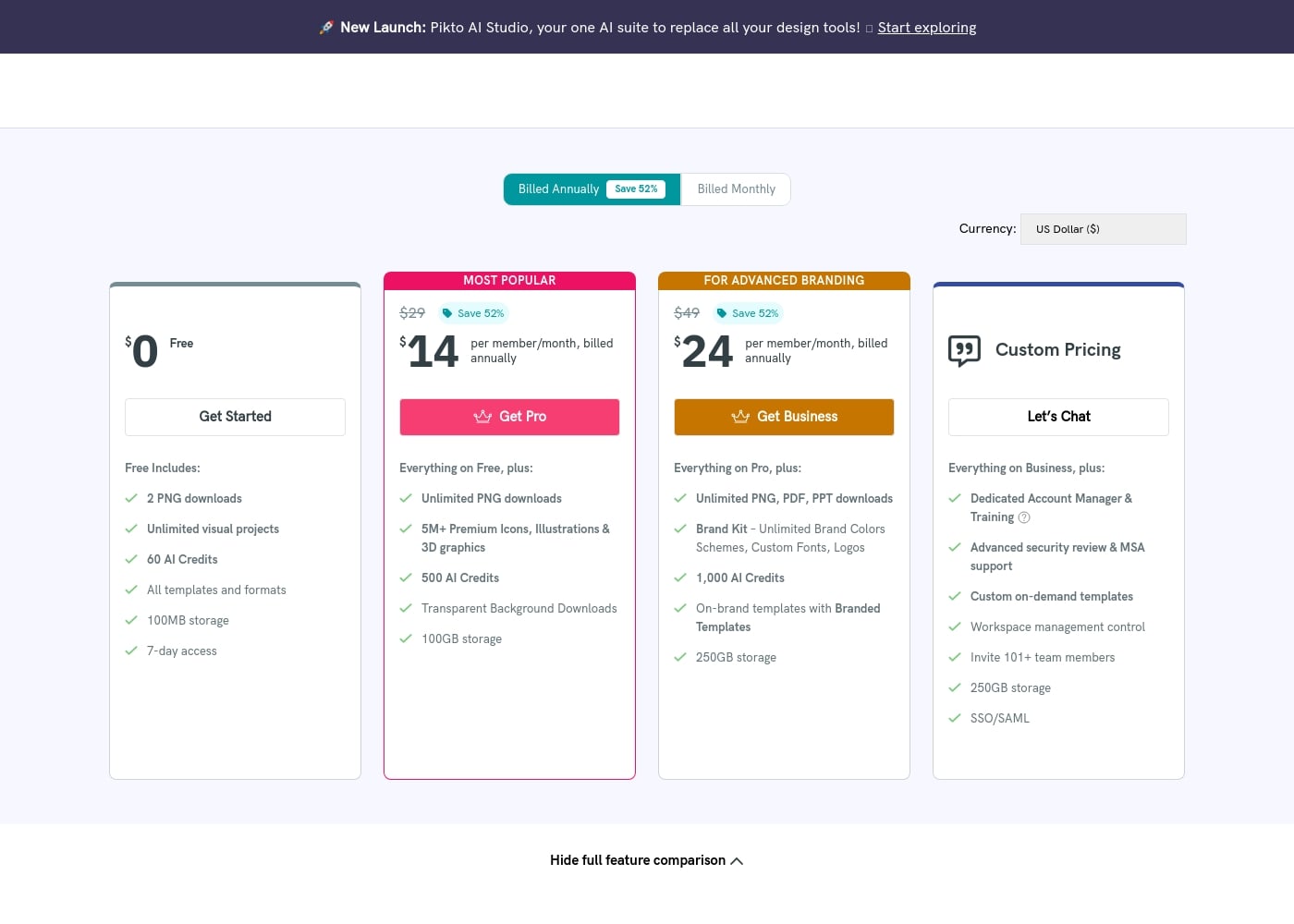
Piktochart offers flexible per-member pricing, starting with a robust free plan. Paid subscriptions like Pro and Business offer significant savings when you choose annual billing, starting as low as $14 per member per month.

プランと料金

Free

月間$0
年間$0
2 PNG downloads, 100MB storage, 1-4 team members max.
  • Unlimited visual projects
  • 60 AI Credits
  • All templates and formats
  • Includes 7-day access

Pro

月間$29 per member
年間$14 per member
100GB storage, 1-100 team members.
  • Unlimited PNG downloads
  • 5M+ Premium Icons, Illustrations & 3D graphics
  • 500 AI Credits
  • Transparent Background Downloads

Business

月間$49 per member
年間$24 per member
250GB storage, 1-100 team members.
  • Unlimited PNG, PDF, PPT downloads
  • Brand Kit – Unlimited Brand Colors Schemes, Custom Fonts, Logos
  • 1,000 AI Credits
  • On-brand templates with Branded Templates

Custom Pricing (Enterprise)

料金についてお問い合わせください
Invite 101+ team members, 250GB storage
  • Dedicated Account Manager & Training
  • Advanced security review & MSA support
  • Custom on-demand templates
  • SSO/SAML

Education

年間$39.99 per member, billed annually
100GB storage, 250 AI Credits. Valid educational email address required.
  • Unlimited PNG, PDF, PPT downloads
  • Limited access to Brand Kit
  • 5M+ Pro Icons, Illustrations, and 3D graphics
  • Transparent Background Downloads

Nonprofit

年間$60 per member, billed annually
100GB storage, 250 AI Credits.
  • Unlimited PNG, PDF, PPT downloads
  • Limited access to Brand Kit
  • 5M+ Pro Icons, Illustrations, and 3D graphics
  • Transparent Background Downloads

Piktochart costs between $0 and $49 per member per month with six plans: Free at $0, Pro at $14, Business at $24, Education at $39.99, Nonprofit at $60 (all prices annual/per member), and Custom/Enterprise (Custom Pricing).

The information below shows what is included in each plan to help you pick the best fit for your visual communication needs.

Free

Price: $0 Websites Supported: Not explicitly stated Best For: Personal use and testing new tools Refund Policy: Not explicitly stated Other Features:

  • Unlimited visual projects
  • 60 AI Credits
  • 100MB storage
  • 7-day access to visuals and videos

This is a great starting place to explore Piktochart's capabilities. You can use all templates and share your workspace with up to three additional members for free. You get two PNG downloads to test your creations.

Pro

Price: $14 per member/month, billed annually ($29 billed monthly) Websites Supported: 1–100 team members Best For: Regular users and small teams Refund Policy: Not explicitly stated Other Features:

  • Unlimited PNG downloads
  • 5M+ Premium Icons, Illustrations & 3D graphics
  • 500 AI Credits
  • 100GB storage
  • Transparent Background Downloads

This plan suits professionals or small teams focusing on regular visual production. It removes download limits and introduces key features like transparent backgrounds. You'll gain full access to the premium graphic library to make better visuals.

Business

Price: $24 per member/month, billed annually ($49 billed monthly) Websites Supported: 1–100 team members Best For: Advanced branding and corporate teams Refund Policy: Not explicitly stated Other Features:

  • Unlimited PNG, PDF, and PPT downloads
  • Unlimited Brand Kit (Colors, Fonts, Logos)
  • 1,000 AI Credits
  • On-brand templates with Branded Templates
  • 250GB storage

Piktochart Business is perfect for larger teams needing comprehensive brand control. It unlocks unlimited usage of the Brand Kit, ensuring consistency across all company visuals.

Education

Price: $39.99 per member, billed annually Websites Supported: Not explicitly stated (Best for universities and colleges) Best For: Students and educators Refund Policy: Not explicitly stated Other Features:

  • Unlimited PNG, PDF, and PPT downloads
  • Limited Brand Colors Schemes and Fonts
  • 250 AI Credits

This special rate is ideal for educational institutions seeking powerful design tools at a reduced cost. A valid educational email address is required to qualify for this plan.

Nonprofit

Price: $60 per member, billed annually Websites Supported: Not explicitly stated Best For: Nonprofit organizations Refund Policy: Not explicitly stated Other Features:

  • Unlimited PNG, PDF, and PPT downloads
  • Limited Brand Colors Schemes and Fonts
  • 250 AI Credits

Nonprofits receive a substantial discount on the standard Pro features with this specialized annual plan for mission-driven organizations.

Custom Pricing (Enterprise)

Price: Custom Pricing Websites Supported: 101+ team members Best For: Large organizations requiring advanced administrative and security features Refund Policy: Not explicitly stated Other Features:

  • Dedicated Account Manager & Training
  • Advanced security review & MSA support
  • Custom on-demand templates
  • SSO/SAML

If you have a very large team or need specific security and onboarding requirements, contact the sales team directly. This Enterprise tier is designed for large-scale operations.

We offer a $0 Free plan which includes a 7-day access period to help you get started immediately. While subscriptions can be canceled anytime from your Account Settings, Piktochart generally handles refunds on a case-by-case basis as outlined in their Terms of Use. You can reach out to their support team if you feel a refund is justifiable.
ユーザーレビュー

Piktochart receives overwhelmingly positive feedback across external review platforms, maintaining an excellent TrustScore primarily due to its usability and impressive customer support. Reviewers frequently praise the platform's intuitiveness, noting that it allows users without graphic design experience to create professional-quality infographics and reports quickly.

A key feature cited as a massive time-saver is the AI tool, which seamlessly transforms text prompts or Word documents into polished visual designs. Support responsiveness is consistently described as top-notch: fast, friendly, informative, and proactive in resolving issues, whether dealing with account transfers or processing justified refunds.

Users appreciate the wide array of customizable templates and the continually improving feature set. While some minor difficulties were mentioned regarding specific regional payment modes, the general sentiment regarding pricing and value is strong, particularly given the functionality included in the generous free plan.

Reliability is also a core strength, with many users relying on Piktochart for high-impact presentations for years. It’s truly a tool that works as described.

👍

他の場所でのユーザーの声

M. J.
· Trustpilot
5.0 / 5

Piktochart is a super intuitive platform. It allowed me, without any graphic design experience, to make professional infographics and flyers very quickly. The pre-made templates are extremely helpful and customizable.

K. L.
· Trustpilot
5.0 / 5

Piktochart is incredibly easy to use and navigate. I especially appreciate the new AI feature that quickly transforms a Word document into a polished, visual design. It is truly a huge time-saver.

まだレビューがありません。

レビューを書く

Piktochartのレビューを書く
0/100文字
0/2000文字

Piktochartを使う理由は?

Stop wasting time hunting for stock photos or struggling with complex design software. Piktochart empowers you to create powerful, professional visuals instantly.

  • Instant Visual Generation: Leverage Pikto AI tools to instantly generate visuals. You simply type the prompt, and the generative AI builds your image or infographic in mere seconds.
  • Professional Data Visuals: Effortlessly turn raw data into captivating visuals. Create custom diagrams, interactive maps, or charts like pie charts and bar charts, all without requiring prior design skills.
  • Maintain Brand Consistency: Ensure strong brand consistency across all designs. Brand Assets is your central hub for colors, fonts, and logos, automatically transforming templates into thousands of stylish, on-brand visuals.
  • Seamless Team Collaboration: Revolutionize team creativity with streamlined collaboration. Review and align effortlessly in a shared workspace, using features for commenting and revising, similar to leading document editors.
  • Rival Top Competitors: Achieve professional design results that rival large firms with full graphic shops. Small businesses and startups can make a big impact with high-caliber visuals that boost awareness and help land strategic partnerships. ✅

Those needing to simplify dense topics—from educators in classrooms to HR departments communicating key metrics—will find immense value here. Ready to transform your raw data into polished reports? Get started for free today!

Piktochartでワークフローを変革する準備はできていますか?

Piktochart 代替ツール

Infographic Makerカテゴリの他のツール

よくある質問

How is Piktochart priced if our team needs to add more users?

Piktochart subscriptions are priced per member, meaning you pay for each seat you purchase. The standard Pro, Business, Education, and Nonprofit plans support up to 100 team members in a single workspace. If you need more than 100 users, you'll require a Custom Pricing plan.

What happens to my visuals and videos after the Free plan’s initial 7-day access period?

The Free plan provides unlimited visual projects but includes only 7-day access to retaining those visuals and videos. You will need to upgrade to Pro or Business to ensure continuous access and retention of your creative content.

What is your official policy regarding subscription refunds?

Piktochart generally does not provide automatic refunds, as stated in the Terms of Use. However, if you feel a refund is justified, you can contact the support team to have your case reviewed individually.

Can I connect external data sources to generate charts and maps?

Yes, you can easily input data using CSV import. Paid plans also offer dynamic data integration, allowing you to import live information directly from Google Sheets to populate your charts.

Does Piktochart integrate with other workflow platforms like video and storage tools?

Yes, in the Video Essentials features, Piktochart supports integrations with both Zoom and Google Drive. Two-factor authentication can also be set up using Google or Facebook authentication.

How many AI credits do I receive with the different subscription plans?

The Free plan includes 60 AI Credits. The Pro plan offers 500 AI Credits, the Business plan provides the most with 1,000 AI Credits, and specialized Education or Nonprofit plans receive 250 AI Credits.

Which security features are available across all Piktochart plans, including the Free version?

All plans include Two-Factor Authentication (2FA), Privacy Settings, and the ability to authenticate access via Google or Facebook. Enterprise plans include additional security reviews and MSA support.

My organization requires strict brand consistency. Which plan provides the best branding tools?

The Business plan is optimal for this requirement, offering an unlimited Brand Kit. This includes unlimited brand colors, custom fonts, logos, and the ability to convert all templates into Branded Templates for consistency.

If we buy an Enterprise plan, what onboarding support is included for large teams?

The Custom Pricing/Enterprise plan includes a Dedicated Account Manager and Training. This also covers a personalized onboarding program with a one-off 1-hour training session for your team.

What options are available for specialized payment methods, like bank transfers?

We accept major credit cards (Visa, MasterCard) and PayPal. For purchases totaling $168 or more, you may contact support to arrange a direct bank deposit, though this takes several days to complete.

Is Live Chat support included with all paid subscriptions?

No, Live Chat Support is available for Pro, Business, Education, and Nonprofit users. The Free plan provides access to the Self-Service Knowledge Base and Email Support.

What are the storage limitations for uploads on the paid plans?

Workspace storage varies by tier. The Free plan includes 100MB, Pro and the specialized plans (Education/Nonprofit) offer 100GB, and the Business plan gives you 250GB of storage.

Do you support multiple languages or currencies for international users?

Yes, the pricing page supports local currency display for USD, GBP, EUR, SGD, MXN, and INR. Additionally, video subtitle features support up to 60 languages.

Can I cancel my subscription or change plans easily?

You can cancel your subscription anytime via your Account Settings. If you need to upgrade or downgrade your plan, you can contact the support email for assistance.

Piktochartを試してみる準備はできましたか?公式サイトまたは価格をご覧ください。