GitLab vs Glances
GitLab and Glances solve completely different problems. GitLab is a powerhouse for building and shipping software. Glances is a smart integrator that unifies your existing business apps into one view. Choosing between them isn't about features—it's about your core workflow.
Comprehensive DevSecOps, but complex.
GitLab is a powerful, all-in-one platform that unifies the entire software lifecycle. We find it delivers on its promise of acceleration and unified security, though its depth can create a steep learning curve for smaller teams. Overall, it's an excellent choice for organizations seeking a single, scalable solution for planning, building, and deploying software securely.
長所
- Single platform for the entire DevSecOps lifecycle
- Built-in security scanning accelerates vulnerability detection
- AI-powered workflows (Duo Agent) enhance productivity
- Offers a functional Free tier for individuals and small projects
短所
- Learning curve can be steep due to platform breadth
- Enterprise features like advanced security require costly Ultimate tier
- Compute and storage limits on lower tiers may require paid add-ons
- Annual billing commitment for paid plans
強力なノーコード統合
Glancesは、アプリを単一のライブビューに統合するノーコード統合ツールだと認識しています。ガイダンス付きセットアップ、ツール全体にわたるリアルタイムデータ、チームメイトのための安全なアクセスを評価しています。全体として、設定を簡潔に保ちつつ、ガバナンスとクロスツールワークフローを求めるチームにとって堅実な選択肢ですが、年間価格などの一部の詳細は表示されていません。
長所
- ガイダンス接続オプションを備えたノーコードセットアップ
- アプリをまたいだ統合されたライブビュー
- 主要アプリ(Monday.com & QuickBooks)でのリアルタイムデータ同期
- 資格情報を共有せずに安全なデータアクセス
短所
- 現在の表示では年間価格は確認できません
- サポートされているウェブサイトなど、一部の製品詳細が明記されていません
- 返金ポリシーが明確に記載されていません
- シートごとの価格設定は、大規模チームにとっては高くなる可能性があります
についてGitLab
GitLab is an end-to-end DevSecOps platform for teams of all sizes, from startups to large enterprises. It’s the single place to plan, build, test, secure, and deploy your software. You get all your projects, releases, and code in one data plane, so both your team and AI agents work from the same information. 💡
についてGlances
Glancesは、ビジネスアプリを単一のライブビューに統合するノーコード統合ツールです。チームが同じ場所に留まり、複数のアプリからリアルタイムでデータを確認し、現在のワークフローを離れることなくアクションを実行できるように支援します。AsanaからZendeskまで、Glancesは多様なビジネスアプリのスタックを接続します。💡
ハイライト
機能比較
機能の概要
主な違いを強調し、各機能の勝者を選びます。
Core Purpose
GitLab builds software. Glances connects your existing apps.
GitLab is a complete platform for the software lifecycle. It handles planning, coding, testing, security, and deployment in one place. Glances doesn't build software. It creates a single view across your business apps like Asana and QuickBooks. It lets you see data and take actions without switching tabs. The difference is fundamental. GitLab is for creating a product. Glances is for managing work in tools you already use.
AI Capabilities
GitLab has powerful AI agents. Glances focuses on data unification.
GitLab's Duo Agent Platform uses AI to automate dev tasks. Agents can create merge requests from issues or review code. Teams report saving 4 hours per engineer weekly. Glances doesn't advertise AI features. Its strength is connecting apps and showing live data. The intelligence is in the unified view, not AI automation. GitLab is investing heavily in AI for development. Glances uses technology to avoid complex data syncing.
Security & Compliance
GitLab has built-in scanners. Glances focuses on secure data access.
GitLab bakes security into the platform. It includes scanners for vulnerabilities in code and dependencies. You get compliance evidence automatically in pipelines. Glances provides secure data transport. It lets teammates access insights without sharing account credentials. It doesn't scan code or manage compliance frameworks. For DevSecOps, GitLab is the clear leader. Glances handles secure access for business data sharing.
Ease of Setup
Glances is no-code and guided. GitLab has a learning curve.
Glances is designed for no-code setup. You can connect apps in minutes with Guided Connect. The trial lets you see value immediately. GitLab is a comprehensive platform. Its breadth means a steeper learning curve. Teams often need time to configure pipelines and security rules. If you need quick wins without code, Glances is easier. GitLab requires more investment for its powerful capabilities.
Integration Ecosystem
GitLab integrates with DevOps tools. Glances connects business SaaS apps.
GitLab connects with tools like Jira, Jenkins, and cloud providers. It imports from GitHub and Bitbucket. It's built for the development toolchain. Glances connects apps from Asana to Zendesk. You can request new app integrations. It focuses on business productivity suites. Your choice depends on your stack. Need Jira and Kubernetes? GitLab. Need Asana and QuickBooks? Glances.
Team Collaboration
GitLab collaborates on code. Glances unifies data across business roles.
GitLab enables collaboration on code, issues, and pipelines. Teams work together on the same platform with clear roles and permissions. Glances helps sales, support, and ops collaborate. It gives everyone a shared view of customer data across apps. You can grant safe access without sharing logins. GitLab is for technical teams building together. Glances is for cross-functional teams needing shared context.
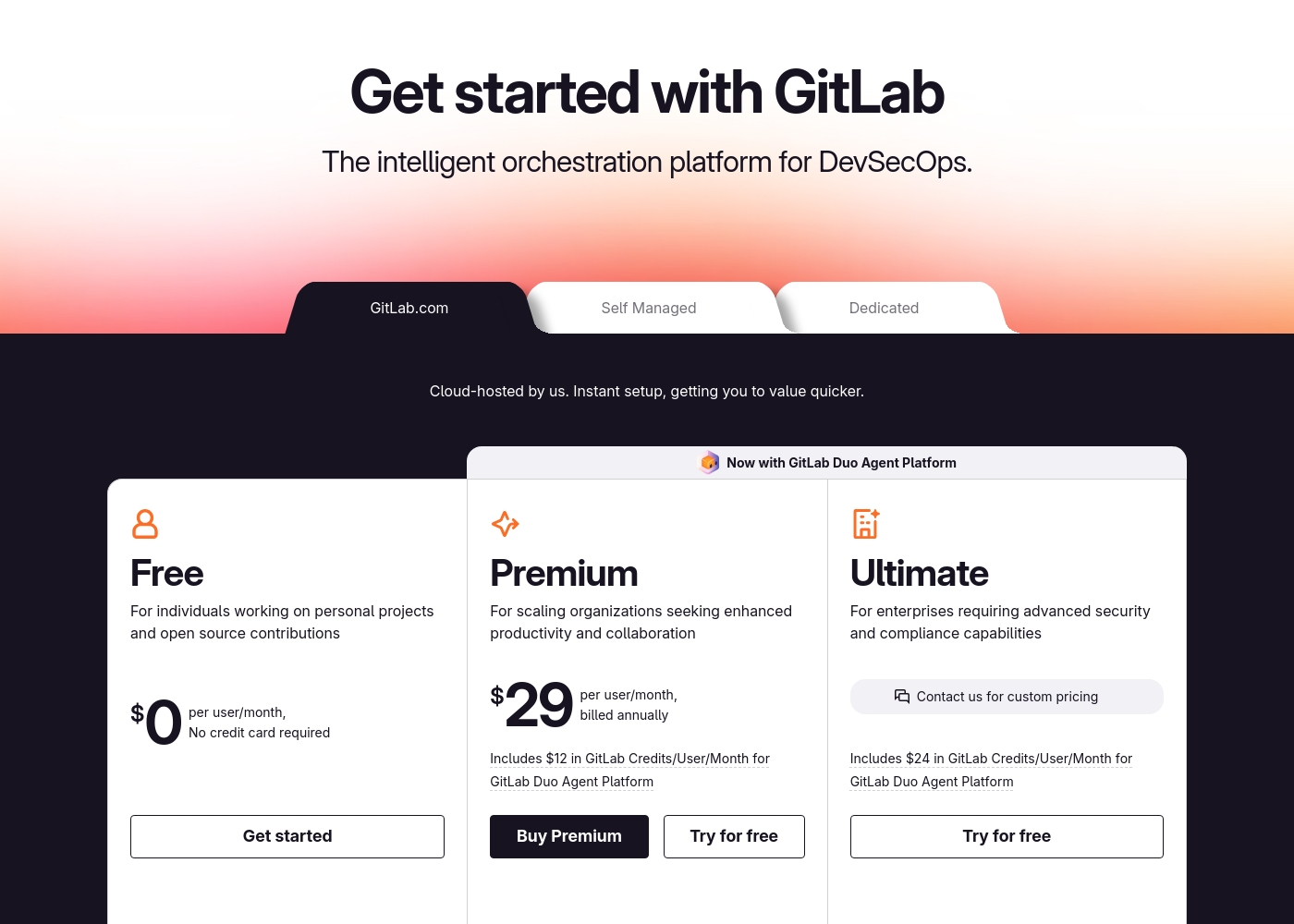
GitLab pricing: GitLab offers a range of DevSecOps plans from a free tier for individuals to an Ultimate enterprise solution for $99/month. Subscriptions include various compute minutes, storage allocations, and security features to fit different team sizes and needs.
Please note: the provided screenshot shows $29/user/month for Premium, while the text mentions $99 for Ultimate elsewhere; we have prioritized the current primary source values below for clarity. Actually, the provided text includes $0, $29 annually, and custom pricing options depending on the deployment method (SaaS or Self-Managed).
Overall it is a per-seat annual subscription model with usage-based add-ons for credits and compute time. For current SaaS pricing: Free $0, Premium $29/mo annually, Ultimate $99/mo annually (implied for custom).
Glancesの価格は月額29ドルから99ドルで、2つのプランがあります:プロフェッショナル(ユーザーあたり月額29ドル)とGlances for monday.com & QuickBooks(月額99ドル)。表示されている価格は月次請求のものです。年間価格はここでは表示されていません。どちらのプランにも無料トライアルがあり、開始時にクレジットカードの入力は求められません。
以下の価格詳細で、各プランで得られる内容を確認できます。
Professional
価格:ユーザーあたり月額29ドル 対応ウェブサイト:明記されていません 最適:アクセスとアプリ全体の可視性を強力にコントロールしたいチーム 返金ポリシー:明記されていません その他の機能:
- 無制限のアプリの接続と検索
- チームのロールと権限の管理
- 安全なデータ転送
- アプリごとのビューのカスタマイズ
- 他のアプリでのアクション実行
- 無制限のアプリの接続と検索
- チームのロールと権限の管理
- 安全なデータ転送
- アプリごとのビューのカスタマイズ
- 他のアプリでのアクション実行
- Proのすべてに加え、最大3ユーザー
- 請求書をMondayにリアルタイム同期
- QuickBooksの見積もりと請求書の作成・送信
- QuickBooksの見積もりを請求書に変換
- 顧客およびサブ顧客の作成と更新
Pricing Notes
- GitLab's Free plan is generous for individuals and small projects.
- GitLab's paid plans require annual billing.
- Glances offers a no-credit-card-required free trial for both plans.
- GitLab has usage-based costs for AI credits and extra compute.
- Glances' monday.com & QuickBooks plan is a flat $99/month for up to 3 users.
Pricing Head-to-Head
ユーザーレビュー
External user reviews for GitLab are currently inaccessible for a full synthesis, as both Trustpilot and Capterra returned security verification errors. 📄 Therefore, we cannot provide a balanced, specific summary of recurring user themes on accuracy, ease of use, support, or pricing at this time. We recommend checking these sources directly for up-to-date sentiment.
GitLab streamlined our entire development pipeline. Having CI/CD, security, and planning in one place saves our team significant time each week.
Capterraの記載によると、Glancesはそのノーコードアプローチ、幅広い統合、統一されたライブデータビューへの明確なパスについて高く評価されています。Trustpilotのデータは提供されていませんが、Capterraでは、ユーザーは現在の作業を離れることなくアプリをまたいだ定型タスクを実行できる点を評価しており、これによりエラーの削減と時間の節約につながると述べています。この製品は、360度ビュー、リアルタイムデータ、チームメイトのための安全なアクセス、そしてシンプルな無料トライアルを重視しています。価格設定には2つのプランがあり、プロフェッショナルプランはユーザーあたり月額29ドル、monday.com & QuickBooks用のバンドルプランは月額99ドルで、カード不要のトライアルがあります。オンボーディングのメリットとして、ワークフローをカスタマイズするためのガイダンス接続オプションや、導入のハードルを下げるノーコード設定が挙げられます。これは重い設定ツールではなく、設定を軽快に保ち透明性を維持しながら、ガバナンスと幅広いアプリ接続性を提供するものです。全体として、Glancesは中規模チームにとって、ツール全体での一貫性を求める一方で、設定を簡潔に保ちたい場合に確かな価値を提供します。👍
Glancesはアプリを煩雑さなく統合してくれます。ノーコード設定で数時間節約でき、ライブビューでチームはシステム全体で連携を保てています。
私たちの判定
This isn't a fair fight. GitLab and Glances are tools for entirely different jobs. Picking one depends on what you're trying to build or manage. GitLab's superpower is being the single source of truth for software. It bundles planning, code, CI/CD, and security into one powerful platform. Teams report saving hours per week and shipping faster. Glances's superpower is creating clarity from chaos. It connects your existing business apps into one live view. You see data from Asana and QuickBooks together without switching tabs. The deciding factor is your core activity. Are you building and deploying software? Choose GitLab. Are you trying to streamline workflows across your business tools? Choose Glances. For development teams, GitLab is the clear choice. For business teams drowning in tab-switching, Glances is the solution. Know your workflow, and the right tool becomes obvious.
よくある質問
Can GitLab and Glances be used together?
They serve different purposes. GitLab is for your development workflow. Glances could potentially connect GitLab data into a broader business view, but it's not their primary focus.
Which is better for a small business owner?
It depends. If you run a software company, GitLab. If you manage a team juggling multiple SaaS apps for operations, Glances is likely more helpful for daily tasks.
Does Glances offer any development features like GitLab?
No. Glances is focused on integrating and viewing data from existing business apps. It doesn't include code hosting, CI/CD, or security scanning.
Is GitLab too complex for non-technical teams?
GitLab is designed for technical teams building software. Non-technical business teams would find its interface and features overwhelming and irrelevant to their work.
How does Glances handle data security?
Glances pulls data in real-time and doesn't store it. It uses secure, encrypted connections and lets you control access without sharing login credentials.
Can I get a free trial for both?
Yes. GitLab has a free tier and trials for paid plans. Glances offers a free trial with no credit card required for both of its plans.
選択する準備はできましたか?
両方のツールにはそれぞれの強みがあります。特定のニーズに基づいて選択してください。