GitLab vs Glances
GitLab and Glances solve completely different problems. GitLab is a powerhouse for building and shipping software. Glances is a smart integrator that unifies your existing business apps into one view. Choosing between them isn't about features—it's about your core workflow.
Comprehensive DevSecOps, but complex.
GitLab is a powerful, all-in-one platform that unifies the entire software lifecycle. We find it delivers on its promise of acceleration and unified security, though its depth can create a steep learning curve for smaller teams. Overall, it's an excellent choice for organizations seeking a single, scalable solution for planning, building, and deploying software securely.
Avantages
- Single platform for the entire DevSecOps lifecycle
- Built-in security scanning accelerates vulnerability detection
- AI-powered workflows (Duo Agent) enhance productivity
- Offers a functional Free tier for individuals and small projects
Inconvénients
- Learning curve can be steep due to platform breadth
- Enterprise features like advanced security require costly Ultimate tier
- Compute and storage limits on lower tiers may require paid add-ons
- Annual billing commitment for paid plans
Intégration sans code solide
Nous considérons Glances comme une intégration sans code qui unifie les applications en une vue en direct. Nous apprécions sa configuration guidée, les données en temps réel à travers les outils, et l'accès sécurisé pour les coéquipiers. Globalement, nous le trouvons un choix solide pour les équipes nécessitant une gouvernance et des flux de travail inter-outils, bien que certains détails comme les prix annuels ne soient pas affichés.
Avantages
- Configuration sans code avec options de connexion guidée
- Vue unifiée et en direct à travers les applications
- Synchronisation des données en temps réel sur les applications majeures (Monday.com & QuickBooks)
- Accès sécurisé aux données sans partage des identifiants
Inconvénients
- Tarification annuelle non affichée dans la vue actuelle
- Certains détails du produit (ex. sites web pris en charge) non spécifiés clairement
- Politique de remboursement non clairement énoncée
- La tarification par utilisateur peut augmenter pour les équipes plus nombreuses
À propos deGitLab
GitLab is an end-to-end DevSecOps platform for teams of all sizes, from startups to large enterprises. It’s the single place to plan, build, test, secure, and deploy your software. You get all your projects, releases, and code in one data plane, so both your team and AI agents work from the same information. 💡
À propos deGlances
Glances est une intégration sans code qui unifie vos applications métier en une seule vue en direct. Elle aide les équipes à rester au même endroit, à voir les données de plusieurs applications en temps réel et à effectuer des actions sans quitter leur flux de travail actuel. D'Asana à Zendesk, Glances connecte une pile diversifiée d'applications métier. 💡
Points forts
Comparaison des fonctionnalités
Aperçu des fonctionnalités
Nous mettons en évidence les principales différences et désignons un gagnant pour chaque fonctionnalité.
Core Purpose
GitLab builds software. Glances connects your existing apps.
GitLab is a complete platform for the software lifecycle. It handles planning, coding, testing, security, and deployment in one place. Glances doesn't build software. It creates a single view across your business apps like Asana and QuickBooks. It lets you see data and take actions without switching tabs. The difference is fundamental. GitLab is for creating a product. Glances is for managing work in tools you already use.
AI Capabilities
GitLab has powerful AI agents. Glances focuses on data unification.
GitLab's Duo Agent Platform uses AI to automate dev tasks. Agents can create merge requests from issues or review code. Teams report saving 4 hours per engineer weekly. Glances doesn't advertise AI features. Its strength is connecting apps and showing live data. The intelligence is in the unified view, not AI automation. GitLab is investing heavily in AI for development. Glances uses technology to avoid complex data syncing.
Security & Compliance
GitLab has built-in scanners. Glances focuses on secure data access.
GitLab bakes security into the platform. It includes scanners for vulnerabilities in code and dependencies. You get compliance evidence automatically in pipelines. Glances provides secure data transport. It lets teammates access insights without sharing account credentials. It doesn't scan code or manage compliance frameworks. For DevSecOps, GitLab is the clear leader. Glances handles secure access for business data sharing.
Ease of Setup
Glances is no-code and guided. GitLab has a learning curve.
Glances is designed for no-code setup. You can connect apps in minutes with Guided Connect. The trial lets you see value immediately. GitLab is a comprehensive platform. Its breadth means a steeper learning curve. Teams often need time to configure pipelines and security rules. If you need quick wins without code, Glances is easier. GitLab requires more investment for its powerful capabilities.
Integration Ecosystem
GitLab integrates with DevOps tools. Glances connects business SaaS apps.
GitLab connects with tools like Jira, Jenkins, and cloud providers. It imports from GitHub and Bitbucket. It's built for the development toolchain. Glances connects apps from Asana to Zendesk. You can request new app integrations. It focuses on business productivity suites. Your choice depends on your stack. Need Jira and Kubernetes? GitLab. Need Asana and QuickBooks? Glances.
Team Collaboration
GitLab collaborates on code. Glances unifies data across business roles.
GitLab enables collaboration on code, issues, and pipelines. Teams work together on the same platform with clear roles and permissions. Glances helps sales, support, and ops collaborate. It gives everyone a shared view of customer data across apps. You can grant safe access without sharing logins. GitLab is for technical teams building together. Glances is for cross-functional teams needing shared context.
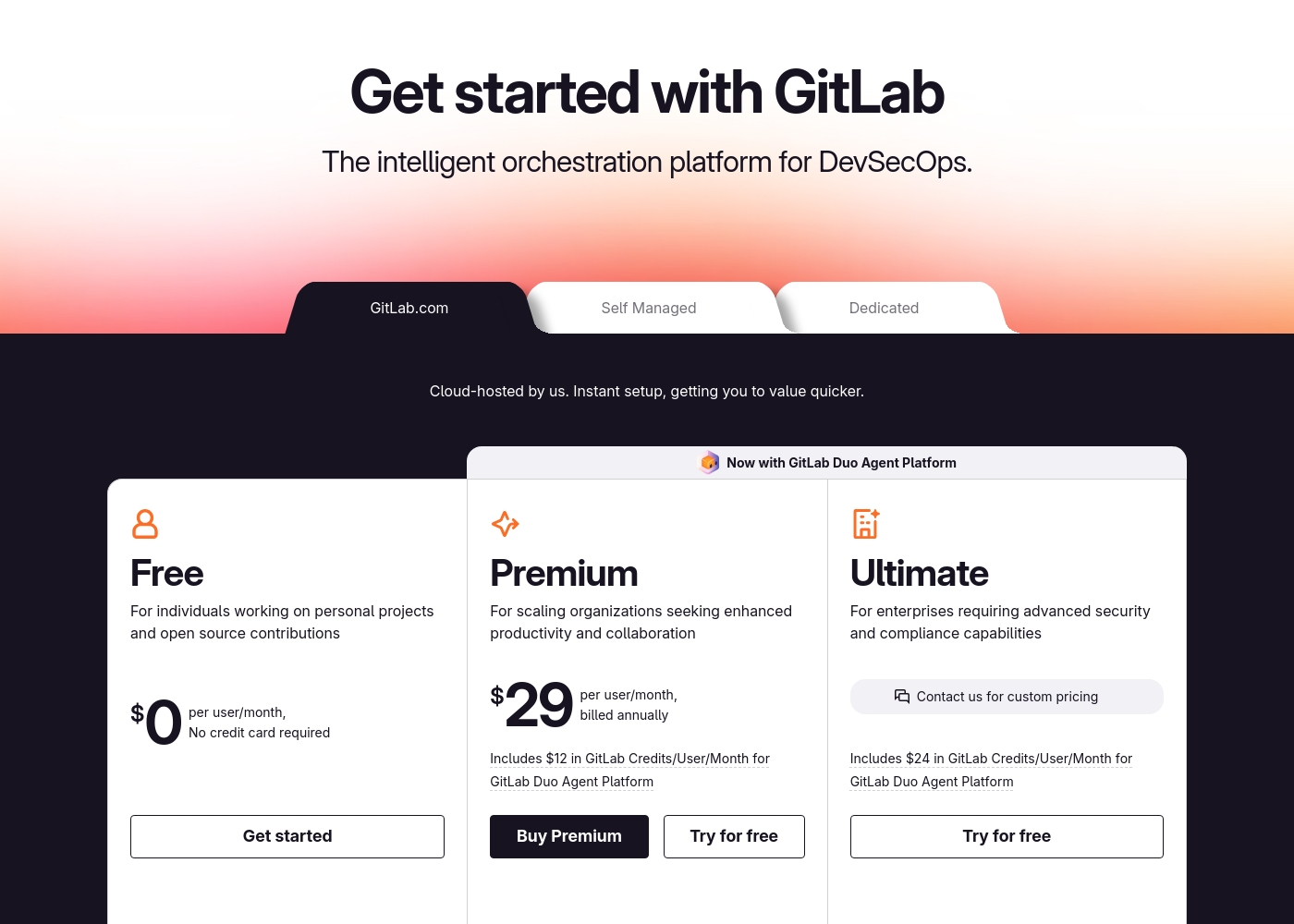
GitLab pricing: GitLab offers a range of DevSecOps plans from a free tier for individuals to an Ultimate enterprise solution for $99/month. Subscriptions include various compute minutes, storage allocations, and security features to fit different team sizes and needs.
Please note: the provided screenshot shows $29/user/month for Premium, while the text mentions $99 for Ultimate elsewhere; we have prioritized the current primary source values below for clarity. Actually, the provided text includes $0, $29 annually, and custom pricing options depending on the deployment method (SaaS or Self-Managed).
Overall it is a per-seat annual subscription model with usage-based add-ons for credits and compute time. For current SaaS pricing: Free $0, Premium $29/mo annually, Ultimate $99/mo annually (implied for custom).
Glances coûte entre 29 $ et 99 $ par mois avec 2 forfaits : Professionnel à 29 $ par utilisateur/mois, Glances pour monday.com & QuickBooks à 99 $/mois. Les prix affichés correspondent à la facturation mensuelle ; la tarification annuelle n'est pas indiquée ici. Un essai gratuit est disponible pour les deux forfaits, et vous n'aurez pas besoin de fournir de carte de crédit pour commencer.
Les détails des prix ci-dessous précisent ce que vous obtenez avec chaque forfait.
Professionnel
Prix : 29 $ par utilisateur/mois Sites Web Pris en Charge : Non spécifié Idéal pour : les équipes nécessitant un contrôle solide sur l'accès et une visibilité sur l'ensemble des applications Politique de Remboursement : Non spécifié Autres Fonctionnalités :
- Connecter et rechercher un nombre illimité d'applications
- Gérer les rôles et les autorisations de l'équipe
- Transport de données sécurisé
- Personnaliser les vues pour chaque application
- Effectuer des actions dans d'autres applications
- Connecter et rechercher un nombre illimité d'applications
- Gérer les rôles et les autorisations de l'équipe
- Transport de données sécurisé
- Personnaliser les vues pour chaque application
- Effectuer des actions dans d'autres applications
- Tout ce que Pro offre, plus jusqu'à 3 utilisateurs
- Synchronisation en temps réel des factures vers Monday
- Créer et envoyer des devis et factures QuickBooks
- Convertir les devis QuickBooks en factures
- Créer et mettre à jour des clients et sous-clients
Pricing Notes
- GitLab's Free plan is generous for individuals and small projects.
- GitLab's paid plans require annual billing.
- Glances offers a no-credit-card-required free trial for both plans.
- GitLab has usage-based costs for AI credits and extra compute.
- Glances' monday.com & QuickBooks plan is a flat $99/month for up to 3 users.
Pricing Head-to-Head
Avis des utilisateurs
External user reviews for GitLab are currently inaccessible for a full synthesis, as both Trustpilot and Capterra returned security verification errors. 📄 Therefore, we cannot provide a balanced, specific summary of recurring user themes on accuracy, ease of use, support, or pricing at this time. We recommend checking these sources directly for up-to-date sentiment.
GitLab streamlined our entire development pipeline. Having CI/CD, security, and planning in one place saves our team significant time each week.
Les avis sur Capterra suggèrent que Glances est apprécié pour son approche sans code, ses intégrations étendues et son chemin clair vers une vue des données unifiée et en direct. Les données Trustpilot ne sont pas fournies dans nos sources, mais Capterra mentionne que les utilisateurs apprécient d'effectuer des tâches courantes sur plusieurs applications sans quitter leur travail actuel, ce qui aide à réduire les erreurs et à gagner du temps.
Le produit met l'accent sur une vue à 360 degrés, les données en temps réel et un accès sécurisé pour les coéquipiers, ainsi qu'un essai gratuit simple. La tarification montre deux forfaits – Professionnel à 29 $ par utilisateur/mois et un forfait regroupé à 99 $/mois pour monday.com & QuickBooks – avec un essai ne nécessitant pas de carte.
Glances unifie nos applications sans le désordre. La configuration sans code nous a fait gagner des heures, et la vue en direct maintient notre équipe alignée sur les systèmes.
Notre verdict
This isn't a fair fight. GitLab and Glances are tools for entirely different jobs. Picking one depends on what you're trying to build or manage. GitLab's superpower is being the single source of truth for software. It bundles planning, code, CI/CD, and security into one powerful platform. Teams report saving hours per week and shipping faster. Glances's superpower is creating clarity from chaos. It connects your existing business apps into one live view. You see data from Asana and QuickBooks together without switching tabs. The deciding factor is your core activity. Are you building and deploying software? Choose GitLab. Are you trying to streamline workflows across your business tools? Choose Glances. For development teams, GitLab is the clear choice. For business teams drowning in tab-switching, Glances is the solution. Know your workflow, and the right tool becomes obvious.
Questions fréquemment posées
Can GitLab and Glances be used together?
They serve different purposes. GitLab is for your development workflow. Glances could potentially connect GitLab data into a broader business view, but it's not their primary focus.
Which is better for a small business owner?
It depends. If you run a software company, GitLab. If you manage a team juggling multiple SaaS apps for operations, Glances is likely more helpful for daily tasks.
Does Glances offer any development features like GitLab?
No. Glances is focused on integrating and viewing data from existing business apps. It doesn't include code hosting, CI/CD, or security scanning.
Is GitLab too complex for non-technical teams?
GitLab is designed for technical teams building software. Non-technical business teams would find its interface and features overwhelming and irrelevant to their work.
How does Glances handle data security?
Glances pulls data in real-time and doesn't store it. It uses secure, encrypted connections and lets you control access without sharing login credentials.
Can I get a free trial for both?
Yes. GitLab has a free tier and trials for paid plans. Glances offers a free trial with no credit card required for both of its plans.
Prêt à choisir ?
Chaque outil a ses forces. Choisissez selon vos besoins.