Software A vs Camtasia
Anireel and Camtasia tackle video creation from opposite angles. Anireel makes lively animations fast for marketing and eLearning purposes. Camtasia excels at flexible, high-quality screen recording for detailed software demos. Your choice depends on whether you need illustration or technical demonstration.
Avantages
Inconvénients
Powerful screen recording, premium price tag.
We find Camtasia to be an extremely capable, industry-standard tool for creating high-quality instructional video content. Its multitrack editing flexibility and AI enhancements effectively streamline complex workflows. Overall, Camtasia excels in core functionality, but its restrictive, mandatory subscription model significantly diminishes the overall value proposition for many loyal users.
Avantages
- Industry-standard platform for flexible screen recording and tutorial creation.
- Significantly simpler and more intuitive interface compared to advanced editors.
- Multitrack recording allows independent editing of screen, audio, and camera.
- Offers powerful AI features like text-based video editing and audio cleanup.
Inconvénients
- Mandatory annual subscription model has replaced perpetual licenses.
- Users are frustrated by restrictive licensing (single-device sign-in limitations).
- Perceived as overly expensive compared to free or low-cost competitors.
- Inconsistent customer service experiences, including slow/non-responsive support.
À propos deSoftware A
À propos deCamtasia
Camtasia is truly everything you need in one powerful tool. It combines screen recording with full video editing capabilities. This software uses AI-powered tools to simplify the creation process. It is designed to help you turn your existing knowledge into highly engaging videos. 💡
Points forts
Comparaison des fonctionnalités
Aperçu des fonctionnalités
Nous mettons en évidence les principales différences et désignons un gagnant pour chaque fonctionnalité.
Core Focus & Purpose
Anireel is built for quick animated explainers; Camtasia specializes in screen recorded tutorials.
Anireel helps beginners create lively marketing and eLearning content quickly. It focuses on drag-and-drop actions and ready-made professional templates. The goal is 'zero-skill creation' to produce animated videos fast. Camtasia is the industry standard for high-quality software demonstrations and training materials. It combines flexible screen recording with full professional video editing capabilities. Camtasia prioritizes control over your recorded media for flawless tutorials. This difference is foundational to their feature sets and ideal audiences. You use Anireel to create fictional worlds, and Camtasia to document the real world. Anireel works best if your content needs characters and custom scenes for storytelling.
Screen Recording
Camtasia offers multi-track recording flexibility; Anireel does not record screens.
Anireel is an animation studio and does not offer any screen or camera recording functionality. It focuses entirely on creating new animated content from scratch. You must rely on external recordings imported into the platform for visual elements. Camtasia's core strength is its powerful multitrack recording capability. It records screen, camera, and audio onto separate, independent tracks. This separation allows you to edit each element independently, saving frustration and time. If screen sharing and software demos are your main purpose, Camtasia is essential. Anireel cannot fulfill basic training demonstration needs. Camtasia makes complex editing simple by letting you fix one track without touching the others.
Animated Assets
Anireel excels at custom characters and scenes; Camtasia relies on premium stock assets.
Anireel includes an advanced Character Builder for extensive appearance customization. You can easily add your official company logo to your branded characters. It provides rich assets covering specific industries like finance or medical care. Camtasia's Pro plan offers access to a massive library of 100 million-plus premium assets. It focuses on stock footage, music, and graphic overlays for professional polish. Camtasia lacks personalized character creation entirely. Anireel is perfect for internal communications requiring consistent brand characters. Camtasia has wider stock options but no branded character tools. Anireel’s specificity for animation makes it far superior for explainer video assets.
AI Text Editing
Camtasia offers powerful text-based video editing; Anireel focuses AI on Text-to-Speech.
Anireel utilizes AI primarily for its sophisticated Text-to-Speech (TTS) engine. This generated speech includes lip-syncing for your custom characters. Anireel’s Script-to-Animation also quickly turns text into scenes. Camtasia's AI changes the editing workflow using text-based video editing. You can remove sentences in the transcript, and the corresponding video clip disappears instantly. Camtasia also generates scripts from simple prompts. Camtasia's text editing feature dramatically accelerates the revision process for long videos. Anireel uses text input for content generation, while Camtasia uses it for surgical editing efficiency. For editing efficiency, Camtasia’s approach saves more professional production time.
Audio Quality & Cleanup
Camtasia actively cleans audio noise; Anireel only focuses on generating high-quality TTS voiceovers.
Anireel provides a generous allowance of 200,000 TTS characters monthly to create voiceovers. The focus is on producing high-quality, deep-learned speech without manual intervention. It does not contain tools for cleaning up recorded audio. Camtasia offers advanced audio cleanup tools to remove background fan noise and static. It also automatically removes common verbal fillers like 'uuhms' and 'aahs.' This ensures crystal-clear instructional narration. If you record your own voice, Camtasia's audio cleanup is a non-negotiable feature. Anireel bypasses recording issues by generating speech entirely from text. Professional training materials must have clear audio, which Camtasia guarantees quickly with its AI tools.
Platform Availability
Camtasia supports both Mac and Windows; Anireel is strictly limited to Windows only.
Anireel is designed exclusively for Windows users, specifically 64-bit Windows 11, 10, and 8.1. Mac users cannot run the software natively on their systems. This severely limits team adoption across mixed operating environments. Camtasia is compatible with both major desktop operating systems: Windows 10/11 and macOS 15 and newer versions. This makes Camtasia highly accessible across different professional environments. If your team uses Mac computers, Camtasia is your only viable option here. Anireel's Windows-only limitation is a significant barrier to entry for many users. Camtasia’s wider support ensures greater flexibility for freelancers and organizations.
Pricing Structure
Anireel is significantly cheaper and offers a Perpetual license; Camtasia requires mandatory annual subscriptions.
Anireel offers superior pricing flexibility, starting at $96 annually (or $8 per month equivalent). It also provides a perpetual, one-time payment option for $149 lifetime access. A permanent Free Plan is also available to test features. Camtasia requires mandatory annual subscriptions, with the cheapest plan starting at $179.88 per year. There is no stated monthly payment option or one-time license available for individual users. The top tier Pro plan jumps to $599 yearly. Anireel offers much better value for budget-conscious creators who prefer a lifetime purchase. Camtasia’s higher price reflects its status as an industry-standard professional tool. For users sensitive to recurring costs, Anireel's Perpetual Plan offers security and confidence.
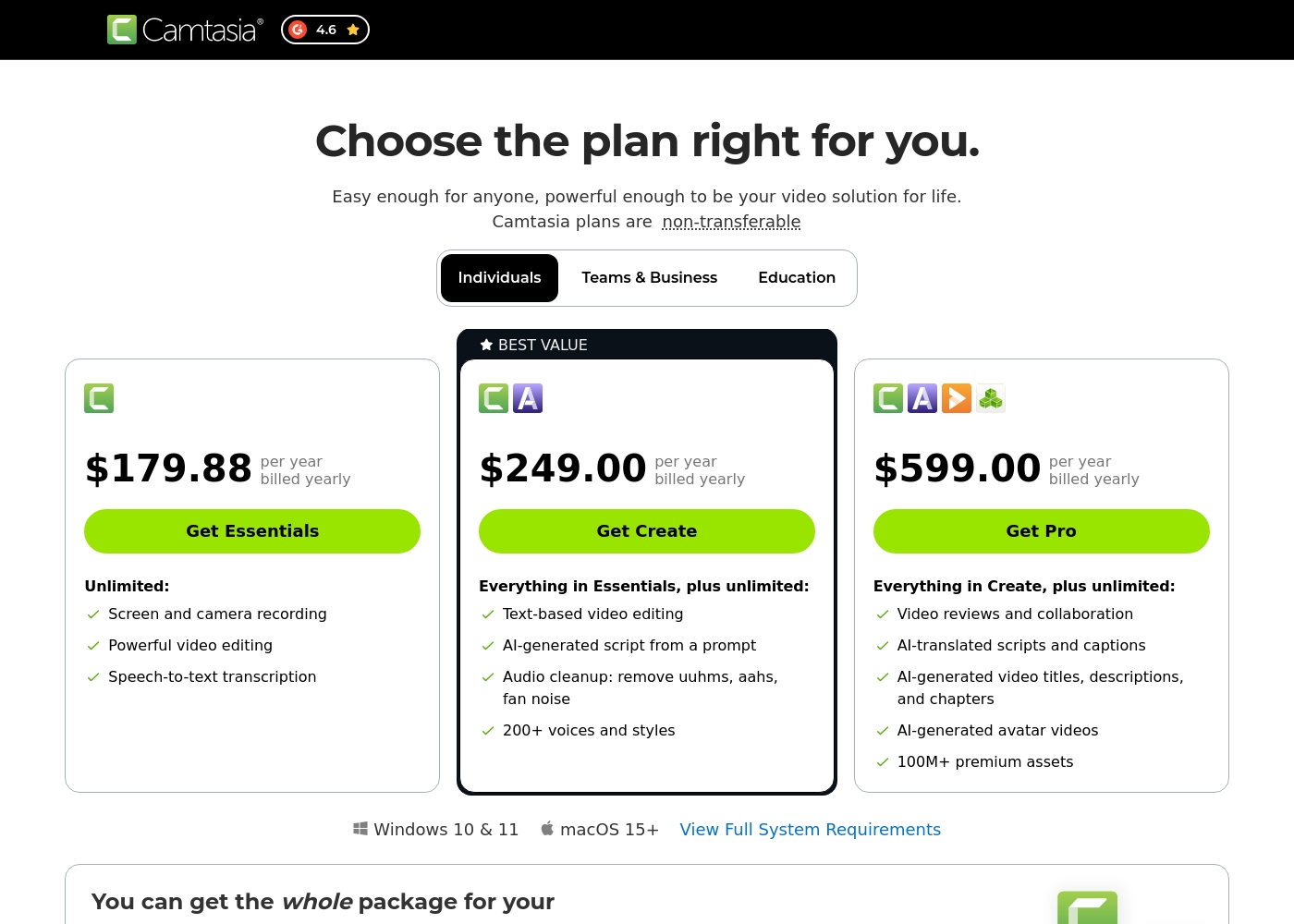
Camtasia costs between $179.88 and $599.00 per year with 3 plans: Essentials at $179.88, Create at $249.00, and Pro at $599.00. These plans cater to individuals, offering robust video and screen recording tools through an annual subscription model.
Essentials
Price: $179.88 per year billed yearly Websites Supported: Not explicitly stated Best For: Not explicitly stated Refund Policy: Not explicitly stated Other Features:
- Screen and camera recording
- Powerful video editing
- Speech-to-text transcription
The Essentials plan is perfect if you only need foundational tools for recording and editing videos. It provides unlimited screen and camera recording capabilities, which is great for beginners or those with basic needs.
- Screen and camera recording
- Powerful video editing
- Speech-to-text transcription
- Everything in Essentials
- Text-based video editing
- AI-generated script from a prompt
- Audio cleanup: remove uuhms, aahs, fan noise
- 200+ voices and styles
- Everything in Create
- Video reviews and collaboration
- AI-translated scripts and captions
- AI-generated video titles, descriptions, and chapters
- AI-generated avatar videos
Pricing Notes
- Anireel offers a permanent Free Plan and a low-cost Perpetual Plan for lifetime ownership ($149).
- Camtasia operates exclusively on mandatory annual subscriptions; there are no monthly payment options.
- Anireel's Annual Plan ($96) is significantly less expensive than Camtasia’s starter Essentials plan ($179.88).
- Camtasia does not provide an explicit free trial or a money-back guarantee based on the pricing data provided.
- The Camtasia Pro tier ($599) is nearly six times the cost of the Anireel Annual Plan ($96).
Pricing Head-to-Head
Avis des utilisateurs
Camtasia enjoys a long-standing reputation as an industry-standard tool, particularly for screen recording and tutorial creation. Users overwhelmingly praise the core software, noting it is dramatically simpler and more intuitive to use than complex alternatives like Adobe products, while still offering a deep feature set.
However, recent changes to the pricing model and licensing structure have caused significant user frustration. The shift to mandatory annual subscriptions, coupled with new restrictive single-device sign-in limits for individual users, is a major recurring complaint.
The software is great, the developers deserve five stars for the product quality. But management introduced a highly frustrating subscription model. The mandatory sign-in cycle when switching devices significantly harms my workflow.
Notre verdict
Choosing between Anireel and Camtasia is about picking your video style: animated explainers or complex screen recordings. Anireel is the champion for speed, budget, and low-skill animation production. Use the powerful Script-to-Animation feature to generate full videos instantly. For $96 annually, Anireel provides custom characters and a strong TTS engine. If budget and quick, illustrative results are your focus, Anireel is your tool. Camtasia is simply unmatched for creating flexible, sophisticated training materials. Its multitrack recording separates screen action from audio narration completely. AI editing, like text-based cuts and audio cleanup, makes Camtasia highly efficient for professionals. Camtasia supports both Windows and Mac, unlike Anireel. The deciding factor is your content type: animation or documentation. If your video needs lie in producing detailed software demos, choose Camtasia immediately. If you need lively, branded explainer videos without animation expertise, stick with Anireel. Anireel offers superior value and ease for character-based content creation. Camtasia delivers the unmatched flexibility and power necessary for professional screen recorded materials.
Questions fréquemment posées
Which is better for creating animated explainer videos: Anireel or Camtasia?
Anireel is purpose-built for animated video creation and wins clearly here. It includes custom character builders and Script-to-Animation features for speed. Camtasia focuses on screen recording and lacks native animation tools.
Is Camtasia worth the high cost over Anireel’s Perpetual Plan?
Camtasia is worth the cost if you need advanced features like multitrack screen recording and text-based editing. Anireel’s Perpetual Plan is great value, but only if you primarily need quick, character-driven animated content. You need to weigh animation vs. screen demo needs.
Can I use Anireel on my Mac computer?
Unfortunately, no. Anireel is strictly limited to Windows operating systems (64-bit only). Camtasia offers native support for both Windows and macOS users.
Does Anireel offer advanced AI editing like Camtasia?
Anireel uses AI primarily for its Text-to-Speech engine and animation generation. Camtasia offers advanced AI features like text-based video editing and automatic audio cleanup, which Anireel does not have.
Which tool provides the most flexible pricing options?
Anireel provides the most flexible pricing. It offers a permanent Free Plan, a low-cost Annual subscription, and a one-time Perpetual license option. Camtasia requires a mandatory, higher-priced annual subscription for all paid tiers.
Which software is best for creating software demonstration tutorials?
Camtasia is overwhelmingly superior for demonstrations and tutorials. Its multitrack recording and editing flexibility allow you to refine every detail independently. Anireel is not designed for screen capturing.
Prêt à choisir ?
Chaque outil a ses forces. Choisissez selon vos besoins.