Traducción completa pronto — detalles del producto en inglés, navegación localizada.
xTiles

Reseña de xTiles

xTiles helps busy people and teams plan each day and organize projects.

Por Ciroapp Editorial Team · Actualizado 9 oct 2026

Puede aplicarse una comisión sin coste adicional

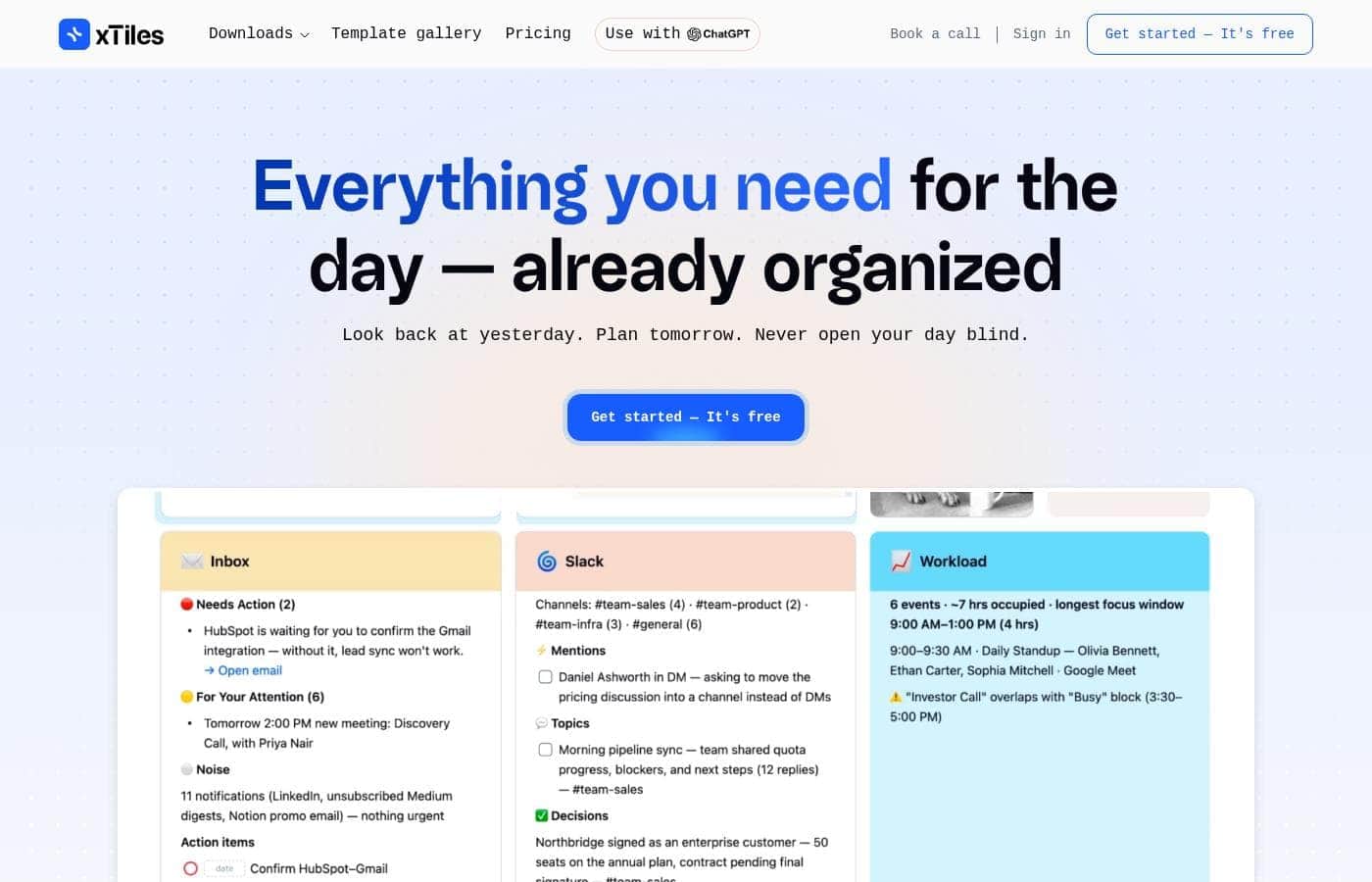
Captura de pantalla de la página de inicio de xTiles

De un vistazo

Resumen rápido de xTiles: valoración, precios, funciones clave y puntos destacados.
Página del proveedor consultada el 13 oct 2026

Puntuación Ciroapp

3.5/ 5

One connected space for plans and projects

xTiles pulls notes, tasks, and daily plans into one connected space, with ready-made templates and AI help that turns conversations into projects. The free entry point makes it easy to test with real work. Pricing tiers, refund terms, and integration depth stay unclear, though. Overall, a friendly pick for template-first planners and small teams.

Ventajas

  • Ventajas:Keeps notes, tasks, and daily plans in a single connected view
  • Ventajas:Ready-made templates across several categories cut the blank-page problem
  • Ventajas:AI help turns conversations into organized projects, tasks, and a daily plan

Desventajas

  • Desventajas:You have to sign up before you can build anything, so there is no offline or guest mode
  • Desventajas:Only a free starting point is public; tiers, seats, and capacity limits are unclear
  • Desventajas:Refund and renewal terms are not visible before you commit
Ideal para
  • People who plan their days but lose track of notes and tasks
  • Small teams that want shared projects and a daily plan together
  • Coaches and consultants organizing client work alongside their own planning
Esta sección es un resumen. Más abajo encontrarás detalles sobre funciones, casos de uso, precios y reseñas.

¿Qué es xTiles?

xTiles is a planning and organization app for individuals and teams. You connect your work in one place, see the whole picture, and get AI help with what to do next. It offers ready-to-use templates across several categories for busy minds.

Coaches, consultants, and creators are part of its community. You can start for free and create your first project right away.

Verdict

Best for Individuals and small teams who want daily planning and project organization in one connected space, especially those who like starting from templates..

A solid fit if you want your day and your projects in one connected place; start with the free plan, one template, and a single small project to see how it feels.

Strengths

  • Connects scattered notes, tasks, and plans in one view
  • AI help turns conversations into organized projects and daily plans
  • Ready-to-use templates across several categories

Watch-outs

  • Signup is required before you can build anything
  • Public plan tiers and refund terms are not shown on the main page
  • Integration depth with other tools is not spelled out

xTiles Funciones clave

✨ One Connected View

Link your work once, and the whole picture shows up in a single view. Boards and tiles keep notes, tasks, and plans side by side, so nothing resets each morning. Instead of hunting across apps, you look back at yesterday and plan tomorrow in the same place.

It suits both daily planning and longer projects.

✨ AI That Suggests Next Steps

Connect your favorite AI assistant, then ask it to turn a conversation into organized projects, tasks, and a daily plan. That is where AI help comes in, and it fits the moment after a busy call when details are still fresh. You get structure instead of scattered notes.

✨ Start From a Template, Not a Blank Page

Ready-made templates span several categories, so you begin with a structure that already works. That shortens the path from signup to a usable board, and it helps a lot if you would rather adapt something than build from scratch. Pick the category that matches how you actually work.

✨ Daily Planning and Team Work Together

Coaches and consultants use xTiles to keep client projects, tasks, and notes in one visual space. Small teams lean on shared boards and projects, so everyone sees the same plan. Personal planning and team work live in the same app, which means fewer tools to juggle day to day.

📱 Your Plan Follows You Across Devices

The apps work across multiple devices, so your boards move with you between desktop and phone. Check the plan on the go, add a task between meetings, and pick up where you left off. More than 1,000,000 people already use xTiles, including coaches, consultants, and creators.

Casos de uso

🗓️ Plan your day without losing yesterday

Look back at yesterday, then plan tomorrow. Connect notes, tasks, and your day in one view so nothing resets overnight. Start from a ready-made template instead of a blank page.

Expected outcome: your week stays visible instead of opening your day blind.

🧑💼 Coaches and consultants with client work

Keep client projects, tasks, and notes in one visual space. AI helps turn a conversation into an organized project with clear next steps. Your own planning sits beside the work you do for clients, so you're not switching tools.

Tip: Build one client board first, then reuse the structure.

👥 Small teams sharing one plan

Shared templates and projects fit team work, not just personal planning. Everyone works from the same board, so priorities stay aligned without extra meetings. Move tasks as the week changes, and keep today's plan next to the project.

Expected outcome: one shared view.

🧠 ADHD and executive function coaching

Coaches in xTiles' partner community support ADHD and executive function clients. Give someone a template that already has structure, then adapt it together as the week goes. Expected outcome: clients work from a board they can follow, not a blank page.

Precios de xTiles

Precios aún no verificados — consulta la web del proveedor.

la página de precios de xTiles

Captura de la página de precios de xTilesVer captura de la página de precios
PlanPago mensualPago anualIncluye
Free
Ver web del proveedor
  • Create your first project at no cost
  • Ready-to-use templates across several categories
  • AI that turns conversations into organized projects, tasks, and a daily plan
  • Works across multiple devices
  • Community of more than 1,000,000 users

Historial de precios

Seguimos los precios desde el 10 oct 2026. Aún no hay cambios.

Rango de precios: Free

Tipos de precios: Free plan

Notas sobre precios

xTiles starts free — you can sign up and create your first project at no cost, then explore ready-made templates and AI-assisted planning from there.

xTiles is free to start — you can sign up and create your first project without paying anything.

Here's what that free starting point covers.

Free

Other Features:

  • Sign up and create your first project at no cost
  • Ready-to-use templates across several categories
  • AI assistance that turns conversations into organized projects, tasks, and a daily plan
  • Apps that work across multiple devices, so your work follows you
  • A creative community of more than 1,000,000 people already using xTiles

Free is the right pick if you want to see how xTiles fits the way you already work. The idea is simple: look back at yesterday, plan tomorrow, and stop opening your day blind. Coaches and consultants use it to keep client projects, tasks, and notes in one visual space, and small teams lean on it for shared boards. Because the templates come ready to use, you start with a structure that already works instead of building one from scratch. Try it here first, then decide whether you need anything more.

What to know before you commit. Getting started is free rather than a timed trial, so there's no countdown to race. That makes it easy to test the boards, tiles, and AI features on real work before you think about anything else. If you later need more capacity, extra seats, or team-level controls, it's worth confirming limits, seats, and renewal terms with xTiles directly before you commit.
Avísame cuando xTiles cambie de precio

Un correo cuando detectemos un cambio en la página de precios del proveedor. Sin boletín ni ofertas. Baja con un clic.

Reseñas de usuarios

Aún no hay reseñas.

Escribir una reseña

Escribir una reseña para xTiles
0/100 caracteres
0/2000 caracteres

¿Por qué usar xTiles?

It's easy to start a planner and hard to keep it useful. xTiles targets that gap by keeping your work connected instead of scattered.

  • One connected view: link your work once and see the whole picture instead of hunting across apps.
  • AI that suggests next steps: ask your favorite AI to turn conversations into organized projects, tasks, and a daily plan.
  • Ready-made templates: begin from a category template rather than staring at a blank page.
  • Community-tested use: coaches, consultants, and creators in its partner community use it for clarity.
  • Free entry point: create your first project at no cost before deciding on anything more.
  • Works for teams too: shared templates and projects fit both personal planning and team work.

Alternativas a xTiles

Otras herramientas en la categoría Colaboración visual

Ver todas las herramientas de Colaboración visual
Miro

Miro

Visual Collaboration4.3/5

Innovación, redefinida

Preguntas frecuentes sobre xTiles

Is there a free trial, or is xTiles simply free to start?

It's not a countdown trial, since the free starting point has no end date. You sign up, build your first project, and test boards, tiles, and AI help on real work.

How many people can join a workspace, and what limits apply?

Seats, capacity, and plan tiers aren't public, so confirm those with xTiles before committing a team. Shared boards and templates do support small-team work.

Does xTiles connect to the tools I already use?

Integration depth isn't spelled out. xTiles runs across multiple devices and pairs with your preferred AI assistant. Check each specific connection against your stack before you switch.

Who gets the most out of xTiles?

Individuals and small teams who want daily plans and projects in one connected view. It fits coaches and consultants juggling client work, and anyone who would rather adapt a template than start blank.

¿Listo para probar xTiles? Consulta el sitio oficial o los precios.

¿Eres xTiles? Reclama esta ficha · Obtén la insignia