Opus Clip

Opus Clip

The only AI editor that actually drives growth.

#1 dans Video Repurposing
2 min de lectura · Actualizado 10/5/2025
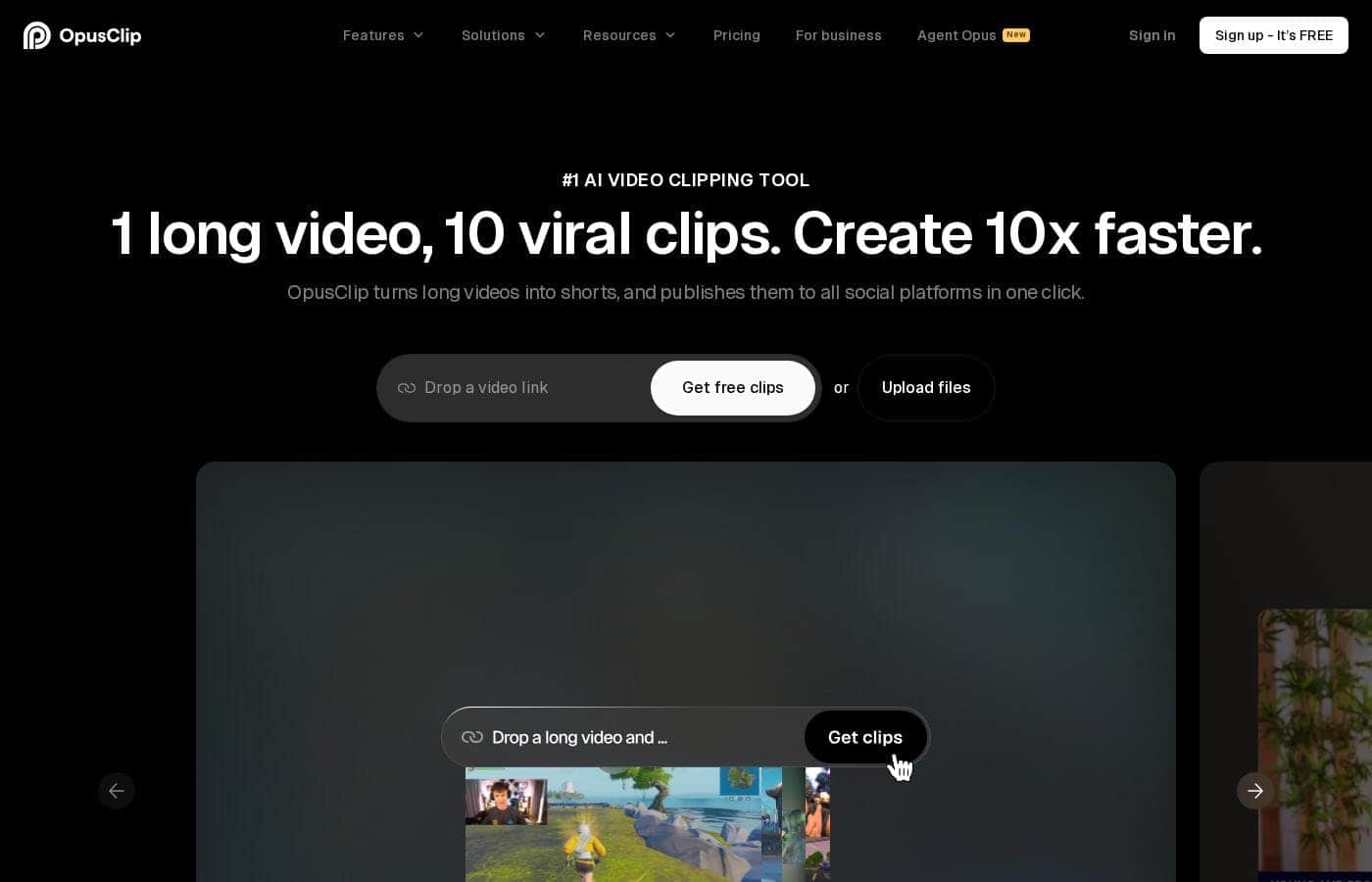
Captura de pantalla de la página de inicio de Opus Clip

At a glance

Quick overview for Opus Clip: rating, pricing summary, key features, and highlights.

software.ciroappReview

4.6
Essential AI tool for viral short content.

We found Opus Clip to be an exceptional tool for streamlining content creation workflows, automating the difficult task of transforming long-form content into polished vertical shorts with high accuracy and speed. Overall, this AI editor delivers on its promise to maximize social media output and reach for both budget-conscious creators and growing agencies.

Ventajas

  • Pro:Drastic speed increase (clips created up to 5x faster).
  • Pro:Highly accurate automatic captioning and dynamic text.
  • Pro:Permanent Free plan and affordable paid tiers starting at $15/mo.
  • Pro:Watermark-free export available on the Starter plan.

Desventajas

  • Con:Media storage is temporary, expiring rapidly on lower tiers.
  • Con:All Free tier exports include a watermark.
  • Con:Fixed storage and unlimited advanced AI B-Roll require the Pro plan.
Prueba gratuita
Yes — 7 días
Rango: $0–$29/monthFree plan, Free trial, Monthly subscription, Yearly subscription
This section is a summary. Detailed sections about features, use cases, pricing, and reviews follow below.

Reseña de Opus Clip, precios, funciones, pros y contras

The biggest frustration for creators is the massive time sink of editing short clips. It can take days just to repurpose one long video. OpusClip solves this challenge instantly.

This smart tool helps you create and publish videos 5x faster using powerful AI editing models. Now you can focus on audience growth, not tedious production work. ✨

¿Qué es Opus Clip?

OpusClip is an advanced AI editor built to automate your video workflow. It analyzes your long video and uses big data to identify the most viral-worthy moments. The AI then re-arranges those moments into high-quality shorts.

These clips are automatically polished with dynamic captions and smooth transitions. You can take full editing control or let the AI take over; either way, it's made effortless. Team workspaces are also available to help your business scale creative output without scaling overhead.

Opus Clip Funciones clave

✨ Precision AI Clip Selection

OpusClip uses powerful AI to pinpoint the best moments in your long videos. It analyzes big data and current trends across major social platforms. This smart process generates a deep understanding of your video content for reliable repurposing.

The AI identifies highlighting moments, re-arranges them, and ensures the final clip is coherent and attention-grabbing. This feature allows you to focus on growth instead of tedious production work.

✨ Universal Video Repurposing (ClipAnything)

The unique ClipAnything model works across all major video genres. You can easily convert interviews, vlogs, gaming footage, or sports content into short clips. This system is designed to clip anything, even videos with little or no dialogue.

The model understands visual, audio, sentiment cues, and emotional context throughout the video. You can initiate the process with a single click or specify exact moments using simple natural language prompts.

✨ Dynamic Reframing and Tracking (ReframeAnything)

Use ReframeAnything to ensure your subject remains perfectly targeted and framed. This AI relayout feature automatically resizes the video for vertical formats suitable for any platform. The technology uses advanced AI object tracking to keep moving subjects perfectly centered in the frame.

If you need maximum control, you can utilize manual tracking to instruct the AI exactly what to follow. This ensures professional formatting every time.

✨ Automated Polish and Accessibility

OpusClip automatically polishes your clips with dynamic features for a professional look. It uses smooth transitions and adds highly accurate, automatically generated captions. The system achieves an accuracy rate of over 97% for captions, promoting maximum accessibility for viewers.

You retain full editing control and can freely change or edit the text after generation. The AI-edited final clips also end with a strong call-to-action. ✨

✨ Maximum Workflow Acceleration

You can create and publish your videos up to five times faster than traditional methods. The platform offers a comprehensive web application for managing your entire editing process. For advanced functionality, an API is available for workflow integration.

Use the developer tools to connect OpusClip with your CMS and other tools. This allows you to truly automate your creative output and put your content process on autopilot.

✨ Scaling with Teams and Branding

OpusClip helps scale your creative output without scaling administrative overhead. You can easily set up team workspaces for robust project management and member collaboration. Define your unified brand identity using customizable brand templates.

These templates allow you to manage your logo, intro/outro segments, color palettes, and critical font styles across all content.

Casos de uso

⏱️ Converting Weekly Content into Viral Visibility

It used to take solo creators days to transform a single long video into multiple short, vertical clips. OpusClip removes this massive time sink completely. You simply upload your latest hour-long video, and the AI instantly selects the most viral-worthy moments using big data analysis. The tool then polishes these clips with dynamic captions and smooth transitions.

Now you can publish videos 5x faster, meeting the demands of multiple platforms effortlessly. This lets you focus on audience engagement and growth instead of tedious production work.

📈 Scaling Output for Agencies and Growing Teams

As every business becomes video-first, scaling creative output without increasing team overhead is crucial. OpusClip offers dedicated Team workspaces that allow collaboration and management of large creative projects.

Teams can create and lock down various brand templates, ensuring every clip uses the correct font style, color, and logo. For enterprise users, the API integration allows you to fully automate the video creation workflow by connecting OpusClip with your existing CMS and tools.

🎮 Using 'ClipAnything' for Niche Video Genres

Problem: Traditional AI clip cutters often only work well for static content, like video podcasts. They struggle with genres where the action is rapid or subjects move constantly.

Approach: Use the unique ClipAnything model. This advanced feature understands visual, audio, and sentiment cues across all video types—including vlogs, fast-paced gaming, interviews, and sports highlights.

Expected outcome: OpusClip consistently finds and creates high-impact shorts from any genre.

Tip: Even if subjects are in motion, ReframeAnything ensures they stay perfectly centered by applying AI object tracking automatically.

🔗 Driving Traffic Back to Long-Form Pillars

Short-form content is your best advertising. Successful creators use OpusClip to maximize the reach of their long-form podcasts or YouTube videos. The AI selects moments that are coherent and attention-grabbing, making them highly effective hooks.

By creating high-quality, magnetic short clips, you naturally drive viewers who want the full context back to your original content. Many users report seeing their long-form view counts increase significantly after consistently posting these AI-generated shorts.

✍️ Achieving Consistency and Accessibility

Creators need to deliver polished content that is accessible to all viewers, even those watching silently in social feeds. OpusClip automatically adds captions to every video upon generation. This process is highly accurate, often exceeding 97% accuracy.

If you need custom adjustments, you can freely edit the text within the platform. This workflow ensures professional quality and accessibility without requiring manual subtitle work, reducing your overall production cost.

🤖 Maintaining Content Flow on Autopilot

You don't have time to be editing every single day. OpusClip’s workflow automation handles the entire process, letting you keep content rolling even when you step away. Use the web app to pre-process multiple videos and let the AI queue up high-performing shorts.

Expected outcome: You can literally 'go on vacation and still keep your content rolling.' The AI does the heavy lifting, allowing you to maximize your effort to output ratio.

Resumen de precios de Opus Clip

Rango de precios
$0–$29/month
Tipos de precios
Free plan, Free trial, Monthly subscription, Yearly subscription

Opus Clip offers a permanent Free plan alongside flexible paid monthly subscriptions starting at $15 per month. The pricing structure is based on processing speed, storage, collaboration tools, and access to premium AI features like advanced B-Roll generation.

Planes y precios

Free

Monthly$0
Media storage expires after 3 days.
  • Regular AI clipping processing speed
  • Local video import (Up to 10GB)
  • Animated captions with watermark
  • Export limited to 1080p rendered clips

Starter

Monthly$15
Media storage expires after 29 days.
  • Faster processing than Free and Trial
  • Watermark-free video export
  • AI B-Roll Generator (3 clips/month)
  • 20 AI Voice-overs per day
  • Auto video import from verified YouTube account

Pro

Monthly$29
Includes 100GB fixed storage and video import up to 30GB.
  • Faster processing than Starter
  • 100GB fixed storage
  • 2 users/pack, up to 4 users total
  • Unlimited stock B-Roll; 50 AI B-Roll clips per day
  • Export in bulk

Business

MonthlyCustom
YearlyCustom
Customized storage and custom censored words list access.
  • Dedicated enterprise queue; Fastest processing
  • Unlimited member seats and storage
  • Single-Sign On (SSO) and SOC II Type 2 compliant
  • Priority customer support with dedicated Slack channel

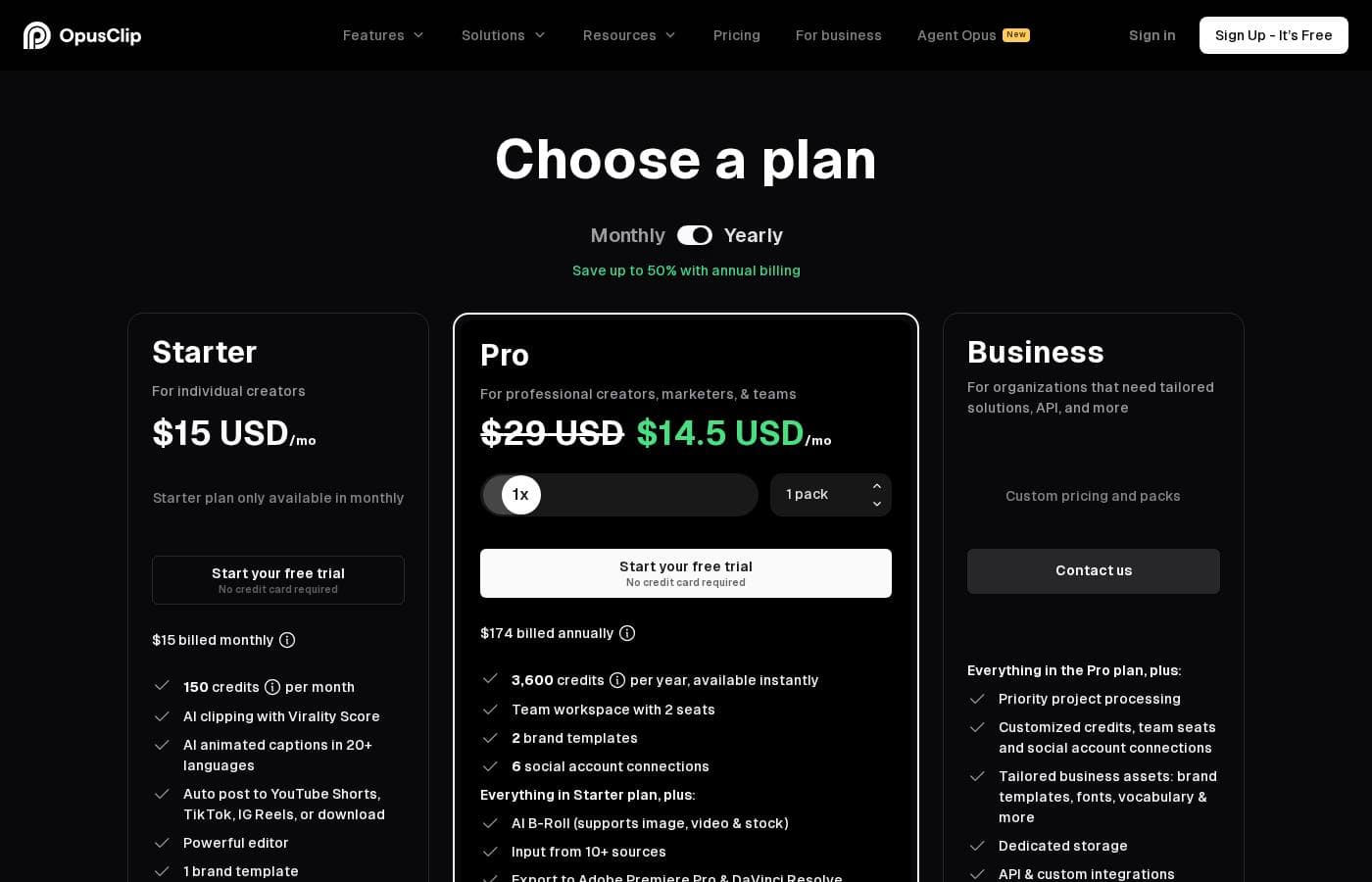
Opus Clip costs between $0 and a custom price per month with four plans: Free at $0, Starter at $15/mo, Pro at $29/mo, and Business (Custom).

If you're ready to select an option, here is a detailed breakdown of what is included in each plan.

Free

Price: $0/mo Websites Supported: Not explicitly stated Best For: New users or small-scale content creators Refund Policy: Not explicitly stated Other Features:

  • Regular AI clipping processing speed
  • Local video import up to 10GB
  • Animated caption templates (with watermark)
  • 60 minutes of video processing time refreshed monthly

This is a great starting point if you want to experiment with the service. It allows you to produce clips regularly to see what works for your audience without worrying about cost. This plan has limited media storage that expires after 3 days.

Starter

Price: $15/mo Websites Supported: Not explicitly stated Best For: Solo creators focused on maximizing social media reach Refund Policy: Not explicitly stated Other Features:

  • Faster processing than the Free plan
  • Watermark-free video export
  • AI B-Roll Generator (3 clips per month)
  • 20 AI Voice-overs per day

The Starter plan is perfect once you decide to commit to regular short-form video publishing. You get faster processing and the key benefit of clean, watermark-free exports ready for any platform.

Pro

Price: $29/mo Websites Supported: Not explicitly stated Best For: Growing teams, agencies, or high-volume creators Refund Policy: Not explicitly stated Other Features:

  • Faster processing than the Starter plan
  • 100GB fixed storage
  • Up to 4 member seats (2 users/pack)
  • Unlimited stock B-Roll and 50 AI B-Roll clips per day

If you are scaling up your operation or working with a small team, the Pro plan provides the resources you need. The substantial increase in B-Roll generation and included storage will support heavy daily creation volumes.

Business

Price: Custom Websites Supported: Not explicitly stated Best For: Enterprises, large media companies, or organizations needing custom solutions Refund Policy: Not explicitly stated Other Features:

  • Dedicated enterprise processing queue and servers
  • Unlimited member seats and media storage
  • Single-Sign On (SSO) and SOC II Type 2 compliance
  • Priority customer support via dedicated Slack channel

The Business plan is designed for organizations that require custom integration, maximum speed, and enterprise-level security. Simply contact the sales team to discuss integration and specific feature needs.

Opus Clip offers a free tier for creators who want to get started right away. You can also try out the Pro plan with a generous 7-day free trial before making any payment commitment.

Reseñas de usuarios

Users consistently praise Opus Clip for its remarkable ease of use and its ability to drastically speed up content production. The core functionality—turning lengthy videos into viral shorts—is highly effective, with many creators reporting time savings of up to 5x.

Reviewers frequently highlight the accuracy of the automated caption generation and the practical utility of the ReframeAnything feature, which ensures subjects remain centered. Pricing is generally seen as fair, especially since a robust permanent Free plan is available.

However, heavy usage or the need for fixed storage and unlimited B-Roll pushes creators to the $29/month Pro plan. Specific details on support responsiveness are less common, but stability and reliability are often commended, making Opus Clip a solid tool for high-volume content repurposing.

It’s an essential tool for scaling social media reach. 🚀

Qué dicen en otras fuentes

Sarah K.
· Capterra
5.0 / 5

I used to spend hours manually editing one long video. Opus Clip changes that completely. Now, I upload my content and have tons of high-quality clips ready in minutes. It’s truly revolutionized my weekly workflow.

David P.
· Capterra
4.5 / 5

The automatic captioning is incredibly accurate right out of the box. Plus, the Reframe feature keeps the speaker perfectly centered every time. This saves me so much manual effort and the results look professional.

Aún no hay reseñas.

Escribir una reseña

Escribir una reseña para Opus Clip
0/100 caracteres
0/2000 caracteres

¿Por qué usar Opus Clip?

OpusClip is more than just a cutter; it's a partner designed specifically for growth. If you are struggling to keep up with content demands, this tool provides real, measurable results. Millions of successful creators already rely on this editor to streamline their output and maximize reach.

Here is why OpusClip is crucial for a modern content strategy:

  • Redefine Speed: What used to take days now takes minutes, allowing you to publish content 5x faster.
  • Clip Anything, Seriously: Unlike other tools, the unique ClipAnything model works across all video genres—vlogs, gaming, sports, and interviews—not just podcasts.
  • Perfect Platform Formatting: The ReframeAnything feature ensures your subjects stay perfectly centered, even if they are moving. It resizes any video for any platform instantly.
  • Automatic Quality Assurance: It leverages AI to select the best highlighting moments, ensuring the clip is coherent and attention-grabbing.
  • Built-in Accuracy: Enjoy highly accurate, automatically added captions, allowing you to edit text freely and ensure viewer accessibility.
  • Measurable Growth: Many users report significant increases in watch time (up to 57%) and views (up to 2x) on platforms like YouTube and TikTok. 💡

OpusClip is a no-brainer for any creator aiming to convert long-form videos to vertical shorts efficiently. You can explore the platform today with a free-forever plan or start a Pro trial to see the benefits right away. Grab those free clips and watch your channel grow! 🎉

Listo para transformar su flujo de trabajo con Opus Clip?

Preguntas frecuentes

How is monthly usage measured? Is it based on clips or time?

Usage is calculated based on video processing time, not the number of clips produced. The permanent free plan includes 60 minutes monthly. Paid tiers offer flexible processing credits and remove processing time limits.

What is included in the 7-day free trial?

The free trial provides you with full access to the Pro plan features. This trial includes 90 minutes of video processing time. This is enough to generate approximately 30 downloadable clips.

How long do my clips and media stay stored in the system?

Storage duration varies depending on your plan. Free media expires after three days, and Starter media expires after 29 days. The Pro plan includes 100GB of fixed storage, while Business plans offer unlimited storage space.

What kind of API access or third-party integrations are available?

API access is available only in the Business tier for customized workflow integration. Pro plan users can use Zapier integration, limited to 300 credits per month. All plans allow export to standard MP4 files.

Will Opus Clip work for my video category, or just for podcasts?

Opus Clip uses its unique ClipAnything model to work with any video genre. It successfully clips vlogs, gaming, sports, and interviews. You can even use natural language prompts to select and generate specific moments.

What are the video file size limits for uploads?

The Free and Starter plans accept local video imports up to 10GB per video. The Pro and Business plans allow local video imports up to 30GB per video. Pro and Business also support importing via public MP4 URLs.

Which languages are supported by Opus Clip for captions and transcription?

The service supports more than 20 languages for clipping and transcription. These include major languages like English, Spanish, French, German, and Japanese. The full list is extensive and continues to grow.

What methods are available for customer support if I run into issues?

Free and Starter users access support through Discord AI chat. Pro users receive live help via Intercom chat. Business customers get priority support, including a dedicated Slack channel.

What is Opus Clip's refund policy or cancellation process?

Not explicitly stated on the official site. The site does not mention a standard money-back guarantee policy for paid subscriptions. Cancellation details are not provided on the pricing page.

Which advanced security standards are supported for enterprise customers?

The Business plan features enterprise-level security, including Single-Sign On (SSO) login. It is also compliant with the SOC II Type 2 security standard. Email OTP login is standard across all tiers.

Can I integrate the output into professional editing software?

Yes, if you are on the Pro or Business plans, you can. These tiers allow you to export your files directly to professional Non-Linear Editors. This includes popular applications like Adobe Premiere Pro and DaVinci Resolve.

¿Listo para probar Opus Clip? Consulta el sitio oficial o los precios.