Mobicip

Mobicip

Mobicip Smart Parental Control App for Busy Parents

#6 dans Parental Control
2 min de lectura · Actualizado 10/4/2025
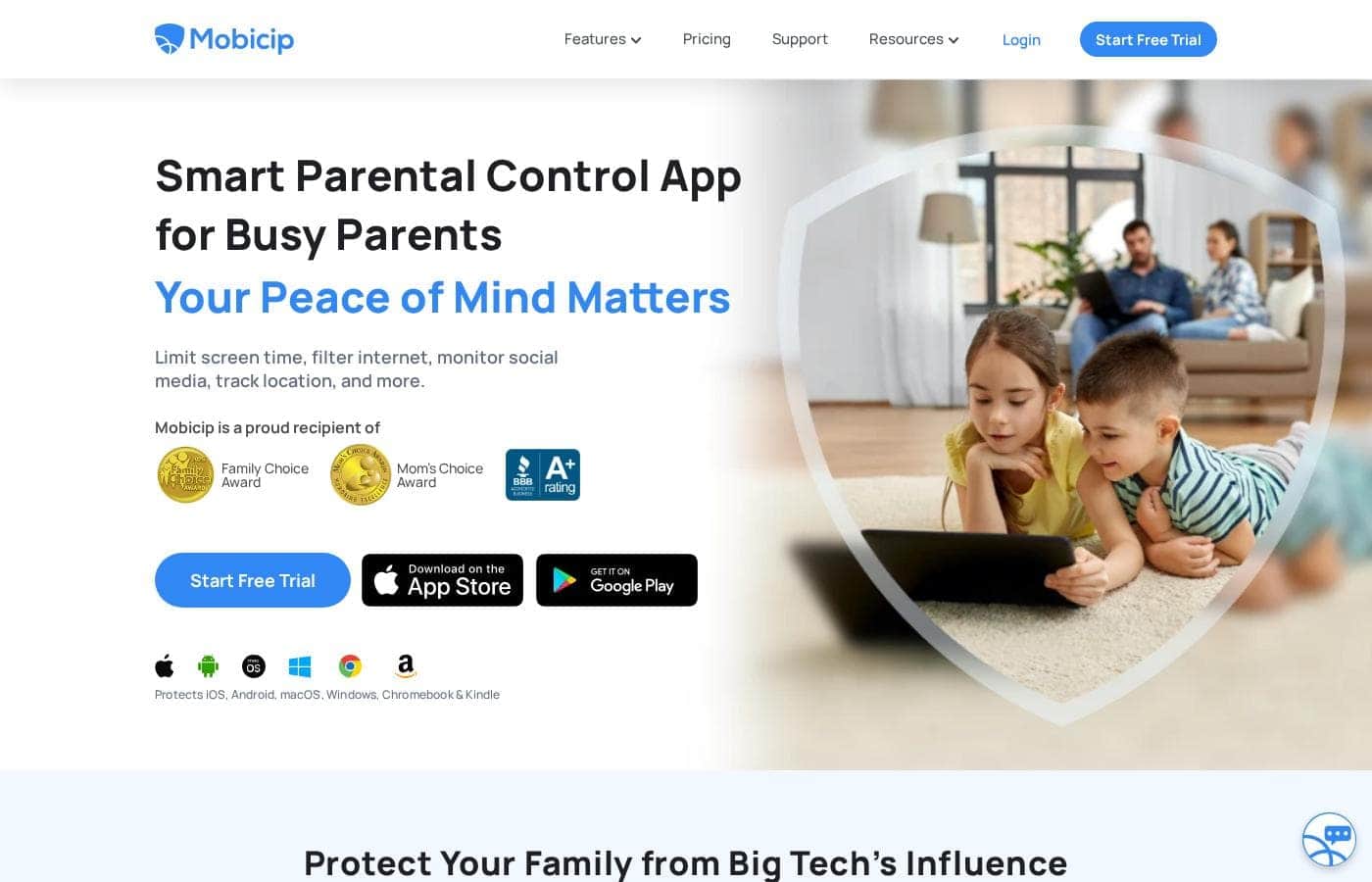
Captura de pantalla de la página de inicio de Mobicip

At a glance

Quick overview for Mobicip: rating, pricing summary, key features, and highlights.

software.ciroappReview

3.8
Comprehensive Features, Criticized Reliability.

We found Mobicip offers comprehensive, multi-platform features like robust screen time limits and social media monitoring at a competitive annual price. Overall, we are concerned by multiple reports indicating that controls are easily circumvented by tech-savvy children, which fundamentally undermines the security promise of the product.

Ventajas

  • Pro:App blocking and time schedules work effectively for basic enforcement.
  • Pro:Supports a wide range of platforms (iOS, Android, Windows, Chromebooks).
  • Pro:Competitive annual pricing tiers based on family device count.
  • Pro:Email customer support is rated highly and is helpful during initial setup.

Desventajas

  • Con:Controls are easily bypassed by children changing device time or disabling the VPN.
  • Con:Settings frequently get corrupted or unblocked following software updates.
  • Con:Administrative functions, like account cancellation, are not available in the web portal and require contacting support.
  • Con:Technical glitches can cause connectivity problems and significant battery drain.
Prueba gratuita
Yes — 7 días
Rango: $2.99–$7.99/monthFree trial, Monthly subscription, Yearly subscription
This section is a summary. Detailed sections about features, use cases, pricing, and reviews follow below.

Reseña de Mobicip, precios, funciones, pros y contras

Are you struggling to keep your children safe from Big Tech’s constant influence? Managing screen addiction and toxic content is incredibly challenging for busy parents. Mobicip is the smart control solution designed to bring you peace of mind. ✨

This powerful tool helps you decide exactly how and when your child can access videos, games, and social media. Using Mobicip, you can limit screen time and proactively filter the internet easily.

¿Qué es Mobicip?

Mobicip is a comprehensive Smart Parental Control App built specifically for the needs of busy families. It aims to simplify digital parenting by offering reliable protection across many different platforms. 💡

Unlike tools restricted to a single company, Mobicip bridges the gap by applying consistent settings across nearly any device. It protects your family on iOS, Android, macOS, Windows, Chromebook, and even Kindle. The app is simple to set up and keeps detailed track of everything your child does online.

Mobicip Funciones clave

✨ Consistent Rules Across Every Device ✨

Mobicip solves one of the biggest challenges in modern digital parenting: inconsistency. This powerful tool applies the exact same settings and rules to your child, no matter which device they are using. This approach greatly simplifies enforcement for busy parents.

Mobicip bridges the gap often left by tools restricted to proprietary companies. You gain reliable, unified protection across iOS, Android, macOS, Windows, Chromebook, and Kindle devices. This means you do not need separate solutions for phones, tablets, and computers.

✨ Flexible Screen Time Management

You can effectively manage screen addiction by setting thoughtful usage boundaries. Mobicip gives you complete control to define precisely when and how long your child can access videos, games, and social media. You can set realistic daily or weekly screen time limits tailored to your family's unique requirements.

This feature allows you to create customized schedules for activities. You can organize screen usage and specific app access at varying times throughout the day or week. If you need immediate intervention, you also have the option to remotely lock devices instantly.

✨ AI-Powered Advanced Filtering and Blocking

Mobicip uses powerful AI technology to proactively secure your child from harmful content online. This ensures your family’s browsing experience is safe from adult websites and inappropriate material. We provide the most powerful web filter available to protect your children.

Beyond just blocking websites, the system manages distracting applications effectively. The App Blocker targets usage in categories like games, videos, and social media. This comprehensive protection also includes uninstall protection, which prevents children from removing the security software themselves.

✨ Monitoring Habits and Location Awareness

It's simple to stay informed about your child’s online activities and habits. Mobicip provides detailed Activity Reports that summarize how your children spend their precious time online. This gives you critical awareness of their device usage patterns.

For enhanced safety, Mobicip tracks sensitive conversations on the top three social apps to detect harmful content. You can also view your family’s live location instantly using the Family Locator. You can create geofences too, which alert you when your child enters or leaves specific, frequently visited places.

✨ Encouraging Self-Regulation and Collaboration

Digital parenting is most successful when it is a collaborative effort involving trusted adults. The Guardians feature lets you securely share parenting responsibilities with family members or trusted friends. This ensures consistent support and coverage for your children when you are busy.

Mobicip helps children develop self-control, moving beyond simple limits. The Child Dashboard allows your youth to monitor their own screen time usage visually. This key feature fosters self-regulation skills while motivating kids with achievable goals and rewards.

Casos de uso

🌐 Applying Consistent Rules Across Every Device

Your family likely uses a mix of devices, like Apple tablets, Windows computers, and Android phones. It's often difficult to apply the same boundaries across all these different platforms. Mobicip solves this by bridging the gap, instantly applying consistent limits and filters per child.

The same customized schedules and app blocks work reliably whether your child is on a Chromebook, a Kindle, or an iOS device. This comprehensive coverage simplifies enforcement and ensures rules remain firm regardless of the gadget they choose.

🗓️ Establishing Device-Free Study and Family Time

It's easy for video games or social media to distract children from priorities, like homework or dinner. You can effectively manage device addiction by creating customized schedules. Set specific times during the day or week when distracting apps are completely inaccessible.

Combine schedules with App Limits to restrict the daily time spent specifically on games or social platforms. This active management helps build healthier routines and brings peace of mind during crucial family hours.

🛡️ Intervening Before an Online Crisis Happens

Parents worry about social media exposure to toxic content or bullying. Mobicip proactively addresses this by monitoring conversations on the top three social apps. It tracks interactions specifically for harmful content and alerts you if trouble arises.

For web browsing, the powerful AI-based internet filter blocks adult websites and other inappropriate materials. If your child faces an actual emergency, they can use the built-in SOS button to send an instant digital call for help.

📍 Confirming Your Child's Safe Arrival

Busy parents need to know their children arrived safely at school, practice, or home. The Family Locator feature shows your child’s live location instantly. This avoids stressful phone tag when they are late.

You can also create geo-fences around places your family frequents, such as the library or a grandparent's house. You will receive a notification the moment your child enters or leaves these tracked spots. This feature helps prevent risky behaviors and offers immediate reassurance.

🤝 Sharing Digital Parenting with Trusted Adults

You don't need to manage all digital boundaries alone. The Guardians feature allows you to share parenting responsibilities easily. Maybe another trusted adult, like a co-parent or grandparent, needs to oversee evening screen time access.

You can grant them access to help track activity reports and enforce the established limits. This collaboration feature makes maintaining consistent rules far easier for everyone in the family circle.

📈 Fostering Responsibility and Self-Regulation

Mobicip supports self-regulation skills, teaching kids to manage their time responsibly. The unique Child Dashboard lets your young person keep an eye on their own screen time usage. This visibility encourages them to stick to their daily limits.

Use the Goals and Rewards system to motivate them further. By enabling them to monitor their own behavior, they actively collaborate with you to improve their habits, rather than just reacting to imposed limits.

Resumen de precios de Mobicip

Rango de precios
$2.99–$7.99/month
Tipos de precios
Free trial, Monthly subscription, Yearly subscription

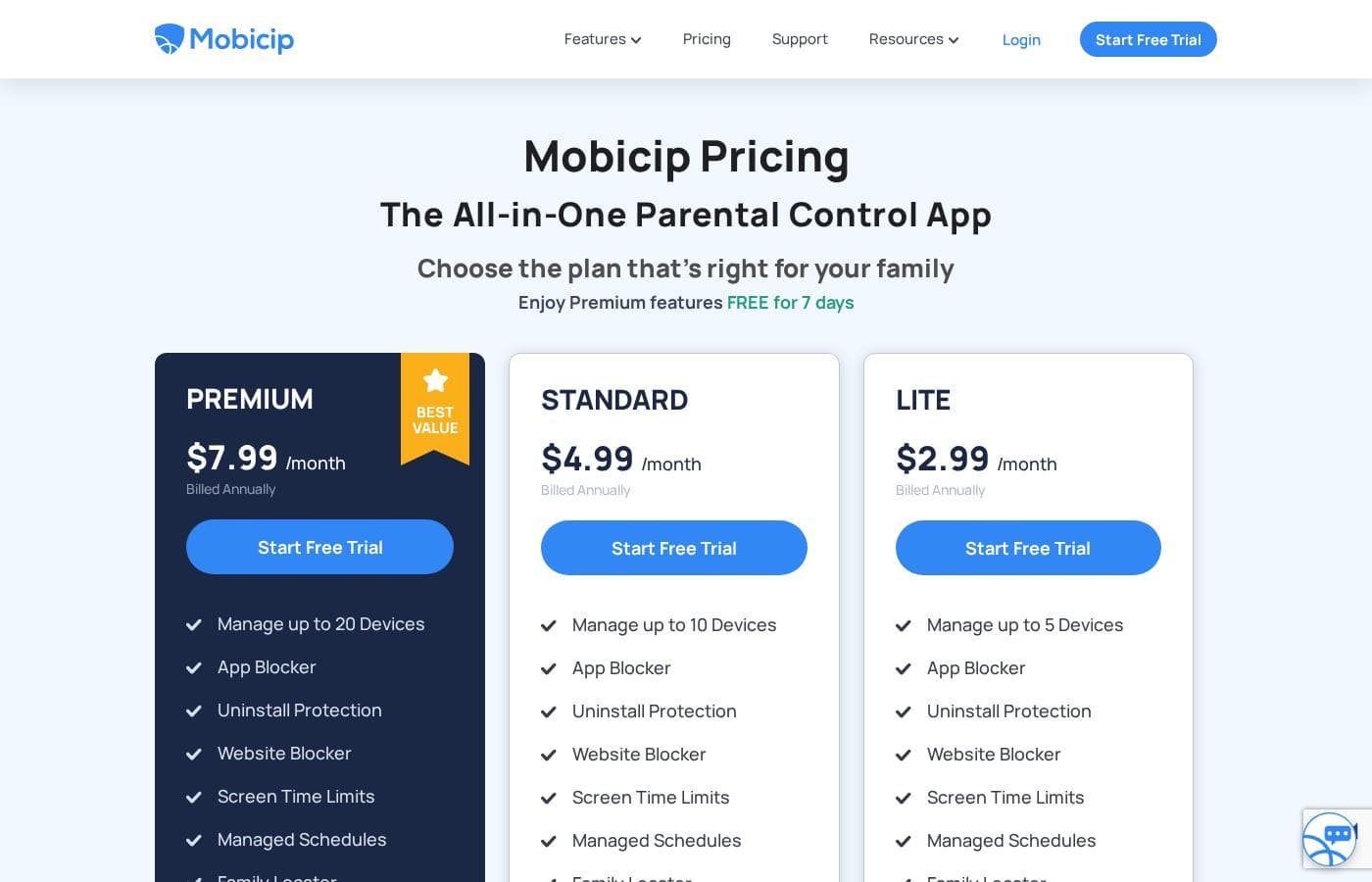
Mobicip offers three annual pricing tiers, ranging from $2.99/month to $7.99/month, all billed annually. All plans include core parental control features and differ only by the maximum number of devices they support.

Planes y precios

LITE

Monthly$2.99
Manage up to 5 Devices
  • Manage up to 5 Devices
  • App Blocker
  • Uninstall Protection
  • Website Blocker
  • Screen Time Limits
  • Activity Schedules
  • Family Locator
  • Remotely Lock Devices
  • + 1 más funciones

STANDARD

Monthly$4.99
Manage up to 10 Devices
  • Manage up to 10 Devices
  • App Blocker
  • Uninstall Protection
  • Website Blocker
  • Screen Time Limits
  • Activity Schedules
  • Family Locator
  • Remotely Lock Devices
  • + 1 más funciones

PREMIUM

Monthly$7.99
Manage up to 20 Devices
  • Manage up to 20 Devices
  • App Blocker
  • Uninstall Protection
  • Website Blocker
  • Screen Time Limits
  • Activity Schedules
  • Family Locator
  • Remotely Lock Devices
  • + 1 más funciones

Mobicip costs between $2.99 and $7.99 per month (when billed annually) with three plans: LITE at $2.99/month, STANDARD at $4.99/month, and PREMIUM at $7.99/month.

You can easily choose the right plan for your family's needs below. All options include a 7-day free trial of Premium features.

LITE

Price: $2.99/month (Billed Annually) Websites Supported: Not explicitly stated Best For: Families with 5 or fewer devices Refund Policy: Not explicitly stated Other Features: Uninstall Protection, Website Blocker, Screen Time Limits, Activity Schedules, Activity Reports, Family Locator

The LITE plan is perfect for smaller households or individuals needing essential protection on just a few devices. You gain core parental controls, like setting screen time limits and tracking device activity. It's a foundational choice if you need maximum security for five devices or less.

STANDARD

Price: $4.99/month (Billed Annually) Websites Supported: Not explicitly stated Best For: Families covering up to 10 devices Refund Policy: Not explicitly stated Other Features: App Blocker, Remotely Lock Devices, Uninstall Protection, Activity Schedules, Screen Time Limits, Family Locator

This STANDARD plan offers a solid balance of value and necessary coverage for growing families. You can easily monitor and secure up to ten devices, which works well for multiple children with various gadgets. This tier provides all necessary premium features, scaling up the device count from the LITE option.

PREMIUM

Price: $7.99/month (Best Value, Billed Annually) Websites Supported: Not explicitly stated Best For: Large families needing maximum coverage Refund Policy: Not explicitly stated Other Features: Manage up to 20 Devices, App Blocker, Website Blocker, Remotely Lock Devices, Activity Reports, Screen Time Limits

The PREMIUM package is marked as the best value and is ideal for busy parents managing many kids or a large device network. You handle all essential parental controls while securing up to twenty devices at once. If your family requires maximum coverage across phones, tablets, and computers, this robust plan is the right fit. 👨‍👩‍👧‍👦

Mobicip provides a free 7-day trial across all three tiers so you can fully test the features before subscribing. Since all billing is completed annually, starting with a trial ensures the chosen service fits your family's security requirements. While there is no explicit money-back guarantee mentioned, you can review your billing details online.

Reseñas de usuarios

Mobicip holds a "Great" 4.1-star rating on Trustpilot, though this score is based on a very limited number of reviews. Users generally appreciate the core functions like app blocking and setting screen time schedules, which successfully helps keep young children focused, and email customer service has been highly praised as "Excellent" during setup.

However, significant reliability concerns challenge Mobicip's effectiveness as a true parental control tool. Several parents report that the app is easily bypassed—teenagers can circumvent controls by changing phone time, disabling the VPN, or simply deleting the app to regain full access.

According to user reports, Mobicip was aware of some iOS vulnerabilities (like the time change trick) and acknowledged they couldn't fix them. We also noted recurring bugs involving settings getting corrupted after software updates, connectivity issues impacting messaging apps like WhatsApp, and poor battery performance, especially on Android.

Administrative tasks, such as cancelling an account, currently require contacting the support team instead of using the simple web portal. Overall, while the concept is strong and support can be helpful, the reliability issues raise serious questions about its protective capabilities.

⚠️

Qué dicen en otras fuentes

Liam M.
· Trustpilot
5.0 / 5

App blocking and screen time schedules work well, especially for keeping my children focused during class time. We successfully use it across both iPhones and Windows PCs. It is an effective tool for setting digital boundaries.

Sarah K.
· Trustpilot
4.0 / 5

Their email customer service was very helpful when I ran into problems during the initial setup process. They responded quickly, which made getting the app configured much smoother.

Aún no hay reseñas.

Escribir una reseña

Escribir una reseña para Mobicip
0/100 caracteres
0/2000 caracteres

¿Por qué usar Mobicip?

If you are ready for a parenting solution that goes beyond just blocking content, Mobicip is for you. It offers powerful AI-based controls trusted by over two million families, earning both the Family Choice Award and the Mom’s Choice Award. This robust system helps you collaborate with your children while keeping them safe.

Here’s why Mobicip works for modern families:

  • Maintain Consistent Rules: Mobicip ensures the same boundaries and rules apply to your child, regardless of whether they are using a phone, tablet, or computer. This simplifies enforcement greatly.
  • Prioritize Safety with AI: You can utilize the most powerful web filter available to block adult websites and inappropriate content. The App Blocker targets games, video, and social media apps that cause distraction.
  • Share Responsibilities Easily: The Guardians feature lets you share digital parenting tasks with other trusted adults in your circle.
  • Foster Self-Regulation: Rather than just imposing limits, the Child Dashboard allows your youth to monitor their own screen time usage and encourages self-regulation skills.
  • Intervene When Necessary: Mobicip tracks conversations on the top three social apps for harmful content. You can also monitor your family’s location instantly and create geofences for frequented spots.

Mobicip provides robust security and helps motivate your children with achievable goals and rewards. If you are seeking a complete solution built around protection and collaboration, Mobicip is an excellent choice.

✅ Start your Free Trial today and regain control over your family's complex digital environment.

Listo para transformar su flujo de trabajo con Mobicip?

Preguntas frecuentes

How does Mobicip handle its pricing structure? Do I pay monthly?

All Mobicip plans require annual billing, despite the price being shown as a monthly rate. This yearly commitment provides customers with a better overall value for the subscription.

What features are included in the 7-day free trial?

The 7-day free trial gives you full access to all Premium features. This means you can thoroughly test the AI filtering, social media monitoring, and device limits before subscribing.

Does Mobicip offer a money-back guarantee if I am not satisfied?

Not explicitly stated on the official site. The documentation notes that users can review their detailed billing information online.

If I need to monitor more devices later, how do I upgrade my plan?

Mobicip plans are based entirely on the number of devices you need to manage (5, 10, or 20). If your family exceeds your current device limit, you'll need to upgrade to the next, higher device tier.

Which specific operating systems and devices are supported by the app?

Mobicip supports a very wide range of platforms for consistent control. It protects devices running iOS, Android, macOS, Windows, Chromebook, and Kindle.

Do the different pricing plans have different features?

No. All three plans—LITE, STANDARD, and PREMIUM—include the full comprehensive set of core parental control features. The only difference between tiers is the total number of devices you can manage.

When is the customer support team available to help me?

The dedicated support team is available Monday through Friday to ensure a smooth product experience. Customers can reach them easily by email or by scheduling a call.

How does Mobicip prevent my child from disabling the parental controls?

All standard plans include an Uninstall Protection feature. This is designed to help ensure your children cannot easily remove the Mobicip application from their monitored devices.

Which social media applications does Mobicip monitor for risky content?

Mobicip proactively monitors conversations for potentially harmful content on the top three social media platforms. It provides parents with alerts when dangerous conversations are detected.

Can I track my family's location and receive alerts?

Yes, the Family Locator feature lets you view live location tracking. You can also create geofences to receive notifications when your child safely enters or leaves frequented spots.

Who is Mobicip best suited for, based on its features?

Mobicip is ideal for busy parents who need one system to enforce consistent rules across many different types of devices. It suits families needing protection on up to 20 devices.

How do I cancel or manage my annual subscription?

The official site states that subscribers can review their billing details online. Further detailed steps for canceling the subscription are not explicitly noted in the public documentation.

¿Listo para probar Mobicip? Consulta el sitio oficial o los precios.