Traducción completa pronto — detalles del producto en inglés, navegación localizada.
Dropbox DocSend

Reseña de Dropbox DocSend

Secure file sharing with document analytics for sales and fundraising teams

Dropbox DocSend cuesta desde 15 US$ (≈ 13,41 €)/mes · 5 planes

Por Ciroapp Editorial Team · Actualizado 9 oct 2026

Puede aplicarse una comisión sin coste adicional

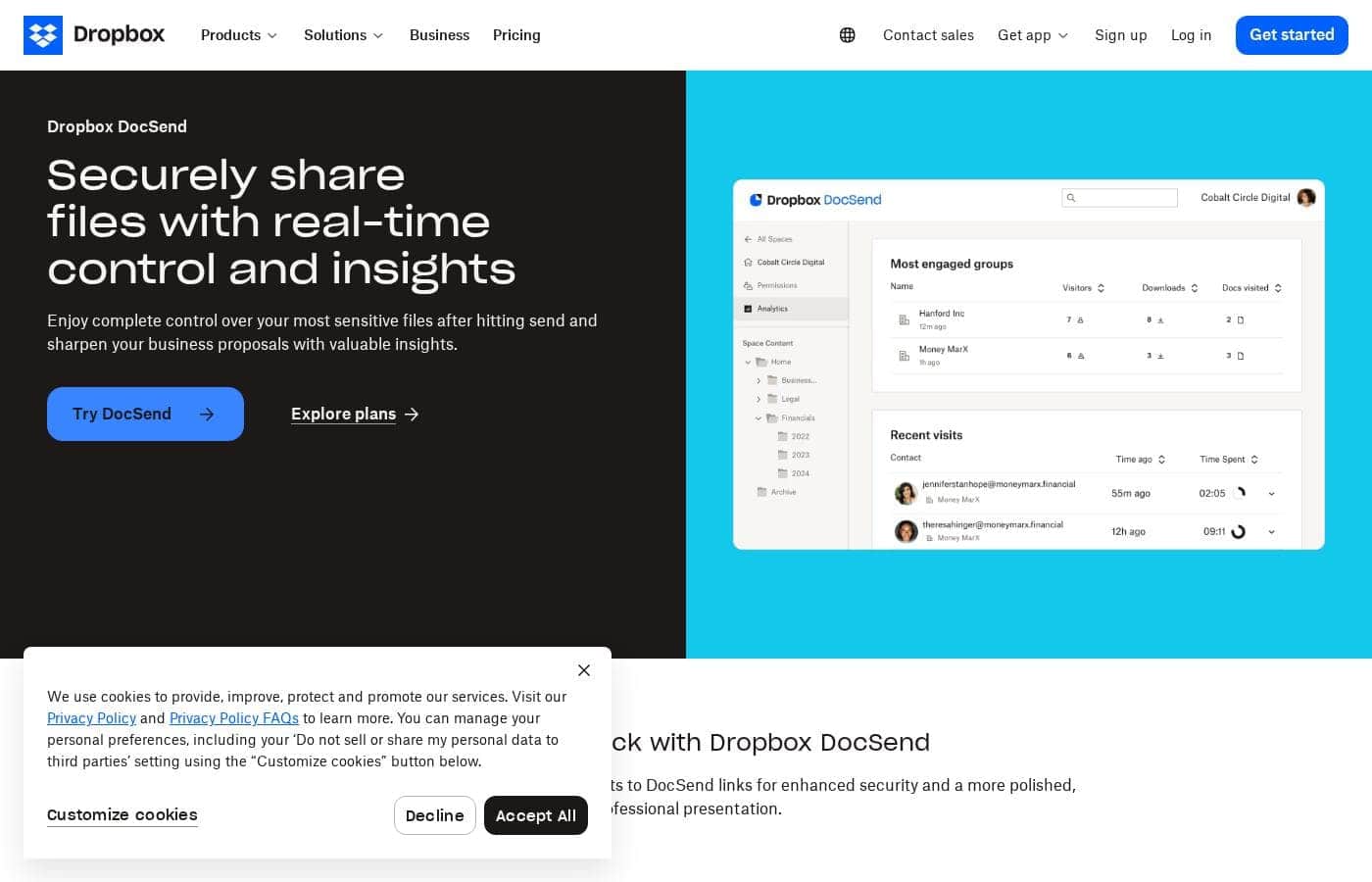
Captura de pantalla de la página de inicio de Dropbox DocSend

De un vistazo

Resumen rápido de Dropbox DocSend: valoración, precios, funciones clave y puntos destacados.
Página del proveedor consultada el 13 oct 2026

Puntuación Ciroapp

4.1/ 5

Track every document after you hit send.

DocSend turns ordinary attachments into secure links you can track, showing who opened a file, how long they stayed, and where they stopped reading. Pricing is clear across four tiers, though yearly billing locks you in and there's no permanent free plan. Overall, a strong pick for sales and fundraising teams.

Ventajas

  • Ventajas:Secure links keep you in control after sending, with view requirements and download permissions you set yourself
  • Ventajas:Real-time email alerts tell you when someone is reviewing a proposal, so you can time your follow-up
  • Ventajas:Page-level analytics show time spent per page and where readers drop off

Desventajas

  • Desventajas:There's no permanent free plan, only a time-limited trial, and the trial length isn't published
  • Desventajas:Advanced and Advanced Data Rooms bundle three seats, so a solo user pays for seats they never use
  • Desventajas:Yearly billing charges the full year up front and every paid plan renews automatically
Ideal para
  • Sales teams sending proposals that need to stand out from ordinary email attachments
  • Fundraising teams and founders sharing financials with investors through a data room
  • Executives and board liaisons circulating board materials before a meeting
Prueba gratuita
Yes
Esta sección es un resumen. Más abajo encontrarás detalles sobre funciones, casos de uso, precios y reseñas.

¿Qué es Dropbox DocSend?

Dropbox DocSend is a file-sharing tool built for people who send high-stakes documents. Instead of attaching a file to an email, you share a link you can still control. Teams use it for business proposals, board materials, financials, and fundraising data rooms.

Advanced options include virtual data rooms, file indexing, and one-click NDAs. The pitch is simple: a more secure, polished way to present documents, plus analytics that show how recipients engage with them.

Verdict

Best for Sales, fundraising, and executive teams that share sensitive documents outside their organization and want to understand how recipients engage with them..

Dropbox DocSend makes sense when visibility into a document matters as much as the document itself. Confirm the current pricing, billing terms, and setup requirements first, then pilot it on one high-stakes proposal or data room.

Strengths

  • Keeps control of files after sending, including view requirements and download permissions
  • Sends real-time notifications when someone is reviewing a proposal
  • Page-level analytics show time per page and where readers drop off

Watch-outs

  • The page doesn't publish plan pricing, billing cycle details, or refund terms, so you'll need to confirm them directly
  • Editing and co-authoring aren't the focus here; the tool is built around sharing and tracking
  • Because it's a separate platform, it adds a step alongside whatever file storage you already use

Dropbox DocSend Funciones clave

🔒 Secure sharing that lasts past the send button

DocSend swaps email attachments for secure links you still control after sending. You set the terms of access, like requiring an email and a passcode before anyone can view the file. You also decide whether a file can be downloaded.

Replacing raw attachments with links gives every document a cleaner, more polished look.

✨ Analytics that show you who is actually reading

Line graphs show how long readers spend on each page and where they drop off, so you can see which sections hold attention. Email alerts notify you in real time when someone is reviewing a proposal. That helps you time your follow-up instead of guessing.

Standard and higher plans add video and rich-media analytics.

✨ Data rooms for sensitive deals

Virtual data rooms give you version control over financials and research you send outward. A few pieces carry the weight:

  • Visitor group permissions decide who sees what
  • Diligence tracking and an audit log record activity
  • Enhanced rooms offer double the capacity per room

✨ One-click NDAs with an audit trail

Peers and investors can sign an NDA with a single click before you hand over research. Signed documents stay available afterward, which makes an easy audit trail. Unlimited eSignature comes with Standard and up, while the entry plan includes a limited allowance of envelopes.

✨ Controls built for due diligence conversations

Tighter plans add dynamic watermarking and email verification for viewers, so you know exactly who opened a file. Folder- and file-level security permissions let you narrow access further. These are the controls that tend to come up when investors or lawyers review a deal.

Casos de uso

📈 Sending sales proposals

Sales teams send proposals as DocSend links. Email alerts fire while a prospect reads, so you time your follow-up. Graphs show which sections held attention and where readers dropped off.

Expected outcome: you know who's engaged before you call.

Tip: open your follow-up with the section they lingered on.

💰 Running a fundraising process

Founders and deal teams run a raise in an Advanced Data Room. Version control keeps financials current as they manage distribution and access. Visitor group permissions decide who sees what, and the audit log records activity for investors and lawyers.

Expected outcome: investors review the right version of every document.

🏛️ Circulating board materials

Board liaisons share board decks as secure links before a meeting. You set email and passcode requirements, then check the analytics to see who opened the materials and what drew their attention. That shapes the agenda you walk in with.

Expected outcome: a meeting tailored to what board members actually read.

✍️ Sharing research under NDA

Finance and legal teams send one-click NDAs alongside research or financials. Peers and investors sign in a single step, and signed documents stay available afterward. That leaves a clean audit trail without chasing paper.

Tip: keep signed NDAs on file so diligence requests are quick to answer.

Precios de Dropbox DocSend

Desde15 US$/mes≈ 13,41 €

  • 5 planes
  • Ahorra hasta un 40 % con pago anual

Página del proveedor revisada el 13 oct 2026; confirma los precios actuales en la página de precios de Dropbox DocSend

Captura de la página de precios de Dropbox DocSendVer captura de la página de precios
PlanPago mensualPago anualIncluye
Personal
por usuario
15 US$/mes
≈ 13,41 €
10 US$/mes
≈ 8,94 €
120 US$ al año
Ahorra hasta un 33 % con pago anual
One user; 10 GB storage
  • Secure document links with real-time view tracking
  • Basic document analytics
  • Limited eSignature envelopes
  • 10 GB storage per user
Standard
Más popular
por usuario
65 US$/mes
≈ 58,10 €
45 US$/mes
≈ 40,22 €
540 US$ al año
Ahorra hasta un 31 % con pago anual
Priced per user; 50 GB storage per user
  • Everything in Personal
  • Multi-file sharing and folders
  • Video and rich-media analytics
  • Unlimited eSignature
  • Custom branding and password protection
  • +1
Advanced
250 US$/mes
≈ 223,45 €
150 US$/mes
≈ 134,07 €
1800 US$ al año
Ahorra hasta un 40 % con pago anual
Includes 3 users; extra seats cost more
  • Everything in Standard
  • Dynamic watermarking
  • Email verification for viewers
  • Lightweight data rooms (Spaces)
  • Folder- and file-level security
  • +1
Advanced Data Rooms
300 US$/mes
≈ 268,14 €
180 US$/mes
≈ 160,89 €
2160 US$ al año
Ahorra hasta un 40 % con pago anual
Includes 3 users; extra seats cost more
  • Everything in Advanced
  • Enhanced data rooms with double capacity per room
  • Visitor group permissions
  • Diligence tracking and data room audit log
  • Data room analytics
  • +1
Enterprise
Ver web del proveedor
  • Custom pricing and contract terms
  • Set up through the sales team

Convertido al tipo de referencia del BCE del 13 oct 2026; el proveedor puede cobrar un precio local distinto.

Historial de precios

Seguimos los precios desde el 9 oct 2026. Aún no hay cambios.

Tipos de precios: Free trial, Monthly subscription, Yearly subscription, Per seat pricing

Notas sobre precios

Dropbox DocSend starts at $10 per user per month when you pay yearly, and the four self-serve plans run up to $180 per month for Advanced Data Rooms. Paying monthly costs more per month, but it skips the one-year commitment, and you can try the product on a time-limited trial before you buy.

Dropbox DocSend costs between $10 and $180 per month, with four self-serve plans: Personal at $10 per user/month, Standard at $45 per user/month, Advanced at $150/month, and Advanced Data Rooms at $180/month. Those are the annual-billing rates.

Here's how the tiers stack up, and who each one fits.

Personal

Price: $10 per user/month billed annually, or $15 month to month Best For: freelancers and solo consultants who share a handful of decks Other Features:

  • Secure links with real-time view tracking
  • Basic document analytics
  • A limited allowance of eSignature envelopes
  • 10 GB of storage, and one seat only

Personal is the cheapest way into DocSend. It works well if you send the occasional proposal and just want to know when someone opens it. You get one seat, so it's you and nobody else.

Standard

Price: $45 per user/month billed annually, or $65 month to month Best For: small teams sharing multiple files with clients and investors Other Features:

  • Everything in Personal
  • Multi-file sharing and folders
  • Video and rich-media analytics
  • Unlimited eSignature
  • Custom branding and password protection
  • 50 GB of storage per user

Standard is the tier most growing teams land on. The jump from Personal buys you multi-file sharing, branding, and unlimited eSignature, which matters once you're sending more than one document at a time.

Advanced

Price: $150 per month billed annually, or $250 month to month Best For: teams that need tighter control over who can open a file Other Features:

  • Everything in Standard
  • Dynamic watermarking
  • Email verification for viewers
  • Lightweight data rooms (Spaces)
  • Folder- and file-level security permissions
  • Three users included

Advanced adds the security layer that shows up in due diligence conversations. Note that the monthly figure covers three users, so a one-person team would be paying for seats it never uses. Stay lower if you don't need watermarking or data rooms.

Advanced Data Rooms

Price: $180 per month billed annually, or $300 month to month Best For: fundraising and deal teams running a formal diligence process Other Features:

  • Everything in Advanced
  • Enhanced data rooms with double the capacity per room
  • Visitor group permissions
  • Diligence tracking and a data room audit log
  • Data room analytics
  • Three users included

Advanced Data Rooms is built for a raise or a transaction. You get bigger rooms, per-group permissions, and an audit trail that investors and lawyers tend to ask for. If you're sending decks rather than running a data room, this is more than you need.

Enterprise

Best For: larger organizations with custom security and contract requirements Other Features: custom pricing and terms set with the sales team

Enterprise is a conversation rather than a checkout page. Reach out to sales if you need custom terms or a volume arrangement.

Every paid plan renews automatically, and yearly plans bill the full year up front in exchange for the lower monthly rate. Monthly billing costs more but you can stop whenever you like.

There's no permanent free plan. New accounts do get a time-limited trial, so you can test secure links and analytics before paying. Since there's no published money-back window, it's worth confirming the trial length and seat minimums before you commit to a yearly plan.
Calculadora de coste

Calcula cuánto cuesta Dropbox DocSend para tu equipo.

Facturación
Al mes
75 US$≈ 67,04 €
Al año
900 US$≈ 804,43 €

Personal se cobra por usuario: precio × 5 puestos. Estimación con precios de lista publicados, sin impuestos, complementos ni descuentos.

Convertido al tipo de referencia del BCE del 13 oct 2026; el proveedor puede cobrar un precio local distinto.

Cómo pagar menos por Dropbox DocSend

  • Paga anualmente: ahorra hasta un 40 % frente al pago mensual.
  • Hay una prueba gratuita: pruébalo antes de pagar.
  • Algunos planes se cobran por usuario: paga solo los puestos que realmente se usan.
  • Herramientas más baratas de esta categoría empiezan en 4,17 US$/mes.
Empezar prueba gratuita

Avísame cuando Dropbox DocSend cambie de precio

Un correo cuando detectemos un cambio en la página de precios del proveedor. Sin boletín ni ofertas. Baja con un clic.

Reseñas de usuarios

Aún no hay reseñas.

Escribir una reseña

Escribir una reseña para Dropbox DocSend
0/100 caracteres
0/2000 caracteres

¿Por qué usar Dropbox DocSend?

If your proposals disappear into an inbox and you never learn whether they were read, the problem isn't your pitch. It's the delivery method.

  • Stay in control after sending. You set the terms of access, such as requiring an email and passcode before someone can view a file, and you decide whether the file can be downloaded.
  • Get notified in real time. Email alerts tell you when someone is reviewing a proposal, which helps you time your follow-up instead of guessing.
  • See how readers behave. Line graphs show time spent per page and where people drop off, so you know which sections hold attention.
  • Look more professional. Replacing raw email attachments with links gives every document a more polished presentation.
  • Run fundraising with version control. Data rooms let you manage distribution and access to financials and research, which matters when information is sensitive.
  • Simplify NDAs. One-click NDAs let peers and investors sign quickly, and signed documents stay available afterward for an easy audit trail.

Taken together, that's a shift from hoping a document was read to knowing which prospects are engaged and tailoring your next conversation to their interests.

Alternativas a Dropbox DocSend

Otras herramientas en la categoría Gestión de archivos

Ver todas las herramientas de Gestión de archivos
iMazing

iMazing

File management4.2/5Desde 4,17 US$/mes (≈ 3,73 €)

Gestiona tu iPhone. Bajo tus reglas.

CopyTrans

CopyTrans

File management3.9/5

El paquete de aplicaciones eficiente para gestionar las transferencias de datos entre iPhone, iPad y PC.

Preguntas frecuentes sobre Dropbox DocSend

¿Cuánto cuesta Dropbox DocSend?

El plan de pago más barato de Dropbox DocSend, Personal, cuesta 15 US$ (≈ 13,41 €) al mes. Los planes de pago van de 15 US$ a 300 US$ al mes.

¿Dropbox DocSend ofrece una prueba gratuita o garantía de devolución?

Dropbox DocSend ofrece una prueba gratuita.

¿Cuánto se ahorra con la facturación anual de Dropbox DocSend?

Pagar anualmente ahorra hasta un 40% frente a la facturación mensual, según los precios de lista de Dropbox DocSend.

¿Ha cambiado el precio de Dropbox DocSend recientemente?

No. No hemos detectado cambios de precio desde que empezamos a seguirlo el 9 oct 2026.

How do seats and storage limits work across the plans?

Personal covers one user and gives 10 GB. Standard is priced per user, with 50 GB each. Advanced and Advanced Data Rooms bundle three seats, and extra users cost more. A solo buyer may pay for seats they never use.

What security controls come with the paid plans?

Standard adds password protection and custom branding. Advanced brings dynamic watermarking, email verification, and file-level permissions. Advanced Data Rooms adds visitor group permissions, diligence tracking, and an audit log for due diligence.

Is there a free plan, and who gets the most value?

There's no permanent free plan, just a time-limited trial, and the trial length isn't published. It suits sales, fundraising, and executive teams that share sensitive files and want to see how readers engage.

¿Listo para probar Dropbox DocSend? Consulta el sitio oficial o los precios.

¿Eres Dropbox DocSend? Reclama esta ficha · Obtén la insignia