GitLab vs Glances
GitLab and Glances solve completely different problems. GitLab is a powerhouse for building and shipping software. Glances is a smart integrator that unifies your existing business apps into one view. Choosing between them isn't about features—it's about your core workflow.
Comprehensive DevSecOps, but complex.
GitLab is a powerful, all-in-one platform that unifies the entire software lifecycle. We find it delivers on its promise of acceleration and unified security, though its depth can create a steep learning curve for smaller teams. Overall, it's an excellent choice for organizations seeking a single, scalable solution for planning, building, and deploying software securely.
Ventajas
- Single platform for the entire DevSecOps lifecycle
- Built-in security scanning accelerates vulnerability detection
- AI-powered workflows (Duo Agent) enhance productivity
- Offers a functional Free tier for individuals and small projects
Desventajas
- Learning curve can be steep due to platform breadth
- Enterprise features like advanced security require costly Ultimate tier
- Compute and storage limits on lower tiers may require paid add-ons
- Annual billing commitment for paid plans
Fuerte integración sin código
Consideramos que Glances es una integración sin código que unifica aplicaciones en una vista única y viva. Valoramos su configuración guiada, los datos en tiempo real a través de herramientas y el acceso seguro para compañeros de equipo. En general, nos parece una opción sólida para equipos que necesitan gobernanza y flujos de trabajo entre herramientas, aunque algunos detalles como el precio anual no se muestran.
Ventajas
- Configuración sin código con opciones de Conexión Guiada
- Vista unificada y en vivo a través de aplicaciones
- Sincronización de datos en tiempo real a través de las principales aplicaciones (Monday.com & QuickBooks)
- Acceso seguro a datos sin compartir credenciales
Desventajas
- Precio anual no mostrado en la vista actual
- Algunos detalles del producto (ej. sitios web soportados) no indicados explícitamente
- Política de reembolso no claramente indicada
- El precio por usuario puede aumentar para equipos más grandes
Acerca deGitLab
GitLab is an end-to-end DevSecOps platform for teams of all sizes, from startups to large enterprises. It’s the single place to plan, build, test, secure, and deploy your software. You get all your projects, releases, and code in one data plane, so both your team and AI agents work from the same information. 💡
Acerca deGlances
Glances es una integración sin código que unifica tus aplicaciones de negocio en una única vista en vivo. Ayuda a los equipos a permanecer en un solo lugar, ver datos de múltiples aplicaciones en tiempo real y realizar acciones sin salir de su flujo de trabajo actual. Desde Asana hasta Zendesk, Glances conecta una pila diversa de aplicaciones de negocio. 💡
Aspectos destacados
Comparación de características
Resumen de Funcionalidades
Destacamos las principales diferencias y elegimos un ganador para cada característica.
Core Purpose
GitLab builds software. Glances connects your existing apps.
GitLab is a complete platform for the software lifecycle. It handles planning, coding, testing, security, and deployment in one place. Glances doesn't build software. It creates a single view across your business apps like Asana and QuickBooks. It lets you see data and take actions without switching tabs. The difference is fundamental. GitLab is for creating a product. Glances is for managing work in tools you already use.
AI Capabilities
GitLab has powerful AI agents. Glances focuses on data unification.
GitLab's Duo Agent Platform uses AI to automate dev tasks. Agents can create merge requests from issues or review code. Teams report saving 4 hours per engineer weekly. Glances doesn't advertise AI features. Its strength is connecting apps and showing live data. The intelligence is in the unified view, not AI automation. GitLab is investing heavily in AI for development. Glances uses technology to avoid complex data syncing.
Security & Compliance
GitLab has built-in scanners. Glances focuses on secure data access.
GitLab bakes security into the platform. It includes scanners for vulnerabilities in code and dependencies. You get compliance evidence automatically in pipelines. Glances provides secure data transport. It lets teammates access insights without sharing account credentials. It doesn't scan code or manage compliance frameworks. For DevSecOps, GitLab is the clear leader. Glances handles secure access for business data sharing.
Ease of Setup
Glances is no-code and guided. GitLab has a learning curve.
Glances is designed for no-code setup. You can connect apps in minutes with Guided Connect. The trial lets you see value immediately. GitLab is a comprehensive platform. Its breadth means a steeper learning curve. Teams often need time to configure pipelines and security rules. If you need quick wins without code, Glances is easier. GitLab requires more investment for its powerful capabilities.
Integration Ecosystem
GitLab integrates with DevOps tools. Glances connects business SaaS apps.
GitLab connects with tools like Jira, Jenkins, and cloud providers. It imports from GitHub and Bitbucket. It's built for the development toolchain. Glances connects apps from Asana to Zendesk. You can request new app integrations. It focuses on business productivity suites. Your choice depends on your stack. Need Jira and Kubernetes? GitLab. Need Asana and QuickBooks? Glances.
Team Collaboration
GitLab collaborates on code. Glances unifies data across business roles.
GitLab enables collaboration on code, issues, and pipelines. Teams work together on the same platform with clear roles and permissions. Glances helps sales, support, and ops collaborate. It gives everyone a shared view of customer data across apps. You can grant safe access without sharing logins. GitLab is for technical teams building together. Glances is for cross-functional teams needing shared context.
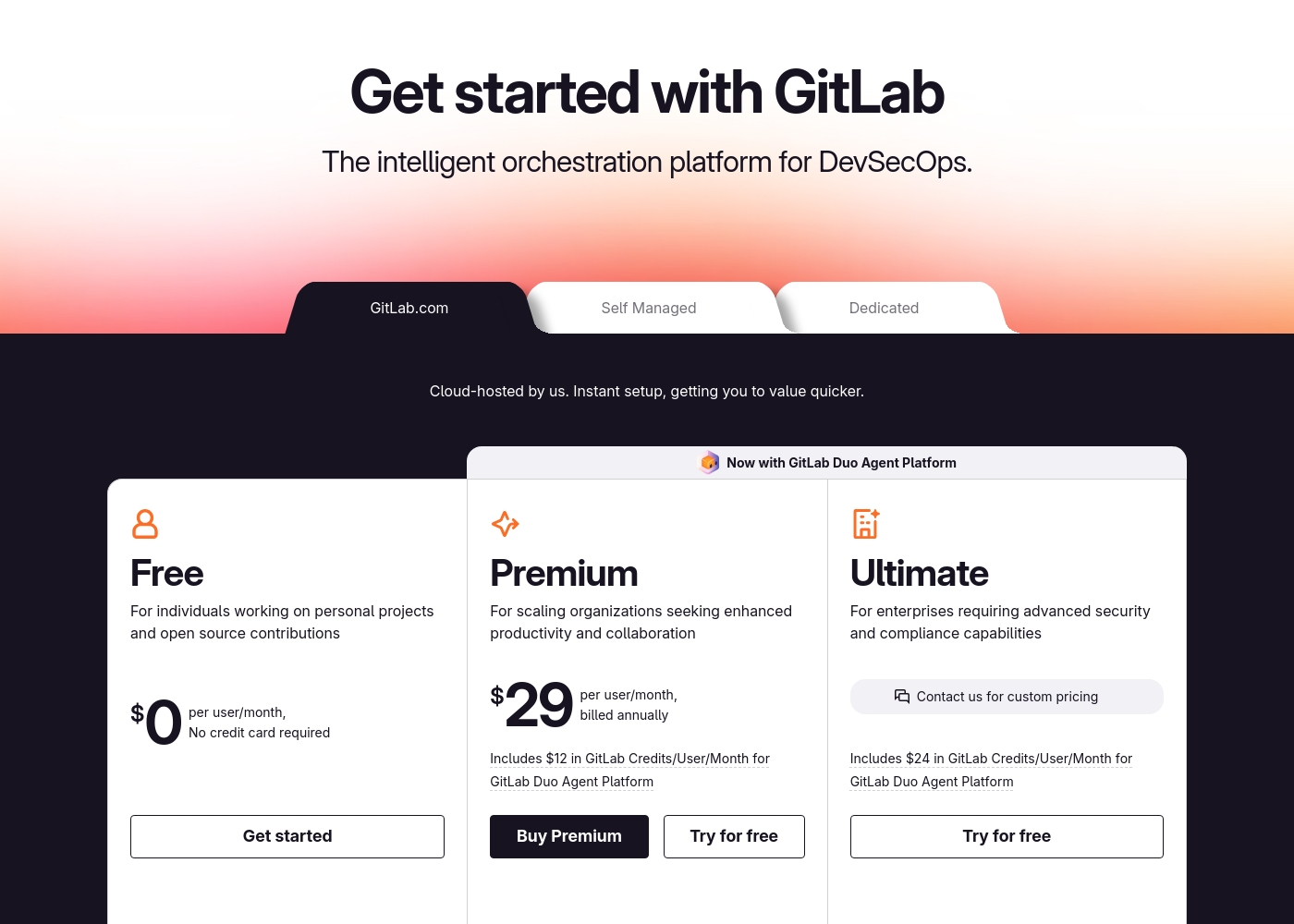
GitLab pricing: GitLab offers a range of DevSecOps plans from a free tier for individuals to an Ultimate enterprise solution for $99/month. Subscriptions include various compute minutes, storage allocations, and security features to fit different team sizes and needs.
Please note: the provided screenshot shows $29/user/month for Premium, while the text mentions $99 for Ultimate elsewhere; we have prioritized the current primary source values below for clarity. Actually, the provided text includes $0, $29 annually, and custom pricing options depending on the deployment method (SaaS or Self-Managed).
Overall it is a per-seat annual subscription model with usage-based add-ons for credits and compute time. For current SaaS pricing: Free $0, Premium $29/mo annually, Ultimate $99/mo annually (implied for custom).
Glances cuesta entre $29 y $99 al mes con 2 planes: Profesional a $29 por usuario/mes, y Glances para monday.com & QuickBooks a $99 al mes. El precio mostrado refleja la facturación mensual; el precio anual no se muestra aquí. Hay una prueba gratuita disponible para ambos planes, y no se te pedirá tarjeta de crédito para empezar.
Los detalles de precios a continuación desglosan lo que obtienes con cada plan.
Professional
Precio: $29 por usuario/mes Sitios web soportados: No indicado explícitamente Ideal para: Equipos que necesitan un control sólido del acceso y visibilidad general de la aplicación Política de reembolso: No indicado explícitamente Otras características:
- Conecta y busca aplicaciones ilimitadas
- Gestiona roles y permisos del equipo
- Transporte de datos seguro
- Personaliza vistas para cada aplicación
- Realiza Acciones en otras aplicaciones
- Conecta y busca aplicaciones ilimitadas
- Gestiona roles y permisos del equipo
- Transporte de datos seguro
- Personaliza vistas para cada aplicación
- Realiza Acciones en otras aplicaciones
- Todo lo de Pro, más hasta 3 usuarios
- Sincronización en tiempo real de facturas a Monday
- Crea y envía estimaciones y facturas de QuickBooks
- Convierte estimaciones de QuickBooks en facturas
- Crea y actualiza clientes y subclientes
Pricing Notes
- GitLab's Free plan is generous for individuals and small projects.
- GitLab's paid plans require annual billing.
- Glances offers a no-credit-card-required free trial for both plans.
- GitLab has usage-based costs for AI credits and extra compute.
- Glances' monday.com & QuickBooks plan is a flat $99/month for up to 3 users.
Pricing Head-to-Head
Reseñas de usuarios
External user reviews for GitLab are currently inaccessible for a full synthesis, as both Trustpilot and Capterra returned security verification errors. 📄 Therefore, we cannot provide a balanced, specific summary of recurring user themes on accuracy, ease of use, support, or pricing at this time. We recommend checking these sources directly for up-to-date sentiment.
GitLab streamlined our entire development pipeline. Having CI/CD, security, and planning in one place saves our team significant time each week.
Las reseñas de Capterra sugieren que Glances es valorado por su enfoque sin código, amplias integraciones y un camino claro hacia una vista de datos unificada y en vivo. Los datos de Trustpilot no se proporcionan en nuestras entradas, pero Capterra menciona que los usuarios aprecian ejecutar tareas rutinarias a través de aplicaciones sin abandonar su flujo de trabajo actual, lo que ayuda a reducir errores y ahorrar tiempo.
El producto enfatiza una vista de 360 grados, datos en tiempo real y acceso seguro para compañeros de equipo, además de una prueba gratuita sencilla. Los precios muestran dos planes—Profesional a $29 por usuario/mes y un paquete de $99/mes para monday.com & QuickBooks—con una prueba que no requiere tarjeta.
Glances unifica nuestras aplicaciones sin el desorden. La configuración sin código nos ahorró horas, y la vista en vivo mantiene a nuestro equipo alineado en todos los sistemas.
Nuestro Veredicto
This isn't a fair fight. GitLab and Glances are tools for entirely different jobs. Picking one depends on what you're trying to build or manage. GitLab's superpower is being the single source of truth for software. It bundles planning, code, CI/CD, and security into one powerful platform. Teams report saving hours per week and shipping faster. Glances's superpower is creating clarity from chaos. It connects your existing business apps into one live view. You see data from Asana and QuickBooks together without switching tabs. The deciding factor is your core activity. Are you building and deploying software? Choose GitLab. Are you trying to streamline workflows across your business tools? Choose Glances. For development teams, GitLab is the clear choice. For business teams drowning in tab-switching, Glances is the solution. Know your workflow, and the right tool becomes obvious.
Preguntas Frecuentes
Can GitLab and Glances be used together?
They serve different purposes. GitLab is for your development workflow. Glances could potentially connect GitLab data into a broader business view, but it's not their primary focus.
Which is better for a small business owner?
It depends. If you run a software company, GitLab. If you manage a team juggling multiple SaaS apps for operations, Glances is likely more helpful for daily tasks.
Does Glances offer any development features like GitLab?
No. Glances is focused on integrating and viewing data from existing business apps. It doesn't include code hosting, CI/CD, or security scanning.
Is GitLab too complex for non-technical teams?
GitLab is designed for technical teams building software. Non-technical business teams would find its interface and features overwhelming and irrelevant to their work.
How does Glances handle data security?
Glances pulls data in real-time and doesn't store it. It uses secure, encrypted connections and lets you control access without sharing login credentials.
Can I get a free trial for both?
Yes. GitLab has a free tier and trials for paid plans. Glances offers a free trial with no credit card required for both of its plans.
¿Listo para elegir?
Ambas herramientas tienen sus fortalezas. Elige según tus necesidades específicas.