Zoho Books bietet skalierbare Buchhaltungslösungen, die von einem dauerhaften kostenlosen Plan für Kleinstunternehmen bis hin zu erweiterten Unternehmensstufen reichen. Sie können sich für die monatliche Zahlung entscheiden oder durch die Wahl derJährlichen Abrechnung erheblich Geld sparen.
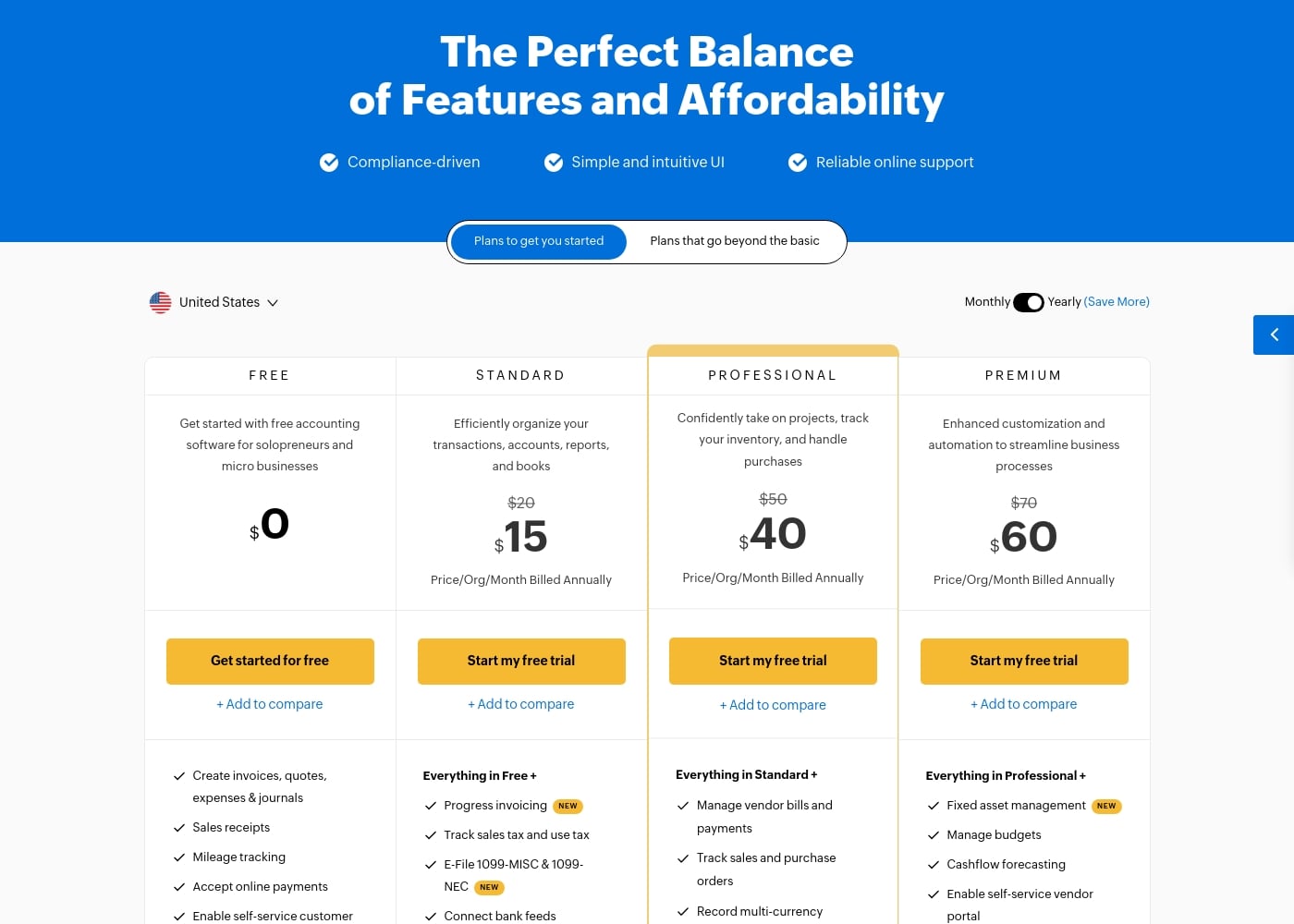
Zoho Books kostet zwischen 0 $ und 275 $ pro Monat (jährlich abgerechnet) mit sechs Plänen: FREE für 0 $, STANDARD für 15 $, PROFESSIONAL für 40 $, PREMIUM für 60 $, ELITE für 120 $ und ULTIMATE für 240 $.
Zoho Books bietet Pläne, die mit Ihrem Unternehmen wachsen können, vom Einzelunternehmer bis hin zu großen Teams. Werfen wir einen genauen Blick darauf, was in jeder Option enthalten ist.
FREE
Preis: 0,00 $
Websites unterstützt: Nicht explizit angegeben
Am besten geeignet für: Einzelunternehmer und Kleinstunternehmen (bis zu 50.000 $ Jahresumsatz)
Rückerstattungsrichtlinie: Nicht explizit angegeben
Weitere Funktionen:
- Erstellen von Rechnungen, Angeboten, Ausgaben und Journalen
- Verarbeitung von Kassenbelegen und Nachverfolgung von Fahrten
- Self-Service-Kundenportal aktivieren
- E-Mail-Support (1 Benutzer + 1 Buchhalter)
Diese dauerhaft kostenlose Option ist ideal für neue Unternehmen oder sehr kleine Betriebe, die grundlegende Buchhaltungsfunktionen ohne laufende Kosten benötigen. Sie erhalten alle Grundlagen, um die grundlegende Kundenabrechnung und Ausgabenverfolgung zu bewältigen.
STANDARD
Preis: 15 $/Monat (Jährlich abgerechnet) oder 20 $/Monat (Monatlich)
Websites unterstützt: Nicht explizit angegeben
Am besten geeignet für: Effiziente Organisation von Transaktionen, Konten und Berichten
Rückerstattungsrichtlinie: Nicht explizit angegeben
Weitere Funktionen:
- Alles von Free, plus Fortschrittsrechnungsstellung
- Umsatzsteuer und Verbrauchssteuer verfolgen sowie 1099s elektronisch einreichen
- Bankverbindungen herstellen und Konten abstimmen
- API-Zugriff und benutzerdefinierte Felder
Der Standardplan ist sinnvoll, wenn Sie grundlegende Teamzusammenarbeit und erweiterte Compliance-Funktionen wie 1099-Einreichung und Umsatzsteuer-Tracking benötigen. Er erweitert Ihre Funktionen erheblich im Vergleich zum kostenlosen Plan und unterstützt bis zu 3 Benutzer.
PROFESSIONAL
Preis: 40 $/Monat (Jährlich abgerechnet) oder 50 $/Monat (Monatlich)
Websites unterstützt: Nicht explizit angegeben
Am besten geeignet für: Unternehmen, die Lagerbestände, komplexe Projekte und Einkäufe verwalten
Rückerstattungsrichtlinie: Nicht explizit angegeben
Weitere Funktionen:
- Alles von Standard, plus Bestandsverfolgung
- Lieferantenrechnungen, Zahlungen und Transaktionen in mehreren Währungen verwalten
- Verkaufs- und Bestellungen sowie Projektrentabilität verfolgen
- Benutzerdefinierte Rollen und erweiterte Tools zur Zusammenarbeit
Wählen Sie den Professional-Tarif, wenn Sie eine robuste Bestandsverwaltung und eine bessere Kontrolle über Lieferantenbeziehungen und Multi-Währungs-Transaktionen benötigen. Diese Stufe unterstützt bis zu 5 Benutzer und führt Projektbuchhaltungsfunktionen ein.
PREMIUM
Preis: 60 $/Monat (Jährlich abgerechnet) oder 70 $/Monat (Monatlich)
Websites unterstützt: Nicht explizit angegeben
Am besten geeignet für: Verbesserte Anpassung und Automatisierung von Geschäftsprozessen
Rückerstattungsrichtlinie: Nicht explizit angegeben
Weitere Funktionen:
- Alles von Professional, plus Anlagenbuchhaltung
- Budgets und Cashflow-Prognosen verwalten
- Self-Service-Lieferantenportal aktivieren
- Benutzerdefinierte Module und tiefe Anpassungsregeln
Wenn Ihre Organisation erweiterte Geschäftskontrollen und Automatisierung benötigt, ist Premium eine gute Wahl. Es unterstützt 10 Benutzer und bietet hochrangige Finanztools wie Budgetierung und Prognosen.
ELITE
Preis: 120 $/Monat (Jährlich abgerechnet) oder 150 $/Monat (Monatlich)
Websites unterstützt: Nicht explizit angegeben
Am besten geeignet für: Erweiterte Buchhaltung kombiniert mit vollständiger Bestandsverwaltung
Rückerstattungsrichtlinie: Nicht explizit angegeben
Weitere Funktionen:
- Alles von Premium, plus erweiterte Bestandsverwaltung (Chargen-/Seriennummernverfolgung)
- Lagerhäuser und Verbundartikel verwalten
- Online-Verkaufskanäle verbinden (Etsy, eBay, Amazon)
- Versandetiketten drucken und Sendungen verfolgen
Elite ist für Unternehmen mit komplexer E-Commerce- oder physischer Produktlogistik konzipiert und führt erweiterte Funktionen für die Verwaltung von Beständen über mehrere Standorte hinweg ein, was bis zu 10 Benutzer unterstützt.
ULTIMATE
Preis: 240 $/Monat (Jährlich abgerechnet) oder 275 $/Monat (Monatlich)
Websites unterstützt: Nicht explizit angegeben
Am besten geeignet für: Gewinnung tieferer Einblicke durch erweiterte Business-Intelligence-Funktionen
Rückerstattungsrichtlinie: Nicht explizit angegeben
Weitere Funktionen:
- Alles von Elite, plus Umsatzerfassung
- Erweiterte Analysen und 50+ vorerstellte Datenvisualisierungen
- KPIs verfolgen und Berichte in Anwendungen einbetten
- Erhöhte Benutzerkapazität (15 Benutzer) und Datenlimits
Der Ultimate-Plan ist für Organisationen gedacht, die intensive Business-Intelligence- und Datenanalysefunktionen benötigen. Sie profitieren von überlegenen Berichtstools und der höchsten verfügbaren Benutzeranzahl.
Alle kostenpflichtigen Tarife beinhalten eine risikofreie 14-tägige Testversion, damit Sie Funktionen testen können, bevor Sie sich festlegen. Zoho Books arbeitet nach einem Pay-as-you-go-Service-Modell, was bedeutet, dass Sie nicht an einen Vertrag gebunden sind und Ihr Abonnement jederzeit kündigen können.