Pngtree vs Shade
Pngtree and Shade serve very different creative needs. Pngtree is a massive library of downloadable PNG graphics. Shade is a centralized media hub for team storage and workflow. Your choice depends on whether you need assets or asset management.
Best for: Designer, die häufig transparente PNG-Assets benötigen, Vermarkter erstellen wiederkehrende saisonale Kampagnengrafiken
Best for: Creative and marketing teams, Video production departments
Schneller PNG-Zugriff mit Lizenzdetails, die Sie sorgfältig lesen sollten
Pngtree ist hilfreich für den schnellen Zugriff auf PNGs und Designvorlagen. Gewerbliche Benutzer sollten jedoch den Lizenzumfang überprüfen, Aufzeichnungen führen und Kundenbeschwerden Dritter abwägen, bevor sie sich verpflichten.
Vorteile
- Große Bibliothek transparenter PNGs, Vorlagen, Hintergründe und Präsentationsressourcen.
- Bezahlte Pläne werben mit Lizenzen für die kommerzielle Nutzung, schnelleren Downloads und keiner Angabepflicht.
- Nützliche integrierte Bearbeitungs- und AI-Tools zum Entfernen des Hintergrunds und zur schnellen Bildvariation.
- Zum Testen der Suchqualität vor dem Bezahlen steht ein kostenloser Plan zur Verfügung.
Nachteile
- Die Bedingungen für Einzellizenzen beziehen sich auf Einzelplätze und decken möglicherweise nicht die Team- oder Kunden-Principal-Nutzung ab.
- In Bewertungen Dritter wird auf wiederkehrende Beschwerden zu Abrechnung, Support und urheberrechtlichen Hinweisen hingewiesen.
- Aktionspreise auf Lebenszeit können attraktiv sein, sollten jedoch anhand der aktuellen Bedingungen überprüft werden.
- Generische Aktien-Assets müssen möglicherweise bearbeitet werden, um ein vorgefertigtes Marken-Erscheinungsbild zu vermeiden.
Intelligente Suche, aber Preisgestaltung ist undurchsichtig.
Wir finden, dass Shade einen überzeugenden zentralen Hub für Medienteams bietet, mit herausragender KI-Suche und intelligentem File-Streaming. Insgesamt ist es ein starkes Workflow-Tool, aber das Fehlen öffentlicher Preise für Teampläne ist ein erheblicher Nachteil für potenzielle Käufer.
Vorteile
- All-in-One-Plattform für Speicher, Überprüfung und Freigabe
- Intelligentes File-Streaming für schnellen Zugriff auf große Dateien
- Leistungsstarke KI-Suche und automatisierte Metadaten
- Sichere Archivierung für langfristige Projektspeicherung
Nachteile
- Team- und Enterprise-Preise sind nicht öffentlich zugänglich
- Erfordert eine Vertriebs-Demo für detaillierte Angebote und Skalierbarkeit
- Begrenzte externe Bewertungsdaten für tiefe Validierung
ÜberPngtree
Pngtree ist ein Marktplatz für Stockgrafiken, der sich auf PNG-Bilder, Hintergründe, Vorlagen, Illustrationen, Texteffekte, PowerPoint-Assets und neuere AI-Tools konzentriert. Auf der individuellen Preisseite werden eine große, kuratierte Asset-Bibliothek, kostenlose tägliche Downloads, Premium-Pläne für die kommerzielle Nutzung, schnellere Download-Geschwindigkeit, Hintergrundentfernung, Online-Bearbeitung und eine lebenslange Planoption beworben. Die Plattform lässt sich am besten als Design-Ressourcenbibliothek und nicht als vollständige Kreativsuite verstehen.
ÜberShade
💡 Shade ist eine All-in-One-Plattform für Medienspeicherung und -verwaltung. Sie wurde speziell für Kreativ- und Medienteams entwickelt, die täglich große Dateien bearbeiten. Sie kombiniert intelligentes File-Streaming, Überprüfungstools und intelligente Suche an einem Ort.
Highlights
Funktionsvergleich
Funktionsübersicht
Wir heben die Hauptunterschiede hervor und wählen einen Gewinner für jede Funktion.
Core Purpose
Pngtree provides stock assets. Shade manages your own assets. They solve different problems.
Pngtree is a marketplace. You browse and download ready-to-use PNG images, templates, and backgrounds for your projects. It's like a giant library of creative ingredients. Shade is a storage and workflow hub. It's a central home for your team to upload, organize, search, and collaborate on your own media files like videos and graphics. The key difference is acquisition vs. management. Pngtree helps you get new assets. Shade helps you work with the assets you already have. A marketing team might use Pngtree to grab a Halloween graphic. That same team would use Shade to store and manage all their campaign videos.
Asset Library
Pngtree offers millions of downloadable assets. Shade has no library, only your own files.
Pngtree's main feature is its massive library. It specializes in transparent PNGs and has millions of items, including templates and illustrations. New assets are added daily. Shade does not provide any stock assets. Its library consists entirely of media files you and your team upload. It's a blank slate for your own content. This is the most fundamental difference. If you need graphics, Pngtree is the clear choice. If you need to organize existing files, Shade is the relevant tool. You'd choose Pngtree to find a specific birthday cake illustration. You'd choose Shade to archive last year's video project.
Search & Discovery
Shade's AI search finds files by description. Pngtree's search is for browsing its own library.
Pngtree has a search bar to find items within its own asset library. You search by keywords to discover new images and templates. Shade offers AI-powered search across your uploaded media. It uses automated metadata to help you find specific files even if you don't remember their name, based on content description. Shade's search is for management. Pngtree's search is for shopping. Shade helps you find what you have. Pngtree helps you find what you need to get. For example, you'd use Shade to find 'the sunset clip from the summer shoot.' You'd use Pngtree to search for 'transparent sunset graphic.'
Collaboration Tools
Shade has built-in review and approval workflows. Pngtree is a solo download experience.
Pngtree is designed for individual creators. The core action is browsing and downloading files for your own use. There are no team collaboration features. Shade includes tools for team review and approval. You can share media via secure links and gather time-stamped feedback directly on files, streamlining the approval process. This makes Pngtree a personal tool and Shade a team tool. Collaboration is a central part of Shade's value proposition. A freelance designer would use Pngtree. A video production team would need Shade to get client sign-offs on edits.
File Handling
Shade streams large files for instant access. Pngtree downloads standard-sized assets.
Pngtree downloads assets directly to your computer. Download speeds are high for premium users, but the action is a complete file transfer. Shade features intelligent file streaming. This allows team members to access and preview very large files like 4K video instantly in the browser without waiting for a full download. Streaming is a major advantage for media-heavy teams. It solves the bottleneck of working with huge files. Pngtree's assets are typically smaller and don't require this. Editing a video project in Shade can start immediately. Downloading a 5MB PNG from Pngtree is quick but a different workflow.
Commercial Licensing
Pngtree provides commercial licenses. Shade doesn't license assets—it stores your own.
Pngtree's paid plans include valid commercial licenses for their assets. You can also download official copyright certificates for legal protection on client work. Shade does not provide licenses. It is a storage platform. You are responsible for ensuring you have the rights to any files you upload and store in it. This is a critical difference for legal use. Pngtree handles the licensing for its own assets. Shade assumes you already have the rights to your files. Using a Pngtree image in a product design is covered by your subscription. Uploading your company's logo to Shade requires you to own that logo.
Learning Curve
Both are simple, but Pngtree is a familiar download site. Shade requires team onboarding.
Pngtree functions like any stock photo site. If you've used Shutterstock or Adobe Stock, you'll understand it instantly. It's a browse-and-download model. Shade is an all-in-one platform for storage and workflow. While reviews praise its intuitive interface, it requires setting up a central library and teaching team members the review and search processes. Pngtree has a lower initial learning curve for an individual. Shade has a higher setup curve but more long-term value for a team. An individual can be productive on Pngtree in minutes. A team might need a day to properly onboard to Shade.
Value Proposition
Pngtree's value is access to a huge asset library. Shade's value is team efficiency and organization.
Pngtree's value is clear: pay a fee to access millions of assets you can use commercially. The risk is whether the business practices (reports of aggressive upselling) undermine that value. Shade's value is efficiency and reduced chaos. It aims to save creative teams time searching for files and streamline feedback loops. Its value is harder to quantify but solves real workflow pain. The comparison is apples-to-oranges. One sells ingredients, the other sells a kitchen organization system. You'd calculate Pngtree's ROI on asset cost vs. hiring a designer. You'd calculate Shade's ROI on time saved searching and faster project turnarounds.
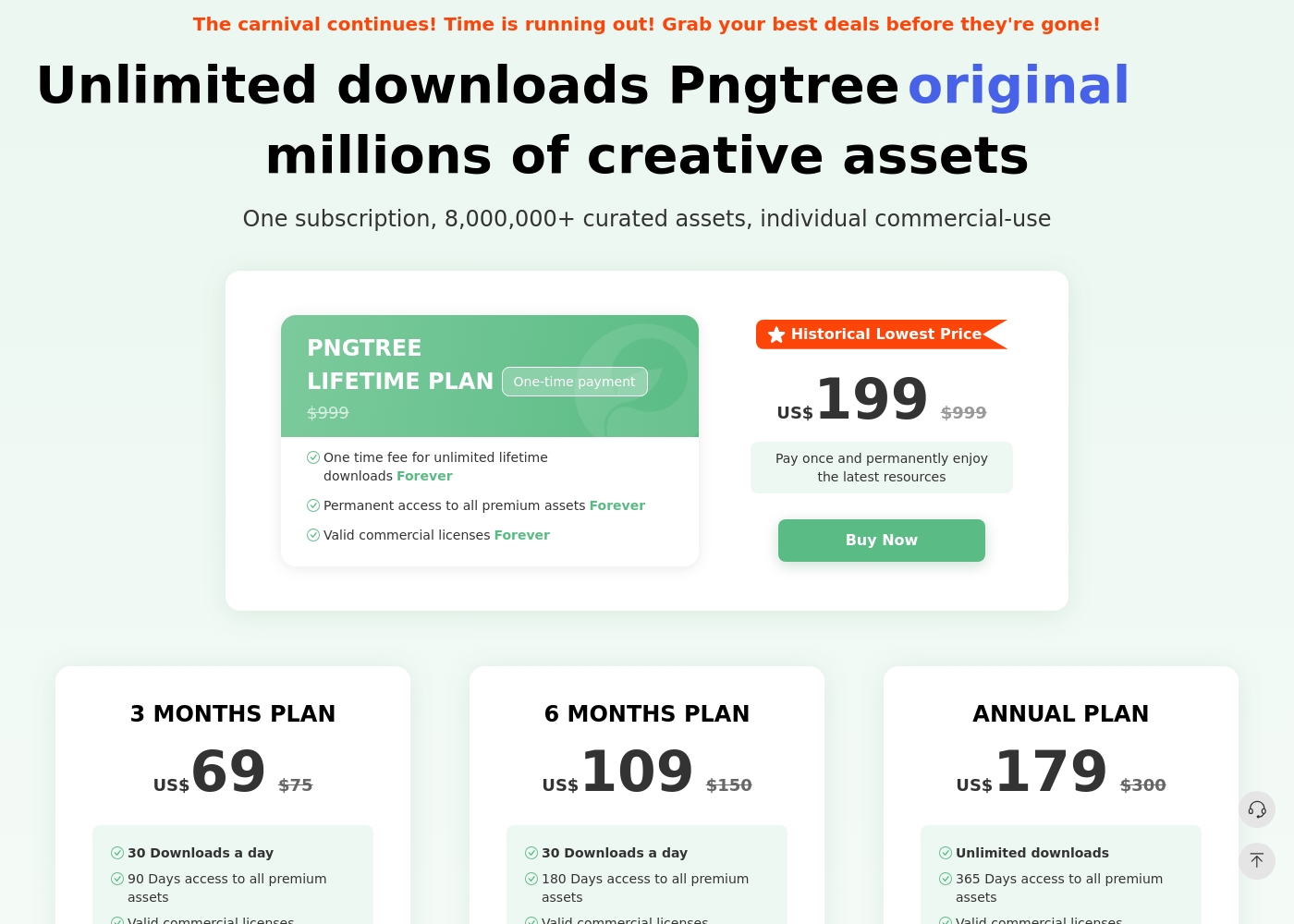
Pngtree bietet einen kostenlosen Plan mit begrenzten täglichen Downloads und mehrere kostenpflichtige Einzelpläne. Auf der Preisseite sind derzeit ein 3-Monats-Plan, ein 6-Monats-Plan, ein Jahresplan und ein Lebenszeitplan aufgeführt. Der Jahresplan und der Lifetime-Plan legen Wert auf unbegrenzte Downloads, während kürzere kostenpflichtige Pläne tägliche Download-Limits vorsehen. Bezahlte Pläne werben mit gültigen kommerziellen Lizenzen, schnelleren Downloads, keiner Angabepflicht und Premium-Assets. Die Lizenzbedingungen sind weiterhin wichtig: Die Einzellizenz gilt für einen Einzelplatz, und für die Team- oder umfassendere Geschäftsautorisierung ist möglicherweise ein Unternehmensplan erforderlich.
- 1 Million kostenloses Vermögen
- 2 Downloads / Tag
- Keine Namensnennung erforderlich (für kostenlose Assets)
- Download-Geschwindigkeit bis zu 0,5 MB/s
- 90 Tage Zugriff auf alle Premium-Assets
- Gültige kommerzielle Lizenzen
- Hochgeschwindigkeits-Downloads (10 MB/s)
- Für Premium-Inhalte ist keine Quellenangabe erforderlich
- 180 Tage Zugriff auf alle Premium-Assets
- Gültige kommerzielle Lizenzen
- Hochgeschwindigkeits-Downloads (10 MB/s)
- Für Premium-Inhalte ist keine Quellenangabe erforderlich
- Unbegrenzte Downloads
- 365 Tage Zugriff auf alle Premium-Assets
- Gültige kommerzielle Lizenzen
- Hochgeschwindigkeits-Downloads (10 MB/s)
- Für Premium-Inhalte ist keine Quellenangabe erforderlich
Shade kostet einen nicht näher genannten Betrag mit mindestens 1 Plan: Start for Free für $0.
Die Wahl des richtigen Plans hängt von den spezifischen Anforderungen Ihres Teams an Medienspeicher und Workflow ab.
Start for Free
Preis: $0 Unterstützte Websites: Nicht explizit angegeben Am besten geeignet für: Einzelpersonen oder kleine Teams, die die KI-Suche testen möchten Rückerstattungsrichtlinie: Nicht explizit angegeben Weitere Funktionen: Intelligentes File-Streaming, Überprüfung und Freigabe, automatisierte Metadaten, KI-Suche, Medienarchivierung
- Intelligentes File-Streaming
- Überprüfung und Freigabe
- Automatisierte Metadaten
- KI-Suche
- Archiv
Pricing Notes
- Pngtree offers clear, tiered pricing from $69 for 3 months to a $199 lifetime plan. All paid plans include commercial licenses.
- Shade has a free starting plan. Paid team/enterprise pricing is not public and requires contacting sales.
- Pngtree's free plan is very limited (2 downloads/day). Shade's free plan has no stated limits for initial testing.
- Pngtree has a 15-day money-back guarantee. Shade's refund policy is not stated.
Pricing Head-to-Head
Nutzerbewertungen
Pngtree hat als schnelle Grafikbibliothek einen starken Nutzen, aber Käufer sollten diesen Nutzen gegen die Lizenzkomplexität und das negative Kundenfeedback von Drittanbietern abwägen. Der sicherste Ansatz besteht darin, zuerst den Katalog zu testen, jeden Download zur kommerziellen Nutzung zu dokumentieren und nicht davon auszugehen, dass ein individueller Plan automatisch alle Team- oder Kundenszenarien abdeckt.
Im Jahr 2020 habe ich 199 US-Dollar für den Permanent Premium Lifetime Plan bezahlt. Jetzt fordern sie ein Upgrade auf einen neuen Enterprise-Plan und werfen mir eine Urheberrechtsverletzung vor. Lebenszeit sollte Leben ohne Grenzen bedeuten, aber sie versuchen ständig, mehr Geld zu erpressen.
Externe Bewertungen für Shade zeigen eine insgesamt positive Stimmung, obwohl die Stichprobengröße klein zu sein scheint. Nutzer auf Capterra heben die Benutzerfreundlichkeit der Plattform und ihre starke KI-gestützte Suchfunktion hervor, die Teams hilft, Dateien schnell zu finden.
Einige Rezensenten erwähnen auch, dass der Onboarding-Prozess reibungslos verlief und der Kundensupport schnell reagierte. Einige Punkte beziehen sich auf den Nutzen des zentralisierten Medien-Hubs für die Zusammenarbeit.
Die KI-Suche ist ein echter Game-Changer. Wir können jedes Filmmaterial in Sekunden finden, ohne endlose Ordner durchsuchen zu müssen. Das hat unserem Team bei Projekten so viel Zeit gespart.
Unser Fazit
For most individuals, Pngtree offers quick access to the PNG assets they need. For teams managing their own media, Shade provides a more valuable and ethical workflow solution. Pngtree's superpower is its sheer volume of transparent PNG images and templates. It's the go-to when you need a specific graphic fast for a design project. Shade's superpower is intelligent media management. Its AI search and streaming turn a chaotic file server into a streamlined creative hub. The deciding factor is your core need. Do you need to *find and buy* assets, or do you need to *organize and collaborate* on assets you already have? Choose Pngtree for individual, on-demand stock assets. Choose Shade if your team wastes hours searching for files or juggling feedback. The right tool depends entirely on your workflow.
Häufig gestellte Fragen
Which is better for small teams: Pngtree or Shade?
Shade is built for team collaboration and centralized storage. Pngtree's plans are individual and lack team features like shared libraries or review tools.
Does Pngtree have AI search like Shade?
No. Pngtree's search is for browsing its own library. Shade's AI search helps you find files within your own uploaded media based on content description.
Is Shade worth the extra cost over Pngtree?
It's a different cost structure. Pngtree sells assets directly. Shade's cost is for a workflow platform. The value depends on whether you need asset storage or asset acquisition.
Can I use Pngtree images commercially?
Yes, but only with a paid premium plan. The free plan does not include commercial licenses. Paid plans also offer downloadable copyright certificates.
Does Shade have a free trial?
Yes. You can start with a free plan to explore core features like AI search and file streaming before committing to a paid team plan.
Which tool has better customer support?
User reviews are mixed for both. Pngtree has a 1.4-star rating with complaints about aggressive practices. Shade has a 3.8-star rating but notes can be slow.
Bereit zu wählen?
Beide Tools haben Stärken. Wähle passend zu deinem Bedarf.