Maileroo vs Sender
Maileroo and Sender are both solid email platforms, but they serve different masters. Maileroo is a powerhouse for transactional delivery and developer-friendly API work. Sender shines as a simple, all-in-one marketing tool for small businesses. Here's how to pick the right one.
Best for: Developers and technical teams sending transactional emails, Businesses needing guaranteed high-volume email delivery
Best for: Small businesses and beginners in email marketing, Marketing teams needing collaboration tools
Wir fanden heraus, dass Maileroo eine leistungsstarke Zustellung bietet, die von einem wirklich hervorragenden Kundenservice unterstützt wird. Die Einrichtung ist bemerkenswert einfach, was komplexe Transaktions-E-Mails für Entwickler und Laien gleichermaßen vereinfacht. Insgesamt ist Maileroo eine sehr zuverlässige und benutzerorientierte Lösung für Unternehmen jeder Größe.
Vorteile
- Hervorragender und reaktionsschneller Kundensupport, selbst bei kostenlosen Plänen.
- Extrem hohe Zustellraten; E-Mails vermeiden konsequent Spam-Ordner.
- Integrations- und Einrichtungsprozess ist schnell und denkbar einfach.
- Saubere, elegante und professionelle Benutzeroberfläche.
Nachteile
- Genaue Preise für höhere Volumenstufen sind nur über einen Rechner oder ein individuelles Angebot erhältlich.
- Möglicherweise fehlen einige erweiterte Funktionen im Vergleich zu etablierten High-End-Plattformen.
Simple, free, and effective for basics.
We found Sender to be a solid, no-frills tool for core email marketing tasks. Its free plan is a major draw for startups and small businesses. Overall, it delivers good value with a straightforward interface, though it may lack some advanced features for power users.
Vorteile
- Extremely generous free plan (2,500 contacts, 15k emails/month).
- Clean, user-friendly interface that's easy to learn.
- Transparent, affordable pricing with no hidden fees.
- Includes essential automation features from the start.
Nachteile
- Advanced features and segmentation are limited on lower tiers.
- Some users report occasional email deliverability issues.
- Integrations can be inconsistent with certain platforms.
- Free plan lacks SMS marketing capabilities.
ÜberMaileroo
Maileroo ist eine leistungsstarke Plattform, die auf eine bessere und schnellere E-Mail-Zustellung ausgelegt ist. Sie hilft Unternehmen jeder Größe, sowohl anspruchsvolle Marketingkampagnen als auch wichtige Transaktions-E-Mails nahtlos zu versenden. Sie können Ihre Kommunikation einfach erstellen, verwalten und versenden, egal ob Sie für eine Aktion werben oder eine wichtige Bestellbestätigung senden. 💡 Die Einrichtung ist unkompliziert, sodass Sie sich auf das Verfassen effektiver Nachrichten konzentrieren können, anstatt sich um technische Komplexität sorgen zu müssen.
ÜberSender
Sender is an email marketing platform designed for businesses of all sizes. It helps you build, automate, and send email campaigns that people actually want to read. Think of it as your straightforward tool for staying in touch with your audience and driving sales. 🚀
Highlights
Funktionsvergleich
Funktionsübersicht
Wir heben die Hauptunterschiede hervor und wählen einen Gewinner für jede Funktion.
Free Plan Value
Sender's free plan is more generous for marketing. Maileroo's is perfect for transactional testing.
Maileroo's Free Plan includes 3,000 outbound emails monthly. It also gives you unlimited contacts and basic automations. Sender's Free Forever plan offers 15,000 emails per month for up to 2,500 subscribers. This includes 24/7 support and full automation. The key difference is volume and audience size. Sender lets you email a larger list more often. Maileroo's plan is ideal for developers testing transactional workflows. If you're a blogger, Sender's free tier is a clear win. If you're an app needing reliable emails, Maileroo's is plenty.
Ease of Setup
Maileroo wins for developers. Sender wins for non-technical users.
Maileroo setup involves API keys or SDK integration. It's trivially simple if you're a developer. You can be sending within minutes. Sender offers a 5-minute setup with a visual builder. You can connect WordPress or WooCommerce with no code. It's built for beginners. The trade-off is technical skill vs. simplicity. Maileroo assumes you can handle code. Sender assumes you want a point-and-click experience. Choose Maileroo if your team includes a developer. Choose Sender if your marketing team runs the show.
Deliverability Focus
Maileroo's infrastructure is built for inbox placement. Sender focuses on marketing reach.
Maileroo runs its own email infrastructure. This guarantees high deliverability and speed. It's designed to keep you out of spam. Sender's reviews note occasional deliverability hiccups. Their focus is on campaign tools and ease-of-use, not infrastructure purity. Maileroo also offers free dedicated IPs for high-volume senders (250K+ emails). Sender doesn't mention this. For critical transactional emails, Maileroo's reliability is its superpower. Sender is fine for promotional blasts.
Marketing Features
Sender offers a more complete marketing toolkit out-of-the-box.
Sender includes landing pages, 100+ templates, and SMS marketing. You can run omnichannel campaigns from one dashboard. Maileroo focuses on email delivery and campaigns. It has segmentation and A/B testing, but lacks landing pages and templates. The gap is in breadth. Sender is a mini marketing suite. Maileroo is a specialized delivery engine. If you need to capture leads with pop-ups, Sender is your tool. If you just need to send great emails, Maileroo excels.
Pricing Transparency
Sender's prices are clear. Maileroo's higher tiers require a quote.
Sender publishes full pricing. You see $10/month for 1,000 subscribers. No hidden fees. Maileroo's costs for over 3,000 emails are hidden. You must use a calculator or contact sales. This is common for usage-based models. The difference affects budgeting. Sender lets you predict costs. Maileroo requires a conversation for scale. For predictable budgets, Sender wins. For custom enterprise needs, Maileroo's model might be better.
Team Collaboration
Sender includes multi-user seats. Maileroo doesn't specify team features.
Sender's paid plans include 3 to 10 user seats. Teams can collaborate on campaigns with role-based access. Maileroo's data doesn't mention multi-user access or team features. It seems focused on individual developers or single accounts. This is a critical difference for growing teams. Sender supports collaboration natively. Maileroo may require separate logins. If you have a marketing team of 5, Sender's Professional plan is built for you. Maileroo is for individual or technical use.
Advanced Segmentation
Maileroo offers deeper, behavior-based segmentation. Sender's is more basic.
Maileroo highlights advanced segmentation based on user behavior. You can create precise segments for targeted campaigns. Sender's advanced features are limited on lower tiers. You may need the Professional plan for robust segmentation. The difference is depth vs. accessibility. Maileroo provides powerful tools upfront. Seller gates them behind higher costs. For data-driven marketers who live in analytics, Maileroo's segmentation is superior.
Maileroo kostet 0 $ pro Monat für den kostenlosen Plan, der bis zu 3.000 E-Mails beinhaltet. Die Preise skalieren über dieses Volumen hinaus, aber die genauen Kosten für höhere Stufen werden nicht explizit angegeben.
Um Ihnen bei der Auswahl der richtigen Lösung zu helfen, finden Sie hier eine Aufschlüsselung des kostenlosen Dienstes und der allgemeinen Skalierungsstruktur.
Kostenloser Plan
Preis: 0 $ pro Monat Unterstützte Websites: Nicht explizit angegeben Ideal für: Neue Benutzer, Entwickler oder kleine Start-ups, die zuverlässige Transaktions-E-Mail-Volumina unter 3.000 monatlich benötigen. Rückerstattungsrichtlinie: Nicht zutreffend (Kostenlos) Weitere Funktionen:
- 3.000 ausgehende E-Mails/Monat
- 1.000 eingehende E-Mails/Monat
- Unbegrenzte Kontakte in allen Plänen
- Automatisierungen
- Keine Kreditkarte zum Starten erforderlich
- 3.000 ausgehende E-Mails/Monat
- 1.000 eingehende E-Mails/Monat
- Unbegrenzte Kontakte
- Automatisierungen
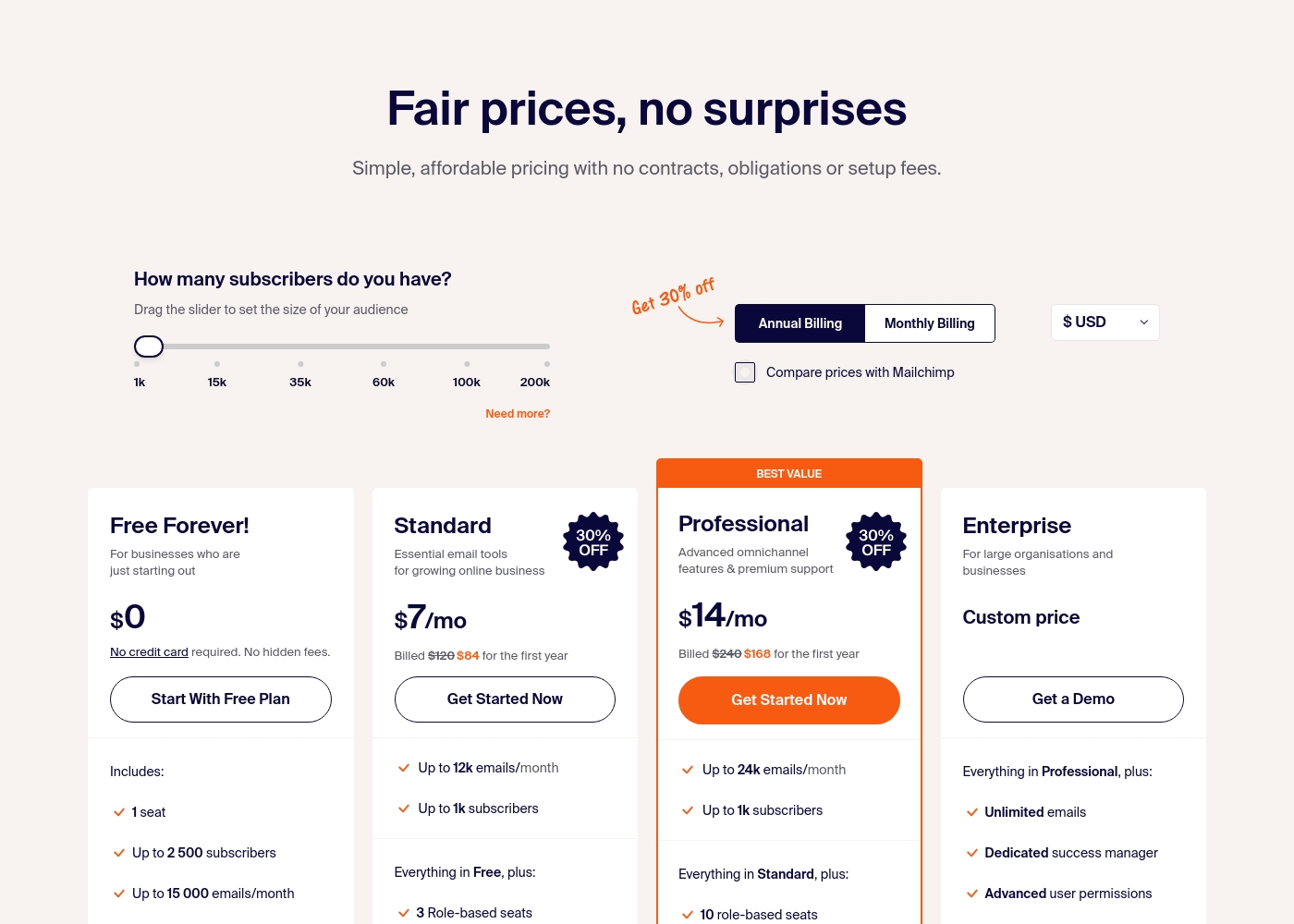
Sender costs between $0 and a custom price per month with 4 plans: Free Forever at $0, Standard at $7, Professional at $14, and Enterprise at Custom price.
Take a look at the specific features and limits included in each plan tier below.
Free Forever!
Price: $0 monthly Best For: Businesses who are just starting out Other Features: 1 seat, up to 2,500 subscribers, 15,000 emails/month, 24/7 live support, email automation.
- 1 seat
- Up to 2,500 subscribers
- Up to 15,000 emails/month
- 24/7 live support
- Email automation
- Up to 12k emails/month
- Up to 1k subscribers
- 3 Role-based seats
- Automated sequences
- Up to 24k emails/month
- Up to 1k subscribers
- 10 role-based seats
- Premium support
- Unlimited emails
- Dedicated success manager
- Advanced user permissions
Pricing Notes
- Maileroo's Free Plan is permanent with 3,000 emails. No credit card needed.
- Sender's Free Forever plan is permanent with 15,000 emails. Also no credit card.
- Maileroo's paid pricing is volume-based and not public. You must contact sales.
- Sender's paid plans start at $10/month (billed annually) for 1,000 subscribers.
- Maileroo includes Unlimited Contacts on all plans, saving money for large lists.
- Sender's plans cap subscribers (e.g., 1,000 on Standard), but offer multi-user seats.
Pricing Head-to-Head
Nutzerbewertungen
Das Nutzerfeedback zu Maileroo ist überwältigend positiv und hat auf Trustpilot eine hervorragende Bewertung von 4,6 Sternen erhalten. Rezensenten heben durchweg das außergewöhnliche Niveau des Kundensupports hervor und erwähnen, dass das Team (und Mitarbeiter wie Areeb) auch bei Nutzern des kostenlosen Tarifs geduldig, zeitnah und detailliert helfen.
Diese proaktive Reaktionsfähigkeit ist ein wesentliches Unterscheidungsmerkmal. Nutzer, die von Anbietern wie Postmark, Mailjet und Amazon SES wechseln, berichten, dass der Migrationsprozess unglaublich einfach ist und die Integration oft als denkbar einfach beschrieben wird.
Ich war vom Kundensupport begeistert. Ich habe mich für den kostenlosen Tarif angemeldet und brauchte Hilfe bei der Einrichtung, und Maileroo hat mich mit detaillierten Anweisungen bei jedem Schritt unterstützt. Dies war mit Abstand eine der besten Erfahrungen, die ich mit einem Unternehmen gemacht habe.
User sentiment on Trustpilot and Capterra highlights Sender's generous free plan and ease of setup as major positives. Many praise the intuitive interface and reliable automation.
😊 However, some note occasional deliverability hiccups and a learning curve for advanced features. Customer support is frequently mentioned as responsive, though a few users report slow responses during peak times.
The free plan is unbeatable for a new business. I set up my first automation in minutes. The platform is simple and gets the job done without fuss.
Unser Fazit
For most people, **Sender** is the easier, more complete tool. It's the clear winner if you're doing traditional email marketing. But **Maileroo** isn't really competing in that arena. Its superpower is bulletproof transactional email delivery. It's the engine you trust for password resets and receipts. The deciding factor is your core need. Pick **Sender** if you want to build campaigns, automate sequences, and collaborate with a team. Pick **Maileroo** if you're a developer or business obsessed with email landing in the inbox, every single time. **Final verdict:** Choose **Sender** for straightforward, affordable email marketing. Choose **Maileroo** for mission-critical transactional email delivery and API simplicity.
Häufig gestellte Fragen
Which is better for transactional emails: Maileroo or Sender?
Maileroo is built specifically for transactional email delivery with high reliability. Sender also supports transactional emails, but its focus is on marketing campaigns. For critical messages like password resets, Maileroo's infrastructure is superior.
Does Sender have a free plan like Maileroo?
Yes, Sender's Free Forever plan is more generous, offering 15,000 emails per month for 2,500 subscribers. Maileroo's free plan includes 3,000 emails. Both are permanent and don't require a credit card.
Is Maileroo worth it if I just need email marketing?
Probably not. Maileroo excels at email delivery and API work, but lacks marketing tools like landing pages and templates. Sender is a better fit for basic email marketing needs.
Can I migrate from Maileroo to Sender easily?
Migration details aren't specified for either platform. However, both offer straightforward setups. You'd need to re-import your contacts and rebuild campaigns in Sender's visual builder.
Which tool is easier for a non-technical user?
Sender is significantly easier for non-technical users. It offers a 5-minute setup and a drag-and-drop interface. Maileroo requires some technical knowledge to use its API and developer tools.
Does Sender support SMS marketing?
Yes, Sender offers SMS marketing credits that you can purchase separately. The cost depends on the destination country. Maileroo does not mention SMS capabilities.
Bereit zu wählen?
Beide Tools haben Stärken. Wähle passend zu deinem Bedarf.